

 MODUL DETEKSI SELULER JAMALERT
Guide Instalasi
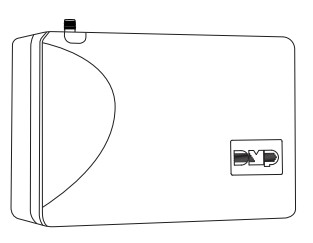 Figure 1: Jam Alert Cellular Detection Module
DESKRIPSI
The JamAlert module is a cellular frequency jamming detector. The module has two onboard outputs that can be connected to zones on a panel or used to trigger peripheral devices. For more information about zone programming, refer to the compatible panel installation guide.
JamAlert uga nduweni LED kanggo menehi tandha yen jamming dideteksi lan kalebu mode testing kanggo mesthekake modul ndeteksi frekuensi kanthi bener.
Apa Klebu?
▶ One JamAlert Cellular Detection Module
▶ Two 1k Ohm EOL resistors
▶ Four mounting screws
KOMPONEN SISTEM
Terminal Sambungan Daya
Modul kasebut bisa didhukung saka output tambahan 12 VDC saka panel kontrol. Mirsani polaritas lan gunakake kabel AWG 18-22 kanggo nyambungake terminal +12 (positif) modul menyang terminal +12 panel, lan terminal -12 (negatif) modul menyang terminal -12 panel. Waca Gambar 2 lan 3.
Tamper
The JamAlert module includes a wall and case tamper. The case tamper is pressed when the cover of the module is secured onto the enclosure. The wall tamper is pressed when the back of the cover is mounted onto a wall.
When the cover is removed or the module is removed from the wall, the module sends a tamppesen alangan er kanggo pusat ngawasi. 
INSTALASI
- Pilih Lokasi
Install the module away from metal objects and at least 4 to 5 ft. away from any high RF-emitting devices, including high-powered wireless receivers, Wi-Fi routers, and cellular signal boosters, to ensure proper frequency detection. Do not mount the module inside or on a control panel metal enclosure. Mounting the module on or near metal surfaces impairs cellular jamming detection performance. - Pasang Modul
The module should be mounted to a wall using the included #6 screws in the mounting holes. See Figure 2. Mount the module in a secure, dry place to protect the module from damage due to tampering utawa unsur. Sampeyan ora perlu mbusak PCB nalika nginstal modul. - Kawat Modul
 Ati-ati: Pedhot kabeh daya saka panel sadurunge kabel modul. Gagal nglakoni bisa nyebabake karusakan utawa ciloko peralatan. Mirsani polaritas nalika nggawe sambungan daya.
Use 18 to 22 gauge wire when wiring the module. When routing wires, ensure they do not interfere with the tamper ngalih. Waca Gambar 3 lan 4.
1. Use a wire to connect the module’s 12V positive to terminal 7 on the DMP panel. Use another wire to connect the module’s 12V negative to terminal 10 on the DMP panel.
 Note: If you are connecting to a non-DMP panel, confirm the proper terminals for the positive and negative 12V.
2. On the cell jamming detection output, use a wire to connect the NO terminal to any zone on the panel. Use another wire to connect the C terminal to the panel ground.
Note: If you are connecting to a DMP panel, use a 1k Ohm EOL resistor across the NO and C terminals. If connecting to a non-DMP panel, use the correct resistance value for that panel.
3. On the tamper output, nggunakake kabel kanggo nyambungake terminal C kanggo zona sembarang ing panel. Gunakake kabel liyane kanggo nyambungake terminal NC menyang lemah panel. Gunakake resistor 1k Ohm EOL ing kabel sing disambungake menyang terminal NC.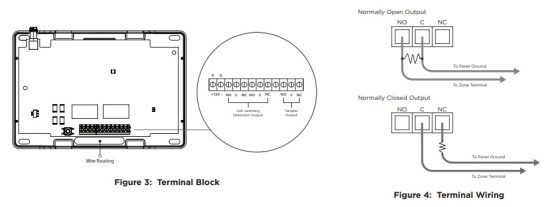
- Sambungake Antena
1. Place the antenna onto the SMA connector. Refer to Figure 2.
2. Twist the antenna until it is securely tightened.
3. Carefully replace the housing cover on the mounted base. Ensure not to damage any PCB components when removing or replacing the housing cover.
PROGRAM PANEL
Deleng pandhuan pamrograman panel sing kompatibel kanggo informasi pemrograman lengkap. Sawise ngrampungake saben langkah, penet CMD kanggo maju menyang pituduh sabanjure. Kanggo program JamAlert menyang panel DMP, ngrampungake langkah-langkah ing ngisor iki:
- Reset panel. Ing keypad, ketik 6653 (PROG) kanggo ngakses menu PROGRAMMER.
- At ZONE INFORMATION, enter the zone number for the cell jamming detection output.
- At *UNUSED*, enter a name for the zone.
- Pilih JENIS ZON.
- At NEXT ZONE, select YES.
- Enter the zone number for the tamper output
- At *UNUSED*, enter a name for the zone.
- Pilih JENIS ZON.
- Pencet CMD nganti STOP ditampilake. Pencet tombol pilih baris ndhuwur utawa area kanggo nyimpen pemrograman.
INFORMASI TAMBAHAN
Operasi Modul
Nalika macet frekuensi sel dideteksi, output onboard diaktifake lan ngirim weker menyang panel. Kajaba iku, yen macet sel dideteksi, lampu LED dadi abang. Yen daya urip, lampu LED dadi ijo.
Mode Testing
JamAlert nggunakake operasi tes lokal kanggo mesthekake modul ndeteksi frekuensi kanthi bener. Kanggo ngetik mode testing, rampungake langkah-langkah ing ngisor iki:
- Ensure the JamAlert is in its housing and the back case tamper is satisfied.
- Disconnect the antenna, then power on the JamAlert.
- Tekan tamper button at least 4 times in a row quickly to enter testing mode.
- Connect the antenna to automatically trigger the detection mode. When the device detects a frequency, the LED turns on.
- To exit testing mode, power cycle the device or press and hold the tamper button for more than 5 seconds. The LED flashes green 3 times to confirm you have exited testing mode.
Kompatibilitas
▶ Panel Kontrol Seri XTL
▶ Panel Kontrol Seri XT
▶ XF6 Series Control Panels
▶ Panel Kontrol Seri XR
▶ TMSentry Control Panels
▶ Com Series Communicators
Informasi Pemesanan
JAMALERT Modul Deteksi Jamming Selular
Spesifikasi
Daya Utama 12 VDC saka panel
Draw Saiki
Siaga (Tamper On) 131 mA
Alarm (Jammed, Tamper On) 206 mA
Dirancang, direkayasa, lan
diproduksi ing Springfield, MO
nggunakake komponen AS lan global.
LT-2962 25192
© 2025
INTRUSION • FIRE • AKSES • JARINGAN
2500 Boulevard Kemitraan Lor
Springfield, Missouri 65803-8877
800.641.4282 | DMP.com
Dokumen / Sumber Daya
 |
JamAlert LT-2962 Modul Deteksi Selular [pdf] Pandhuan Instalasi LT-2962 Cellular Detection Module, LT-2962, Cellular Detection Module, Detection Module, Module |