Pambuka
Thank you for choosing the Hbada Ergonomic Gaming Chair. This manual provides essential information for the safe and efficient assembly, operation, and maintenance of your new chair. Please read these instructions carefully before use and retain them for future reference.

Image: The Hbada Ergonomic Gaming Chair in a modern gaming environment, showcasing its design and presence.
Informasi Safety
- Priksa manawa kabeh komponen ana lan ora rusak sadurunge dipasang. Aja nggunakake yen ana bagean sing ilang utawa rusak.
- Follow the assembly instructions precisely. Incorrect assembly can lead to instability and injury.
- Aja ngadeg ing kursi. Gunakna mung kanggo lungguh.
- Aja ngluwihi kapasitas bobot maksimal (waca spesifikasi).
- Supaya bocah lan pets adoh saka kursi sak perakitan.
- Aja nganti kursi kena sinar srengenge langsung utawa suhu ekstrem kanggo nyegah degradasi bahan.
Dimensi produk
Understanding the dimensions of your chair is important for proper placement and comfortable use. Below are the key measurements:
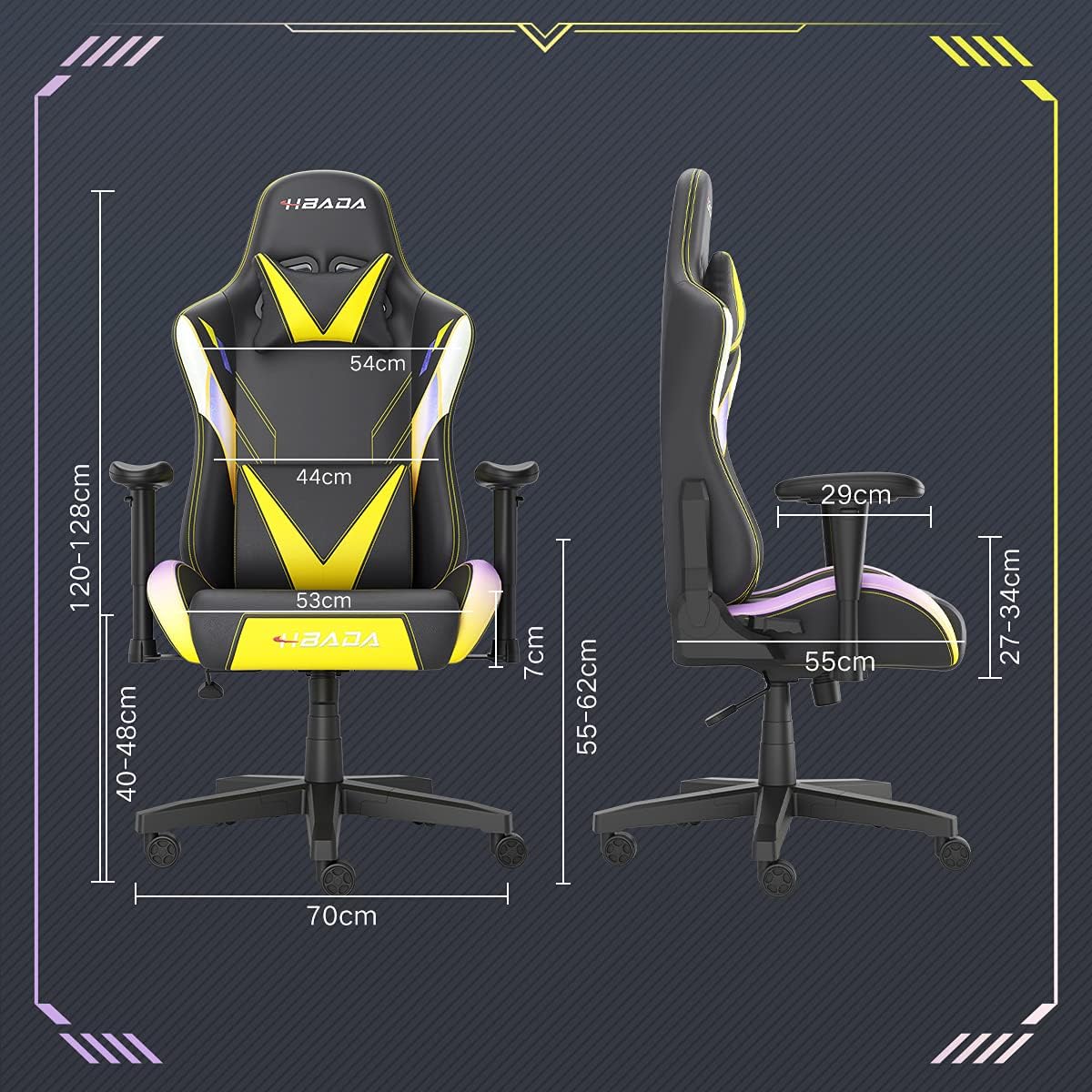
Image: A detailed diagram illustrating the various dimensions of the Hbada Gaming Chair, including height, width, and depth measurements.
- Dhuwur sakabèhé: 120-128 cm (bisa diatur)
- Dhuwur kursi: 40-48 cm (bisa diatur)
- Jembar Kursi: 53 cm
- ambane kursi: 55 cm
- Jembar mburi: 54 cm (shoulder area), 44 cm (lumbar area)
- Armrest Dhuwur (saka kursi): 7 cm (adjustable)
- Diameter dhasar: 70 cm
Setup lan Majelis
Please follow these steps carefully to assemble your Hbada Gaming Chair. It is recommended to have a clear, spacious area for assembly.
Langkah Majelis:
- Step 1: Assemble the Base and Wheels
Insert the five casters into the holes on the star base. Then, place the gas lift cylinder into the center hole of the base.

Image: Illustration of attaching the five casters to the chair's star-shaped base and inserting the gas lift cylinder.
- Step 2: Attach the Seat and Backrest
Connect the backrest to the seat using the provided screws and mounting plates. Ensure all screws are tightened securely.

Image: Diagram showing the process of securing the backrest to the seat cushion using screws and brackets.
- Langkah 3: Pasang Armrests
Attach the armrests to the sides of the seat using the designated screws. Make sure they are firmly attached.

Image: Visual guide for attaching the armrests to the chair's seat base.
- Step 4: Connect Seat to Base
Carefully place the assembled seat onto the gas lift cylinder, ensuring it is properly seated and stable.

Image: Depiction of lowering the assembled seat onto the gas lift cylinder, connecting the upper and lower parts of the chair.
- Step 5: Attach Headrest and Lumbar Pillow
Secure the detachable headrest and lumbar support pillow to the chair as desired for optimal comfort.

Image: Instructions for attaching the headrest and lumbar support pillows to the gaming chair.
Instruksi Operasi
Your Hbada Gaming Chair is designed with several adjustable features to provide personalized comfort and support.
Key Adjustable Functions:
- Adjustable Sitting Height: Use the lever located under the seat on the right side to raise or lower the chair. Pull the lever up to adjust the height, then release it at your desired position. The seat has an 8 cm elevation range.
- Reclining Backrest (90° to 155°): The backrest can be reclined from 90 degrees (upright) to 155 degrees (nearly flat). Use the recline lever on the side of the chair to adjust the angle. Lean back to your preferred position and lock the lever.
- Sandaran tangan sing bisa diatur: The armrests can be adjusted in height by 7 cm. Locate the button or lever on the side of each armrest to unlock, adjust, and then lock them into your desired height.
- 360° Free Swivel: The chair features a full 360-degree swivel function, allowing for easy movement and access to your surroundings without needing to move the entire chair.
- Detachable Headrest and Lumbar Support: The chair includes a removable headrest pillow and lumbar support cushion for enhanced ergonomic comfort. Adjust their positions or remove them based on your preference.

Gambar: A liwatview of the chair's ergonomic systems, highlighting adjustable sitting height, armrests, 155° reclining, 360° swivel, cool racing casters, and durable base.

Image: The Hbada Gaming Chair demonstrated in its 155-degree reclined position, illustrating the recline controller.
Pangopènan
Regular maintenance will help prolong the life and appearance of your Hbada Gaming Chair.
- Reresik kulit PU: Wipe the PU leather surfaces with a soft, damp cloth. For stubborn stains, use a mild soap solution and then wipe with a clean, damp kain. Aja nggunakake bahan kimia sing atos utawa pembersih sing abrasif, amarga iki bisa ngrusak bahan kasebut.
- Perawatan Caster: Periodically check the casters for accumulated dust or hair. Clean them with a brush or vacuum cleaner to ensure smooth movement and prevent damage to your flooring.
- Frame and Components: Regularly inspect all screws and bolts to ensure they are tight. Re-tighten if necessary to maintain stability.
- Ngindhari sinar srengenge langsung: Prolonged exposure to direct sunlight can cause the PU leather to fade and crack. Position your chair away from direct sunlight when possible.
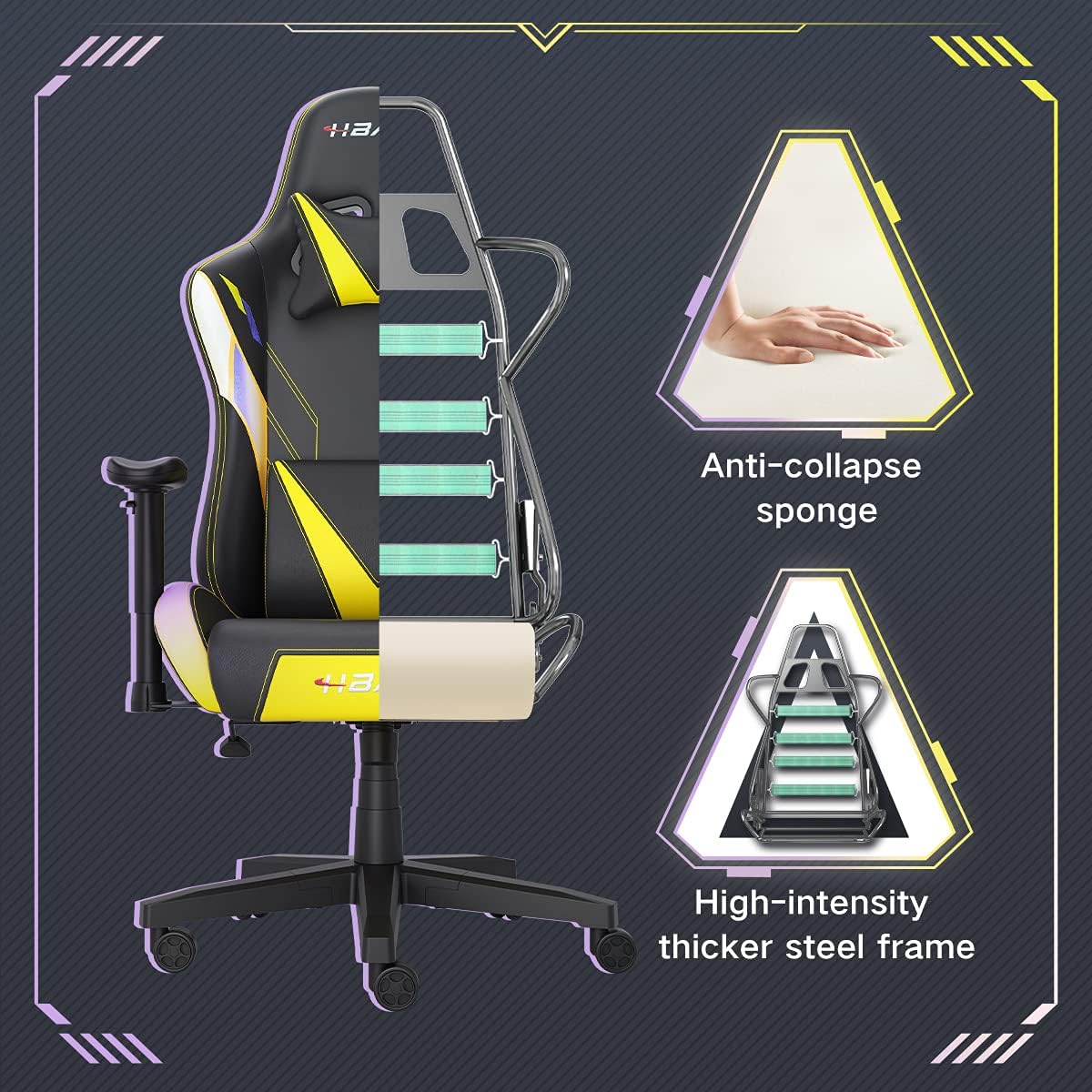
Gambar: A cutaway view of the chair's internal structure, highlighting the anti-collapse sponge padding and the high-intensity thicker steel frame, indicating durable construction.
Ngatasi masalah
If you encounter any issues with your Hbada Gaming Chair, refer to the following common problems and solutions:
| Masalah | Kemungkinan Penyebab | Solusi |
|---|---|---|
| Kursi ora nyetel dhuwur | Gagal fungsi angkat gas utawa tuas ora aktif. | Priksa manawa tuas pangaturan dhuwur wis kepasang kanthi bener. Yen masalah isih ana, lift gas bisa uga kudu diganti. Hubungi layanan pelanggan. |
| Kursi goyang utawa ora stabil | Ngawut-awut longgar utawa perakitan sing ora bener. | Check all assembly screws and bolts, and tighten them securely. Refer to the assembly instructions. |
| Roda ora muter kanthi lancar | Lebu (rambut, bledug) kejiret ing kastor. | Turn the chair over and remove any debris from the caster wheels. |
| Backrest ora recline utawa ngunci | Mekanisme Recline macet utawa tuas ora aktif. | Ensure the recline lever is fully engaged. Check for any obstructions around the mechanism. |
Spesifikasi
| Fitur | Rincian |
|---|---|
| Merk | Hbada |
| Nomer Model | W203YMA/EU |
| ASIN | B095PSFLKX |
| warna | kuning |
| Bahan | PU Leather, Metal Frame |
| Dimensi produk | 70 x 70 x 128 cm (Dawa x Jembar x Dhuwur) |
| Bobot produk | 22 kg |
| Fitur Khusus | Ergonomic, Swivel, Casters, Headrest Support, Adjustable Recline (90°-155°), Adjustable Seat Height (8cm range), Adjustable Armrests (7cm range) |
| Jumlah Unit | 1.0 Cacah |
Warranty lan Dhukungan
Your Hbada Gaming Chair comes with a garansi setaun wiwit tanggal tuku. Garansi iki nutupi cacat manufaktur lan cacat bahan ing panggunaan normal.
If you experience any issues during use, including problems with installation, damage, or missing parts, please do not hesitate to contact Hbada customer service. We are committed to providing reliable service and can offer free exchanges for covered issues.
For support, please visit the official Hbada websitus utawa hubungi pengecer Panjenengan.


