1. Pambuka
This manual provides detailed instructions for the installation, operation, and maintenance of your AINAVI 11.5-inch Car Radio Stereo. This advanced system is designed to upgrade your vehicle's infotainment experience with Android 13.0, wireless CarPlay, Android Auto, GPS navigation, and various multimedia features. Please read this manual thoroughly before installation and use to ensure proper functionality and safety.
2. Produk Liwatview
The AINAVI 11.5-inch Car Radio Stereo is a high-performance multimedia system compatible with specific Jeep Wrangler JK, Dodge Grand Caravan, and Dodge Ram models. It features an 11.5-inch QLED touchscreen with 1280x800 resolution, running on Android 13.0 with 4GB RAM and 64GB ROM for smooth operation. Key features include:
- 11.5-inch QLED Touchscreen: G+G full lamination technology with 178° full-viewing amba
- Android 13.0 OS: Latest operating system for enhanced performance.
- Wireless/Wired CarPlay & Android Auto: Seamless smartphone integration.
- Navigasi GPS: Supports online and offline maps.
- 5G WiFi & Bluetooth 5.4: Fast internet connectivity and stable device pairing.
- AM/FM/RDS Radio: Access to various radio stations.
- Kontrol setir: Retains original vehicle controls.

Image: The 11.5-inch HD IPS Touch Screen, showcasing its vibrant display and full lamination technology for clarity and responsiveness.
3. Isi Paket
Priksa manawa kabeh item ing ngisor iki kalebu ing paket sampeyan. Yen ana barang sing ilang utawa rusak, hubungi dhukungan pelanggan.
- 11.5-inch Car Head Unit for Jeep Wrangler JK
- Bingkai Plastik
- AHD 1080P Rear View Camera + Extension Power Cable
- Mikropon
- Antena GPS Kab
- USB 4Pin Cable
- USB 6Pin Cable
- Manual pangguna (dokumen iki)
- Kabel Daya
- Power Harness with CAN BUS (for some models)
- Blue Frame Removal Tool
- Kabel RCA
- Reversing Control Cable
Note: The specific cables included may vary slightly depending on the vehicle model.
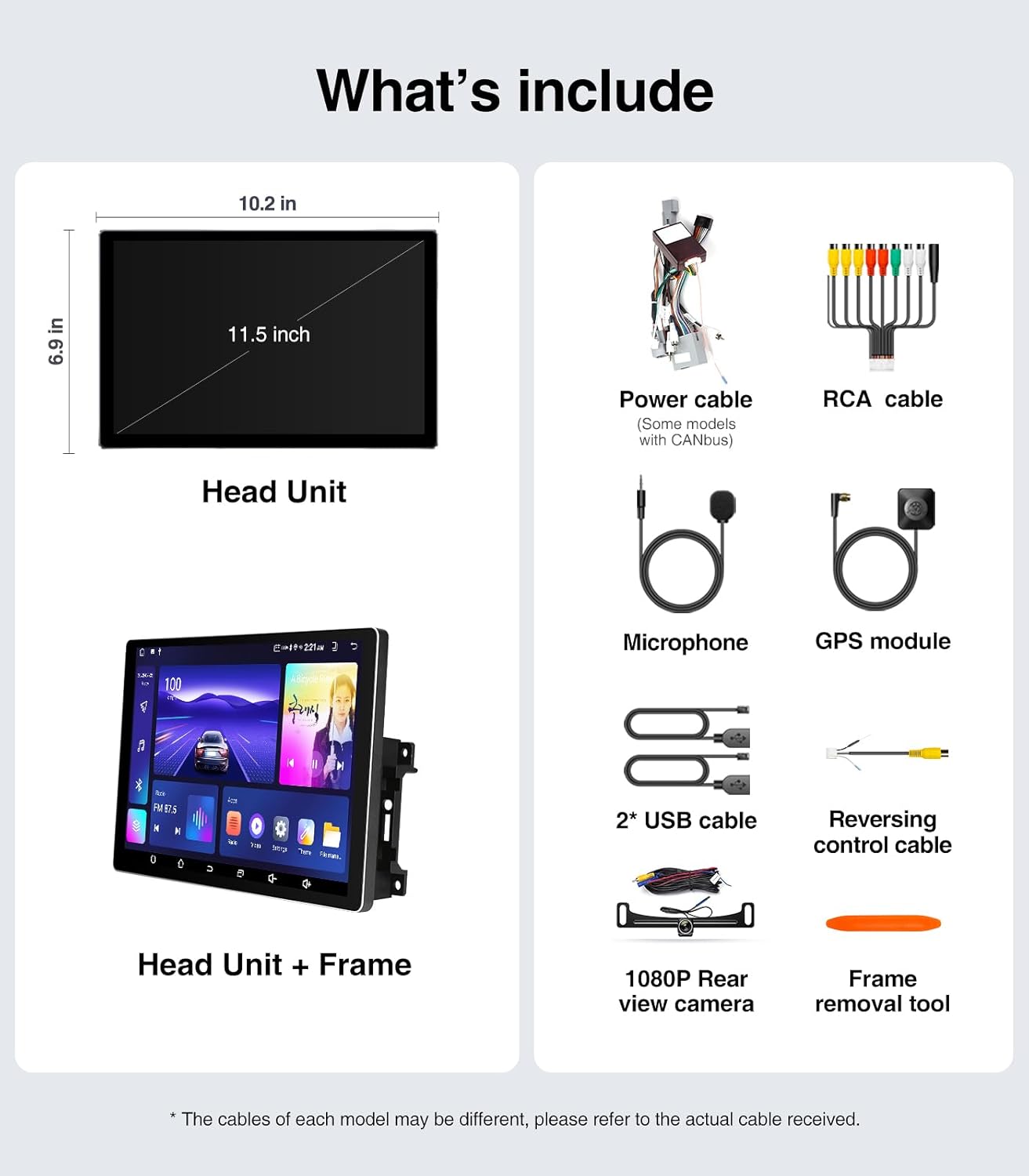
Image: A visual representation of all components included in the package, such as the head unit, frame, various cables, camera, microphone, and tools.
4. Installation Guide (Setup)
The AINAVI Car Radio Stereo is designed for a plug-and-play installation for compatible vehicles. However, professional installation is recommended if you are unfamiliar with car audio system wiring.
4.1 Priksa Pra-Pasang
- Ensure your vehicle is compatible with the head unit (Jeep Wrangler JK 2007-2018, Dodge Grand Caravan 2011-2020, Dodge Ram 2009-2012, etc.).
- Gather all necessary tools, including the provided frame removal tool.
- Disconnect the vehicle's battery before starting the installation to prevent electrical shorts.
4.2 Langkah Instalasi
- Carefully remove the original car radio and dashboard trim using the frame removal tool. Refer to your vehicle's service manual for specific trim removal instructions.
- Connect the provided power harness and CAN BUS (if applicable) to the vehicle's wiring. Ensure all connections are secure.
- Connect the GPS antenna, USB cables, microphone, and rear view camera cables to the corresponding ports on the new head unit.
- Mount the new 11.5-inch head unit into the dashboard opening. Ensure it fits securely within the plastic frame.
- Sambungake maneh baterei kendaraan.
- Turn on the vehicle's ignition and test the head unit's basic functions (power, audio, touch screen).
- Reinstall the dashboard trim panels.

Image: A comparison showing the vehicle's dashboard before and after the installation of the AINAVI 11.5-inch car radio stereo, highlighting the significant visual upgrade.

Image: Illustrates the plug-and-play nature of the installation, showing a user connecting wiring harnesses, along with icons indicating support for Steering Wheel Control and AMP.
5. Instruksi Operasi
5.1 Operasi dhasar
- Daya On/Off: The unit powers on with the vehicle's ignition. Press and hold the power button (if available) for manual power control.
- Layar tutul: Navigate the Android interface by tapping, swiping, and pinching gestures.
- Kontrol Volume: Adjust volume using the on-screen controls or your vehicle's steering wheel buttons.
5.2 Wireless/Wired CarPlay & Android Auto
Connect your iPhone or Android smartphone for seamless integration of navigation, communication, and entertainment apps.
- Ensure Bluetooth is enabled on your smartphone and the head unit.
- On the head unit, open the CarPlay or Android Auto application.
- For wireless connection, pair your phone via Bluetooth. For wired, connect your phone using a USB cable to the designated USB port.
- Tindakake pandhuan ing layar kanggo ngrampungake sambungan.
Once connected, you can use voice commands (e.g., "Hey Siri" or "Hey Google") for hands-free operation.

Image: A visual of the head unit displaying the Wireless CarPlay and Android Auto interface, with a smartphone icon indicating connectivity and various app logos.
5.3 GPS Navigasi
The unit supports both online and offline navigation.
- Peta online: Connect the head unit to a WiFi hotspot (e.g., from your phone) to access real-time traffic information and updated maps.
- Peta Offline: Download maps for your region to the unit's internal storage. This allows navigation without an internet connection.
- Use the pre-installed navigation app or download your preferred app from the Google Play Store.
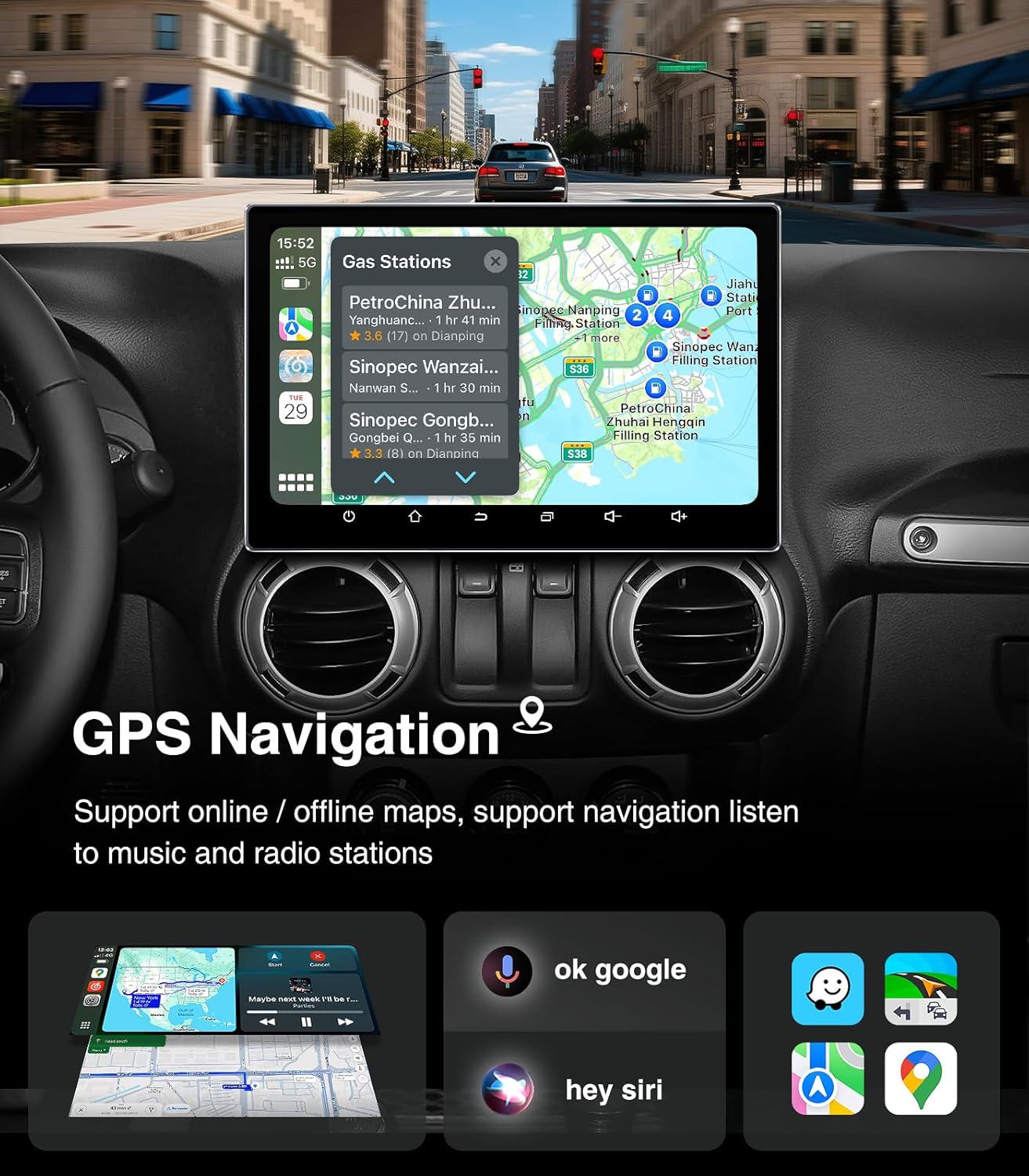
Image: The head unit displaying a GPS navigation map with points of interest and traffic information, alongside icons for voice commands like "ok google" and "hey siri".
5.4 AM/FM/RDS Radio
Access your favorite radio stations with the built-in tuner.
- Open the "Radio" application on the head unit.
- Scan for available stations or manually tune to a specific frequency.
- Simpen stasiun favorit minangka prasetel kanggo akses cepet.
- The RDS (Radio Data System) feature displays station information where available.

Image: The head unit displaying the AM/FM/RDS radio interface, showing frequency tuning and preset options, with a scenic road background.
5.5 5G WiFi Hotspot & Bluetooth Connection
Enhance your connectivity with fast WiFi and stable Bluetooth.
- WiFi: Connect to a mobile hotspot or home WiFi network to browse the internet, download apps, and stream content. Supports dual-band 2.4GHz & 5GHz.
- Bluetooth 5.4: Pair your smartphone for hands-free calls, Bluetooth music streaming, and phonebook synchronization.

Image: The head unit displaying a phone dialer interface, indicating Bluetooth connectivity with a smartphone, and icons for various supported apps like Google Play, Chrome, YouTube, Instagram, and Netflix.
6. Pangopènan
To ensure the longevity and optimal performance of your AINAVI Car Radio Stereo, follow these maintenance guidelines:
- Reresik layar: Gunakake kain sing alus lan tanpa serat kanggo ngusap layar demek kanthi alon. Kanggo smudges wangkal, rada dampen kain karo banyu utawa resik layar-aman. Ngindhari bahan kimia sing atos utawa bahan abrasif.
- Nganyari piranti lunak: Periodically check for system updates through the unit's settings menu. Keeping the software updated ensures optimal performance, security, and access to new features.
- Kontrol suhu: Avoid exposing the unit to extreme temperatures for extended periods. While designed for automotive environments, prolonged exposure to direct sunlight or freezing conditions can affect performance.
- Sambungan kabel: Ensure all cables remain securely connected. Loose connections can lead to intermittent issues.
7. Ngatasi masalah
Yen sampeyan nemoni masalah karo stereo radio mobil sampeyan, delengen masalah lan solusi umum ing ngisor iki:
| Masalah | Kemungkinan Penyebab | Solusi |
|---|---|---|
| Unit ora urip | Sambungan listrik kenthel, sekring kebobolan, masalah baterei kendaraan. | Check power cables and fuse. Ensure vehicle battery is charged. |
| Ora ana swara | Volume kekecilen, bisu diaktifake, masalah kabel speaker, sumber audio salah. | Increase volume, check mute status, verify speaker connections, select correct audio source. |
| Layar tutul ora responsif | Software glitch, screen calibration issue. | Restart the unit. If issue persists, perform a factory reset (data will be lost). |
| CarPlay / Android Auto ora nyambung | Bluetooth/USB issue, phone settings, app not updated. | Ensure Bluetooth is on and paired. Try a different USB cable. Update phone OS and apps. |
| Sinyal GPS ilang utawa ora akurat | GPS antenna obstruction, poor satellite reception. | Priksa manawa antena GPS wis cetha view saka langit. Priksa sambungan antena. |
If these solutions do not resolve the issue, please contact AINAVI customer support.
8. Spesifikasi
| Fitur | Rincian |
|---|---|
| Merk | AINAVI |
| Sistem Operasi | Android 13.0 |
| Kapasitas Panyimpenan Memori | 64 GB (ROM) |
| RAM | 4 GB |
| Ukuran Layar | 11.5 inchi |
| Tipe Tampilan | QLED, G+G Full Lamination |
| Resolusi | 1280x800 |
| Teknologi Konektivitas | Bluetooth 5.4, USB, Wi-Fi (2.4Ghz & 5Ghz), Wireless CarPlay, Wired Android Auto |
| Fitur Khusus | AM/FM/RDS radio, 5G WiFi, CarPlay+Android Auto+Mirror Link+AirPlay, Split Screen Function, Touch Screen |
| Piranti sing kompatibel | Smartphone, iPhone |
| Tipe Pemasangan | Pasang Dashboard |
| Mode Output Audio | Stereo |
| Jinis Layanan Kendaraan | mobil |
9. Warranty lan Dhukungan
AINAVI provides technical support for this product. If you have any questions regarding installation, operation, or troubleshooting that are not covered in this manual, please do not hesitate to contact us via Amazon email. We are committed to providing prompt assistance.
Please retain your proof of purchase for warranty claims. Specific warranty terms and conditions may apply and are available upon request or through the product's purchase platform.