
1. Pandhuan Setup
This section provides instructions for the initial setup of your OPPO A6 Pro 5G CPH2781 smartphone.
1.1 Unboxing lan Inspeksi Awal
Kasebut kanthi teliti, mbusak kabeh komponen saka packaging. Priksa manawa ana item ing ngisor iki:
- OPPO A6 Pro 5G CPH2781 device
- 80W SUPERVOOC Flash Charge adapter
- Kabel USB Tipe-C
- alat ejector SIM
- Pandhuan Miwiti Cepet lan Informasi Keamanan
Priksa piranti apa wae karusakan sing katon sadurunge nerusake.
1.2 Instalasi Kartu SIM lan Panyimpenan
The OPPO A6 Pro 5G supports Dual SIM functionality. Follow these steps to install your SIM cards:
- Goleki tray kertu SIM ing sisih pinggir piranti.
- Lebokake alat ejector SIM menyang bolongan cilik ing jejere tray banjur pencet alon-alon nganti tray metu.
- Selehake kertu Nano-SIM menyang slot sing wis ditemtokake ing tray. Priksa manawa kontak emas madhep mudhun.
- Lebokake maneh tray kertu SIM kanthi ati-ati menyang piranti nganti klik ing panggonane.
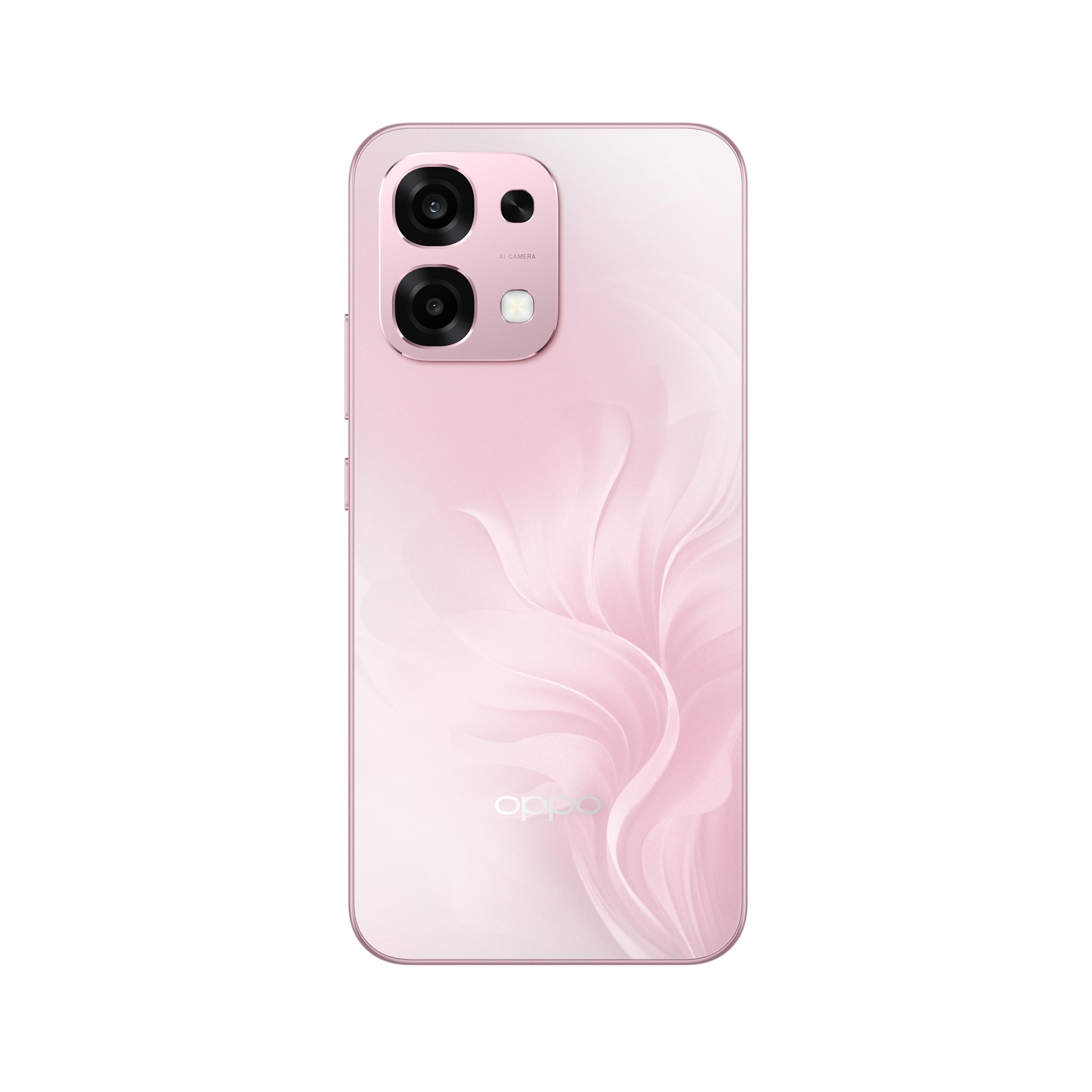
Gambar 1: Mburi view of the OPPO A6 Pro 5G CPH2781, highlighting the camera array and device color.
1.3 Powering On lan Konfigurasi Awal
Kanggo nguripake piranti sapisanan:
- Pencet terus tombol Daya (sing ana ing sisih tengen) nganti logo OPPO katon ing layar.
- Tindakake pituduh ing layar kanggo milih basa, wilayah, lan nyambung menyang jaringan Wi-Fi.
- Mlebu nganggo akun Google utawa gawe akun anyar kanggo ngakses layanan Google lan Play Store.
- Complete the setup wizard, including setting up screen lock methods (PIN, pattern, password, or Face Recognition).
1.4 Ngisi daya piranti
Your OPPO A6 Pro 5G is equipped with 80W SUPERVOOC Flash Charge technology for rapid charging. Use the provided 80W SUPERVOOC adapter and USB Type-C cable for optimal charging performance.
- Sambungake kabel USB Type-C menyang port pangisi daya ing sisih ngisor telpon.
- Connect the other end of the cable to the 80W SUPERVOOC adapter.
- Tancepake adaptor menyang stopkontak.
- Indikator pangisian daya bakal katon ing layar.
2. Instruksi Operasi
This section covers the basic operation and key features of your OPPO A6 Pro 5G CPH2781.
2.1 Navigating ColorOS
Your device runs on ColorOS, OPPO's customized Android operating system. Common navigation gestures include:
- Gesek munggah: Access the app drawer (if enabled) or return to the home screen.
- Gesek mudhun: Open the notification panel and quick settings.
- Gesek ngiwa/tengen: Navigate between home screen pages.
- Tutul: Pilih item utawa mbukak app.
- Tekan dawa: Ngakses menu kontekstual utawa pindhah lambang app.
2.2 Fitur Tampilan
The OPPO A6 Pro 5G features a 6.57-inch 120Hz AMOLED Ultra Bright Display, providing vivid colors and smooth scrolling. You can adjust display settings such as brightness, color mode, and refresh rate in the Settings menu under "Display & Brightness".
2.3 Panggunaan kamera
The device is equipped with an advanced camera system. To open the camera, tap the Camera app icon on your home screen or lock screen. Key features include:
- Mode Foto: Standar, Potret, Wengi, Pro, Panorama.
- Rekaman Video: Supports various resolutions and frame rates.
- Kamera AI: Utilizes artificial intelligence for scene recognition and optimal photo settings.

Figure 2: Detail of the OPPO A6 Pro 5G CPH2781 camera module.
2.4 Fitur AI
The OPPO A6 Pro 5G integrates several AI-powered features to enhance user experience:
- AI Eraser 2.0: For intelligent object removal in photos.
- AI Assistance for Documents: Helps in scanning and managing documents.
- AI Assistant for Notes: Enhances note-taking capabilities.
2.5 Konektivitas
Your device supports 5G cellular technology, Bluetooth, and LTE. AI LinkBoost 3.0 automatically optimizes network performance for stable connections.
- Wi-Fi: Nyambung menyang jaringan nirkabel liwat Setelan > Wi-Fi.
- Bluetooth: Pair with other Bluetooth devices via Settings > Bluetooth.
- Jaringan seluler: Manage 5G/LTE settings via Settings > Mobile Network.
3. Maintenance lan Care
Proper maintenance ensures the longevity and optimal performance of your OPPO A6 Pro 5G CPH2781.
3.1 Perawatan Baterai
Piranti iki dilengkapi baterei 6500mAh. Kanggo ngoptimalake umur baterei:
- Ngindhari suhu sing ekstrem.
- Use the provided 80W SUPERVOOC Flash Charge adapter and cable.
- Aja ngeculake baterei kanthi asring.
- Aktifake mode hemat daya yen perlu.
3.2 Tahan banyu lan bledug
The OPPO A6 Pro 5G CPH2781 has an IP69 rating, indicating resistance to dust and high-pressure water jets. While resistant, it is not waterproof under all conditions. To maintain resistance:
- Ensure the SIM tray is fully closed and sealed.
- Aja nyelehake piranti ing banyu.
- Do not expose the device to saltwater, chlorinated water, or other liquids.
- If the device gets wet, wipe it dry with a clean, soft cloth before charging.
3.3 Physical Protection
The device is certified to military standards for durability. It also comes with a built-in screen protector. For additional protection:
- Consider using a protective case.
- Aja nganti piranti tiba utawa kena benturan sing parah.
- Ngresiki layar lan awak nganggo kain sing alus lan tanpa serat.
4. Ngatasi masalah
This section addresses common issues you might encounter with your OPPO A6 Pro 5G CPH2781.
4.1 Piranti Ora Diuripake
- Priksa manawa baterei wis diisi. Sambungake piranti menyang pangisi daya paling sethithik 10 menit.
- Tindakake restart kanthi paksa kanthi mencet terus tombol Daya lan tombol Volume Naik bebarengan sajrone 10-15 detik.
4.2 Konektivitas Jaringan sing Ala
- Priksa manawa kertu SIM wis dipasang kanthi bener.
- Priksa manawa data seluler wis diaktifake ing Setelan.
- Coba miwiti maneh piranti.
- Reset setelan jaringan (Setelan > Setelan sistem > Gawe serep lan reset > Reset telpon > Reset setelan jaringan).
- Priksa manawa sampeyan ana ing jangkoan jaringan.
4.3 Aplikasi nabrak utawa beku
- Nutup lan mbukak maneh app.
- Clear the app's cache and data (Settings > Apps > App management > [App Name] > Storage usage > Clear cache/Clear data).
- Update the app to the latest version from the Google Play Store.
- Ensure your ColorOS is up to date (Settings > About device > Up to date).
4.4 Baterei Ngirit Cepet
- Priksa panggunaan baterei ing Setelan > Baterei kanggo ngenali aplikasi sing keluwen daya.
- Ngurangi padhange layar lan wektu entek layar.
- Pateni fitur sing ora perlu kaya GPS, Bluetooth, utawa Wi-Fi nalika ora digunakake.
- Enable power-saving mode.
5. Spesifikasi
Below are the key technical specifications for the OPPO A6 Pro 5G CPH2781.
| Fitur | Spesifikasi |
|---|---|
| Merk | OPPO |
| Jeneng Model | A6 Pro (CPH2781) |
| Sistem Operasi | WarnaOS |
| Memori RAM | 8 GB (bisa ditambahi nganti 16 GB) |
| Kapasitas panyimpenan | 256 GB |
| Model CPU | MediaTek Helio G100 |
| Ukuran Layar | 6.57 inchi |
| Tipe Tampilan | AMOLED |
| Refresh Rate | 120 Hz |
| Kapasitas baterei | 6500 mAh |
| Teknologi Pengisian | Pangisi Daya Kilat SUPERVOOC 80W |
| Teknologi Seluler | 5G |
| SIM Card Slot Count | Dual SIM |
| Tingkat tahan banyu | IP69 (anti banyu) |
| Keamanan biometrik | Pangenalan pasuryan |
| Tipe Konektor | USB Tipe C |
| Dibangun ing Media | Pelindung Layar |
6. Informasi babar pisan
Your OPPO A6 Pro 5G CPH2781 comes with a Garansi pabrikan 2 taun. Garansi iki nyakup cacat ing bahan lan pengerjaan ing panggunaan normal.
Please retain your proof of purchase for warranty claims. The warranty does not cover damage caused by misuse, accidents, unauthorized modifications, or normal wear and tear. For detailed terms and conditions, please refer to the warranty card included in your product packaging or visit the official OPPO websitus.
7. Dhukungan Pelanggan
For further assistance, technical support, or service inquiries regarding your OPPO A6 Pro 5G CPH2781, please contact OPPO customer service through the following channels:
- Official OPPO Websitus: Dolan maring Dhukungan OPPO kanggo FAQ, pandhuan ngatasi masalah, lan informasi kontak.
- OPPO Store: Sampeyan uga bisa ngunjungi resmi Toko OPPO ing Amazon kanggo informasi produk lan aksesoris sing gegandhengan.
- Pusat Layanan: Locate authorized OPPO service centers in your region for in-person support.
When contacting support, please have your device model (CPH2781) and serial number ready.