
Pambuka
This manual provides detailed instructions for the safe and efficient operation of your KBS 20-in-1 Bread Maker, Model MBF-014A. Please read all instructions carefully before first use and retain this manual for future reference.
Pandhuan Safety Penting
- Always ensure the bread maker is placed on a stable, heat-resistant surface.
- Aja nyemplungake piranti, kabel, utawa plug ing banyu utawa cairan liyane.
- Ngawasi bocah-bocah kanthi rapet nalika piranti digunakake.
- Aja kontak karo bagean obah nalika operasi.
- Do not touch hot surfaces. Use oven mitts or the provided hook tool when handling the hot bread pan or bread.
- Unplug the appliance from the outlet when not in use and before cleaning. Allow to cool before adding or removing parts.
- Aja ngoperasikake piranti apa wae kanthi kabel utawa plug sing rusak, utawa sawise piranti kasebut gagal utawa rusak kanthi cara apa wae.
- Aja nggunakake lampiran sing ora dianjurake dening pabrikan.
- Aja nggunakake njobo.
- Aja nganti kabel macet ing pinggir meja utawa counter, utawa ndemek permukaan sing panas.
- Aja diselehake ing utawa cedhak karo gas panas utawa kompor listrik, utawa ing oven sing digawe panas.
- Ati-ati banget nalika ngobahake piranti sing ngemot lenga panas utawa cairan panas liyane.
- To disconnect, turn any control to "off," then remove the plug from the wall outlet.
- Aja nggunakake piranti kanggo nggunakake liyane saka dimaksudaké.
Produk Overview
The KBS 20-in-1 Bread Maker is designed for versatile bread making with 20 pre-programmed menus and a customizable mode. It features a nonstick ceramic pan, a durable stainless steel paddle, and a user-friendly touch panel.

Figure 1: KBS 20-in-1 Bread Maker
Setup
Unboxing lan Reresik Awal
- Copot mesin roti lan kabeh aksesoris saka kemasan kanthi ati-ati.
- Wash the bread pan, kneading paddle, measuring cup, and measuring spoon with warm, soapy water. Rinse thoroughly and dry completely.
- Ngilangke njaba pembuat roti nganggo iklanamp kain. Aja nggunakake pembersih abrasive.
- Priksa manawa kabeh bagean wis garing sadurunge dirakit lan digunakake.
Klebu Aksesoris
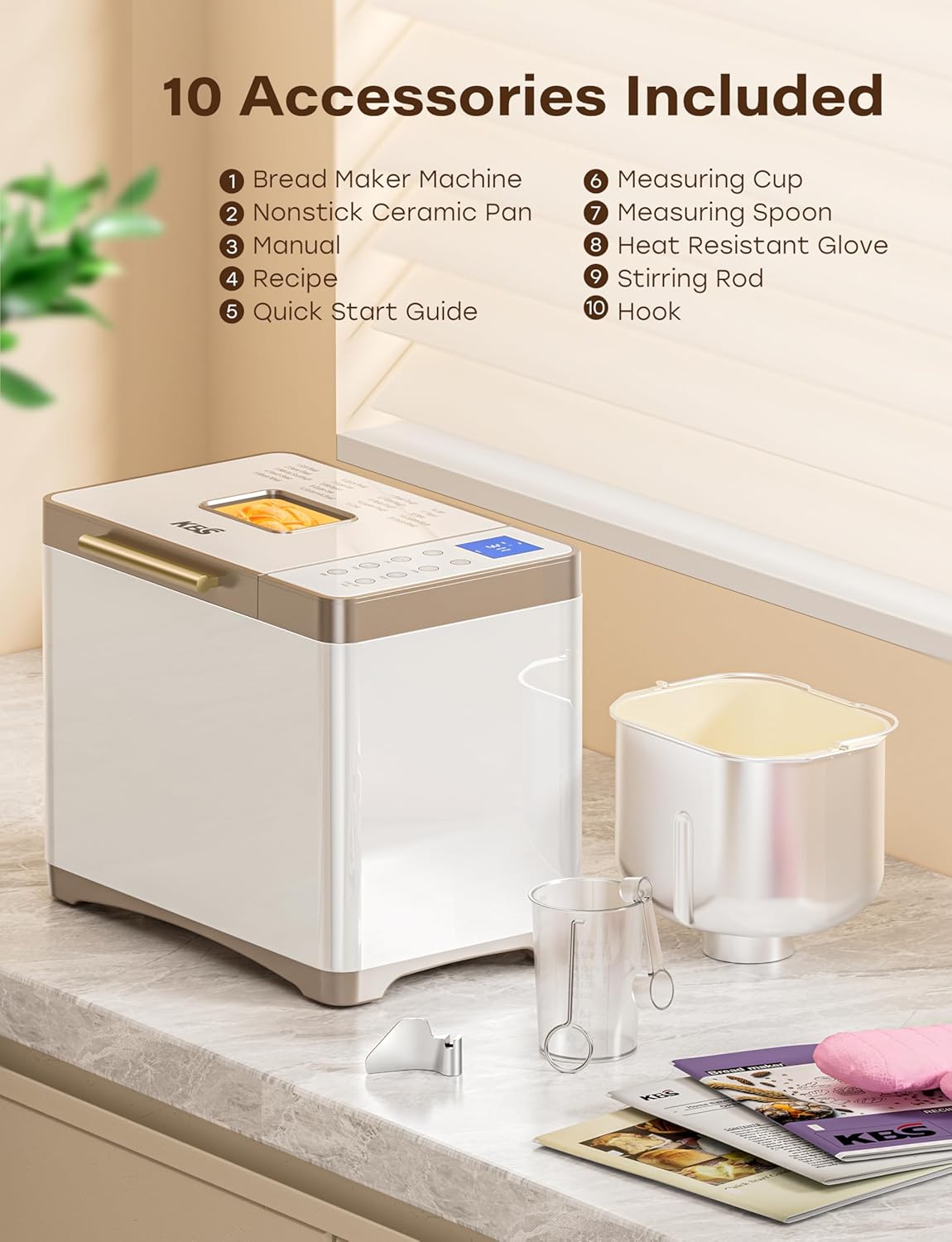
Gambar 2: Aksesoris sing kalebu
Your KBS Bread Maker comes with the following accessories:
- 1 Nonstick Ceramic Pan
- 1 Stainless Steel Kneading Paddle
- 1 Sarung Tangan Tahan Panas
- 1 gelas ukur
- 1 Sendok Takar
- 1 Hook (for removing the kneading paddle)
- 1 Manual Instruksi (dokumen iki)
- 1 Buku Resep
- 1 Pandhuan wiwitan cepet
Installing the Bread Pan and Kneading Paddle
- Place the bread pan into the baking chamber, ensuring it is securely seated. Twist gently if needed to lock it into place.
- Attach the kneading paddle onto the shaft at the bottom of the bread pan. Ensure it clicks into place.
Instruksi Operasi
Panel Kontrol Liwatview

Figure 3: Control Panel and Menu Options
The bread maker features a seamless glass digital touch panel for easy operation and cleaning.
- MENU: Press to cycle through the 20 pre-programmed settings.
- LOAF: Select desired loaf size (1 LB, 1.5 LB, 2 LB).
- WARNA: Choose crust color (Light, Medium, Dark).
- KNEAD: Dedicated button for kneading functions.
- DIY: Access the custom mode (Menu 19) for personalized settings.
- ROTI: Dedicated button for bread making functions.
- +/-: Adjust time for delayed start or custom mode settings.
- START/STOP/PAUSE: Initiate, pause, or cancel a program.
Nambah Bahan
Always add ingredients in the order specified by your recipe, typically liquids first, followed by dry ingredients, and yeast last. Ensure the kneading paddle is correctly installed before adding ingredients.
Pilih Program
The bread maker offers 20 programs, including:
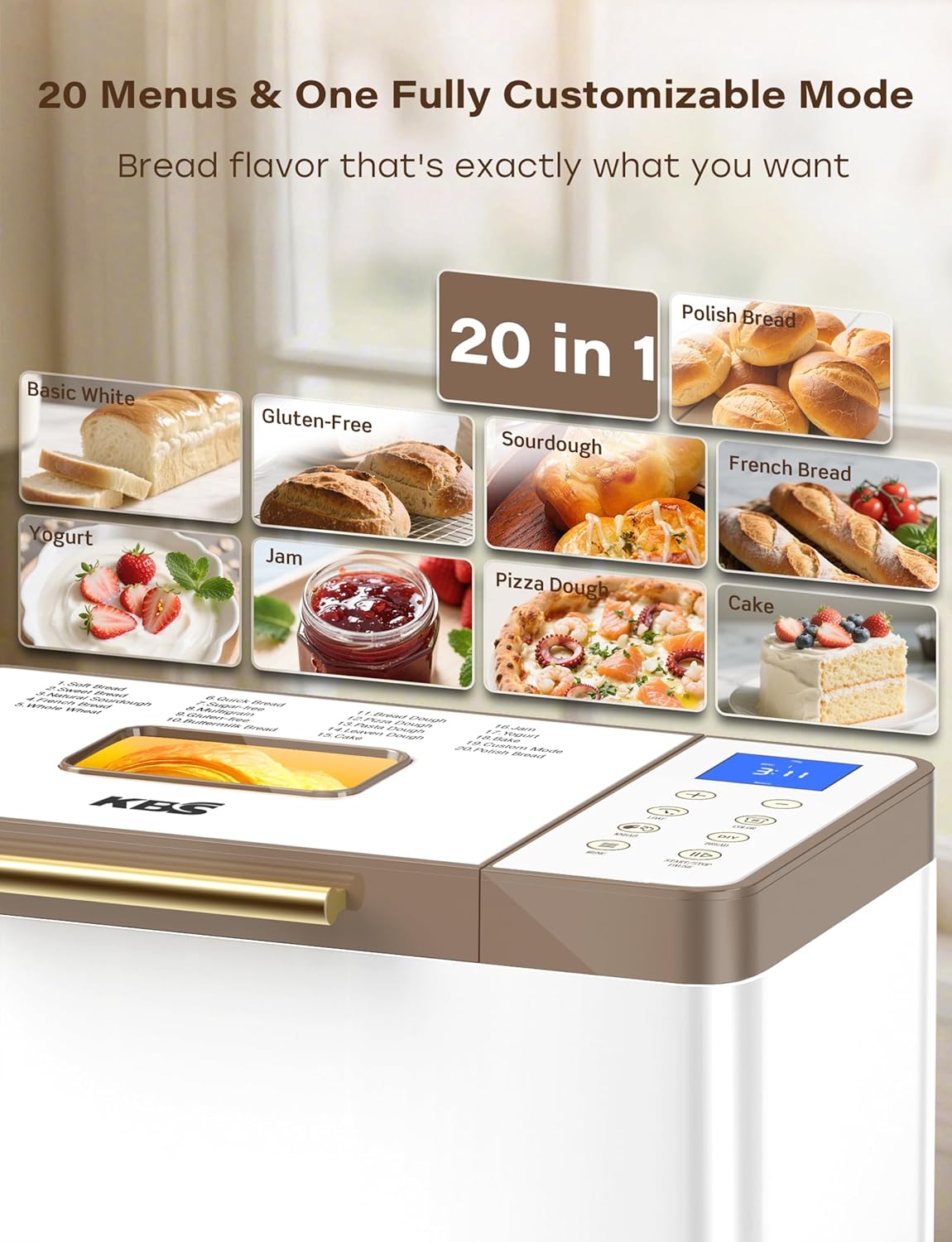
Figure 4: 20 Menu Options
- Soft Bread, Sweet Bread, Natural Sourdough, French Bread, Whole Wheat
- Quick Bread, Sugar-free, Multigrain, Gluten-free, Buttermilk Bread
- Bread Dough, Pizza Dough, Pasta Dough, Leaven Dough, Cake
- Jam, Yogurt, Bake, Custom Mode, Polish Bread
Tekan ing MENU button repeatedly until the desired program number appears on the display.
Loaf Size and Crust Color
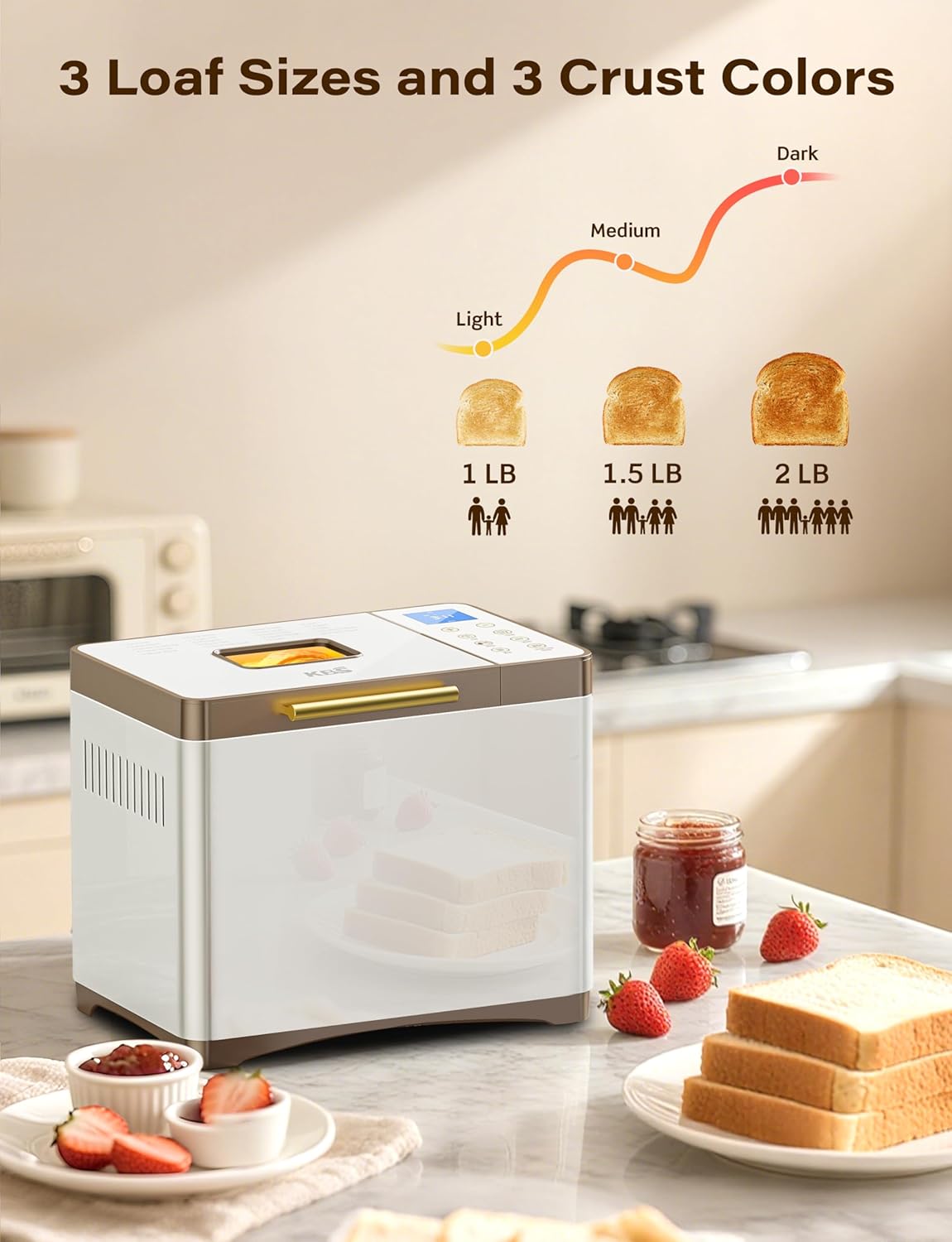
Figure 5: Loaf Size and Crust Color Selection
Sawise milih program, gunakake LOAF button to choose between 1 LB, 1.5 LB, or 2 LB loaf sizes. Use the WARNA button to select your preferred crust darkness: Light, Medium, or Dark.
Custom Mode (Menu 19)
Menu 19 allows for full customization of each baking stage: autolysing, basic rise, degassing, re-rise, reshape, last rise, and bake. Use the +/- buttons to adjust the time for each step. Settings can be saved for future use.
Delayed Start, Keep Warm, and Power OutagSerep e
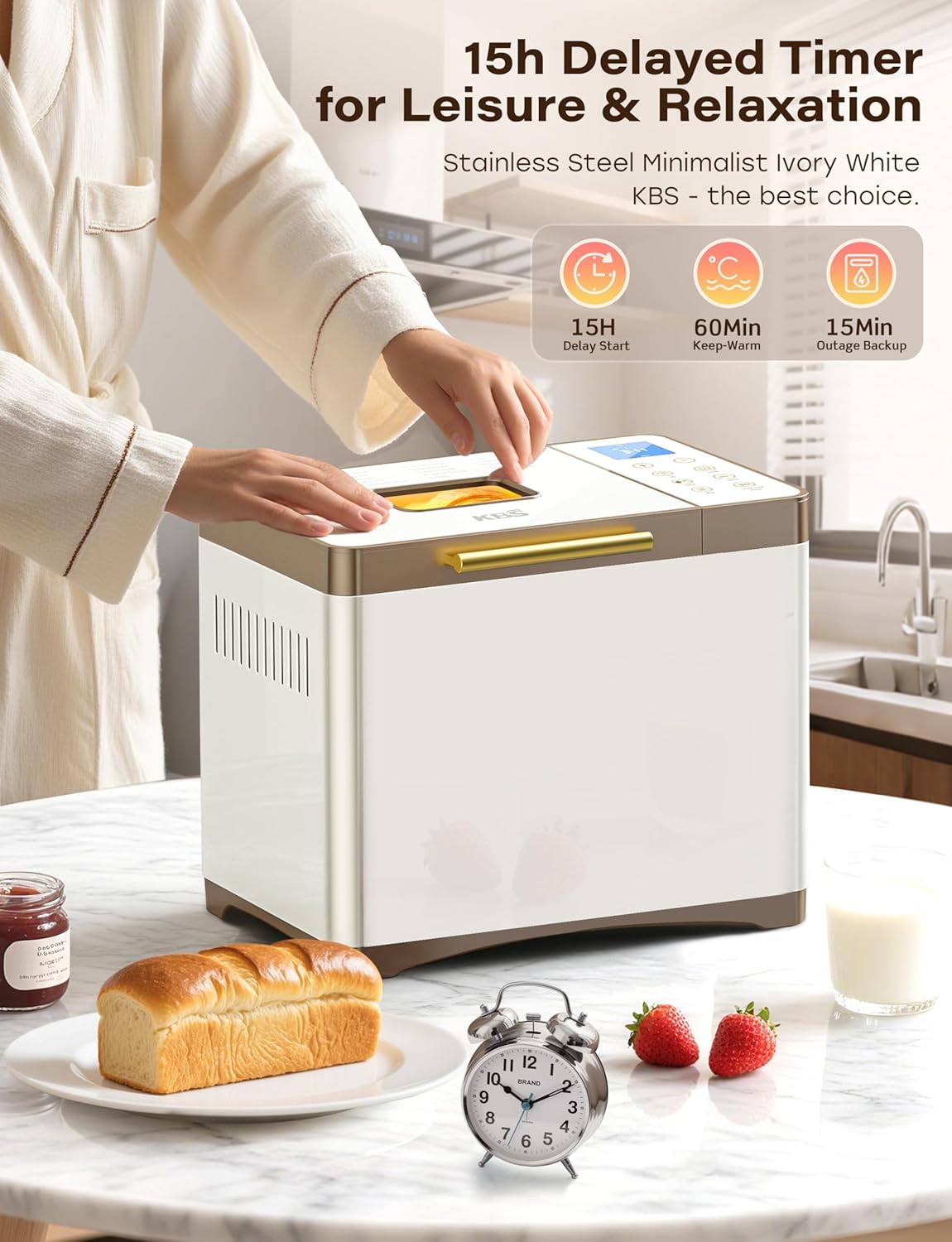
Figure 6: Timer and Power Features
- 15-Hour Delayed Start: Program the bread maker to finish baking at a later time. Use the +/- buttons to set the delay.
- Tetep Anget 60 Menit: After baking, the bread maker automatically enters a 60-minute keep warm cycle to maintain optimal bread temperature.
- 15-Minute Power Outage Gawe serep: In case of a power interruption, the bread maker can resume its program if power is restored within 15 minutes.
Miwiti Program
Once ingredients are added and settings are selected, press the START/STOP/PAUSE button to begin the baking cycle.
Care lan Maintenance
Cleaning the Bread Pan and Kneading Paddle

Figure 7: Nonstick Ceramic Pan and Stainless Steel Paddle
- After use, allow the bread pan and kneading paddle to cool completely.
- Remove the kneading paddle from the pan using the provided hook tool.
- Wash the ceramic pan and stainless steel paddle with warm, soapy water. The ceramic pan is fired at 3000°F for long-lasting nonstick properties and is dishwasher safe.
- For stubborn residue, soak the pan and paddle in warm water for a short period before cleaning.
- Priksa manawa kabeh bagean wis garing kanthi sampurna sadurunge dipasang maneh utawa disimpen.
Reresik njaba
- Ngusap njaba saka pembuat roti kanthi alus, damp kain.
- The seamless glass digital panel can be easily wiped clean.
- Aja nggunakake pembersih abrasif utawa bantalan penggosok, amarga iki bisa ngrusak permukaan.
Ngatasi masalah
If you encounter issues with your bread maker, refer to the common problems and solutions below.
| Masalah | Kemungkinan Penyebab | Solusi |
|---|---|---|
| Roti ora mundhak utawa mundhak banget. | Incorrect yeast amount, expired yeast, incorrect water temperature, wrong flour type. | Ensure yeast is fresh and measured accurately. Use water at the correct temperature (typically lukewarm). Verify flour type matches the recipe. |
| Bread is dense or heavy. | Glepung kakehan, cairan kurang, uleni ora cukup. | Measure ingredients precisely. Adjust liquid slightly if dough appears too dry during kneading. Ensure the correct program is selected for adequate kneading time. |
| Kneading dayung macet ing roti. | Common occurrence, especially with larger loaves. | Allow bread to cool slightly. Use the provided hook tool to carefully remove the paddle. |
| Uneven baking or browning. | Improper ingredient distribution, lid not fully closed, external temperature fluctuations. | Ensure ingredients are evenly distributed. Confirm the lid is securely closed. The 360° hot air circulation and NTC/PID system help maintain even temperature. |
Spesifikasi
| Fitur | Rincian |
|---|---|
| Nomer Model | MBF-014A |
| Merk | KBS |
| warna | Creamy White Stainless Steel |
| Dimensi produk | 8 "D x 13.4" W x 11 "H |
| Bobot Barang | 12.97 kab |
| Jumlah Program | 20 (including Custom Mode) |
| Ukuran Roti | 1 LB, 1.5 LB, 2 LB |
| Setelan Kerak | Cahya, Sedheng, Peteng |
| bahan roti | Nonstick Ceramic (3000°F-fired) |
| Paddle Material | Baja tahan karat |
| Daya Motor | 650W Variable-Frequency Motor |
| Kontrol suhu | Dual NTC and PID System |
| Timer Mulai Tertunda | Nganti 15 jam |
| Fungsi Tetep Anget | 60 menit |
| Daya OutagSerep e | 15 menit |
| Perawatan produk | Dishwasher Safe (pan), Hand Wash (general) |
Warranty lan Dhukungan
Your KBS Bread Maker comes with a 2-year warranty. For technical support or customer service inquiries, please contact our team. We aim to provide customized solutions with a rapid response within 12 hours.
- Periode Garansi: 2 Taun
- Support Response Time: Ing 12 jam
- Please refer to the contact information provided in your Quick Start Guide or on the official KBS websitus kanggo pitulungan.