
1. Pambuka
This manual provides detailed instructions for the safe and efficient operation of your Blukar Mini Rechargeable LED Flashlight, Model K9183. Please read this manual thoroughly before using the product and retain it for future reference.
The Blukar K9183 is a compact, durable, and versatile LED flashlight designed for everyday carry (EDC). Its small size, multiple lighting modes, and USB-C rechargeable battery make it ideal for various situations, from outdoor activities to emergency lighting.
2. Isi Paket
Mangga dipriksa paket kanggo item ing ngisor iki:
- 1 x Blukar Mini Rechargeable LED Flashlight (Model K9183)
- 1 x Kabel Pengisian USB-C
- 1 x Manual pangguna
3. Fitur Produk
- Ultra-Compact EDC Design: Super compact and lightweight, equipped with a keychain for easy attachment to keys, backpacks, or pockets.
- Telung Mode Cahya: Offers High, Medium, and Low brightness levels to suit different illumination needs.
- USB-C Isi Ulang: Features a built-in battery that recharges conveniently via the included USB-C cable.
- Fungsi Memori: Automatically remembers the last used lighting mode when turned off and on again.
- Rating tahan banyu IPX6: Ensures safe operation in wet conditions and rain, making it suitable for outdoor use.
- Konstruksi awet: Made from high-quality aluminum alloy, providing a lightweight, durable, and corrosion-resistant housing.
- Indikator baterei: The power switch illuminates red during charging or when the battery is low, and green when fully charged or in use.
4. Setup
Before initial use, it is recommended to fully charge the flashlight. Refer to the "Charging Instructions" section for details.

Image: The Blukar Mini Rechargeable LED Flashlight K9183, showcasing its compact design and illuminated power button.
Attaching to a Keychain
The flashlight comes with an integrated keychain ring. You can easily attach it to your existing key ring, backpack, or other personal items for convenient access.

Image: Demonstrates various carrying options for the Blukar Mini Flashlight, including with a necklace, keychain, and in a pocket.
5. Instruksi Operasi
The Blukar K9183 flashlight features a single button for all operations.

Image: Illustrates the three lighting modes (High, Medium, Low) and the single-button control for switching modes and turning off.
- Turning On/Changing Modes: Press the power button briefly to turn on the flashlight. Each subsequent brief press will cycle through the brightness modes: High > Medium > Low.
- Pateni:
- If the flashlight has been on for more than 8 seconds in any mode, a single brief press of the power button will turn it off.
- To turn off the flashlight quickly at any time (within 8 seconds of turning on or changing modes), press and hold the power button for approximately 3 seconds.
- Fungsi Memori: The flashlight will remember the last used brightness mode. When you turn it on again, it will activate in that mode.
6. Pandhuan Ngisi daya
The Blukar K9183 flashlight is equipped with a built-in rechargeable battery.
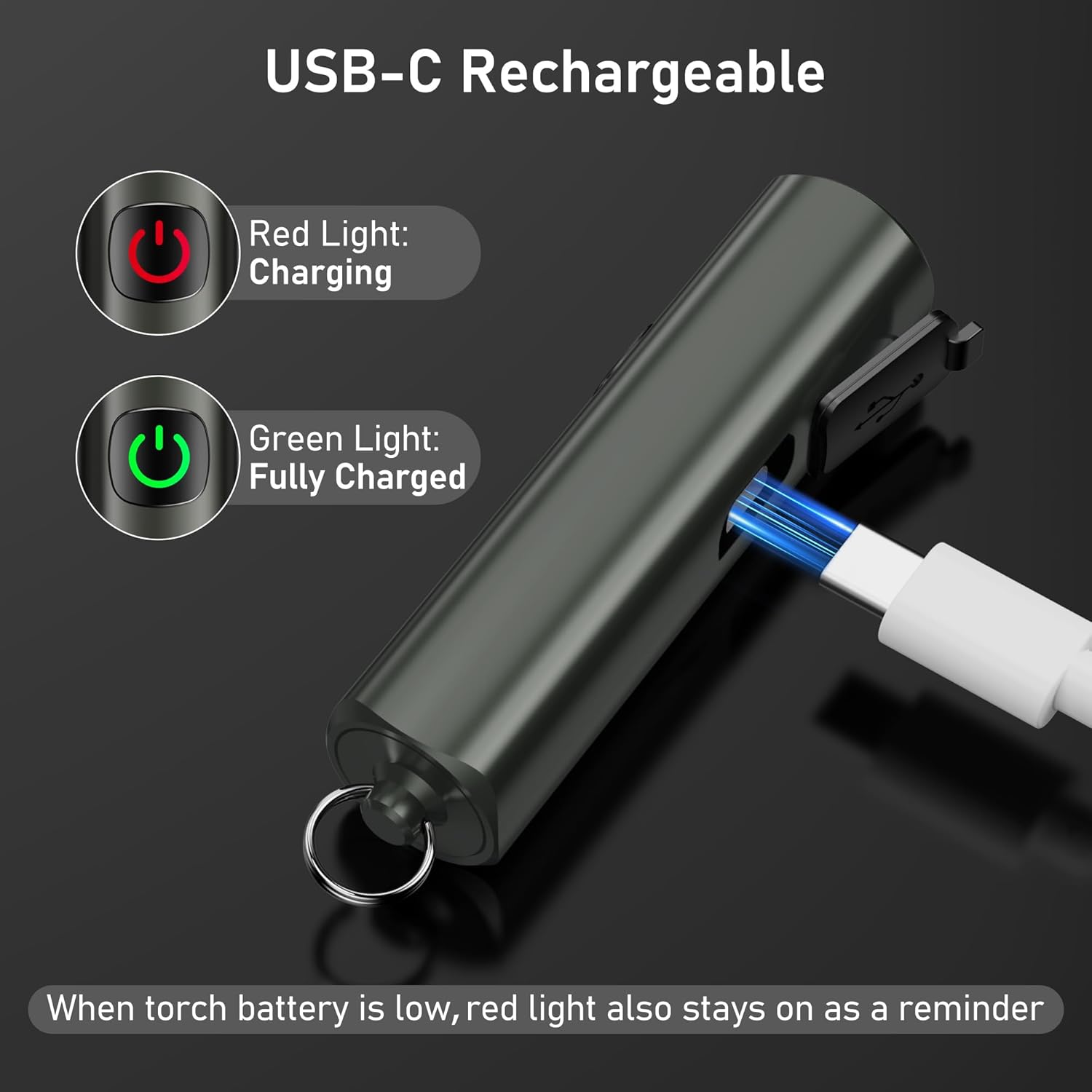
Image: Shows the USB-C charging port and the red/green indicator lights for charging status.
- Golekana port pangisi daya USB-C ing sisih senter, biasane ditutupi tutup karet.
- Gently open the rubber flap to expose the port.
- Connect the included USB-C charging cable to the flashlight's port and the other end to a standard USB power source (e.g., computer, wall adapter, power bank).
- Tombol daya bakal madhangi abang to indicate that the flashlight is charging.
- Once fully charged, the power button will turn ijo.
- Ngisi daya lengkap biasane njupuk kira-kira 2 jam.
- When the battery is low during operation, the power button will also illuminate abang as a reminder to recharge.
A full charge provides up to 5.5 hours of continuous illumination on the low brightness setting.
7. Pangopènan
Reresik
- Ngusap senter nganggo alus, damp kain kanggo mbusak rereget utawa lebu.
- Do not use abrasive cleaners or solvents, as these may damage the finish or internal components.
- Ensure the USB-C port cover is securely closed after charging to maintain its IPX6 waterproof rating.
Panyimpenan
- Simpen senter ing papan sing adhem lan garing, adoh saka sinar srengenge langsung lan suhu sing ekstrem.
- If storing for an extended period, recharge the battery every 3 months to prevent battery degradation and prolong its lifespan.
8. Ngatasi masalah
| Masalah | Kemungkinan Penyebab | Solusi |
|---|---|---|
| Senter ora diuripake. | Baterei wis entek. | Isi daya senter nganggo kabel USB-C sing wis disedhiyakake. |
| Cahya surem utawa sumunar. | Baterei sithik. | Ngisi daya senter. |
| Senter ora ngisi daya. | Charging cable or adapter faulty; port not connected properly. | Ensure the USB-C cable is securely connected. Try a different USB-C cable or power adapter. |
| Cannot change brightness modes. | Operasi sing salah. | Ensure you are pressing the button briefly to cycle modes. |
9. Spesifikasi

Image: Visual representation of key specifications including beam distance, drop test, weight, waterproof rating, and length.
| Fitur | Rincian |
|---|---|
| Nomer Model | K9183 |
| Merk | Blukar |
| Ukuran (L x W x H) | Ukuran 6.64 x 1.58 x 1.58 cm (2.61 x 0.62 x 0.62 inci) |
| Bobot | 27 gram (0.95 oz) |
| Jinis baterei | 1 baterei Lithium-ion (kalebu) |
| Sumber Daya | Baterei powered |
| Rating anti banyu | IPX6 (Resistant to powerful water jets) |
| Port Pengisian | USB-C |
| Wektu Ngisi daya | Kurang luwih 2 jam |
| Max Runtime (Low Mode) | Nganti 5.5 jam |
| Jarak Beam | Nganti 48 meter (157 kaki) |
| Drop Resistance | 1.5 meter (5 kaki) |
| Bahan | Paduan Aluminium Berkualitas Tinggi |
10. Informasi Safety
- Do not shine the flashlight directly into eyes, as the bright light can cause temporary vision impairment.
- Aja nganti tekan bocah. Iki dudu dolanan.
- Do not disassemble, modify, or attempt to repair the flashlight yourself. This may void the warranty and pose safety risks.
- Aja nganti senter kena suhu ekstrem, geni sing mbukak, utawa cairan korosif.
- While the flashlight is IPX6 waterproof, it is not designed for submersion in water.
- Gunakake mung kabel USB-C sing kasedhiya utawa sing padha karo sing disertifikasi kanggo ngisi daya.
11. Warranty lan Dhukungan
For warranty information, please refer to the documentation included with your purchase or visit the official Blukar website. If you encounter any issues or require technical assistance, please contact Blukar customer support through their official channels.