
1. Pambuka
This manual provides comprehensive instructions for the safe and effective use of your KKnoon E24848 Electric Wood Trimmer Router. This versatile power tool is designed for various woodworking tasks, including trimming, grooving, carving, and drilling in wood and other materials. Please read this manual thoroughly before operation and retain it for future reference.
2. Pandhuan Safety
Tansah tindakake pancegahan safety dhasar kanggo nyuda resiko geni, kejut listrik, lan ciloko pribadi.
- Keamanan Area Kerja: Tansah papan kerja sampeyan resik lan padhang. Wilayah sing rame utawa peteng nyebabake kacilakan. Aja ngoperasikake piranti listrik ing atmosfer sing mbledhos, kayata ing ngarsane cairan, gas, utawa bledug sing gampang kobong.
- Keamanan Listrik: Colokan alat daya kudu cocog karo stopkontak. Aja ngowahi plug ing sembarang cara. Aja kontak awak karo lumahing earthed utawa grounded. Aja nyedhiyakake piranti listrik ing udan utawa udan.
- Keamanan Pribadi: Always wear eye protection, dust mask, non-skid safety shoes, hard hat, or hearing protection as appropriate. Do not overreach. Keep proper footing and balance at all times. Dress properly; avoid loose clothing or jewelry.
- Gunakake lan Perawatan Alat: Aja meksa alat listrik. Gunakake alat daya sing bener kanggo aplikasi sampeyan. Copot plug saka sumber daya sadurunge nggawe pangaturan, ngganti aksesoris, utawa nyimpen piranti daya.
- Pangopènan: Jaga alat listrik. Priksa manawa ora cocog utawa naleni bagean sing obah, bagian rusak, lan kondisi liyane sing bisa mengaruhi operasional alat listrik kasebut.
3. Isi Paket
Priksa manawa kabeh item ana nalika mbongkar:
- Electric Trimmer (with transparent base) x 1
- Router Bit Set (15 pieces) x 1
- Trim Guide Base x 1
- Straight Trim Guide Ruler x 1
- Sekrup x 1
- Carbon Brush x 2
- Kunci x 2
- Guide Line x 1
4. Fitur Product lan Komponen
Familiarize yourself with the main parts of your electric trimmer:
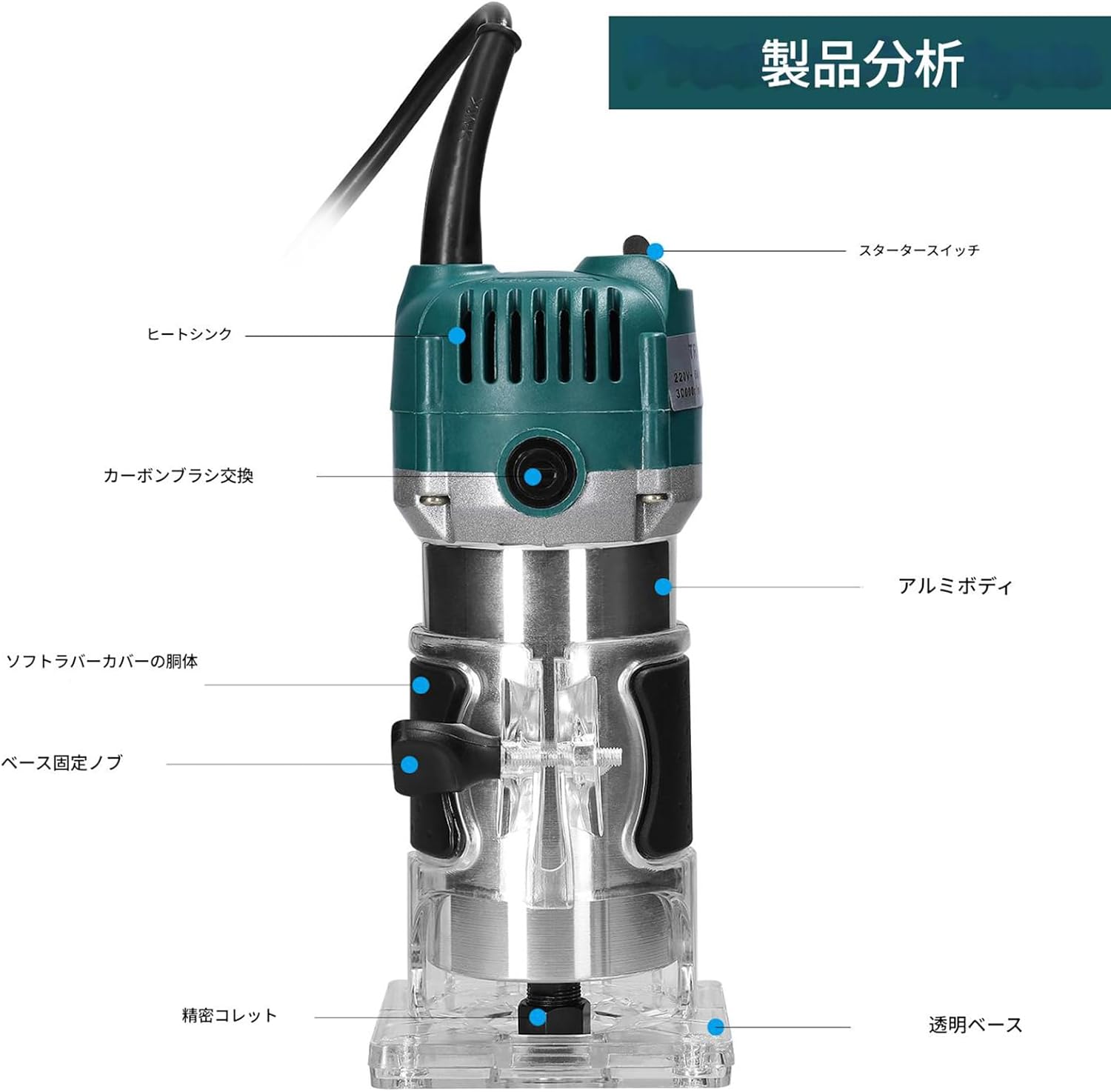
Gambar: Product analysis diagram highlighting key components such as the starter switch, heat sink, carbon brush access, aluminum body, soft rubber cover, base fixing knob, precision collet, and transparent base.
- Konstruksi awet: The main body is constructed from aluminum and plastic, with an internal aluminum heat dissipation fan for efficient cooling and extended tool life. The exterior is waterproof, dustproof, and durable.
- Dasar transparan: Allows for clear observation of the cutting process, ensuring precision and control.
- Tightening Adjustment Knob: Enables precise adjustment of the transparent cover's tightness.
- External Carbon Brush Design: Facilitates easy replacement of carbon brushes, enhancing safety and convenience.
- Kabel Daya Extended: Provides a wider working range.
- Non-slip Handle: High-quality rubber handle with non-slip pads ensures a comfortable grip and precise control, reducing fatigue during prolonged use.
5. Setup
Follow these steps to prepare your trimmer for operation:

Gambar: rinci view of the guide bracket, transparent base, tightening adjustment knob, and the included 15-piece router bit set.
- Nginstal Bit Router:
- Priksa manawa alat wis dicopot.
- Loosen nut collet nggunakake wrench kasedhiya.
- Insert the desired router bit into the collet, ensuring it is fully seated.
- Kencengna mur collet kanthi kenceng nganggo kunci inggris.
- Nyetel ambane nglereni:
- Place the trimmer on the workpiece.
- Loosen the base fixing knob.
- Adjust the trimmer body up or down until the router bit reaches the desired cutting depth.
- Tighten the base fixing knob securely.
- Attaching Guide Bases:
- For straight cuts, attach the straight trim guide ruler to the transparent base using the provided screw.
- For curved or edge trimming, attach the trim guide base.
6. Instruksi Operasi
Tansah mesthekake workpiece wis aman clamped before starting. Wear appropriate personal protective equipment.

Gambar: The electric trimmer being used in a workshop setting for woodworking tasks.
- Daya On/Off: Plug the tool into a suitable power outlet. Use the starter switch to turn the trimmer ON and OFF.
- Miwiti Cut: Hold the trimmer firmly with both hands. Allow the motor to reach full speed before contacting the workpiece.
- Nggawe Cut: Guide the trimmer smoothly and steadily along the desired cutting line. Apply consistent pressure. Avoid forcing the tool, as this can lead to poor cut quality and motor strain.
- Types of Operations:
- Trimming: Use appropriate bits for edge profiling or flush trimming.
- Grooving: Use straight bits and the straight guide ruler for creating grooves.
- Ukiran / Ukiran: Select specialized bits for detailed work.
- Pengeboran Lubang: For specific applications, use appropriate bits and ensure stable positioning.
- Rampung: Once the cut is complete, lift the trimmer from the workpiece before turning it off.
7. Pangopènan
Pangopènan reguler njamin kinerja optimal lan ndawakake umur alat sampeyan.
- Reresik: After each use, unplug the tool and clean dust and debris from the motor vents and transparent base using a soft brush or compressed air. Do not use solvents or abrasive cleaners.
- Penggantian sikat karbon: The carbon brushes are external for easy access. When the motor performance decreases or sparks become excessive, the carbon brushes may need replacement. Unscrew the brush caps, remove the old brushes, and insert new ones. Ensure the new brushes are seated correctly before replacing the caps.
- Pangopènan Collet: Keep the collet and collet nut clean and free of debris to ensure proper bit gripping.
- Panyimpenan: Store the trimmer in a dry, secure location, out of reach of children.
8. Ngatasi masalah
Deleng bagean iki kanggo masalah umum lan solusi.
| Masalah | Kemungkinan Penyebab | Solusi |
|---|---|---|
| Motor ora miwiti | Ora ana sumber daya; Ngalih rusak; Sikat karbon sing rusak | Check power connection; Test switch; Replace carbon brushes |
| Percikan api sing berlebihan saka motor | Sikat karbon sing wis rusak; Komutator sing reged | Replace carbon brushes; Clean commutator (professional service recommended) |
| Poor cut quality or vibration | Dull or damaged router bit; Loose bit in collet; Incorrect feed rate | Replace bit; Tighten collet nut; Adjust feed rate |
| Overheating | Blocked ventilation; Overloading the tool | Clean vents; Reduce load or cutting depth |
Yen masalah tetep, hubungi dhukungan pelanggan.
9. Spesifikasi

Gambar: Diagram illustrating the dimensions of the electric trimmer: 206mm (8.11in) height, 90mm (3.54in) width, and 87mm (3.43in) depth.
| Fitur | Spesifikasi |
|---|---|
| Jeneng produk | Electric Trimmer Router |
| Nomer Model | E24848 |
| Bahan | Plastic + Metal (Aluminum Housing) |
| Konsumsi Daya | 800W |
| Kacepetan ora mbukak | 30,000 r / min |
| Collet Chuck Diameter | 6.35mm (1/4 inci) |
| Ukuran awak | 206 x 87 x 90mm / 8.11 x 3.43 x 3.54 inci |
| Bobot awak | 1891g / 4.17 lbs (approx. 2 kg) |
| Sumber Daya | Corded Electric (Single phase 110V, 50/60Hz) |
| Panjang Kabel Daya | Kira-kira 1.3m |
10. Warranty lan Dhukungan
Kanggo informasi garansi utawa dhukungan teknis, delengen toko utawa pejabat pabrikan websitus. Simpen kuitansi tuku minangka bukti tuku.