
Pambuka
Thank you for choosing the SuperRC M23 Mini RC Drone. This manual provides essential information for the safe operation, setup, maintenance, and troubleshooting of your drone. Please read this manual thoroughly before operating the drone to ensure proper function and to avoid damage or injury. This drone is designed for adult beginners and features a lightweight, portable design with an HD camera and intelligent flight functions.
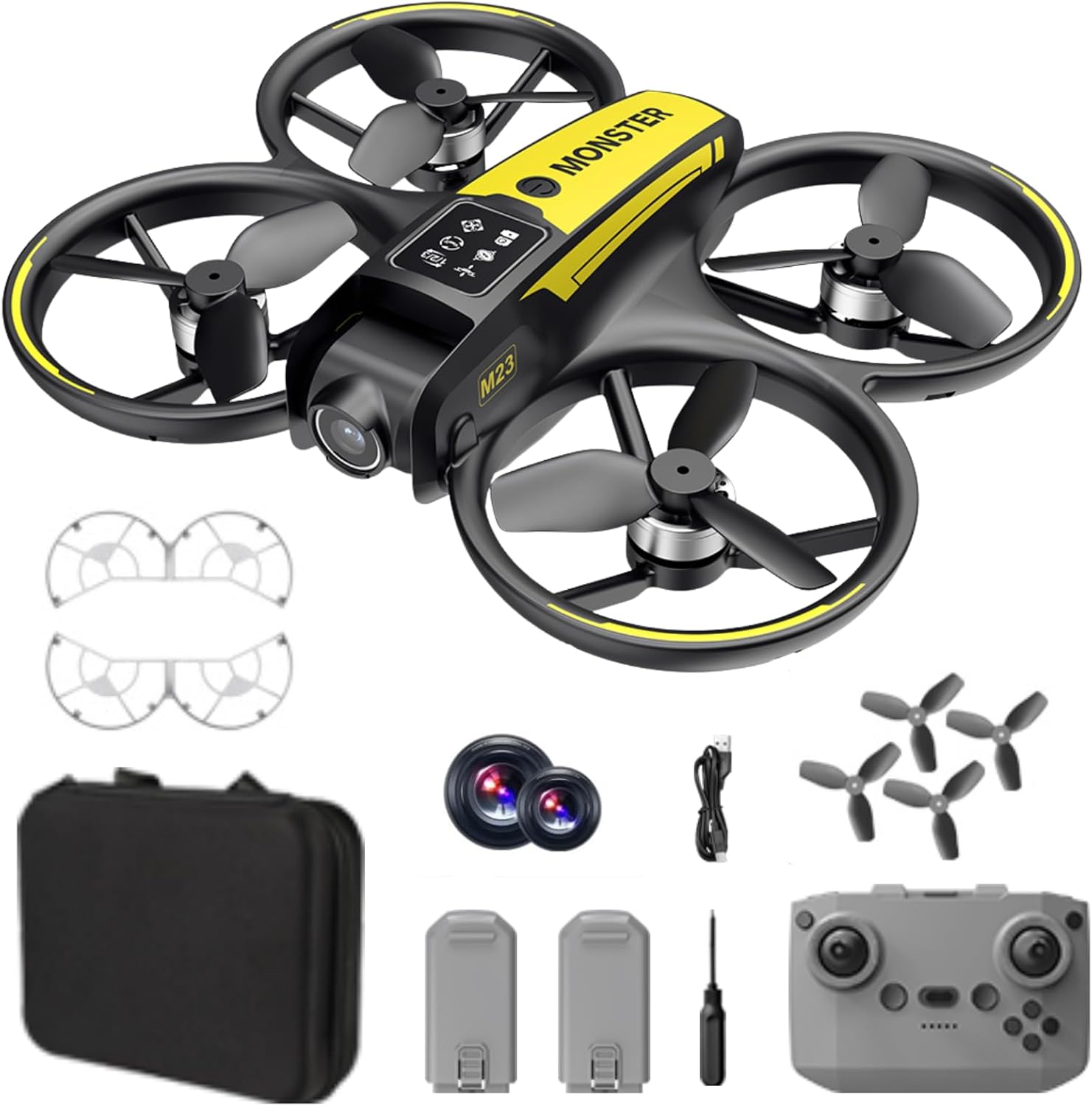
Apa ing Box
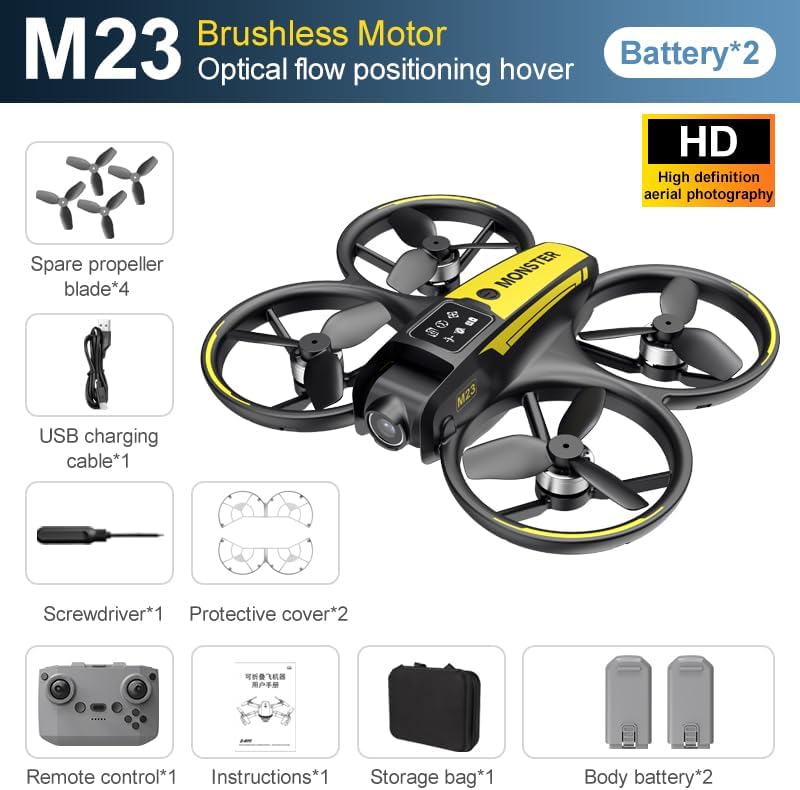
The SuperRC M23 drone package includes the following components:
- M23 Mbengung
- Remote Kontrol
- 2 x 3.7V 1050mAh Baterei Isi Ulang
- 4 x Spare Baling-Baling
- 2 x Propeller Pengawal
- Kertu memori
- Card Reader
- obeng
- Kabel Pengisian USB
- Tas panyimpenan
- Manual pangguna (dokumen iki)

Produk Overview
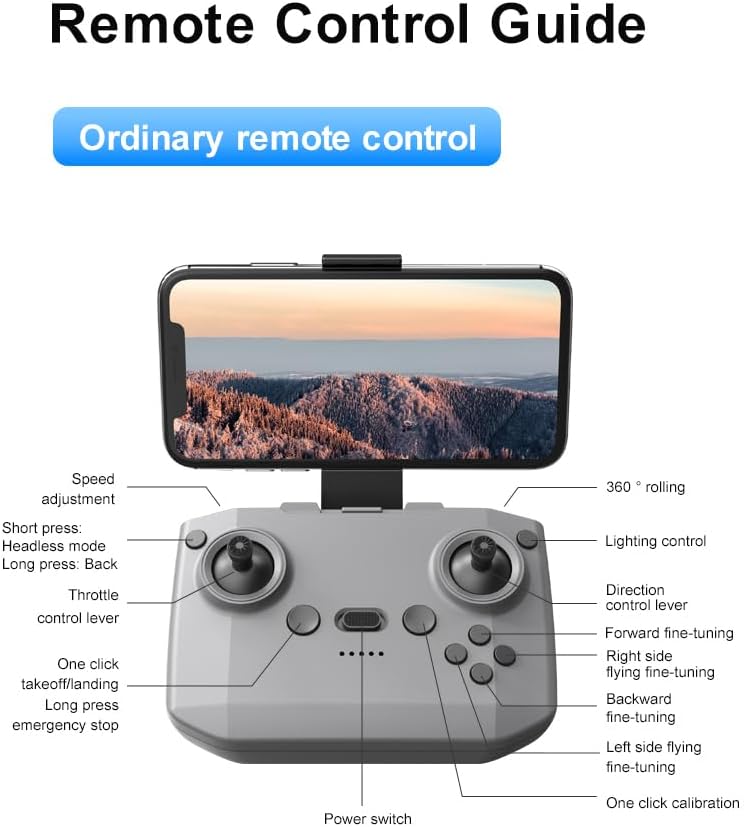
Tata Letak Remote Control
Familiarize yourself with the remote control buttons and their functions before flight.
Setup
1. Instalasi baterei
- Priksa manawa drone lan remot kontrol wis dipateni.
- Goleki kompartemen baterei ing drone.
- Insert a charged 3.7V 1050mAh battery into the compartment until it clicks securely into place.
- For the remote control, open the battery cover and insert the required batteries (not specified in product data, assume standard AA/AAA, user should refer to physical manual for exact type).
2. Instalasi Baling-Baling
Drone iki wis dilengkapi baling-baling sing wis diinstal. Yen perlu diganti:
- Identify the 'A' and 'B' markings on the propellers and the corresponding motor arms.
- Attach 'A' propellers to 'A' motor shafts and 'B' propellers to 'B' motor shafts. Ensure they are firmly secured.
3. Propeller Guard Installation
For added safety, attach the propeller guards:
- Align each propeller guard with the designated slots on the drone's motor arms.
- Gently push until they snap into place.
4. Ngisi daya
Charge the drone batteries using the provided USB charging cable.
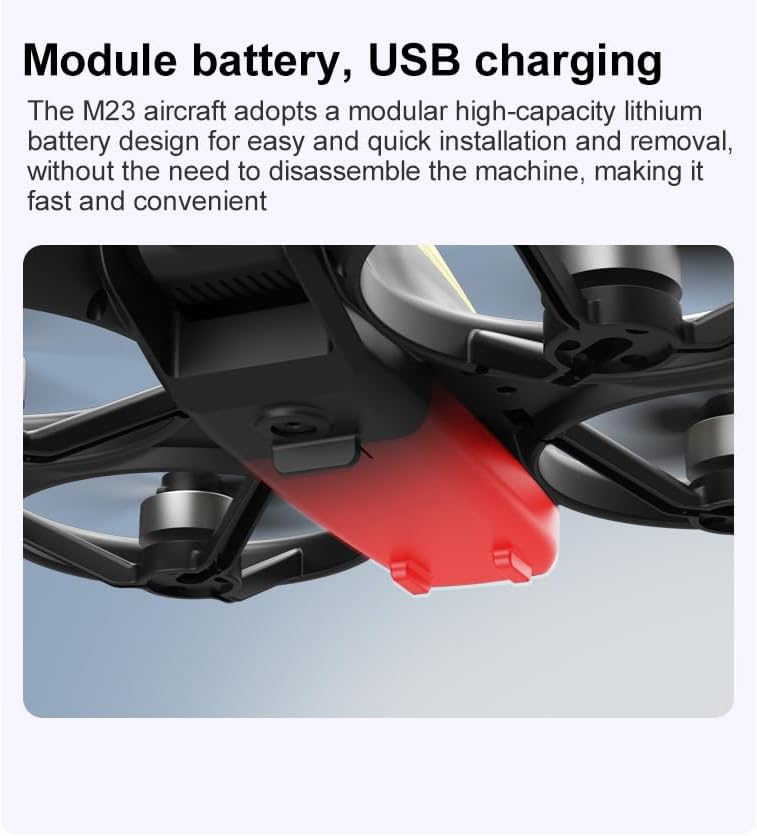
- Sambungake kabel pangisi daya USB menyang baterei drone.
- Plug the other end into a USB power source (e.g., computer, USB wall adapter).
- The indicator light on the cable will show charging status (refer to physical manual for specific light indications).
- Charging time is approximately 60-90 minutes for a full charge.
Instruksi Operasi
Dhaptar Priksa Penerbangan
- Priksa manawa baterei drone lan remot kontrol wis kebak.
- Baling-baling wis dipasang lan aman kanthi bener.
- Propeller guards are attached (recommended for beginners).
- Choose an open, clear area free from obstacles, people, and animals.
- Check local drone regulations before flying.
Operasi Penerbangan dhasar
The following video demonstrates key flight features including one-key takeoff, optical flow positioning, 360-degree roll, and speed switching.
One-Key Takeoff and Landing
- lepas landas: Place the drone on a flat surface. Press the One-Key Takeoff button on the remote control. The drone will automatically ascend and hover at a stable altitude.
- Landing: Press the One-Key Landing button. The drone will slowly descend and land automatically.
Mode lan Fitur Penerbangan
- Mode tanpa sirah: Press the Headless Mode button. In this mode, the drone's orientation is relative to the pilot, making it easier to control without worrying about the drone's front direction.
- Pangaturan Kecepatan: Use the speed adjustment button (or switch) on the remote control to cycle through low, medium, and high speeds. This allows for adaptable flight control based on skill level and environment.
- 360° Gulung: Press the 360° Roll button and then move the right joystick in any direction to perform an aerial flip. Ensure sufficient altitude before attempting.
- Posisi Aliran Optik: The drone utilizes a bottom camera for optical flow positioning, which helps maintain stable hovering, especially indoors or in areas with good ground texture. This feature assists in precise altitude hold.
- Penerbangan lintasan: Through the mobile application, you can draw a desired flight path on your screen. The drone will then follow this trajectory automatically.

Operasi kamera
The M23 drone is equipped with an HD camera with a 90-degree adjustable lens for capturing photos and videos.

- Rekaman Foto/Video: Use the dedicated buttons on the remote control or the mobile app to start/stop video recording or take photos.
- Transmisi Gambar Real-time: Sambungake smartphone sampeyan menyang jaringan Wi-Fi drone kanggo view wektu nyata footage from the drone's camera on your device.
Pangopènan
Reresik
- Regularly clean the drone body with a soft, dry cloth.
- Ensure propellers are free from dust, dirt, or debris.
- Clean the camera lens gently with a microfiber cloth to maintain image quality.
Panyimpenan
- Store the drone and its components in the provided storage bag to protect them from dust and physical damage.
- Keep the drone in a cool, dry place, away from direct sunlight and extreme temperatures.
Perawatan baterei
- Aja overcharge utawa over-discharge baterei.
- Yen disimpen sajrone wektu sing suwe, isi daya batere nganti kapasitas kira-kira 50-60%.
- Avoid exposing batteries to high temperatures or direct sunlight.
Ngatasi masalah
If you encounter issues with your SuperRC M23 drone, refer to the following common problems and solutions:
| Masalah | Kemungkinan Penyebab | Solusi |
|---|---|---|
| Drone ora nanggapi remot kontrol | Low battery on drone or remote; Not paired correctly; Interference | Charge batteries; Re-pair drone and remote (refer to physical manual for pairing steps); Move to an area with less interference |
| Drone mabur nalika mabur | Not calibrated; Wind interference; Damaged propeller | Perform calibration (refer to physical manual); Fly in calm conditions; Replace damaged propellers |
| Kualitas gambar kamera sing kurang apik | Dirty lens; Low light conditions; Wi-Fi interference | Clean camera lens; Fly in well-lit areas; Ensure strong Wi-Fi connection |
| Wektu penerbangan cendhak | Baterei ora kebak; Baterei lawas; Mabur agresif | Ensure battery is fully charged; Consider replacing old batteries; Practice smoother flight maneuvers |
Spesifikasi
Key technical specifications for the SuperRC M23 Mini RC Drone:
| Fitur | Rincian |
|---|---|
| Jeneng Model | M23-Drone |
| Merk | SuperRC |
| Bobot Barang | 0.2 Kilograms (Under 250g) |
| Ukuran Item (L x W x H) | 7"P x 6"L x 2"T (kurang luwih 18 x 15 x 5 cm) |
| Bahan | Plastik |
| Tingkat Keahlian | pamula |
| Kisaran Umur (Deskripsi) | diwasa |
| kamera | HD Camera with 90° Adjustable Lens |
| Resolusi Jupuk Video | 720p |
| Resolusi Output Video | 720 piksel |
| Format Jupuk Video | MP4 |
| Format Gambar sing Didhukung | JPEG |
| Teknologi Sensor Optik | CMOS |
| Teknologi Konektivitas | Wi-Fi, RF |
| Tipe Kontrol | Remote Control |
| Kapasitas baterei | 1050mAh (saben baterei) |
| Komposisi Sel Baterei | Lithium Ion |
| Fitur Khusus | Adjustable, One Button Return, One Key Rotation, Rechargeable, Speed Adjustment, Headless Mode, Optical Flow Positioning |
Warranty lan Dhukungan
SuperRC provides a standard warranty for the M23 Mini RC Drone against manufacturing defects. Please retain your proof of purchase for warranty claims.
Informasi Garansi
- The warranty period typically covers defects in materials and workmanship under normal use.
- Damage resulting from misuse, accidents, unauthorized modifications, or improper maintenance is not covered.
- For specific warranty terms and conditions, please refer to the warranty card included in your product packaging or contact SuperRC customer service.
Dhukungan Pelanggan
If you require further assistance, have questions, or need to report an issue, please contact SuperRC customer support through the following channels:
- Dhukungan Online: Visit the official SuperRC websitus kanggo FAQ, sumber dhukungan, lan formulir kontak.
- Dhukungan Email: Refer to your product packaging or the SuperRC websitus kanggo alamat email layanan pelanggan.
- Dhukungan Pengecer: If purchased from a retailer, you may also contact their customer service for assistance.
When contacting support, please provide your product model (M23) and a detailed description of the issue.