
Pambuka
The Dubstep Flo-F1 is a versatile mini cooling fan designed for personal comfort. This device features three distinct speed settings and an innovative hook-foldable stand, allowing it to function as a handheld fan, a desk accessory, or a hanging cooler. Its design incorporates seven precision-crafted fan blades and a noise reduction air-guidance shell for quiet operation. The fan is equipped with modern USB Type-C charging and simple button controls, making it suitable for various environments such as offices, travel, and home use.
Apa ing Box
- 1 x Dubstep Flo-F1 Mini Handheld Fan
- 1 x Kabel Pengisian USB-C
The package includes the Dubstep Flo-F1 fan and its dedicated USB-C charging cable for convenient power replenishment.
Produk Overview

The Dubstep Flo-F1 Mini Handheld Fan, showcasing its compact form factor, 3-speed mode, and hook-foldable stand. This image highlights the fan's overall design and key features.

A detailed breakdown of the fan's components, including the 7 wedge-shaped fan blades, low sound motor, noise reduction air-guidance shell, Type-C charging port, power on/off button, and the integrated hook design.

A njeblug view illustrating the internal structure of the fan, highlighting the low sound motor, wedge-shaped fan blades, noise reduction air-guidance shell, and the durable material used in its construction.

Close-up images detailing the Type-C charging port for modern connectivity, the power on/off button for easy control, and the versatile hook design for hanging the fan.
Fitur utama:
- Three-Speed Versatility: Features Whisper Wind, Smooth Drift, and Cruise Cool modes for customized cooling.
- Desain sing bisa diowahi: Innovative hook-foldable stand allows use as a handheld, desk, or hanging fan.
- Cooling Lanjut: Seven precision-engineered fan blades and noise reduction air-guidance shell ensure optimal airflow and quiet operation.
- Pengisian USB Tipe-C: Modern charging interface for convenient power replenishment.
- Nyaman Portable: Compact design with integrated hook feature for easy transport and versatile placement.
Setup
- Mbongkar: Carefully remove the Dubstep Flo-F1 fan and USB-C charging cable from the packaging.
- Biaya Wiwitan: Before first use, fully charge the fan using the provided USB-C cable. Connect the USB-C end to the fan's charging port and the USB-A end to a compatible power source (e.g., computer USB port, wall adapter). The charging indicator will show the charging status.
- Ngenali Mode: The fan can be used in three ways:
- Mode genggam: Grip the fan by its handle.
- Mode Gantung: Unfold the integrated hook and clip it onto a bag, loop it on your finger, or hang it from a suitable fixture.
- Mode ngadeg: Fold out the stand at the base to place the fan on a flat surface like a desk or table.
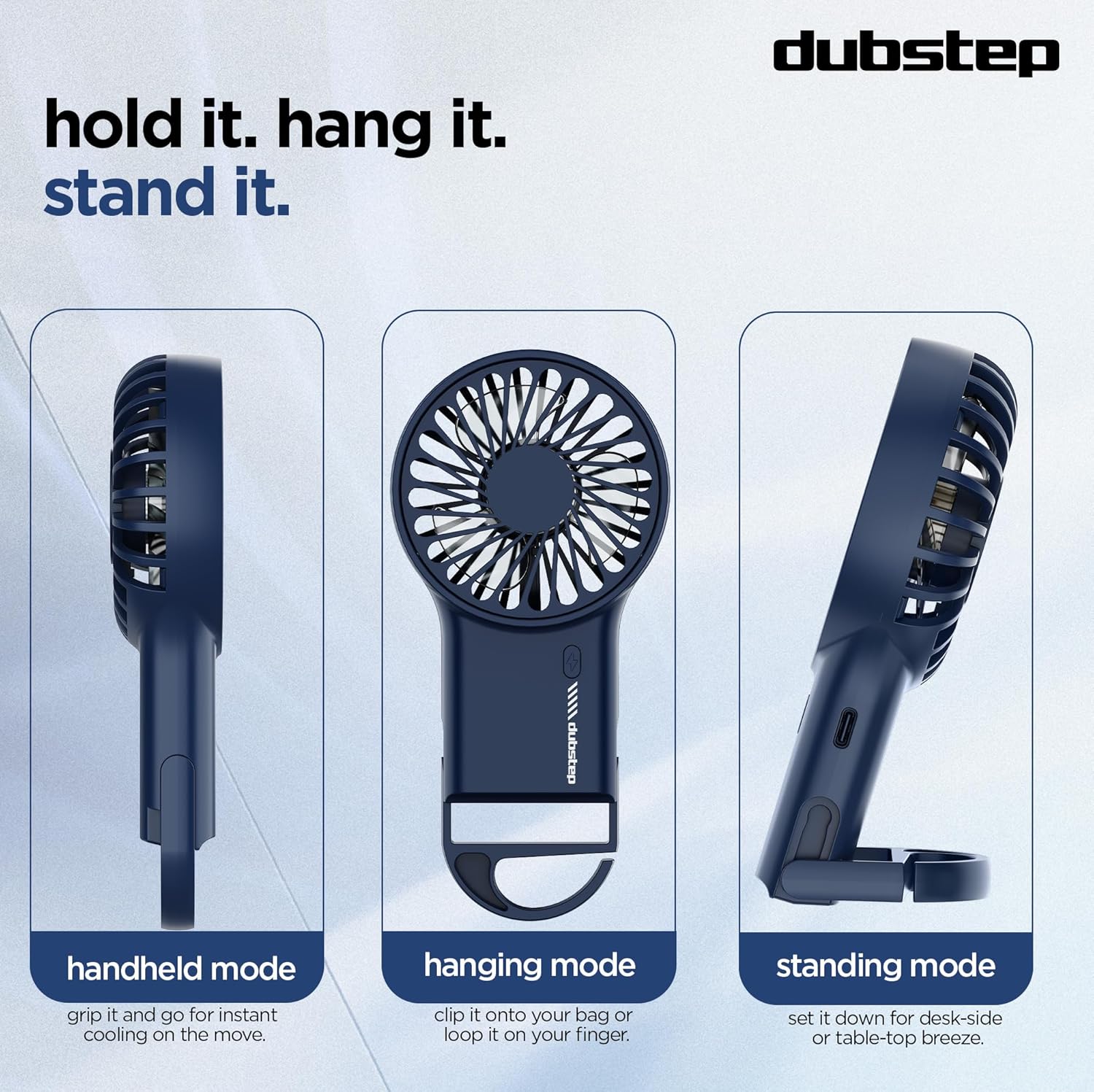
Visual representation of the three versatile usage modes: handheld for on-the-go cooling, hanging for hands-free use, and standing for desk or tabletop airflow.
Instruksi Operasi
- Daya On/Off: Locate the power button on the handle. Press the button once to turn the fan on. Press it again to cycle through speeds or turn it off.
- Nyetel Kacepetan Kipas: Penggemar nawakake telung setelan kacepetan:
- Speed 1 (Whisper Wind): Gentle airflow for subtle cooling.
- Speed 2 (Smooth Drift): Moderate airflow for comfortable cooling.
- Speed 3 (Cruise Cool): Powerful airflow for maximum cooling.

This image demonstrates the three available speed settings, from a gentle breeze to a powerful airflow, controlled by a simple swipe-to-chill action (button press).
Ngisi daya
The Dubstep Flo-F1 fan is equipped with a USB Type-C charging port for convenient power replenishment.
- Sambungake kabel: Insert the USB-C end of the provided charging cable into the fan's charging port.
- Nyambung menyang Daya: Plug the USB-A end of the cable into a compatible USB power source, such as a computer, power bank, or a wall adapter (not included).
- Indikator pengisian: The fan features an indicator light that shows the charging status. Refer to the product's specific indicator behavior for full charge notification (e.g., light changes color or turns off).
Ensure to use a 5V power source for optimal charging.
Pangopènan
To ensure the longevity and optimal performance of your Dubstep Flo-F1 fan, follow these maintenance guidelines:
- Reresik Blades Kipas: Periodically, gently wipe the fan blades and grille with a soft, dry cloth to remove dust and debris. Do not use water or liquid cleaners directly on the fan.
- Panyimpenan: Yen ora digunakake sajrone wektu sing suwe, simpen kipas ing panggonan sing adhem, garing, lan adoh saka sinar srengenge langsung lan suhu sing ekstrem.
- Nyingkiri alangan: Ensure the fan's air intake and output are not obstructed during operation to prevent overheating and maintain efficient airflow.
- Perawatan baterei: To prolong battery life, avoid completely draining the battery frequently. Charge the fan regularly, even if not in constant use.
Ngatasi masalah
- Kipas angin ora urip:
Solusi: Ensure the fan is charged. Connect it to a power source using the USB-C cable and allow it to charge for at least 30 minutes before attempting to turn it on again. - Aliran udara sing lemah:
Solusi: Check if the fan is set to a higher speed mode. Ensure the fan grille and blades are free from dust or obstructions. - Fan Not Charging:
Solusi: Verify that the USB-C cable is securely connected to both the fan and the power source. Try using a different USB-C cable or a different power adapter/USB port. - Swara sing ora biasa sajrone operasi:
Solusi: Turn off the fan and inspect the blades for any foreign objects or damage. If the noise persists after cleaning, contact customer support.
Spesifikasi
| Fitur | Rincian |
|---|---|
| Merk | Dubstep |
| Jeneng Model | Flo-F1 |
| warna | Biru |
| Desain Kipas Angin Listrik | Wearable Fan / Handheld |
| Sumber Daya | Baterei Powered |
| Ukuran produk (L x W x H) | 3.5D x 9W x 19H Sentimeter |
| Fitur Khusus | 3-speed Settings, 8000 RPM, Hook-foldable Stand, Low Noise Motor, Portable, USB Type-C Charging |
| Dianjurake Efesus | Home, Indoor, Kitchen, Office, Outdoor, Travel |
| Tipe Pemasangan | Ngadeg bebas |
| Tipe Kontrol | Tombol Kontrol |
| Cacahe Kecepetan | 3 |
| Tingkat Noise | 40 desibel |
| Wattage | 3 Watt |
| Jumlah Blades | 7 |
| Kacepetan | 8000 RPM |
| Voltage | 5 volt |
| Bisa digunakake maneh | Bisa diisi ulang |
| Bobot Barang | 95 XNUMXgm |
| Jinis Bahan | Acrylonitrile Butadiene Styrene |
Video Produk Overview
Video iki nyedhiyakake ringkesanview of the Dubstep Flo-F1 Mini Handheld USB Rechargeable Desk Cooling Fan, highlighting its features, portability, and various usage scenarios. It demonstrates the product's design, speed modes, and charging capabilities.
Warranty lan Dhukungan
The Dubstep Flo-F1 Mini Handheld USB Rechargeable Desk Cooling Fan comes with a standard brand warranty. For specific warranty terms, duration, and to register your product, please refer to the warranty card included in your package or visit the official Dubstep websitus.
For technical support, troubleshooting assistance, or any product-related inquiries, please contact Dubstep customer service through the contact information provided on the product packaging or their official websitus.
Manufacturer: Nuworld Retail Private Limited, plot No.17-18, Pole No.9, PO Dhoolsiras, Dwarka, Sector-28, New Delhi - 110077