
Pambuka
Welcome to the realme 14 Pro 5G. This manual provides essential information for setting up, operating, maintaining, and troubleshooting your new smartphone. Please read this guide thoroughly to ensure optimal performance and longevity of your device.

Gambar: Ngarep view of the realme 14 Pro 5G smartphone.
Apa ing Box
Upon unboxing your realme 14 Pro 5G, verify that all the following items are included:
- Kabel USB
- Kasus telpon
- Film Proteksi (pre-applied)
- Alat Ejector SIM
Note: A power adapter is not included in the package. Please use a compatible 45W SUPERVOOC charger for optimal charging performance.
Setup
- Pasang kertu SIM: Use the provided SIM ejector tool to open the SIM tray. Insert your Nano-SIM card(s) and/or microSD card (if supported) into the tray, ensuring correct orientation. Close the tray securely.
- Daya On: Press and hold the Power button (located on the right side of the device) until the realme logo appears.
- Konfigurasi wiwitan: Follow the on-screen instructions to select your language, connect to a Wi-Fi network, sign in to your Google account, and set up security features like fingerprint or face unlock.
- Ngisi baterei: For the first use, it is recommended to fully charge the device. Connect the USB cable to your phone and a compatible power adapter (not included).

Gambar: Sisih view of the realme 14 Pro 5G smartphone, highlighting button placement.
Ngoperasikake Piranti Sampeyan
Fitur kamera
The realme 14 Pro 5G is equipped with an advanced camera system for high-quality photography and videography.
- Sony IMX882 OIS AI Camera: Features a 50 MP main sensor with Optical Image Stabilization (OIS) and AI enhancements for superior clarity, even in challenging lighting conditions. It supports 4K video recording.
- MagicGlow Triple Flash: Provides professional-level fill light with intelligent color temperature adjustment for balanced illumination.
- Ultra-clear Selfie Camera: A 16 MP front camera with AI Beauty Algorithm ensures sharp and vibrant self-portraits.

Gambar: Detil view of the realme 14 Pro 5G camera system and its key features.
Baterei lan Ngisi daya
Your device features a robust battery and fast-charging capabilities:
- 5130 mAh Titanic Battery: Designed for extended usage, providing reliable power throughout your day.
- 45W SUPERVOOC Charging: Allows for rapid recharging, minimizing downtime.
- 6000 mm² VC Cooling System: Concentrates on major heat sources for efficient heat dissipation, enhancing performance during intensive tasks like gaming.
- Battery Integrity Guarantee: Enjoy a 4-year battery integrity guarantee.
Kinerja
Experience smooth and responsive performance with the realme 14 Pro 5G:
- Dimensity 7300 Energy 5G Processor: Built on a 4nm high-efficiency process, offering powerful performance with an AnTuTu benchmark score exceeding 750,000+.
- Dynamic RAM: Up to 26 GB of dynamic RAM ensures smooth multitasking, allowing up to 26 applications to run simultaneously.
- Panyimpenan: 512 GB of internal memory provides ample space for all your apps, photos, and videos.
- Tampilan: A 120 Hz curved OLED display with a local peak brightness of 4500 nits and 3840 Hz PWM high-frequency dimming for a fluid and vibrant visual experience.

Gambar: Internal view of the realme 14 Pro 5G showcasing its powerful chipset and memory.
Kekiatan lan Desain
The realme 14 Pro 5G is built to withstand various conditions and features a unique aesthetic:
- IP66/68/69 Dust and Water Resistance: Certified as a rugged smartphone by TÜV Rheinland. Provides protection against dust and water ingress under high temperature and high pressure, continuous water immersion, and high-pressure water jets.
- Cold-Sensitive Color-Changing Design: Each realme 14 Pro features a unique pearl design, incorporating natural shell powder. Cold-sensitive fusible fibers activate a shimmering effect below 16°C, creating a dreamy blue texture with white and golden reflections.
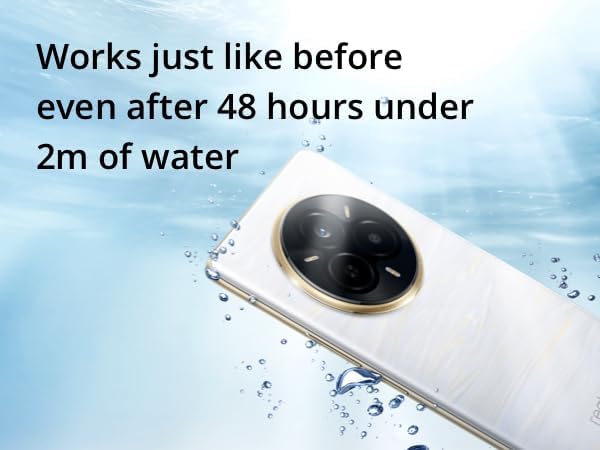
Image: The realme 14 Pro 5G demonstrating its water resistance.
Pangopènan
Proper maintenance ensures the longevity and optimal performance of your realme 14 Pro 5G:
- Reresik: Gunakake kain sing alus lan tanpa serat kanggo ngresiki layar lan awak. Ngindhari bahan kimia sing atos utawa bahan abrasif.
- Nganyari piranti lunak: Priksa lan instal nganyari sistem kanthi rutin kanggo mesthekake yen piranti sampeyan duwe fitur paling anyar, patch keamanan, lan perbaikan kinerja. Menyang Setelan > Babagan Telpon > Nganyari Piranti Lunak.
- Perawatan baterei: Avoid extreme temperatures. Do not leave the device fully charged or completely drained for extended periods.
- Manajemen panyimpenan: Mbusak periodik sing ora perlu files lan app kanggo mbebasake ruang panyimpenan lan njaga kinerja.
Ngatasi masalah
Yen sampeyan nemoni masalah karo piranti, coba langkah-langkah ngatasi masalah umum ing ngisor iki:
- Piranti ora responsif: Pencet terus tombol Daya kira-kira 10-15 detik kanggo meksa miwiti maneh.
- App Crash/Freezing: Close the app and reopen it. If the issue persists, clear the app's cache and data in Setelan > Aplikasi > [Jeneng Aplikasi] > Panyimpenan.
- Urip baterei Miskin: Priksa panggunaan baterei ing Setelan > Baterei to identify power-hungry apps. Adjust screen brightness, disable unnecessary features (GPS, Bluetooth, Wi-Fi when not in use), and enable power-saving modes.
- Masalah Konektivitas Jaringan: Toggle Airplane Mode on and off. Reset network settings in Setelan > Sistem > Opsi Reset > Reset Wi-Fi, seluler & Bluetooth.
- Glitches piranti lunak: Ensure your device software is up to date. As a last resort, consider a factory reset (back up your data first). Go to Setelan > Sistem > Opsi Reset > Busak kabeh data (reset pabrik).
Spesifikasi
| Jeneng Model | realme 14 Pro 5G |
| Sistem Operasi | Android |
| Model CPU | Mediatek Dimensity 1100 |
| Kacepetan CPU | 2 GHz |
| Ukuran RAM | 26 GB (Dynamic RAM) |
| Kapasitas panyimpenan | 512 GB |
| Ukuran Layar | 6.77 inchi |
| Resolusi | 1080 x 2340 |
| Refresh Rate | 120 Hz |
| Kapasitas baterei | 5130 mAh |
| Konektivitas | 5G |
| Tahan bledug & banyu | IP66/68/69 Certified |
| Dimensi produk | 1 x 1 x 1 cm |
| Bobot Barang | 300 g |
| Jack Audio | 3.5 mm |
Warranty lan Dhukungan
Your realme 14 Pro 5G comes with a 4-year battery integrity guarantee, ensuring long-term reliability for this critical component.
For further assistance, technical support, or warranty claims, please visit the official realme support website or contact your local customer service. You can also find more information and products on the Toko realme ing Amazon.