
1. Pambuka
This manual provides essential information for the safe and effective use of your H9 Pro Max Smartwatch. Please read it thoroughly before operating the device and retain it for future reference. The H9 Pro Max Smartwatch is designed to integrate into your daily life, offering fitness tracking, communication features, and health monitoring.
2. Apa ing Box
Upon opening your H9 Pro Max Smartwatch package, you should find the following items:
- H9 Pro Max Smartwatch
- Manual pangguna
- Kabel Pengisian
- Nonton Band
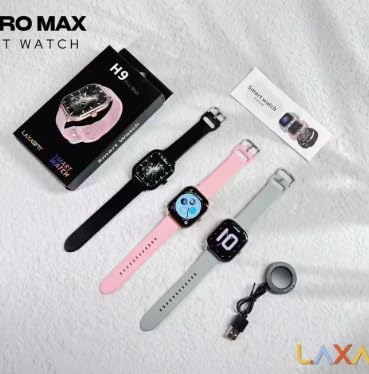
Image: The H9 Pro Max Smartwatch packaging, showing the smartwatch in various colors, the charging cable, and the user manual.
3. Produk Liwatview
The H9 Pro Max Smartwatch features a 2.01-inch HD Retina Display, providing clear visuals and an intuitive touch interface. Its design is suitable for various daily activities and fitness routines.
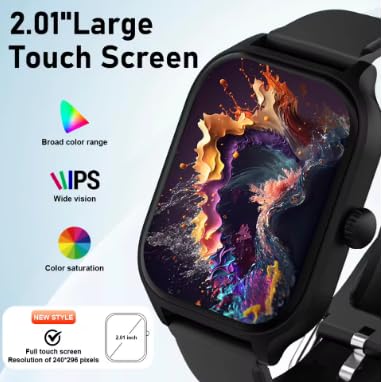
Gambar: A rinci view of the smartwatch's 2.01-inch large touch screen, highlighting its IPS display with broad color range and saturation.
Komponen utama:
- Tampilan: 2.01-inch HD Retina IPS Touch Screen (240x240 resolution)
- Sensor: Heart rate sensor, Blood oxygen sensor, Accelerometer
- Konektivitas: Bluetooth
- Baterei: Lithium Ion (180 Amp Hours capacity)
4. Setup
4.1 Ngisi daya wiwitan
Before first use, fully charge your H9 Pro Max Smartwatch. Connect the charging cable to the watch's charging port and a compatible USB power source. The watch will display a charging indicator.
4.2 Instalasi lan Masangake Aplikasi
Kanggo mbukak kunci fungsi lengkap smartwatch sampeyan, undhuh lan instal LaxasFit app on your smartphone. You can find the app by scanning the QR code provided in the user manual or searching in your device's app store.
- Priksa manawa Bluetooth diaktifake ing smartphone sampeyan.
- Open the LaxasFit app and follow the on-screen instructions to create an account or log in.
- Pilih 'Tambah Piranti' utawa pilihan sing padha ing aplikasi kasebut.
- The app will search for your H9 Pro Max Smartwatch. Select it from the list of available devices.
- Konfirmasi panjalukan pasangan ing smartwatch lan smartphone sampeyan.
5. Instruksi Operasi
5.1 Pandhu arah dhasar
The smartwatch is operated primarily via its touchscreen. Swipe left, right, up, or down to navigate through menus and features. Press the side button to return to the home screen or access the app list.
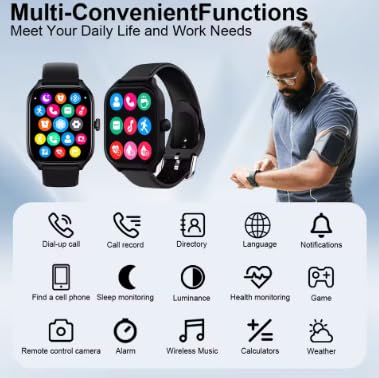
Image: The smartwatch interface showing multiple functions and app icons, demonstrating its versatile capabilities.
5.2 Telpon Bluetooth
Once paired with your smartphone, you can make and receive calls directly from your smartwatch.
- Nelpon: Akses dialpad utawa dhaptar kontak ing jam tangan kanggo miwiti telpon.
- Nampa Telpon: An incoming call notification will appear on your watch. Tap to answer or decline.
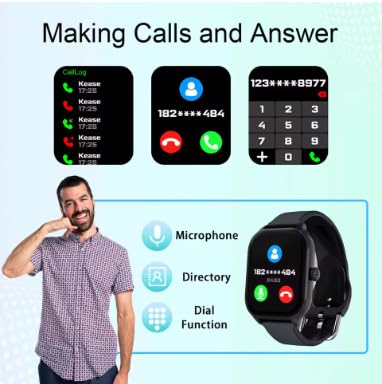
Image: The smartwatch demonstrating its Bluetooth calling features, including call logs, answering calls, and using the dial function.
5.3 Notifikasi Cerdas
Receive notifications from various apps (WeChat, WhatsApp, Instagram, etc.) directly on your wrist. Ensure notification permissions are granted in the LaxasFit app and your phone's settings.
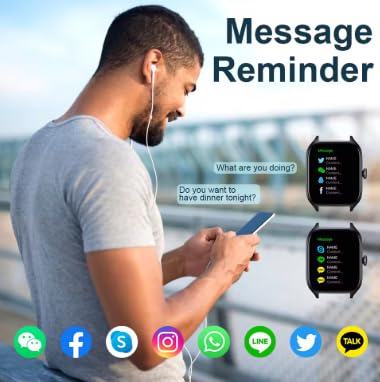
Image: The smartwatch showing message reminders from popular social media applications.
5.4 Monitoring Kesehatan
Smartwatch iki nglacak macem-macem metrik kesehatan:
- Denyut jantung: Pemantauan denyut jantung terus-terusan utawa miturut panjaluk.
- Oksigen getih: Ngukur tingkat saturasi oksigen getih.
- Ngawasi turu: Nglacak pola lan kualitas turu.
- Tekanan getih: Nyedhiyakake maca tekanan getih.
Penafian: The health monitoring features are for general wellness and fitness purposes only and are not intended for medical diagnosis, treatment, or prevention of any disease. Consult a medical professional for any health concerns.
5.5 Mode Multi-Olahraga
Select from various sport modes to track your workouts accurately. Modes include outdoor running, walking, indoor cycling, indoor running, and free exercise.

Image: The smartwatch interface showing available sports modes, with examples of people performing different exercises.
5.6 Music Playback and Remote Camera Control
- Kontrol Musik: Kontrol pamuteran musik ing smartphone sampeyan sing nyambung (puter, jeda, lewati trek).
- Remote kamera: Use your smartwatch as a remote shutter button for your smartphone's camera.
6. Fitur Khusus
- TWS Bluetooth Headset Pairing: Connect your True Wireless Stereo (TWS) Bluetooth headsets directly to the smartwatch for an enhanced audio experience.
- Tampilan jam tangan sing bisa disesuaikan: Personalize your smartwatch with a variety of watch faces available through the LaxasFit app.
- Nganyari Firmware OTA: Receive over-the-air (OTA) updates to keep your smartwatch software current with the latest features and improvements.
- Global Weather Forecast: Stay informed with accurate, up-to-date weather information displayed on your watch.
7. Pangopènan
7.1 Reresik
Wipe the smartwatch and band regularly with a soft, dry cloth. Avoid using harsh chemicals or abrasive materials.
7.2 Pengisian
Charge the device using the provided charging cable. Avoid using damaged cables or chargers. The average battery life is 3 years, with a charging time of approximately 90 hours for a full charge.
7.3 Tahan banyu
penting: This smartwatch is ora tahan banyuAja kena banyu, kalebu adus, nglangi, utawa udan deres, kanggo nyegah karusakan.
8. Ngatasi masalah
- Piranti ora urip: Priksa manawa piranti wis kebak.
- Ora bisa dipasangake karo smartphone: Check if Bluetooth is enabled on both devices and the LaxasFit app is open. Try restarting both the watch and phone.
- Kabar ora katon: Verify notification permissions in the LaxasFit app and your phone's settings.
- Data kesehatan sing ora akurat: Ensure the watch is worn snugly on your wrist. Environmental factors and movement can affect readings.
9. Spesifikasi
| Fitur | Rincian |
|---|---|
| Model | LAXASFIT H9 Pro Max |
| Ukuran Tampilan | 2.01 inchi |
| Tipe Tampilan | IPS 240x240 resolution |
| Kapasitas Panyimpenan Memori | 512 MB |
| Sistem Operasi | Android Wear 1.4, Android Wear 2.8 |
| Teknologi Konektivitas | Bluetooth |
| Kapasitas baterei | 180 Amp jam |
| Baterei Rata-rata Urip | 3 Taun |
| Wektu Ngisi daya | 90 Jam |
| Bobot Barang | 180 g |
| Piranti sing kompatibel | Smartphone, iPhone |
| Fitur Khusus | Accelerometer, Activity Tracker, Custom Activity Tracking, Lightweight, Music Player |
10. Warranty lan Dhukungan
10.1 Informasi babar pisan
Your H9 Pro Max Smartwatch comes with a Garansi 1 wulan saka tanggal tuku. Garansi iki nyakup cacat manufaktur. Mangga nyimpen bukti tuku kanggo claims babar pisan.
10.2 Dhukungan Pelanggan
For further assistance, troubleshooting, or warranty claims, please contact your retailer or the manufacturer's customer support. Refer to the packaging or product websitus kanggo rincian kontak.