
Pambuka
This manual provides essential information for the safe and efficient operation of your SCULPFUN S9 PRO 10W Laser Engraver. The S9 PRO features 10W laser beam shaping technology, offering a 0.06mm ultra-fine laser focus for strong cutting penetration and precision. It is capable of cutting materials such as 15mm thick wood and 10mm acrylic, and engraving ceramics and stainless steel. Please read this manual thoroughly before use to ensure proper setup, operation, and maintenance.

Informasi Safety
Ngoperasikake mesin ukir laser nduweni potensi bebaya. Patuhi kabeh pandhuan keamanan kanggo nyegah ciloko utawa kerusakan.
- Proteksi mripat: Always wear appropriate laser safety glasses when operating the machine. The integrated laser filter on the S9 PRO blocks 98% of ultraviolet light, allowing observation without additional safety glasses for bystanders, but direct laser exposure should always be avoided.
- Saklar Daya: The machine is equipped with a secure power switch. Always turn off the machine when not in use or during maintenance.
- Panggonan sing aman: Utilize the fastening holes on the four feet and frame structure to secure the machine and data cables, preventing accidental movement.
- Perlindhungan lumahing: Use the provided A4-sized steel pad to protect your work surface from laser damage.
- Ventilasi: Ensure adequate ventilation in your workspace to dissipate fumes produced during engraving and cutting.
- Bahan sing gampang kobong: Do not engrave or cut highly flammable materials without proper precautions.
- Anak lan Kewan: Keep children and pets away from the operating area. The laser point can attract attention, but direct exposure is dangerous.

Isi Paket
Priksa manawa kabeh komponen ana nalika mbongkar:
- 1 x SCULPFUN S9 Pro 10 W Laser Engraver
- A4-sized steel pad
- adaptor daya
- kabel USB
- Piranti perakitan
- Manual pangguna (dokumen iki)
Panuntun Setup
1. Majelis
The SCULPFUN S9 PRO features a fast assembly design, allowing for installation typically within 10 to 20 minutes. Follow the steps below:
- Langkah 1: Assemble the main frame components.
- Langkah 2: Attach the X-axis and laser module to the frame.
- Langkah 3: Sambungake kabeh kabel sing perlu.
- Rampung: Priksa manawa kabeh sambungan aman lan pigura stabil.
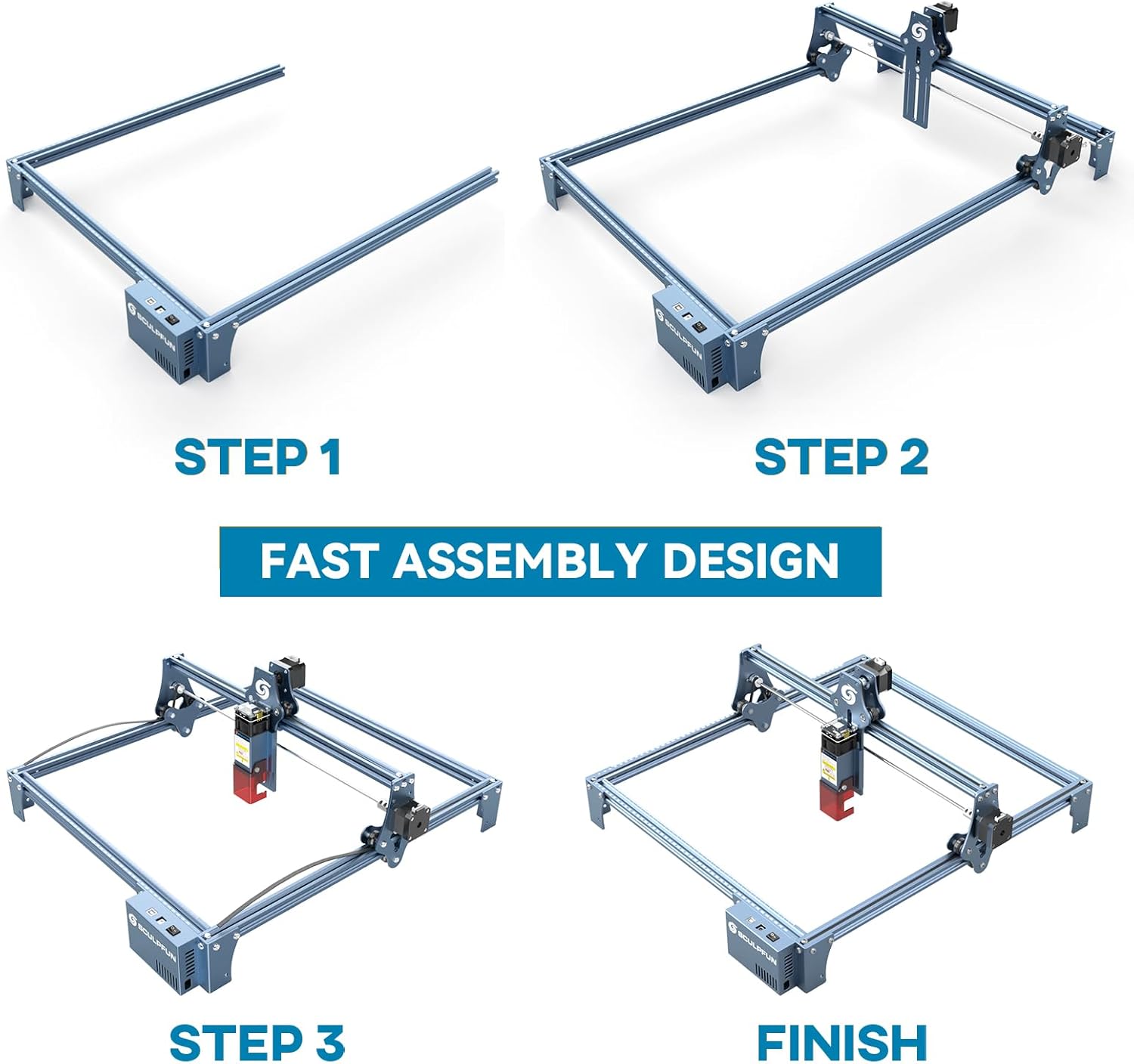
The full-metal structure enhances robustness and engraving accuracy. The X and Y axes include precise scale lines, forming a rectangular measuring ruler for quick object sizing.


2. Imbuhan Fokus
The S9 PRO features a quick fixed-focus design. The laser combines a fixed-focus lens with a sliding design for easy adjustment.
- Place the laser module over your material.
- Move the laser module up or down until the focus is achieved.
- Tighten the screws to secure the laser module in place.

Instruksi Operasi
1. Kompatibilitas Piranti Lunak
The SCULPFUN S9 PRO is compatible with various advanced engraving software:
- LaserGRBL (Windows)
- LightBurn (Windows, macOS, Linux)
- Benbox
- GrblController
- LiteFire
It supports engraving in PWM mode and various file formats including JPG, PNG, DXF, SVG, AI, G-code, NC, and BMP.

2. Material Capabilities
The 10W laser module provides strong cutting and engraving capabilities across a wide range of materials:
- nglereni: Up to 15mm thick wood, 10mm black acrylic.
- Ukiran: Wood, leather, ceramics, stainless steel, aluminum oxide, PCB board, paper, cardboard, dark stone, and more.


3. General Operation Workflow
- Desain: Create or import your design using compatible software (e.g., LightBurn, LaserGRBL).
- Panggonan materi: Place your material on the work surface, ensuring it is flat and secure. Use the integrated rulers for precise positioning.
- Penyesuaian fokus: Adjust the laser focus as described in the Setup section.
- Setelan piranti lunak: Configure laser power, speed, and passes in your chosen software according to the material and desired effect. Refer to software documentation for detailed settings.
- Miwiti Operasi: Initiate the engraving or cutting process from the software. Monitor the machine during operation.
- Rampung: Once the process is complete, turn off the machine and carefully remove your finished piece.
Pangopènan
Regular maintenance ensures optimal performance and extends the lifespan of your SCULPFUN S9 PRO.
- Ngresiki Lensa Laser: Ngresiki lensa laser kanthi periodik kanthi solusi reresik lensa lan kain sing alus lan tanpa serat kanggo njaga presisi laser.
- Resikna Area Kerja: Remove debris and dust from the engraving area after each use to prevent interference with machine movement.
- Priksa Sabuk lan Rel: Check the drive belts for tension and wear. Keep the guide rails clean and lubricated if necessary to ensure smooth movement of the laser module.
- Nganyari Firmware: Check the official SCULPFUN website for any available firmware updates to ensure your machine has the latest features and improvements.
Ngatasi masalah
Bagean iki alamat masalah umum sampeyan bisa nemoni.
- Laser Non Firing:
- Check if the power cable is securely connected and the power switch is on.
- Verify that the USB cable is connected to your computer and the machine.
- Ensure the software is correctly configured and sending commands.
- Check the laser module connection.
- Kualitas Ukiran / Cutting Miskin:
- Re-check the laser focus. An incorrect focus is a common cause of poor quality.
- Adjust laser power and speed settings in your software. Different materials require different settings.
- Priksa manawa materi kasebut rata lan diselehake kanthi aman.
- Resiki lensa laser yen katon reged.
- Mesin Ora Obah Kanthi Bener:
- Check for any obstructions on the rails or belts.
- Ensure belts are properly tensioned and not slipping.
- Priksa manawa kabeh kabel disambungake kanthi aman.
- Wiwiti maneh piranti lunak lan mesin.
- Masalah Sambungan Piranti Lunak:
- Ensure the correct COM port is selected in your software.
- Try restarting your computer and the engraver.
- Reinstall the software or drivers if necessary.
For persistent issues, refer to the SCULPFUN support websitus utawa hubungi layanan pelanggan.
Spesifikasi
| Merk | SCULPFUN |
| Nomer Model | S9PRO10W-ELE |
| Daya Laser | 10W (Diode Laser) |
| Fokus Laser | 0.06mm (Ultrafine) |
| Akurasi Ukiran | 0.01 mm |
| Area Ukiran | 400 x 410 mm |
| Sumber Daya | AC |
| Ukuran Paket | 61.79 x 38.4 x 13.4 cm |
| Paket Bobot | 4.95 kg |
| Klebu Komponen | 1 x SCULPFUN S9 Pro 10 W laser engraver |
| Kompatibilitas Piranti Lunak | LaserGRBL, LightBurn, Benbox, GrblController, LiteFire |
| Didhukung OS | Windows, macOS, Linux |
| Didhukung File Format | JPG, PNG, DXF, SVG, AI, G-code, NC, BMP |
Warranty lan Dhukungan
For warranty information, technical support, or service inquiries, please contact SCULPFUN customer support through their official websitus utawa pengecer ing ngendi produk kasebut dituku. Simpen kuitansi tuku minangka bukti tuku.
Produsen: SCULPFUN
Tanggal kasedhiya pisanan: 29 November 2024