
COSTWAY ES10403US-YE
COSTWAY 190 PPD Commercial Dehumidifier - Instruction Manual
Model: ES10403US-YE
1. Produk Liwatview
The COSTWAY 190 PPD Commercial Dehumidifier is designed for effective humidity control in large areas such as basements, crawl spaces, construction sites, and warehouses. This robust unit features a high dehumidification capacity, an integrated pump for continuous drainage, and user-friendly controls for efficient operation.

Gambar 1: Sisih ngarep view of the COSTWAY Commercial Dehumidifier.

Gambar 2: Kelamples of versatile usage in commercial and industrial environments, including construction sites, water damage restoration, warehouses, basements, crawl spaces, and workshops.
2. Pandhuan Safety
Please read all safety instructions carefully before operating the dehumidifier to prevent injury or damage to the unit.
- Ensure the power supply matches the specifications of the unit (115V/60Hz).
- Aja ngoperasikake dehumidifier nganggo kabel utawa colokan listrik sing rusak.
- Keep the unit away from heat sources, flammable materials, and water.
- Always unplug the dehumidifier before cleaning, maintenance, or moving.
- Do not block the air inlet or outlet. Maintain adequate clearance around the unit for proper airflow.
- Piranti iki ora dimaksudake kanggo digunakake dening wong (kalebu bocah-bocah) sing kurang kemampuan fisik, sensori utawa mental, utawa kurang pengalaman lan kawruh, kajaba wis diwenehi pengawasan utawa instruksi babagan panggunaan piranti kasebut dening wong sing tanggung jawab kanggo safety.
- Anak kudu diawasi kanggo mesthekake yen dheweke ora muter piranti kasebut.
3. Isi Paket
Priksa manawa kabeh komponen ana lan ora rusak nalika dibongkar.
- 1 x Dehumidifier Komersial
- 1 x Selang Drain (26.2 ft)
- 1 x Manual Instruksi
4. Fitur Produk
- Kapasitas Dehumidifikasi Dhuwur: 190 PPD (95℉, 90% RH) suitable for areas up to 9000 sq. ft.
- Built-in Pump for Auto Drainage: Automatically drains collected water through a 26.2 ft hose with a 16 ft vertical lift capability.
- Hassle-free Operation: Features a 0-24H timer, 10%-90% humidity setting range, memory restart, auto turn on/off, and auto defrost function.
- Tampilan Digital Intuitif: For easy monitoring of humidity levels and settings.
- Daya tahan sing ditingkatake: Crafted from heavy-duty rotational molded housing for commercial and industrial use.
- Superior Mobility: Equipped with a collapsible handle and 2 large wheels for easy movement.
- User-friendly Details: Includes 2 non-slip carrying handles, a removable and washable MERV-8 filter, and 2 straps for cord and hose organization.

Figure 3: User-friendly details including non-slip carrying handles, removable and washable MERV-8 filter, and straps for organizing the power cord and drain hose.

Figure 4: Demonstrating the ease of movement with the collapsible handle and large, sturdy wheels.
5. Setup
5.1 Positioning the Dehumidifier
- Selehake dehumidifier ing permukaan sing rata lan stabil.
- Ensure there is at least 12 inches (30 cm) of clear space around all sides of the unit for proper air circulation.
- Aja nyelehake unit ing cedhak sumber panas utawa ing sinar srengenge langsung.
5.2 Nyambungake Selang Saluran
The dehumidifier features a built-in pump for continuous drainage. Connect the provided drain hose for automatic water removal.
- Locate the drain outlet on the unit.
- Attach the quick connector of the 26.2 ft drain hose to the drain outlet. Ensure it is securely fastened to prevent leaks.
- Direct the other end of the drain hose to a suitable drainage point, such as a floor drain, sink, or bucket. The pump can lift water up to 16 ft vertically.
- Ensure the hose is not kinked or obstructed, which could impede drainage.

Figure 5: Illustration of connecting the drain hose using the quick connector for continuous drainage.
5.3 Sambungan Daya
- Colokke kabel daya menyang stopkontak listrik 115V/60Hz sing wis di-ground.
- Aja nggunakake kabel extension utawa adaptor.
6. Instruksi Operasi
6.1 Panel kontrol liwatview
The dehumidifier features an intuitive digital display and touch buttons for easy control.

Gambar 6: Rincian view of the control panel, showing the digital display for humidity and temperature, along with control buttons for power, settings, and timer.
- Tombol daya: Nguripake utawa mateni unit.
- Tombol munggah / mudhun: Adjust humidity settings or timer duration.
- Tombol Mode/Setelan: Cycles through different modes or confirms settings.
- Tombol Timer: Sets the 0-24 hour timer for delayed start or stop.
- Tampilan: Shows current humidity, set humidity, and other operational indicators.
6.2 Operasi Wiwitan
- Pencet tombol Daya kanggo nguripake dehumidifier.
- Tampilan bakal nuduhake kelembapan kamar saiki.
- Use the Up/Down buttons to set your desired humidity level (range: 10% - 90% RH). The unit will operate until the set humidity is reached.
6.3 Fungsi Timer
The timer function allows you to set a delayed start or stop time for the dehumidifier.
- Pencet tombol Timer.
- Use the Up/Down buttons to set the desired delay time in hours (0-24 hours).
- Unit kasebut bakal kanthi otomatis urip utawa mati sawise wektu sing wis ditemtokake.
6.4 Fungsi Pencairan Otomatis
The dehumidifier is equipped with an auto defrost function. If frost builds up on the evaporator coils, the unit will automatically enter defrost mode to melt the frost, ensuring efficient operation. During defrost, the compressor may temporarily stop, and the fan may continue to run.
7. Pangopènan
Pangopènan reguler njamin kinerja optimal lan ngluwihi umur dehumidifier sampeyan.
7.1 Reresik Filter Udara
The MERV-8 filter should be cleaned regularly, typically every 2-4 weeks depending on usage and air quality.
- Copot dehumidifier saka stopkontak.
- Locate the air filter access panel (refer to Figure 3).
- Copot saringan.
- Clean the filter with a vacuum cleaner or wash it gently with warm, soapy water. Rinse thoroughly.
- Enteni filter nganti garing kabeh sadurunge dipasang maneh. Aja nggunakake pengering utawa panas langsung.
- Reinsert the dry filter and close the access panel.
7.2 Reresik njaba
- Ngusap njaba unit kanthi alus, damp kain.
- Aja nggunakake pembersih abrasif, pelarut, utawa bahan kimia sing atos.
7.3 Panyimpenan
- Yen nyimpen unit kasebut sajrone wektu sing suwe, priksa manawa resik lan garing.
- Drain any remaining water from the hose.
- Wrap the power cord and drain hose using the integrated straps for neat storage.
- Simpen ing papan sing adhem lan garing, adoh saka sinar srengenge langsung lan suhu sing ekstrem.
8. Ngatasi masalah
Deleng bagean iki kanggo masalah umum lan solusi. Yen masalah tetep, hubungi dhukungan pelanggan.
| Masalah | Kemungkinan Penyebab | Solusi |
|---|---|---|
| Dehumidifier ora urip. | Ora ana sumber daya; kabel daya ora kepasang ing; Pemutus sirkuit macet. | Ensure unit is plugged into a live outlet; Check circuit breaker; Try a different outlet. |
| Unit mlaku nanging ora ngumpulake banyu. | Room humidity is too low; Temperature is too low (below 41°F/5°C); Air filter is clogged; Air inlet/outlet blocked. | Check room humidity; Ensure ambient temperature is within operating range; Clean the air filter; Clear any obstructions. |
| Banyu bocor saka unit. | Drain hose not properly connected; Drain hose is kinked or blocked. | Ensure drain hose is securely attached; Straighten the drain hose and clear any blockages. |
| Unit frequently enters defrost mode. | Low ambient temperature; High humidity. | This is normal operation in cooler, humid conditions. Ensure proper ventilation. |
| Unit rame. | Unit not on a level surface; Fan obstruction; Loose parts. | Place on a level surface; Check for foreign objects in fan; Contact customer support if noise persists. |
9. Spesifikasi
Technical specifications for the COSTWAY 190 PPD Commercial Dehumidifier.
| Atribut | Nilai |
|---|---|
| Jeneng Model | ES10403US-YE |
| warna | kuning |
| Bahan | LLDPE |
| Ukuran produk (L x W x H) | 24.5" x 14" x 20" (62.2 cm x 35.6 cm x 50.8 cm) |
| Sumber Daya | 115V/60Hz |
| Dirating Daya Input | 590W |
| Dirating Input Saiki | 5.3A |
| Kapasitas Dehumidifikasi (95℉, 90% RH) | 190 Pint / Dina |
| Kapasitas Dehumidifikasi (86℉, 60% RH) | 150 Pint / Dina |
| Kapasitas Dehumidifikasi (80℉, 60% RH) | 90 Pint / Dina |
| Kapasitas Dehumidifikasi (65℉, 60% RH) | 50 Pint / Dina |
| Area Cakupan Max | 9000 Sq.Ft |
| Tingkat Aliran Udara | 412 CFM |
| Range Kelembapan sing bisa diatur | 10% - 90% Kanan |
| Panjang Kabel Daya | 26 ft (7.9 m) |
| Panjang Selang Saluran | 26.2 ft (8 m) |
| Drainage Vertical Height | 16 ft (4.9 m) |
| Bobot Net | 80.5 lbs (36.5 kg) |
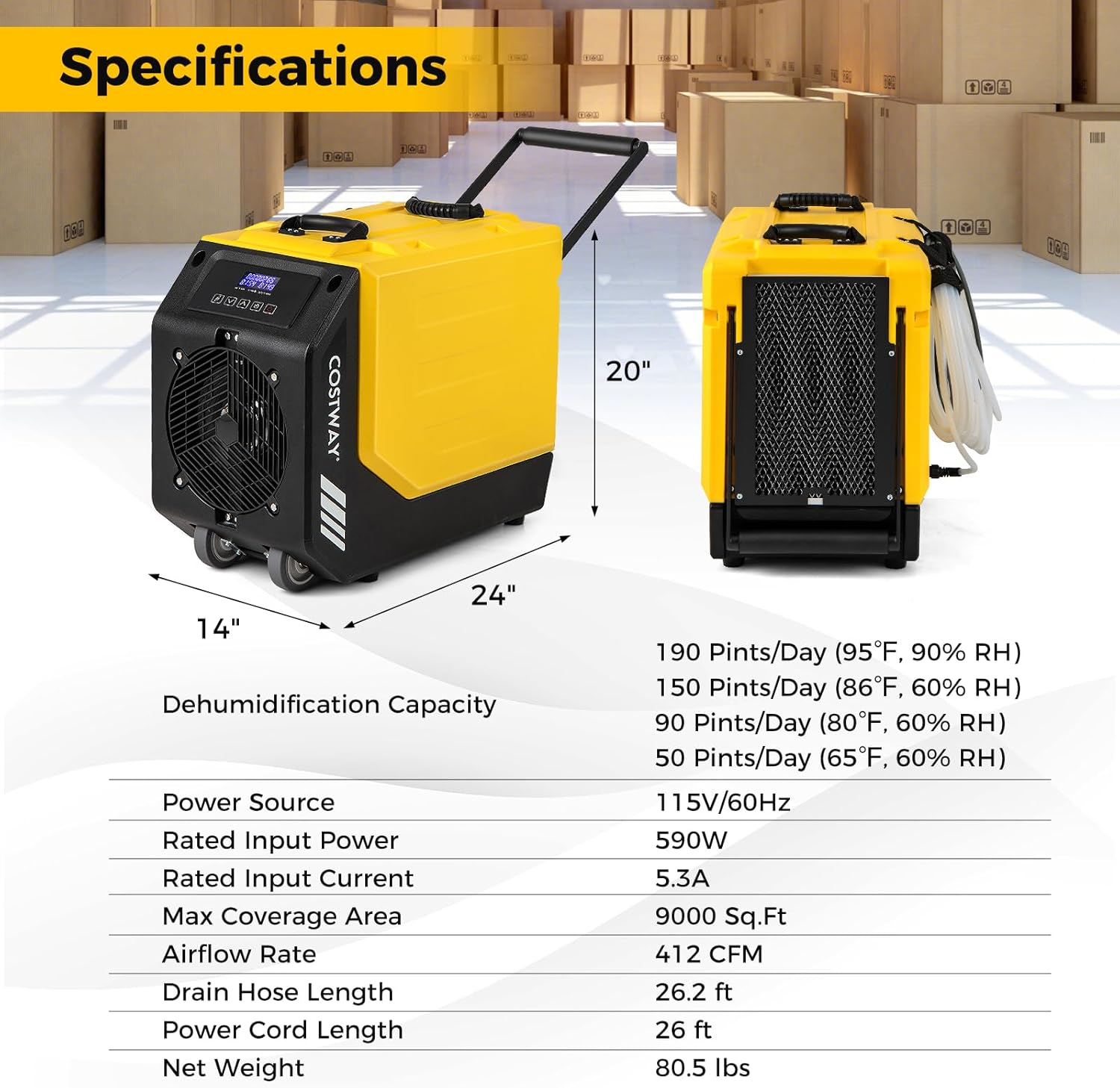
Figure 7: Visual representation of product dimensions and a summary of key specifications.
10. Garansi lan Dhukungan Pelanggan
For warranty information, technical assistance, or any questions regarding your COSTWAY dehumidifier, please contact COSTWAY customer support. Refer to the contact information provided with your purchase or visit the official COSTWAY websitus.
Websitus: www.costway.com
Dokumen sing gegandhengan - ES10403US-YE
 |
Pandhuan Pangguna Dehumidifier Komersial COSTWAY ES10355DE-WH | Kontrol Kelembapan Pandhuan panganggo lengkap kanggo Dehumidifier Komersial COSTWAY ES10355DE-WH. Entuk pandhuan rinci babagan operasi, keamanan, pangopènan, lan pemecahan masalah kanggo manajemen kelembapan sing efektif ing papan komersial, ruang bawah tanah, lan aplikasi industri. |
 |
EdenDirect DHDE140932 Dehumidifier: Manual Gunakake lan Perawatan Pandhuan lengkap kanggo dehumidifier EdenDirect DHDE140932, nutupi fitur, operasi, pangopènan, lan ngatasi masalah kanggo kinerja optimal ing spasi gedhe lan ruang paling ngisor. Kalebu sertifikasi ENERGY STAR lan informasi garansi 5 taun. |
 |
Dehumidifier AlorAir Galaxy 85P: Fitur, Spesifikasi, lan Aplikasi Temokake Dehumidifier AlorAir Galaxy 85P, solusi sing kuat lan ringkes kanggo ngontrol kelembapan ing papan perumahan lan komersial. Sinau babagan fitur, spesifikasi, kinerja, lan aplikasine. |
 |
Pemasangan lan Pandhuan Panggunaan Dehumidifier Sakubeng Omah AprilAire E050W-E130W Pandhuan instalasi lan pandhu arah lengkap kanggo dehumidifier omah kelas profesional AprilAire E050W, E070W, E080W, E100W, lan E130W. Meliputi persiapan, operasi, perawatan, pemasangan kabel, pemecahan masalah, lan servis. |
 |
Abestorm Guardian SNS65 User Manual - Operation, Maintenance, and Troubleshooting Comprehensive user manual for the Abestorm Guardian SNS65 dehumidifier, covering installation, operation, key functions, maintenance, troubleshooting, spare parts, and warranty information. |
 |
Dehumidifier AlorAir Sentinel HD55: Manual Instalasi lan Operasi Get detailed instructions for your AlorAir Sentinel HD55 dehumidifier. This manual covers installation, operation, key features, maintenance, troubleshooting, and warranty details for optimal performance. |
Ask a question about this manual
Ask about setup, troubleshooting, compatibility, parts, safety, or missing instructions. Manuals+ will review the question and use this page’s manual context to help answer it.