
KEENSTAR ST-265TC
KEENSTAR ST-265TC Touch Screen 2-Slice Toaster
Model: ST-265TC
1. Pengamanan Penting
Nalika nggunakake piranti listrik, pancegahan safety dhasar kudu ditindakake, kalebu ing ngisor iki:
- Waca kabeh instruksi sadurunge ngoperasikake pemanggang roti.
- Aja ndemek permukaan sing panas. Gunakake gagang utawa knobs.
- Kanggo nglindhungi saka kejut listrik, aja nyemplungake kabel, plug, utawa pemanggang roti ing banyu utawa cairan liyane.
- Pengawasan sing cedhak perlu nalika piranti apa wae digunakake dening utawa ing cedhak bocah.
- Copot saka stopkontak nalika ora digunakake lan sadurunge ngresiki. Allow kanggo kelangan sadurunge sijine utawa mbusak bagean.
- Aja ngoperasikake piranti apa wae kanthi kabel utawa plug sing rusak, utawa sawise piranti kasebut gagal utawa rusak kanthi cara apa wae.
- Aja nganti kabel macet ing pinggir meja utawa counter, utawa tutul lumahing panas.
- Aja diselehake ing utawa cedhak karo gas panas utawa kompor listrik, utawa ing oven sing digawe panas.
- Aja nggunakake toaster kanggo nggunakake liyane saka dimaksudaké.
- Oversize foods, metal foil packages, or utensils must not be inserted into a toaster as they may involve a risk of fire or electric shock.
- Geni bisa kedadeyan yen toaster ditutupi utawa ndemek bahan sing gampang kobong, kalebu gorden, gorden, tembok, lan liya-liyane, nalika digunakake.
- Aja nyoba nyopot panganan nalika pemanggang roti dipasang.
- Piranti iki mung kanggo panggunaan kluwarga.
2. Produk Liwatview
The KEENSTAR ST-265TC is a modern 2-slice toaster featuring a touch screen interface for precise control over your toasting preferences. It includes wide slots to accommodate various bread types and a removable crumb tray for easy cleaning.
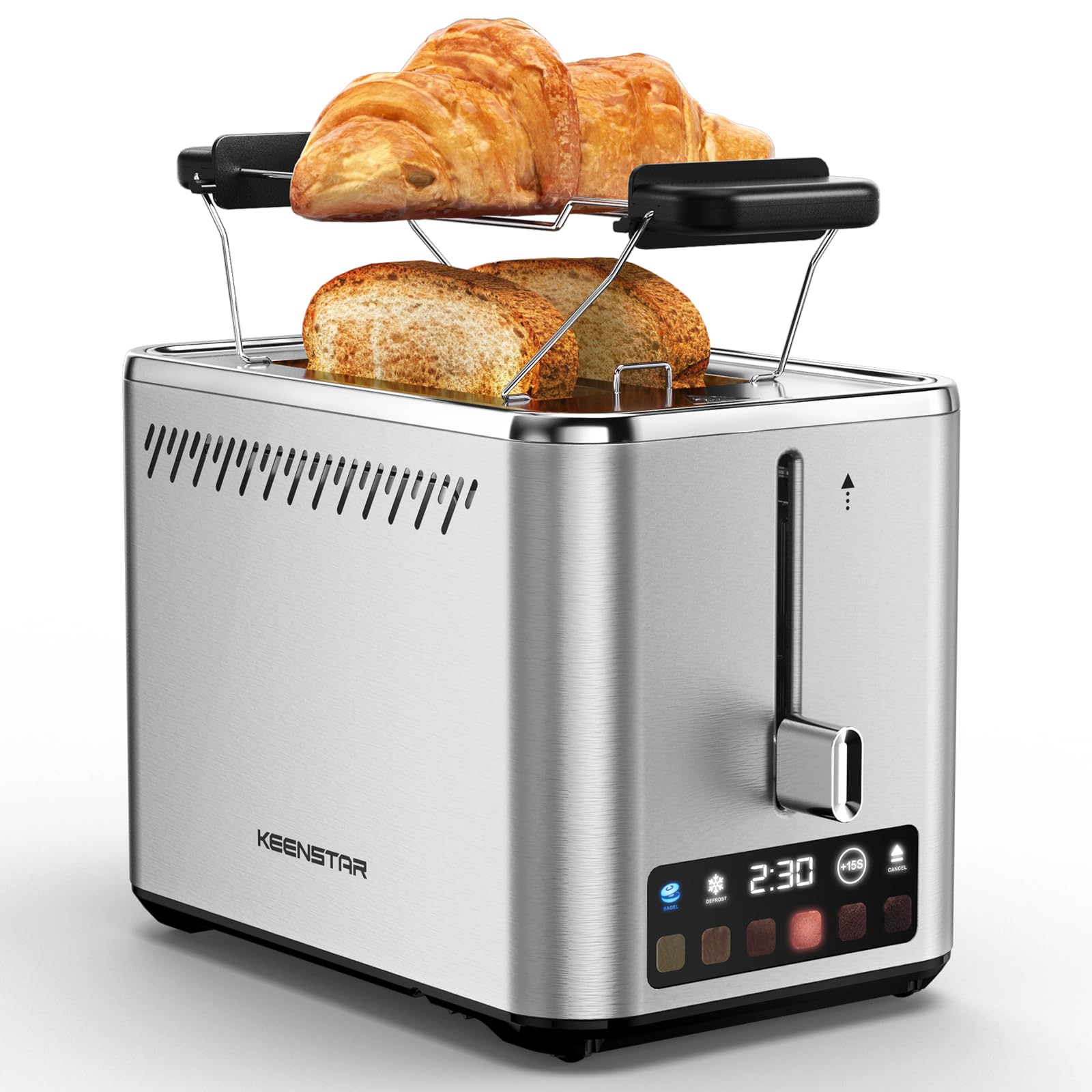
Image: KEENSTAR ST-265TC 2-Slice Toaster in silver stainless steel.
3. Setup
Mbukak bungkus
Carefully remove the toaster and all packaging materials from the box. Ensure all accessories, including the warming rack, are present.
Panggonan
Selehake pemanggang roti ing permukaan sing stabil, warata, tahan panas, adoh saka bahan sing gampang kobong kayata gorden utawa tembok. Priksa manawa ventilasi sing cukup ing sakubenge piranti.
Gunakake pisanan
Before toasting food for the first time, operate the toaster without bread on the highest browning setting (level 6) to burn off any manufacturing residues. A slight odor or smoke may be present; this is normal and will dissipate.
4. Instruksi Operasi
Panel Kontrol Liwatview

Image: The toaster's smart touch control display showing 6 browning levels and extra functions like Bagel, Defrost, +15S, and Cancel.
Panggangan dhasar
- Insert up to two slices of bread into the wide 1.5-inch slots.
- Select your desired browning level (1-6) by touching the corresponding icon on the display. Level 1 is the lightest, and Level 6 is the darkest.
- Press the lever down until it locks into place. The digital display will show a countdown timer.
- The toast will automatically pop up when the cycle is complete.

Image: Visual guide showing the steps for easy toaster operation: 1. Put bread in slots, 2. Select browning level and function, 3. Press the lever down, 4. Enjoy delicious bread.
Fungsi Bagel
This function is designed to toast the cut side of bagels while gently warming the outer side.
- Insert bagel halves into the slots with the cut side facing outwards.
- Pilih tingkat browning sing dikarepake.
- Tutul ing BAGEL button on the display. It will illuminate.
- Press the lever down until it locks.

Image: The toaster's display showing the illuminated BAGEL mode. BAGEL mode toasts one side only; place the cut side facing outward.
Fungsi Defrost
Use this function to toast frozen bread without pre-thawing.
- Lebokake roti beku menyang slot.
- Pilih tingkat browning sing dikarepake.
- Tutul ing DEFROST button on the display. It will illuminate.
- Press the lever down until it locks.

Image: The toaster's display showing the illuminated DEFROST mode. This mode allows you to cook frozen breads easily without guesswork.
+15S Function
If your toast is not quite browned enough after a cycle, you can add an additional 15 seconds of toasting time.
- After a toasting cycle, if more browning is desired, touch the +15S tombol.
- The toaster will initiate a 15-second toasting cycle.
Fungsi Batal
To stop the toasting cycle at any time, simply touch the BATAL button. The lever will automatically raise, and the heating elements will turn off.

Image: The toaster's display highlighting the +15S button to increase baking time by 15 seconds, and the Cancel button to stop heating.
Rak Anget
The included warming rack can be used to warm pastries, croissants, or other items that cannot be placed directly into the toaster slots.
- Place the warming rack securely on top of the toaster, aligning it over the slots.
- Place the item to be warmed on the rack.
- Start a toasting cycle (without bread in the slots) to generate heat. The heat rising from the toaster will warm the item on the rack.
- Monitor the item closely to prevent over-warming or burning.

Image: The removable warming rack attached to the toaster, with a croissant placed on it for warming.
Video produk
Video: Demonstrates the touchscreen and warming tray features of the KEENSTAR toaster.
Video: A re rinciview of the KEENSTAR Smart 2-Slice Toaster, highlighting its touch screen and various functions.
Video: Explores the key features and functionalities of the KEENSTAR toaster.
5. Maintenance lan Cleaning
Pembersihan Umum
Always unplug the toaster from the power outlet and allow it to cool completely before cleaning. Wipe the exterior with a soft, damp kain. Aja nggunakake pembersih abrasif utawa bantalan gosok logam, amarga bisa ngeruk lapisan baja tahan karat.
Tray Bumbung
The removable crumb tray collects crumbs during toasting and should be emptied regularly to prevent fire hazards.
- Priksa manawa pemanggang roti wis dicopot saka stopkontak lan wis adhem tenan.
- Tarik metu tray remah sing ana ing sisih mburi ngisor pemanggang roti.
- Buang remah-remah lan usap tray nganti resik nganggo iklanamp kain.
- Geser baki remah roti bali menyang panggonane nganti muni klik kanthi aman.

Image: The toaster's convenient design showing the removable crumb tray being pulled out and the cord storage area on the bottom.
Panyimpenan kabel
For neat storage, the power cord can be wrapped around the designated area on the underside of the toaster.
6. Ngatasi masalah
- Pemanggang roti ora diuripake: Ensure the power cord is securely plugged into a working electrical outlet. Make sure the toast lever is fully pressed down.
- Panggangan sing ora rata: Ensure bread slices are centered in the slots. Try adjusting the browning level. Different types of bread may require different settings.
- Roti macet ing bolongan: Unplug the toaster immediately and allow it to cool. Gently remove the bread using non-metallic tongs. Never use metal utensils.
- Asap saka pemanggang roti: Unplug the toaster immediately. Remove any food particles or crumbs that may be lodged inside the slots or on the heating elements. Ensure the crumb tray is clean.
7. Spesifikasi
| Merk | KEENSTAR |
| Model | ST-265TC |
| daya | 900 watt |
| Voltage | 120 Volt (AC) |
| Jumlah Irisan | 2 |
| Bahan | Baja tahan karat |
| Ukuran produk (L x W x H) | 10.39" x 7.1" x 6.1" |
| Jembaré Slot | 1.5 ing |
| Fitur Khusus | Cancel Function, LED Indicator, Removable Crumb Tray, Touchscreen, Warming Rack |

Image: Diagram showing the dimensions of the KEENSTAR ST-265TC toaster: 9.4 inches (24cm) length, 6.1 inches (15.6cm) width, 7 inches (18cm) height, and 1.5 inch (3.8cm) wide slots.
8. Warranty lan Dhukungan
Garansi
This KEENSTAR toaster comes with a 2-year warranty. Please refer to the warranty card included in the product packaging for detailed terms and conditions.
Dhukungan Pelanggan
For any questions, technical assistance, or warranty claims, please contact KEENSTAR customer support. Contact information can typically be found on the warranty card or the official KEENSTAR websitus.
Ask a question about this manual
Ask about setup, troubleshooting, compatibility, parts, safety, or missing instructions. Manuals+ will review the question and use this page’s manual context to help answer it.