
1. Pambuka
Matur nuwun kanggo tukuasing the Audizio Milan DAB+ Radio. This portable radio combines modern digital audio broadcasting (DAB+) with traditional FM radio, along with Bluetooth wireless technology for streaming audio from your devices. Featuring a large 2.4-inch color display, integrated battery, and intuitive controls, the Milan radio is designed for ease of use and enjoyment in various settings. This manual provides essential information for setting up, operating, and maintaining your device.
2. Pandhuan Safety
- Waca kabeh instruksi kasebut kanthi teliti sadurunge nggunakake produk.
- Aja mbabarake piranti menyang udan, kelembapan, utawa suhu sing ekstrem.
- Aja nyelehake unit ing cedhak sumber panas kayata radiator, register panas, kompor, utawa piranti liyane (kalebu ampliifiers) sing ngasilake panas.
- Gunakake mung lampiran / aksesoris sing ditemtokake dening pabrikan.
- Copot piranti sajrone badai bledheg utawa yen ora digunakake kanggo dangu.
- Aja mbukak casing. Ora ana bagean sing bisa dilayani pangguna ing njero. Waca kabeh layanan menyang personel layanan sing mumpuni.
- Buang baterei kanthi tanggung jawab miturut peraturan lokal.
3. Isi Paket
Mangga priksa isi paket nalika mbongkar:
- Audizio Milan DAB+ Radio
- Kabel Pengisian USB
- Manual pangguna
4. Produk Liwatview
Familiarize yourself with the main components and controls of your Audizio Milan radio.

Gambar 4.1: Panel Ngarep Swaraview
This image displays the front of the Audizio Milan radio, highlighting the large 2.4-inch color display on the right, the speaker grille on the left, and the various control buttons and knobs below the screen. Key controls include Standby, Mode, Scan, Tune/Select, Info/Menu, Sleep, and preset buttons (1, 2, 3).

Figure 4.2: Screen and Navigation Buttons
An angled view of the radio emphasizing the clear 2.4-inch color display and the accessible navigation buttons. This design allows for easy control and monitoring of radio functions and settings.

Gambar 4.3: Sambungan mburi
This image shows the rear panel of the Audizio Milan radio, detailing the input and output ports. Visible connections include the DC 5V power input (for USB charging), a 3.5mm Line Out jack for connecting to external audio systems, and a 3.5mm Headphone jack for private listening. The extendable antenna is also visible.
Kontrol lan Fungsi:
- Tampilan: 2.4-inch TFT color screen for station information, time, and menu navigation.
- Tombol siyaga: Ngaktifake utawa mateni unit.
- Tombol Mode: Ngalih antarane mode DAB, FM, lan Bluetooth.
- Tombol Scan: Miwiti pemindaian stasiun otomatis ing mode radio.
- Tombol Setel/Pilih: Rotates to tune frequencies or navigate menus; press to select.
- Tombol Info/Menu: Displays station information or accesses the main menu.
- Tombol turu: Ngaktifake fungsi timer turu.
- Tombol Prasetel (1, 2, 3): Quickly recall saved radio stations.
- Tombol Volume: Nyetel tingkat output audio.
- Input DC 5V: Kanggo nyambungake kabel pangisi daya USB.
- Garis Out (3.5mm): Sambungake menyang njaba amppengangkat utawa speaker.
- Jack Headphone (3.5 mm): Kanggo ngrungokake pribadi.
5. Setup
5.1 Daya Ngaktifake
- Biaya Wiwitan: Before first use, fully charge the integrated battery using the supplied USB cable. Connect the USB cable to the DC 5V input on the back of the radio and the other end to a USB power adapter (not supplied) or a computer USB port. The charging indicator on the screen will show charging status.
- Daya On/Off: Tekan ing siyaga tombol kanggo nguripake utawa mateni radio.
5.2 Initial Setup (First Use)
Upon first power-on, the radio may guide you through an initial setup process.
- Pilihan Basa: Gunakake ing Tune / Pilih tombol kanggo nggulung menyang basa sing kasedhiya lan pencet tombol kanggo ngonfirmasi pilihan sampeyan.
- Wektu lan Tanggal: The radio will typically synchronize time and date automatically via DAB+ signal. If not, you can set it manually through the menu.
6. Instruksi Operasi
6.1 Pilihan Mode
Tekan ing Mode button repeatedly to cycle through the available modes: DAB Radio, FM Radio, and Bluetooth.
6.2 Navigasi Menu
Tekan ing Info/Menu tombol kanggo ngakses menu utama. Gunakake ing Tune / Pilih knob to scroll through menu options and press the knob to confirm a selection. Press Info/Menu maneh kanggo metu saka menu.
7. Konektivitas Bluetooth
The Audizio Milan radio features Bluetooth for wireless audio streaming from compatible devices.

Figure 7.1: Bluetooth in Use
This image illustrates the convenience of Bluetooth connectivity, showing a user wirelessly streaming audio from a smartphone to the Audizio Milan radio.
- Ketik Mode Bluetooth: Tekan ing Mode button until "Bluetooth" is displayed on the screen. The radio will enter pairing mode, indicated by a flashing Bluetooth icon or message.
- Aktifake Bluetooth ing Piranti: Ing smartphone, tablet, utawa komputer sampeyan, bukak setelan Bluetooth lan priksa manawa Bluetooth wis diaktifake.
- Select "Audizio Milan": From the list of available devices, select "Audizio Milan". Your device should now be paired and connected.
- Puter Audio: Once connected, you can play audio from your device, and it will be streamed through the Audizio Milan radio.
8. DAB/FM Radio Operation
8.1 Automatic Scanning (DAB/FM)
- Pilih Mode: Tekan ing Mode button to select either DAB or FM radio.
- Mulai Scan: Tekan ing Scan button. The radio will automatically scan for available stations and store them. For DAB, it will list all found stations. For FM, it will stop at the next strong signal.
8.2 Manual Tuning (FM)
Ing mode FM, puter Tune / Pilih tombol kanggo nyetel frekuensi kanthi manual.
8.3 Nyimpen lan Ngelingake Preset
The radio allows you to save up to 20 presets for both DAB and FM stations.
- Kanggo nyimpen:
- Tune menyang stasiun sing dikarepake.
- Pencet terus salah siji saka Preset Buttons (1, 2, or 3) for a few seconds until "Preset Saved" or similar message appears.
- For other presets (4-20), access the preset menu via Info/Menu, select "Save Preset", choose a number, and press Tune / Pilih kanggo konfirmasi.
- Kanggo Kelingan:
- Pencet sedhela salah siji saka Preset Buttons (1, 2, or 3) to instantly recall the saved station.
- For other presets, access the preset menu via Info/Menu, select "Recall Preset", choose the desired number, and press Tune / Pilih kanggo konfirmasi.
9. Clock and Sleep Timer
9.1 Fungsi Jam
The radio displays the current time and date, which is usually synchronized automatically via DAB+ signal. If manual adjustment is needed, navigate to the "Time/Date" settings in the main menu.
9.2 Timer Turu
Timer turu ngidini radio mati kanthi otomatis sawise wektu sing wis ditemtokake.
- Tekan ing Turu button repeatedly to cycle through available sleep timer durations (e.g., 15, 30, 45, 60, 90, 120 minutes, or Off).
- The selected duration will be displayed on the screen. The radio will automatically power off after this time.
10. Pangopènan
- Reresik: Gunakna kain alus lan garing kanggo ngresiki sisih njaba radio. Aja nggunakake pembersih abrasif, lilin, utawa pelarut.
- Perawatan baterei: Kanggo ngawetke daya batere, aja kerep-kerep ngisi daya batere. Yen nyimpen radio suwe banget, isi daya batere nganti udakara 50% lan isi ulang saben sawetara wulan.
- Antena: Extend the telescopic antenna fully for optimal DAB+ and FM reception. Handle with care to avoid damage.
11. Ngatasi masalah
| Masalah | Kemungkinan Penyebab | Solusi |
|---|---|---|
| Ora ana daya / Unit ora urip. | Baterei wis entek. Kabel USB ora nyambung utawa rusak. | Ngisi daya baterei nggunakake kabel USB. Priksa manawa kabel USB wis disambungake kanthi aman menyang sumber daya sing bisa digunakake. |
| Resepsi radio sing ora apik (DAB/FM). | Antena ora ditambahi. Area sinyal lemah. Interferensi saka piranti elektronik liyane. | Antena teleskop kanthi lengkap. Move the radio to a location with better signal reception. Move the radio away from other electronic devices. |
| Pasangan Bluetooth gagal. | Radio not in Bluetooth pairing mode. Bluetooth ing piranti sumber mati. Piranti adoh banget saka radio. | Pencet Mode tombol kanggo ngetik mode Bluetooth. Priksa manawa Bluetooth wis diaktifake ing piranti sumber sampeyan. Place the device within 10 meters (30 feet) of the radio. |
| Ora ana swara. | Volume kurang banget. Fungsi bisu diaktifake. Mode sing salah dipilih. | Increase the volume using the volume knob. Check if the radio is muted (if applicable). Ensure the correct mode (DAB, FM, Bluetooth) is selected. |
12. Spesifikasi
| Merk | Audizio |
| Model | Milan |
| warna | Dark Brown/Silver |
| Tuner | DAB, DAB+, FM |
| Tampilan | Layar Warna TFT 2.4 inci |
| Bluetooth | Yes, for wireless audio streaming |
| Prasetel | 20 for DAB, 20 for FM |
| Baterei | 2000 mAh integrated battery |
| Baterei Playtime | Kira-kira. 10 jam |
| Output daya | 30 W |
| Sambungan Headphone | Jack 3.5mm Kab |
| Output Line | Jack 3.5mm Kab |
| Daya Input | 5V (liwat USB) |
| Ukuran (L x W x H) | 186 x 120 x 115 mm (7.32 x 4.72 x 4.53 inci) |
| Bobot | 0.9 kg (1.98 lbs) |
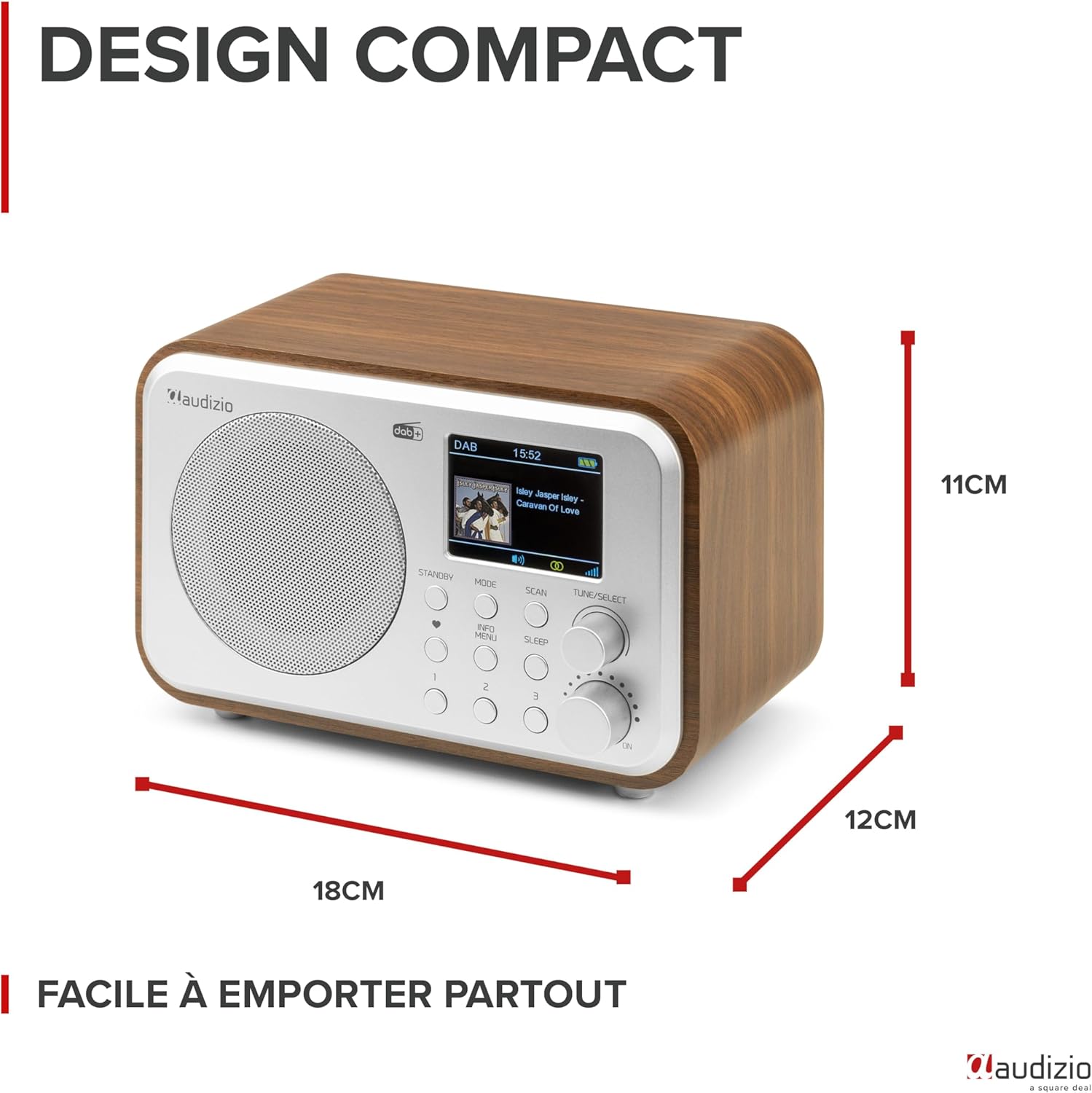
Gambar 12.1: Dimensi Produk
This image provides a visual representation of the Audizio Milan radio's compact dimensions, showing its length, width, and height for easy reference.
13. Warranty lan Dhukungan
The Audizio Milan DAB+ Radio comes with a manufacturer's warranty.
- Garansi Produsen: 2 taun.
- For technical support, warranty claims, or service inquiries, please contact your retailer or the official Audizio support channels. Refer to the product packaging or the Audizio websitus kanggo informasi kontak.