
1. Pambuka
This manual provides comprehensive instructions for the assembly, operation, and maintenance of your SCULPFUN S9 Laser Engraver with Rotary Roller. Designed for precision engraving and cutting, this machine offers advanced features for various materials. Please read this manual thoroughly before use to ensure safe and optimal performance.
2. Produk Liwatview
Fitur Utama
- 5.5W Diode Laser with 90W CO2 Laser Effect: Ultra-fine 0.08mm laser focus for deep cutting.
- Kemampuan Motong: Up to 15mm wood and 10mm acrylic.
- Bahan Ukiran: Ceramics, stainless steel, dark stone, wood, acrylic.
- Rotary Roller Included: For engraving cylindrical objects with a diameter range of 6-150mm.
- Fokus Cepet: Fixed focus lens and sliding rail design for rapid setup.
- Precision dhuwur: Ultra-fine 0.1mm engraving line.
- Desain Keamanan: Laser filter blocks 98% of UV light, emergency stop switch, A4 steel pad for table protection.
- Kompatibilitas Wide: Supports LiteFire, GrblController, Benboc, LightBurn, Laser GRBL.
- File Format: KPG, BMP, NC, G-code, SVG, DXF, PNG.
- Sistem Operasi: Compatible with Windows and Mac.
- Plug lan Play: 100% pre-installed for easy setup.
Gambar produk

Figure 2.1: SCULPFUN S9 Laser Engraver with included rotary roller and exampkurang barang sing diukir.

Figure 2.2: The SCULPFUN S9 in operation, demonstrating cylindrical engraving using the rotary roller.

Gambar 2.3: Rincian view of the S9 laser head, highlighting its 90W CO2 laser effect and beam shaping technology.

Gambar 2.4: Kelamples of the S9's cutting depth on 15mm wood, 10mm plywood, and 10mm acrylic.
Apa Klebu

Figure 2.5: All components included in the SCULPFUN S9 Laser Engraver package.
- 1 x X-axis component
- 2 x X-profiles
- 2 x Y-profiles
- 1 x Control box component
- 3 x Dhukungan sikil
- 1 x Laser component
- 1 x 12V 5A power adapter
- 1 x Kabel Daya
- 1 x kabel USB
- 10 x ikat
- 1 x Sikat
- 1 x Anti-laser goggles
- 1 x 10x10 cm 3mm thick wood chip
- 1 x 10x10 cm wood piece
- 1 x A4 size protective steel pad
- 1 x Mounting kit with screws for steps 1 to 5
- 2 x Sabuk
- 1 x M5 T-type hexagonal wrench
- 1 x M4 L-type hexagonal wrench
- 1 x M3 L-type hexagonal wrench
- 1 x 8 to 10 mm wrench
3. Setup
The SCULPFUN S9 Laser Engraver is designed for quick and easy setup, with many components pre-installed. The rotary roller is also 100% pre-assembled for plug-and-play functionality.
Majelis wiwitan
- Follow the detailed instructions provided in the included manual for assembling the main frame components (X-axis, Y-profiles, support legs).
- Utilize the separated screw kits and included wrenches for a smooth assembly process.
Instalasi Modul Laser
- Carefully attach the laser component to the X-axis.
- Priksa manawa kabeh sambungan aman.
Rotary Roller Connection

Figure 3.1: Steps for connecting the SCULPFUN Rotary Roller, highlighting its pre-installed nature.
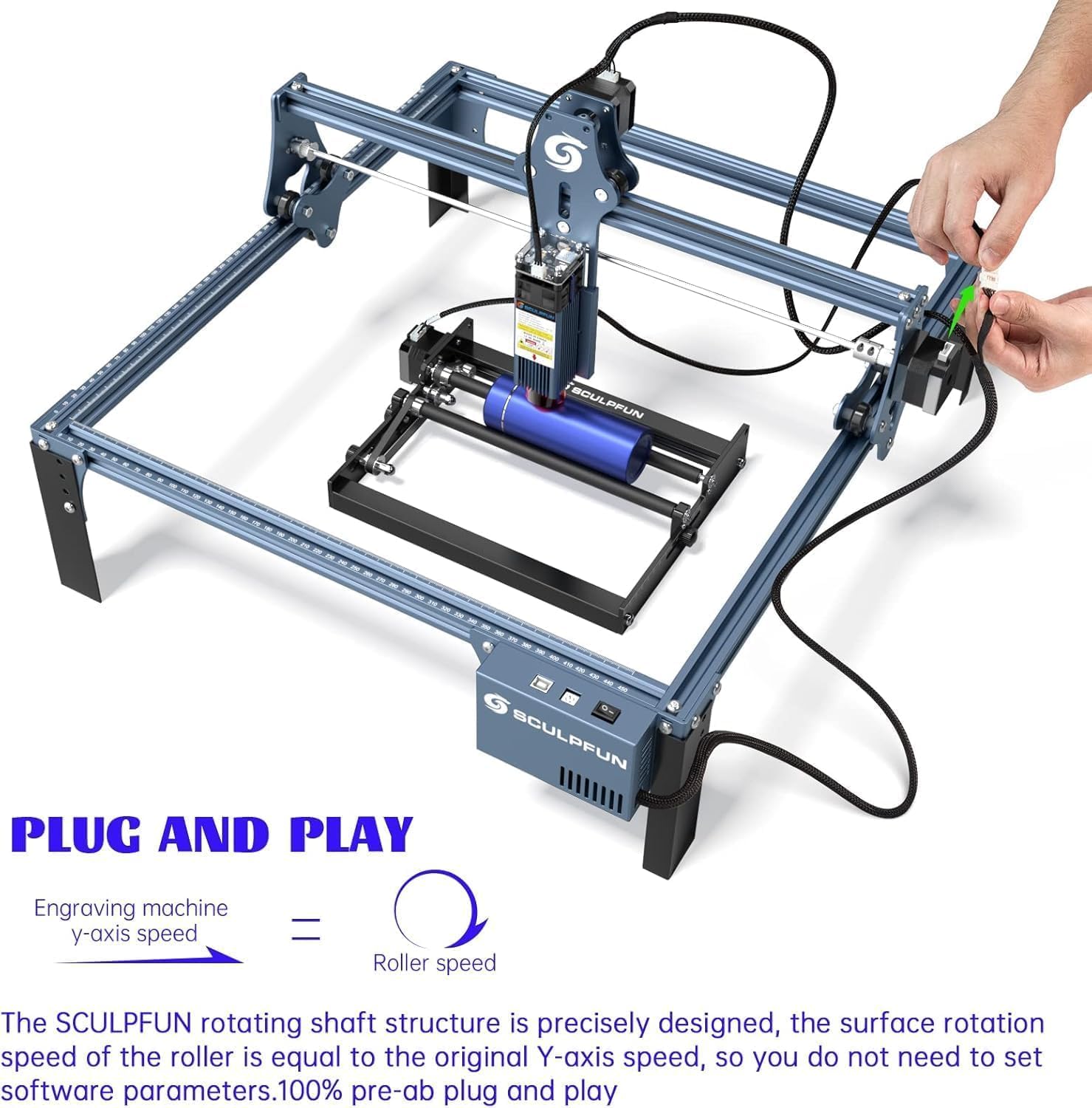
Figure 3.2: The S9 and rotary roller are designed for plug-and-play functionality, simplifying setup.
Connect the rotary roller's adapter cable to the X-axis or Y-axis stepper motor wiring of the laser engraving machine. No additional software settings are required for the rotary roller as its surface rotation speed is precisely designed to match the original Y-axis speed.
Daya lan Koneksi USB
Sambungake adaptor daya lan kabel USB menyang mesin lan komputer sampeyan.
Instalasi piranti lunak
Install your preferred engraving software (e.g., LightBurn, Laser GRBL) on your Windows or Mac computer.
4. Instruksi Operasi
Persiapan Materi

Figure 4.1: The rotary roller provides a larger engraving space for various cylindrical objects.

Figure 4.2: The rotary roller features a sliding adjustment for quick and easy distance setting.

Gambar 4.3: Advan kuncitages of the SCULPFUN Rotary Roller for cylindrical engraving.
Place the material to be engraved or cut on the working surface. For flat materials, use the protective steel pad to prevent damage to your table. For cylindrical objects, position them securely on the rotary roller.
Imbuhan Fokus

Figure 4.4: Adjusting the laser focus by sliding the module up or down.
The S9 features a fixed-focus lens. To adjust focus, slide the laser module along its rail and tighten the screws until the laser beam is optimally focused on the material surface. This ensures a precise 0.08mm ultra-fine laser spot.
Operasi piranti lunak

Figure 4.5: The S9 is compatible with popular laser engraving software like Laser GRBL and LightBurn.

Figure 4.6: The S9's engraving area can be expanded for larger projects.

Figure 4.7: A wide range of materials and objects can be engraved, including pens, cups, flowerpots, and rings.
Open your chosen engraving software (e.g., LightBurn, Laser GRBL). Import your design file (KPG, BMP, NC, G-code, SVG, DXF, PNG formats are supported). Adjust engraving parameters such as power, speed, and passes according to the material type and desired effect. For rotary engraving, ensure the software settings are configured for cylindrical objects, though the S9 rotary roller is designed for plug-and-play speed matching.
Pancegahan Safety

Figure 4.8: The circular protective cover allows for observation while providing eye protection.
- Always wear the provided anti-laser goggles when the machine is operating.
- The laser filter on the S9 can block 98% of UV rays, allowing for observation without goggles, but wearing them is highly recommended for maximum safety.
- Ensure the emergency stop switch is easily accessible during operation.
- Keep pets and children away from the operating machine.
- Operasikake ing papan sing duwe ventilasi apik kanggo mbuwang asap saka ukiran.
5. Pangopènan
Regular maintenance ensures the longevity and optimal performance of your SCULPFUN S9 Laser Engraver.
- Reresik: Regularly clean the laser lens and the machine's rails to ensure optimal performance and prevent dust buildup. Use a soft, lint-free cloth.
- Lubrication: Periodically lubricate the moving parts of the X and Y axes to ensure smooth operation.
- Ketegangan Sabuk: Check the tension of the belts and adjust if necessary to maintain engraving accuracy.
- Laser Module Inspection: Inspect the laser module for any signs of damage or wear. If the laser output appears weak or inconsistent, consult the manufacturer's support.
6. Ngatasi masalah
Bagian iki menehi solusi kanggo masalah umum sing bisa sampeyan temoni.
- Mesin ora aktif:
- Check power cable connections to the machine and the outlet.
- Priksa manawa adaptor daya bisa digunakake kanthi bener.
- Laser Ora Menembak / Output Lemah:
- Verify laser module connection.
- Check focus adjustment.
- Ensure laser power settings in software are correct.
- Ngresiki lensa laser.
- Engraving Inaccuracy/Skipped Steps:
- Priksa tegangan sabuk ing sumbu X lan Y.
- Ensure all screws and connections are tight.
- Verify material is securely placed and not moving during operation.
- Check software settings for speed and acceleration.
- Masalah Sambungan Piranti Lunak:
- Priksa manawa kabel USB wis disambungake kanthi aman.
- Wiwiti maneh piranti lunak lan mesin.
- Check device manager for proper driver installation.
7. Spesifikasi
| Fitur | Spesifikasi |
|---|---|
| Produsen | SCULPFUN |
| Model | S9+roller |
| Tipe Sumber Daya | AC |
| Voltage | 240 volt |
| Daya Output Laser | 5.5W (90W CO2 effect) |
| Area Kerja | 410 x 420 mm |
| Fokus Laser | 0.08 mm |
| Engraving Line Precision | 0.1 mm |
| Cylindrical Engraving Diameter Range | 6-150 mm |
| Cylindrical Engraving Length | 0-230 mm |
| Ukuran Paket | 61.6 x 35.2 x 18.5 cm |
| Paket Bobot | 6.08 kg |
| Kasedhiya Wiwit | 26 Agustus 2024 |
8. Warranty lan Dhukungan
Informasi Garansi
The product may be eligible for extended warranty plans (e.g., 12-month or 24-month extended warranty against failures and defects) available at the time of purchase. Please refer to your purchase documentation for specific warranty terms and conditions.
Dhukungan Pelanggan
For technical assistance, troubleshooting, or inquiries, please visit the official SCULPFUN store on Amazon or contact SCULPFUN customer support directly. You can find more information and contact details at: SCULPFUN Amazon Store.
9. Video Produk Resmi
No official product videos with 'Seller' as creator type and specific URLs were provided in the product data to embed in this manual.