
Keenstone TA01321A-UL
Keenstone Smart Touch Screen Toaster
Model: TA01321A-UL
Manual Instruksi Panganggo
1. Instruksi Safety Penting
Nalika nggunakake piranti listrik, pancegahan safety dhasar kudu ditindakake, kalebu ing ngisor iki:
- Waca kabeh instruksi sadurunge ngoperasikake pemanggang roti.
- Aja ndemek permukaan sing panas. Tansah nggunakake gagang utawa knobs.
- Kanggo nglindhungi saka kejut listrik, aja nyemplungake kabel, colokan, utawa pemanggang roti ing banyu utawa cairan liyane.
- Pengawasan sing cedhak perlu nalika piranti apa wae digunakake dening utawa ing cedhak bocah.
- Copot saka stopkontak nalika ora digunakake lan sadurunge ngresiki. Allow kanggo kelangan sadurunge sijine utawa mbusak bagean.
- Aja ngoperasikake piranti apa wae kanthi kabel utawa plug sing rusak, utawa sawise piranti kasebut gagal utawa rusak kanthi cara apa wae.
- Panggunaan lampiran aksesori sing ora dianjurake dening pabrikan piranti bisa nyebabake ciloko.
- Aja nggunakake njobo.
- Aja nganti kabel macet ing pinggir meja utawa counter, utawa tutul lumahing panas.
- Aja diselehake ing utawa cedhak karo gas panas utawa kompor listrik, utawa ing oven sing digawe panas.
- Aja nggunakake piranti kanggo nggunakake liyane saka dimaksudaké.
- Panganan sing gedhe banget, paket foil logam, utawa piranti kudu ora dilebokake ing pemanggang roti amarga bisa nyebabake kobongan utawa risiko kejut listrik.
- Geni bisa kedadeyan yen toaster ditutupi utawa ndemek bahan sing gampang kobong, kalebu gorden, gorden, tembok, lan liya-liyane, nalika digunakake.
- Aja nyoba nyopot panganan nalika pemanggang roti dipasang.
- Always unplug the toaster from the outlet before attempting to remove food.
- Baki crumb kudu ana sajrone operasi.
2. Produk Liwatview
Familiarize yourself with the components of your Keenstone Smart Touch Screen Toaster.

Gambar 2.1: Sakabèhé view of the Keenstone Smart Touch Screen Toaster.
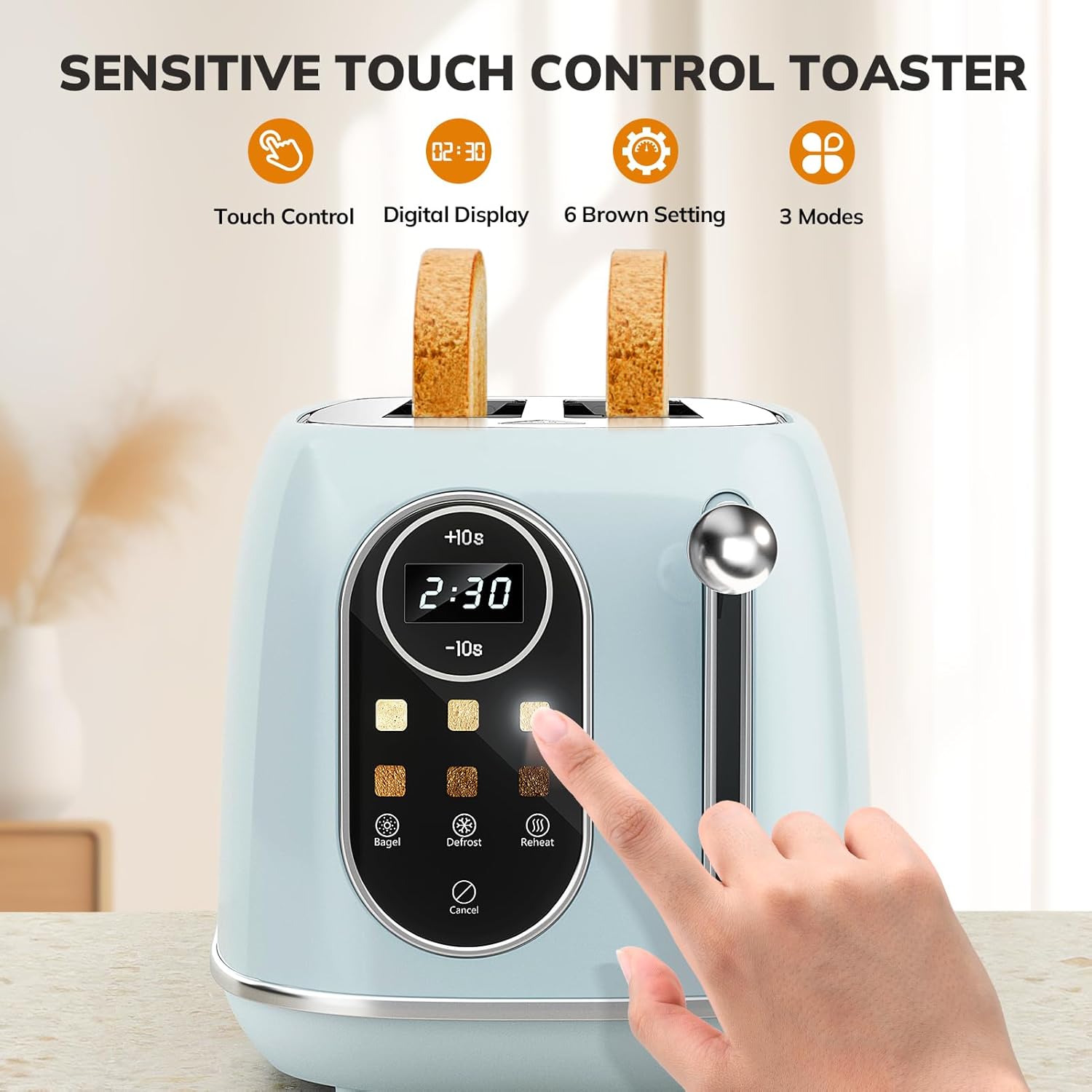
Figure 2.2: Sensitive Touch Control Panel with digital display and function buttons.

Figure 2.3: Extra-wide 1.5-inch slots for various bread types.

Figure 2.4: Internal heating elements for even heat distribution.
Komponen utama:
- Tampilan Layar Tutul: Digital interface for time and settings.
- Browning Level Selectors: Six touch-sensitive buttons for desired toast shade.
- Bagel Function Button: Toasts one side of the bagel.
- Defrost Function Button: Defrosts lan toasts roti beku.
- Reheat Function Button: Warms toast without additional browning.
- Tombol Batal: Langsung mandhegake siklus panggang.
- Toast Lever: Mudhunake lan ngunggahake kreta roti.
- Slot Ekstra Wide: Accommodates various bread thicknesses.
- Tray Crumb sing bisa dicopot: Nglumpukake crumbs kanggo gampang reresik.
3. Setup
- Mbongkar: Copot pemanggang roti lan kabeh bahan kemasan saka kothak kanthi ati-ati.
- Panggonan: Selehake pemanggang roti ing permukaan sing stabil, rata, lan tahan panas, adoh saka bahan sing gampang kobong kayata gorden utawa tembok. Priksa manawa ana ventilasi sing cukup ing sekitar pemanggang roti.
- Reresik awal: Ngilangke njaba saka toaster karo iklanamp cloth. Ensure the crumb tray is empty and properly inserted.
- Panggunaan pisanan (Burn-off): Before first use, operate the toaster without bread on the highest browning setting (Level 6) for one cycle. This will burn off any manufacturing residues and odors. A slight smoke or odor is normal during this initial use. Ensure the area is well-ventilated.
- Plug In: Insert the power plug into a standard 120V AC electrical outlet.
4. Instruksi Operasi
Follow these steps for optimal toasting results.
4.1 Panggangan dhasar
- Sisipake Roti: Place one slice of bread into each toasting slot. The extra-wide slots accommodate various bread types and thicknesses.
- Tuas Ngisor: Push the toast lever down until it locks into place. The digital display will illuminate, showing a default toasting time.
- Pilih Level Kecoklatan: Use the touch-sensitive browning level buttons (1-6) on the control panel to select your desired shade. The digital display will adjust the time accordingly. Refer to the browning guide below for reference.
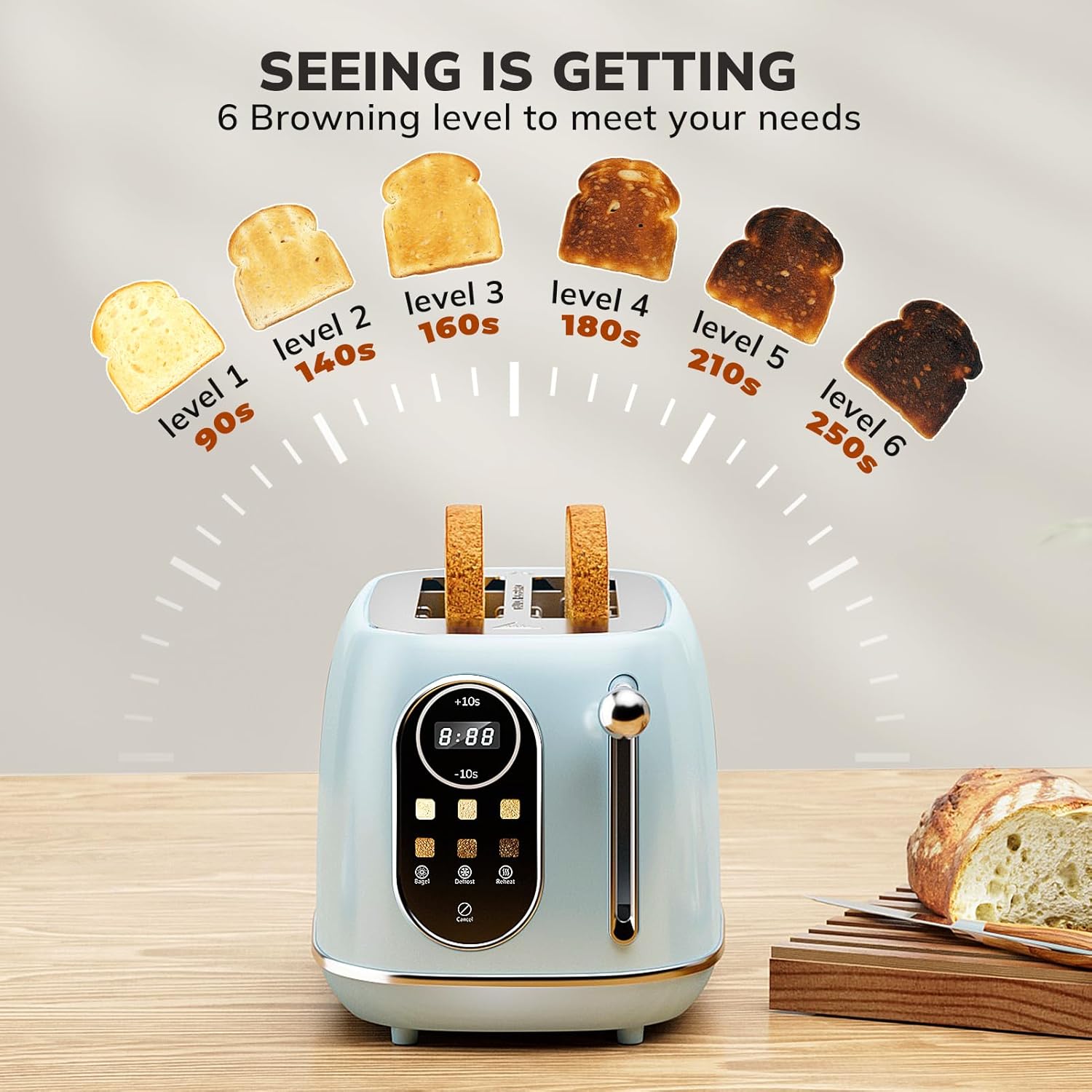
Figure 4.1: 6 Adjustable Browning Levels and approximate times.
- Toasting Cycle: The toaster will begin toasting, and the digital display will count down the remaining time.
- Ejection: Once the cycle is complete, the toast will automatically pop up, and the lever will return to its original position.
4.2 Fungsi Khusus
Your Keenstone toaster includes specialized functions for different needs:

Gambar 4.2: Overview of Bagel, Defrost, Reheat, and Cancel functions.
- Fungsi Bagel: Tekan ing Bagel button after lowering the lever. This function toasts the cut side of the bagel while gently warming the outer side.
- Fungsi defrost: Tekan ing defrost button after lowering the lever. This function is ideal for frozen bread, adding extra time to thaw before toasting to your selected browning level.
- Fungsi Reheat: Tekan ing Panas maneh button after lowering the lever. This function warms already toasted bread without further browning.
- Fungsi Batal: Tekan ing Batal button at any time to stop the toasting cycle and immediately eject the bread.
5. Reresik lan Maintenance
Reresik rutin njamin kinerja sing optimal lan umur panggang roti sampeyan.
- Copot: Tansah copot pemanggang roti saka stopkontak lan kelangan nganti rampung sadurunge ngresiki.
- Reresik njaba: Ngusap lumahing njaba kanthi alus, damp cloth. Do not use abrasive cleaners or metal scouring pads, as they may scratch the stainless steel finish.
- Reresik Tray Crumb:
- Goleki tray crumb sing bisa dicopot ing ngisor roti panggang.
- Pull out the crumb tray to remove it.
- Buang crumbs akumulasi.
- Ngilangke tray nganggo iklanamp kain lan garingake kanthi resik sadurunge dipasang maneh.
- Ensure the crumb tray is fully pushed back into place before using the toaster.
- Pembersihan internal: Do not attempt to clean inside the toaster with any sharp objects or metal utensils. If food becomes lodged, unplug the toaster and carefully remove the food after it has cooled.
- Panyimpenan: Nalika ora digunakake, simpen pemanggang roti ing panggonan sing resik lan garing.
6. Ngatasi masalah
If you encounter issues with your toaster, refer to the following common problems and solutions.
| Masalah | Kemungkinan Penyebab | Solusi |
|---|---|---|
| Toaster ora nguripake. | Ora kepasang utawa masalah stopkontak. | Ensure the toaster is securely plugged into a working electrical outlet. Check the circuit breaker. |
| Roti ora dipanggang kanthi rata. | Inconsistent bread thickness or moisture. | Ensure bread slices are of uniform thickness. Adjust browning level as needed. |
| Roti macet ing pemanggang roti. | Oversized bread or malfunction. | Unplug the toaster immediately. Once cooled, carefully remove the bread using non-metallic tongs. |
| Kumelun utawa mambu kobong. | Crumbs accumulated in the tray or food lodged inside. | Unplug the toaster. Allow to cool. Remove and clean the crumb tray. If food is lodged, carefully remove it. |
| Layar digital ora nanggapi. | Kesalahan elektronik sementara. | Unplug the toaster for a few minutes, then plug it back in to reset the system. |
7. Spesifikasi
- Merk: Keenstone
- Model: TA01321A-UL
- daya: 800 Watt
- Voltage: 120V
- Bahan: Baja tahan karat
- Ukuran produk: 6.9 "D x 7.2" W x 11.6 "H
- Jumlah Irisan: 2
- Fitur khusus: Smart Touch Screen Control, 6 Browning Levels, Bagel Function, Defrost Function, Reheat Function, Removable Crumb Tray, Extra-Wide Slots.
8. Warranty lan Dhukungan
Your Keenstone Smart Touch Screen Toaster is designed for durability and performance. For specific warranty details, please refer to the warranty card or documentation included with your purchase. In case of any issues or for technical support, please contact Keenstone customer service through the contact information provided in your product packaging or on the official Keenstone websitus.
Mangga nyimpen bukti tuku kanggo claims babar pisan.
Ask a question about this manual
Ask about setup, troubleshooting, compatibility, parts, safety, or missing instructions. Manuals+ will review the question and use this page’s manual context to help answer it.