
Pambuka
The VGR VL-985 Limited Edition Professional Hair Clipper is a high-performance grooming tool designed for precise and efficient hair cutting. Featuring a powerful motor with Turbo Mode, a smart digital display, and durable springless blades, this clipper offers a superior trimming experience. Its long-lasting lithium battery provides extended cordless operation, making it ideal for both professional and home use. This manual will guide you through the proper use and care of your VGR VL-985 hair clipper.
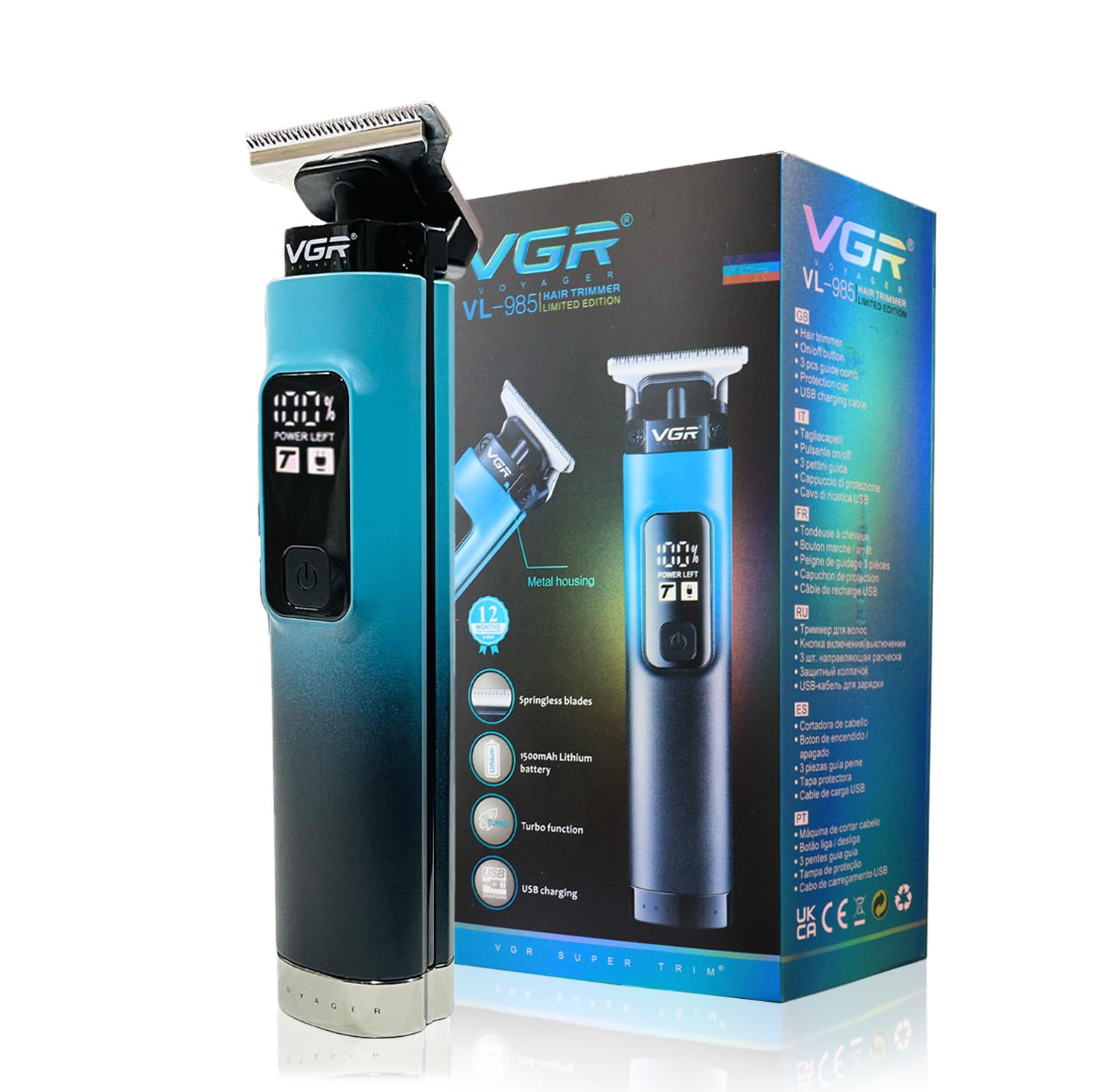
Image: The VGR VL-985 hair clipper shown alongside its product packaging, highlighting its sleek design and branding.
Apa ing Box
Your VGR VL-985 Professional Hair Clipper package includes the following components:
- 1x Hair Trimmer
- 3x Cutting Guide Combs (1mm, 2mm, 3mm)
- 1x Blade Protection Cap
- Kabel Pangisi USB 1x USB
- 1x Sikat Pembersih
- 1 x Minyak Pelumas
- 1x User Manual Book
- 1 x Kartu Garansi

Image: All components included with the VGR VL-985 hair clipper, neatly arranged, showing the clipper, three guide combs, blade protection cap, USB cable, cleaning brush, lubricating oil, and the product box.
Fitur
The VGR VL-985 hair clipper is equipped with advanced features for a superior grooming experience:
- Urip baterei sing luar biasa: Powered by a 1500mAh Lithium Battery, providing up to 200 minutes of continuous operation on a single charge.
- Mode Turbo: Delivers enhanced cutting power for effortlessly gliding through all hair types with precision and speed.
- Layar Digital Pinter: Provides real-time feedback on battery level, charging status, and Turbo Mode activation.
- Springless Stainless Steel Blades: Engineered for durability and longevity, maintaining sharpness for consistent performance.
- Versatile Cutting Options: Includes three cutting guide combs (1mm, 2mm, 3mm) for various hair lengths and styles.
- Pengisian USB Tipe-C: Convenient and fast charging, reaching full charge in approximately 2.5 hours.
- Operasi kabel lan tanpa kabel: Offers flexibility for use while charging or on battery power.
- Kunci Plancong: Nyegah aktivasi sing ora disengaja sajrone transportasi.
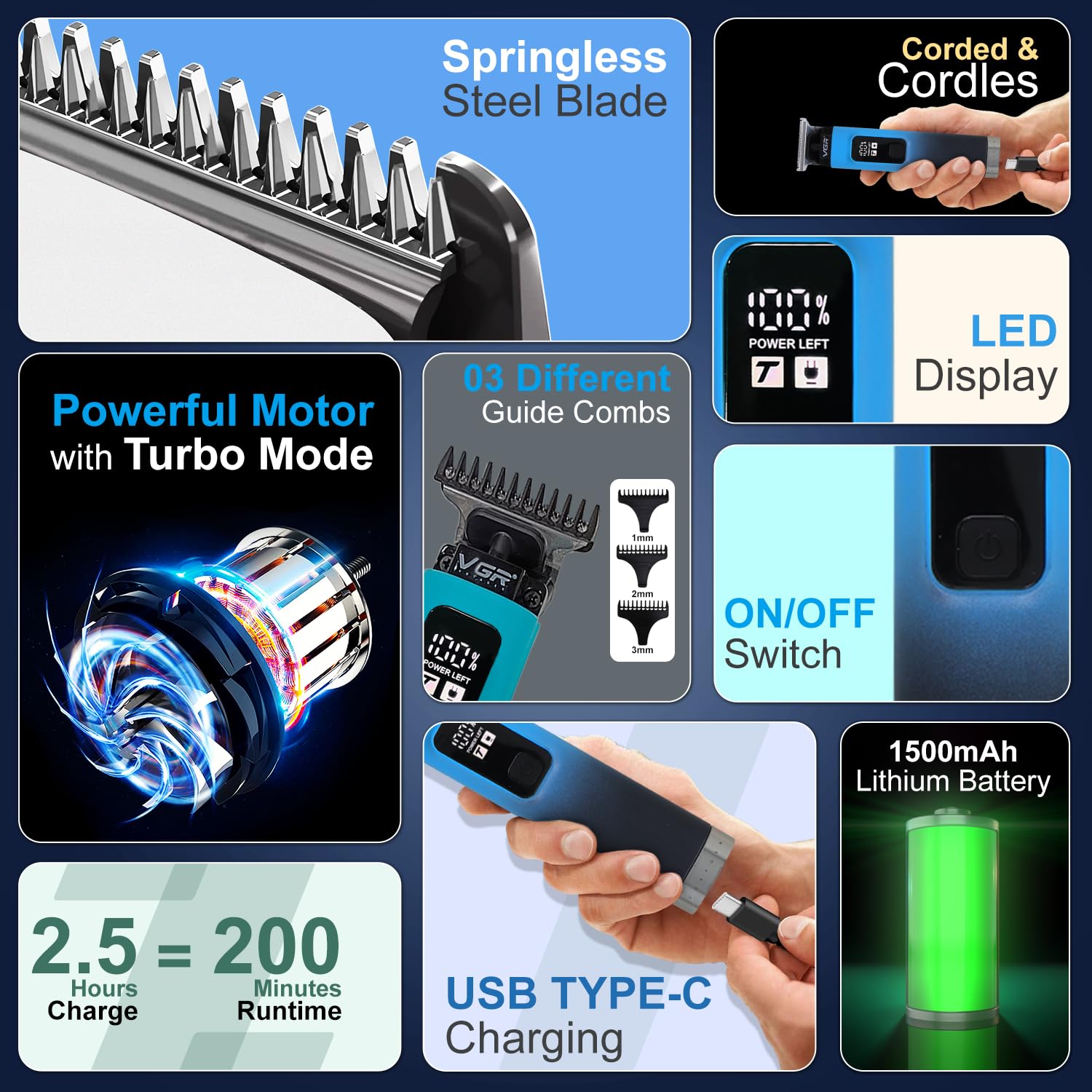
Image: A detailed graphic illustrating the key features of the VGR VL-985, including springless steel blades, powerful motor with turbo mode, LED display, ON/OFF switch, 1500mAh lithium battery, USB Type-C charging, and corded/cordless capability.

Image: A graphic highlighting the VGR VL-985's impressive 200-minute runtime and 2.5-hour USB Type-C charging time, with a person using the clipper.

Gambar: Close-up views of the VGR VL-985's ON/OFF button and the smart LED display, showing battery percentage and Turbo Mode indicator.
Setup
Ngisi wiwitan
Before first use, fully charge the hair clipper. Connect the USB charging cable to the clipper's Type-C port and plug the other end into a compatible USB power adapter (not included). The digital display will show the charging progress. A full charge takes approximately 2.5 hours and provides up to 200 minutes of runtime.
Masang Guide Combs
To attach a guide comb, align the comb with the clipper blade and push it firmly until it clicks into place. To remove, gently pull the comb away from the blade. Ensure the clipper is turned off before attaching or removing combs.
Pelumasan Blade
Apply a few drops of the included lubricating oil to the blades before each use, especially after cleaning. This ensures smooth operation and prolongs blade life. Turn the clipper on for a few seconds to distribute the oil evenly.
Instruksi Operasi
Daya On/Off
Press the power button once to turn the clipper on. The digital display will illuminate, showing the current battery percentage. Press the power button again to turn the clipper off.
Activating Turbo Mode
While the clipper is on, press the Turbo Mode button (if separate, or typically a second press of the power button on some models, refer to display for indicator) to activate Turbo Mode for increased cutting power. The display will indicate when Turbo Mode is active. Press the button again to deactivate.
Using Guide Combs for Hair Length
Select the desired cutting guide comb (1mm, 2mm, or 3mm) and attach it securely to the clipper. For best results, always cut against the direction of hair growth. Start with a longer comb if unsure, and gradually switch to shorter combs for desired length.
Teknik Trimming
Hold the clipper with the blade flat against the scalp or skin. Use smooth, even strokes. For fading or blending, use a rocking motion, lifting the clipper away from the head as you move upwards. Always ensure the blades are clean and lubricated for optimal performance.
Pangopènan
Reresik Blades
After each use, turn off the clipper and remove the guide comb. Use the included cleaning brush to brush away any loose hair from the blades and the clipper head. For a more thorough cleaning, the blades can be rinsed under running water (ensure the clipper body is not submerged if not fully waterproof, refer to product specifications for water resistance). Allow blades to air dry completely before reattaching or storing.
Lubricating Blades
Regular lubrication is crucial for maintaining blade sharpness and preventing rust. Apply 1-2 drops of the provided lubricating oil to the top of the blades after every few uses or after cleaning. Turn the clipper on for a few seconds to distribute the oil evenly across the blade surface.
Panyimpenan
Store the clipper in a cool, dry place, away from direct sunlight and moisture. Always attach the blade protection cap when storing to prevent damage to the blades.
Ngatasi masalah
| Masalah | Kemungkinan Penyebab | Solusi |
|---|---|---|
| Clipper ora bisa diuripake | Battery is depleted; Travel lock is engaged | Charge the clipper fully; Deactivate travel lock (usually by holding power button for 3-5 seconds) |
| Kinerja motong sing kurang apik / Narik rambut | Blades are dull or dirty; Insufficient lubrication; Hair buildup | Clean and lubricate blades; Remove hair buildup; Consider professional sharpening or blade replacement if blades are dull |
| Baterei ora ngisi daya | Faulty cable or adapter; Improper connection | Ensure cable is securely connected; Try a different USB cable or power adapter; Contact customer support if issue persists |
| Clipper runs slowly or weakly | Low battery; Excessive hair buildup in motor area | Charge the clipper; Clean the clipper thoroughly, especially around the blade and motor area |
Spesifikasi
| Fitur | Rincian |
|---|---|
| Nomer Model | VGR VL-985 |
| Sumber Daya | Baterei Powered |
| Jinis baterei | 1500mAh Lithium Ion |
| Runtime | Nganti 200 menit |
| Wektu Ngisi daya | Kira-kira. 2.5 jam |
| Bahan Blade | Baja tahan karat |
| Klebu Combs | 1mm, 2mm, 3mm |
| Ukuran produk (L * W * H) | 16 x 4.5 x 3.5 cm |
| Bobot Barang | 215 g |
| warna | Biru |
Warranty lan Dhukungan
Informasi Garansi
The VGR VL-985 Professional Hair Clipper comes with a garansi 1 taun from the date of purchase. This warranty covers manufacturing defects and ensures reliable performance of your product. Please retain your purchase receipt and warranty card for any claims.
Dhukungan Pelanggan
For any queries, assistance, or warranty claims, please contact VGR customer care:
- Email: customercare@vgrofficial.in
- Telpon: 18002578939 (From 10:00 AM to 6:00 PM, Monday to Saturday)
- Websitus: www.vgrofficial.in
Manufacturer: Ningbo VGR Electric Appliances Co., Ltd.