
1. Pambuka
Thank you for choosing the RIGOL DS1102Z-E Digital Oscilloscope. This manual provides essential information for the safe and efficient use of your device. Please read it thoroughly before operation and keep it for future reference.
The DS1102Z-E is a high-performance digital oscilloscope designed for various applications including research and development, education, maintenance, and industrial testing. It features a 100 MHz bandwidth, 1 GSa/s sample rate, and a 24 Mpts memory depth, enabling precise analysis of complex waveforms.
2. Produk Liwatview
The RIGOL DS1102Z-E is a versatile measurement instrument integrating a frequency counter and supporting protocol decoding for RS232/UART, I2C, and SPI. It also includes FFT analysis and automatic measurement functions to enhance testing efficiency.
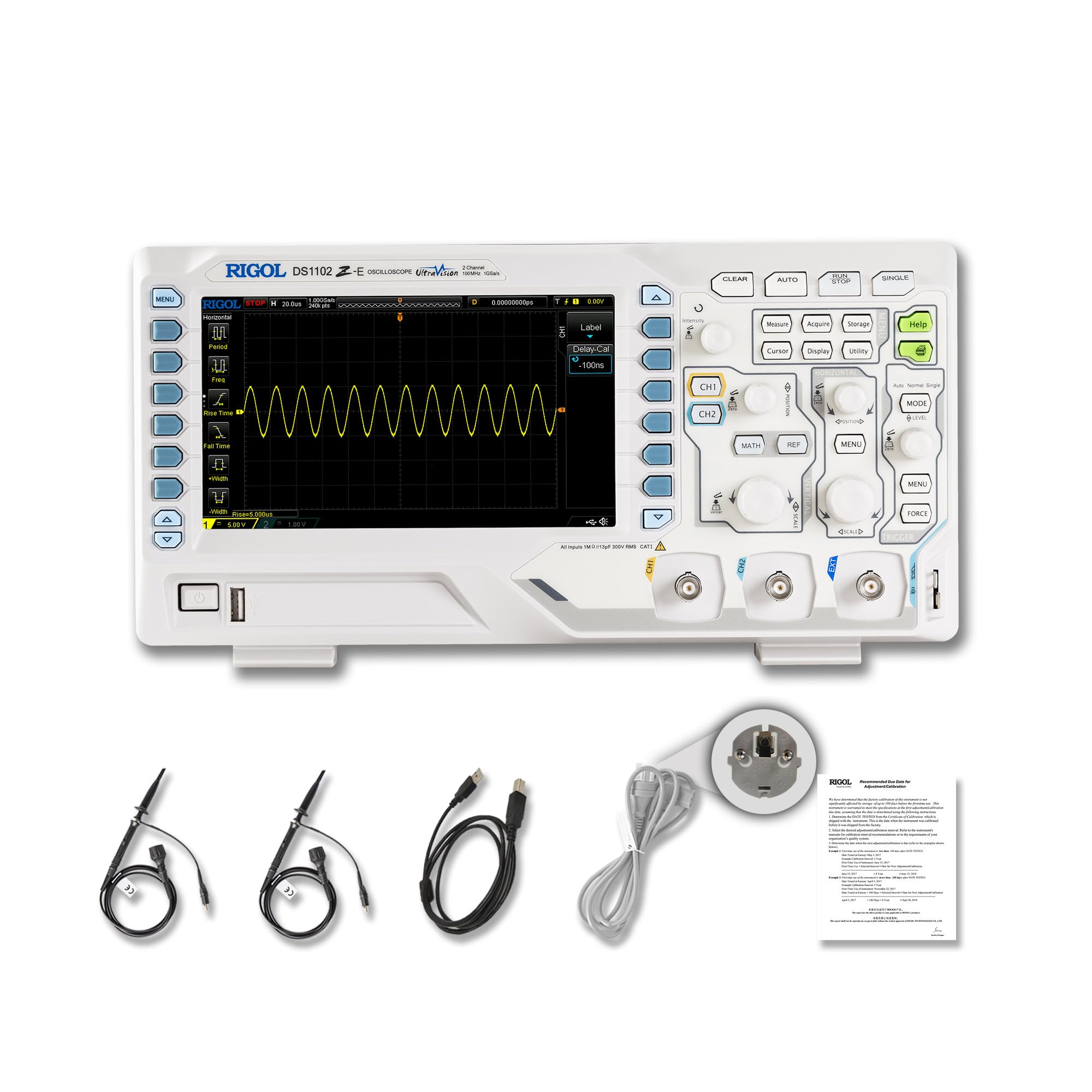
Gambar 2.1: Ngarep view of the RIGOL DS1102Z-E Digital Oscilloscope.
2.1 Fitur Utama
- 100 MHz Bandwidth, 1 GSa/s Sample Rate: Captures signals with high precision.
- 24 Mpts Memory Depth: Allows for extended signal capture and detailed waveform analysis.
- Multi-function Measurement Device: Includes frequency counter, protocol decoding (RS232/UART, I2C, SPI), FFT analysis, and automatic measurement functions.
- Waveform Recording and Playback: Records signal variations and replays them for fault identification.
- Tampilan Dhuwur Definition: 7-inch TFT screen with 256-level grayscale, offering a phosphor-like display effect for clear waveform details.
- Remote Control & Secondary Development Support: Equipped with USB and LAN ports for PC remote control, compatible with SCPI commands, LabVIEW, Visual Basic, and Visual C++.
2.2 Apa ing kothak

Figure 2.2: Contents included with the DS1102Z-E Oscilloscope.
- 1x Main Unit (DS1102Z-E Digital Oscilloscope)
- 2x Passive Probes (150MHz)
- 1x Power Cable (EU plug)
- 1x USB A-B Cable
- 1 x Kartu Garansi
- 1x Calibration Certificate
- 1x Pranyatan Kesesuaian
3. Setup
Follow these steps to set up your RIGOL DS1102Z-E oscilloscope:
- Mbukak kemasan: Carefully remove all components from the packaging. Inspect the device for any signs of damage.
- Sambungan daya: Connect the provided power cable to the oscilloscope's power input and then to a suitable AC power outlet.
- Koneksi Probe: Connect the passive probes to the BNC input connectors (CH1, CH2) on the front panel. Ensure a secure connection.
- Grounding: Always ensure the oscilloscope is properly grounded through the power cable.
- Koneksi USB/LAN (Opsional): If you plan to use remote control or secondary development, connect the USB cable to a PC or the LAN cable to your network.

Gambar 3.1: Overview of the oscilloscope's physical dimensions and ports.
4. Instruksi Operasi
This section covers the basic operation of your oscilloscope.
4.1 Powering On / Off
- Daya On: Press the power button located on the front panel. The device will perform a self-test and display the main interface.
- Daya Mati: Pencet terus tombol daya nganti piranti mati.
4.2 Tampilan Gelombang Dasar
After powering on, connect a signal to one of the input channels (e.g., CH1). Adjust the vertical scale (Volts/Div) and horizontal scale (Time/Div) knobs to display the waveform clearly. Use the OTOMATIS button for automatic setup of the waveform display.

Gambar 4.1: Kelample of a waveform displayed on the oscilloscope screen.
4.3 Fungsi Lanjut
- Fungsi pangukuran: Tekan ing UKURAN button to access automatic measurements like frequency, period, peak-to-peak voltage, lsp.
- Sistem Trigger: Use the trigger controls to stabilize repetitive waveforms. Adjust the trigger level and mode (Edge, Pulse, Video, Slope, etc.) as needed.
- Rekaman gelombang: The oscilloscope allows recording and replaying waveforms. Access this feature through the menu to capture transient events.
- Protocol Decoding: For serial bus analysis (RS232/UART, I2C, SPI), configure the decoding settings via the menu.
- Analisis FFT: Perform Fast Fourier Transform (FFT) to analyze the frequency components of your signal.

Figure 4.2: Complex waveform analysis with measurement data.

Figure 4.3: Multiple waveforms displayed simultaneously for comparison.
5. Pangopènan
Pangopènan sing tepat njamin umur dawa lan akurasi osiloskop sampeyan.
- Reresik: Gunakna kain alus lan garing kanggo ngresiki sisih njaba osiloskop. Kanggo rereget sing bandel, gosok nganggo kain sing rada kasar.amp Kain nganggo deterjen entheng bisa digunakake. Aja nganggo pembersih utawa pelarut sing abrasif.
- Perawatan Layar: Clean the display screen with a soft, lint-free cloth. Do not use excessive force or harsh chemicals.
- Panyimpenan: When not in use, store the oscilloscope in a clean, dry environment, away from direct sunlight, extreme temperatures, and excessive dust.
- Perawatan Probe: Handle probes carefully. Avoid bending or stressing the probe tips. Store them properly to prevent damage.
- Kalibrasi: For optimal performance, periodic calibration by qualified personnel is recommended. Refer to the official RIGOL website for calibration services.
6. Ngatasi masalah
Bagian iki menehi solusi kanggo masalah umum sing bisa sampeyan temoni.
| Masalah | Kemungkinan Penyebab | Solusi |
|---|---|---|
| No power when turned on. | Power cable not connected, power outlet faulty, or power button issue. | Check power cable connection. Test the power outlet. Ensure the power button is fully pressed. |
| Ora ana wangun gelombang sing ditampilake. | No signal input, probe not connected correctly, vertical/horizontal scale incorrect, or trigger not set. | Verify signal source. Check probe connections. Adjust Volts/Div and Time/Div. Press OTOMATIS or adjust trigger settings. |
| Waveform is unstable. | Setelan pemicu sing salah. | Adjust trigger level, mode, and source to stabilize the waveform. |
| Remote kontrol ora bisa digunakake. | USB/LAN cable issue, incorrect network settings, or software driver not installed. | Check cable connections. Verify network configuration. Install necessary drivers and software (e.g., UltraScope). |
If the problem persists, please contact RIGOL technical support.
7. Spesifikasi
Detailed technical specifications for the RIGOL DS1102Z-E Digital Oscilloscope.

Figure 7.1: Visual representation of key technical specifications.
| Fitur | Spesifikasi |
|---|---|
| Merk | Rigol |
| Model | DS1102Z-E |
| Bandwidth | 100 MHz |
| Saluran | 2 Channels + EXT |
| Sample Rating | 1 GSa/s |
| Kedalaman memori | 24 Mpts |
| Gelombang Capture Rate | 30,000 wfms/s |
| Resolusi vertikal | 8 bit |
| Sensitivitas minimal | 1 mV/div |
| Minimum Time Base | 2 ns/div |
| Dhukungan decoding | RS232/UART, I2C, SPI |
| Analisis FFT | Standar |
| Tampilan | 7-inch TFT (800x480) |
| Konektivitas | USB Host, USB Device, LAN |
| Sumber Daya | Adaptor AC Kab |
| warna | Gray / Putih |
| Bobot Barang | 2.9 kg |
| Ukuran (L x W x H) | 31.31 x 16.08 x 12.24 sentimeter |
| Standar sing cocog | CE, RoHS |
| Produsen Part Number | DS1102Z-E |
| Negara Asal | Cina |
8. Warranty lan Dhukungan
RIGOL is committed to providing high-quality products and excellent customer service.
- Garansi: The RIGOL DS1102Z-E Digital Oscilloscope comes with a garansi 3 taun saka tanggal tuku. Garansi iki nyakup cacat ing bahan lan pengerjaan ing panggunaan normal.
- Dhukungan Teknis: RIGOL offers Dhukungan teknis 24/7 to assist you with any questions or issues you may encounter. Please refer to the official RIGOL websitus kanggo informasi kontak lan sumber support.
- Sumber Daya Online: Visit the official RIGOL website for product documentation, software updates (e.g., UltraScope), and additional support materials.

Figure 8.1: RIGOL oscilloscopes support multiple languages for user convenience.