
1. Pambuka
The OSD Audio DAC-X200 is a powerful 2-channel Class D stereo amplifier designed to deliver high-fidelity audio. It features a built-in Hi-Res 24bit/192khz DAC, offering superior digital audio conversion. With versatile input options including USB, Optical, and RCA, and A/B speaker switching, this amplifier is suitable for various home audio setups, from driving bookshelf speakers to powering floorstanding units.
2. Pandhuan Safety
- Sumber Daya: Sambungake unit mung menyang sumber daya sing ditemtokake voltage.
- Ventilasi: Priksa manawa ventilasi sing cukup. Aja ngalangi bukaan ventilasi.
- Banyu lan Kelembapan: Aja mbabarake unit kasebut menyang udan, lembab, utawa kalembaban sing berlebihan.
- Sumber panas: Jaga unit iki adoh saka sumber panas kayata radiator, mesin pemanas, kompor, utawa piranti penghasil panas liyane.
- Reresik: Resik mung nganggo gombal garing.
- Layanan: Aja nyoba layanan produk iki dhewe. Hubungi kabeh layanan kanggo personel layanan sing berkualitas.
- Panggonan: Place the unit on a stable, flat surface. Avoid placing heavy objects on top of the amppanguripan
3. Isi Paket
Priksa manawa kabeh item ana ing paket kasebut:
- OSD Audio DAC-X200 Amppanguripan
- Pandhuan wiwitan cepet
- Kabel Daya
- Remote Control (yen kalebu ing model sampeyan)
4. Produk Liwatview
4.1 Panel ngarep
The front panel provides access to essential controls for daily operation.

Gambar 4.1: Ngarep view of the DAC-X200 amplifier, showing the power button, speaker selectors, balance, and volume controls.

Gambar 4.2: Detail of the front panel, highlighting the Power button and Speaker A/B selection buttons.

Gambar 4.3: Detail of the front panel, showing the Balance and Volume control knobs.
4.2 Panel mburi
The rear panel houses all input and output connections for audio sources and speakers.
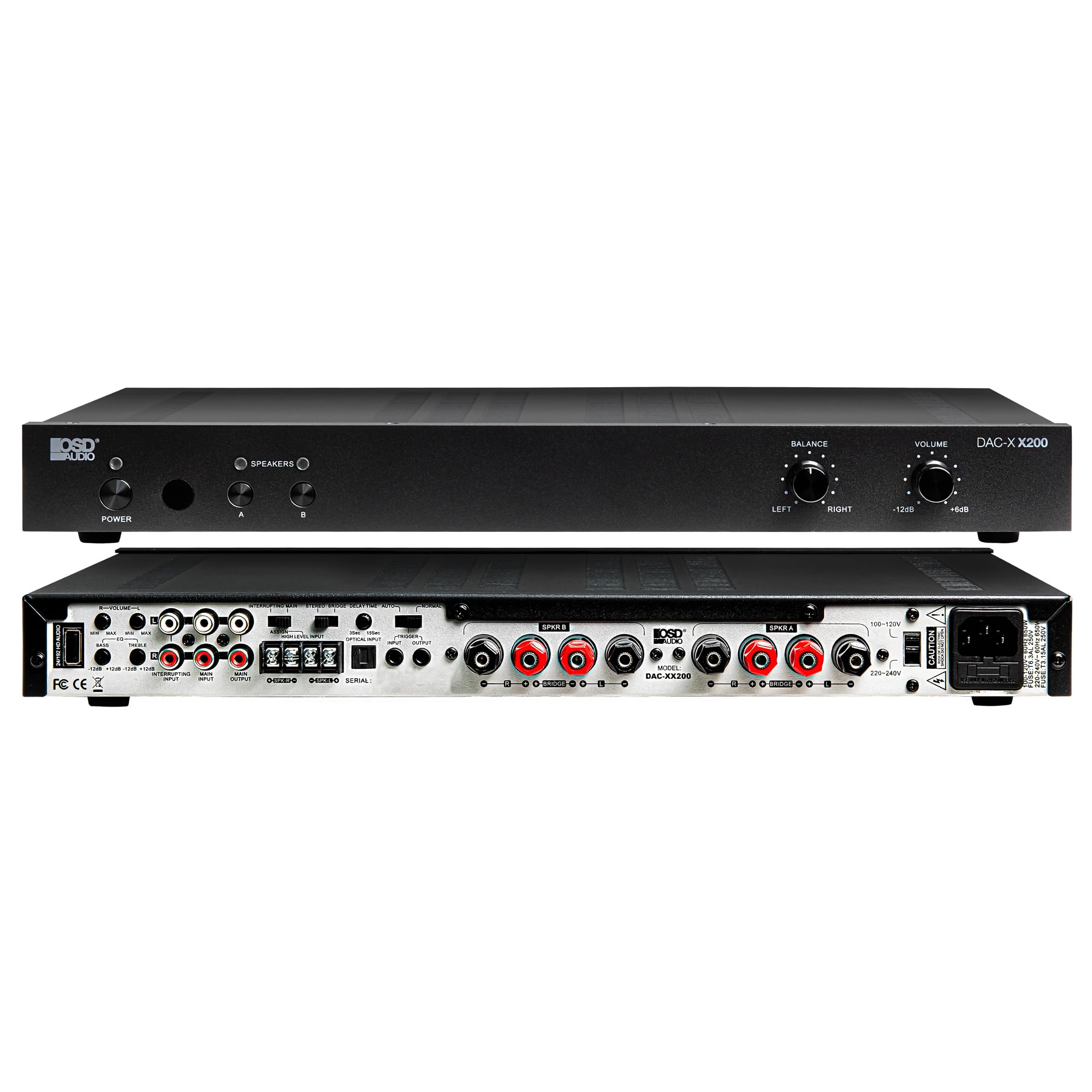
Gambar 4.4: mburi view of the DAC-X200 amplifier, displaying various audio inputs (USB, Optical, RCA), speaker outputs, and power input.

Gambar 4.5: Detail of the rear panel inputs, including USB, Optical, and RCA connections.

Gambar 4.6: Detail of the rear panel speaker output terminals for Speaker A and Speaker B.
5. Setup
5.1 Panggonan
Place the DAC-X200 on a flat, stable surface with adequate space around it for ventilation. Avoid enclosed cabinets or areas with poor airflow to prevent overheating.
5.2 Nyambung Speakers
- Priksa manawa amplifier is powered off and unplugged.
- Sambungake speaker pasif menyang SPEAKER A lan / utawa SPEAKER B terminals on the rear panel. Observe correct polarity (+ to + and - to -).
- For optimal performance, use high-quality speaker wire.
5.3 Nyambungake Sumber Audio
The DAC-X200 supports multiple input types:
- Input USB: Connect a computer or other USB audio source using a Type A to Type A USB 2.0 cable.
- Input optik: Connect digital audio sources like TVs or CD players using an optical cable.
- Input RCA: Connect analog audio sources such as music streamers, turntables (with a pre-amp), or other devices using RCA cables.
5.4 Sambungan Daya
After all audio and speaker connections are made, connect the supplied power cable to the ampsumber daya liifier banjur menyang stopkontak daya AC sing cocog.
6. Instruksi Operasi
6.1 Daya On/Off
Tekan ing DAYA tombol ing panel ngarep kanggo nguripake amplifier urip utawa mati. Lampu indikator daya bakal madhangi nalika unit urip.
6.2 Pilihan Input
The DAC-X200 features smart source switching, automatically detecting and switching to an active input. If multiple inputs are active, you may need to manually select the desired input using the remote control (if applicable) or by cycling through inputs.
6.3 Kontrol Volume
Atur volume output sakabèhé nganggo VOLUME knob on the front panel. Rotate clockwise to increase volume and counter-clockwise to decrease it.
6.4 Kontrol Nada
Gunakake ing BALANCE knob to adjust the left/right channel balance. The DAC-X200 also includes bass and treble adjustment knobs (located on the rear panel or accessible via remote, depending on model variation) to fine-tune the sound to your preference or room acoustics.
6.5 A/B Speaker Switching
Tekan ing A or B buttons on the front panel to select which set of speakers (Speaker A, Speaker B, or both) are active. This allows for multi-room audio configurations.
7. Pangopènan
- Reresik: Gunakake alus, gombal garing kanggo ngresiki njaba saka amppengangkat. Aja nggunakake pembersih cair utawa aerosol.
- Ventilasi: Priksa kanthi periodik manawa bolongan ventilasi wis resik saka bledug lan rereged.
- Panyimpenan: Yen nyimpen unit nganti suwe, copot saka stopkontak lan simpen ing papan sing adhem lan garing.
8. Ngatasi masalah
| Masalah | Kemungkinan Penyebab | Solusi |
|---|---|---|
| Ora ana daya | Kabel daya ora nyambung; Stopkontak ora aktif; Amplisènsi mati. | Check power cable connection; Test power outlet; Press the Power button. |
| Ora ana swara | Incorrect input selected; Speaker cables loose; Volume too low; Speakers A/B not selected. | Select correct input; Check speaker connections; Increase volume; Ensure Speaker A or B is active. |
| Swara kleru | Input signal too high; Speaker impedance mismatch; Faulty cable. | Reduce source volume; Verify speaker impedance (8̣ or 4̣); Replace audio cables. |
| Input not switching automatically | Multiple active sources; Specific source not detected. | Manually select input; Ensure only one source is playing if auto-switching is desired. |
9. Spesifikasi
- Model: DAC-X200
- Daya Output: 100W RMS per channel at 8̣; 225W RMS per channel at 4̣; 450W bridged mono
- Jumlah Saluran: 2
- DAC: Hi-Res 24bit/192khz, DSD formats supported
- Input: USB, Optical, RCA
- Speaker Zones: A/B Switching
- Ukuran (L x W x H): 16.7 x 10 x 2 inci
- Tipe Bahan: Plastik
- UPC: 810074881173
10. Informasi babar pisan
OSD Audio products are designed for reliability and performance. This product is covered by a limited warranty against defects in materials and workmanship. Please refer to the official OSD Audio websitus web utawa dokumentasi tuku sampeyan kanggo syarat lan kahanan garansi tartamtu, kalebu durasi lan rincian jangkoan. Simpen bukti tuku sampeyan kanggo klaim garansi.
11. Dhukungan
For technical assistance, troubleshooting not covered in this manual, or service inquiries, please contact OSD Audio customer support. You can find contact information, FAQs, and additional resources on the official OSD Audio websitus.
Websitus: www.osdaudio.com