
Pambuka
This manual provides essential information for the installation, operation, maintenance, and troubleshooting of the Cisco Catalyst C9300L-24P-4X-E Network Essentials Switch. This device is designed for enterprise-grade access, offering 24 Gigabit PoE+ ports and four 10 Gbps SFP+ uplinks for robust network connectivity.
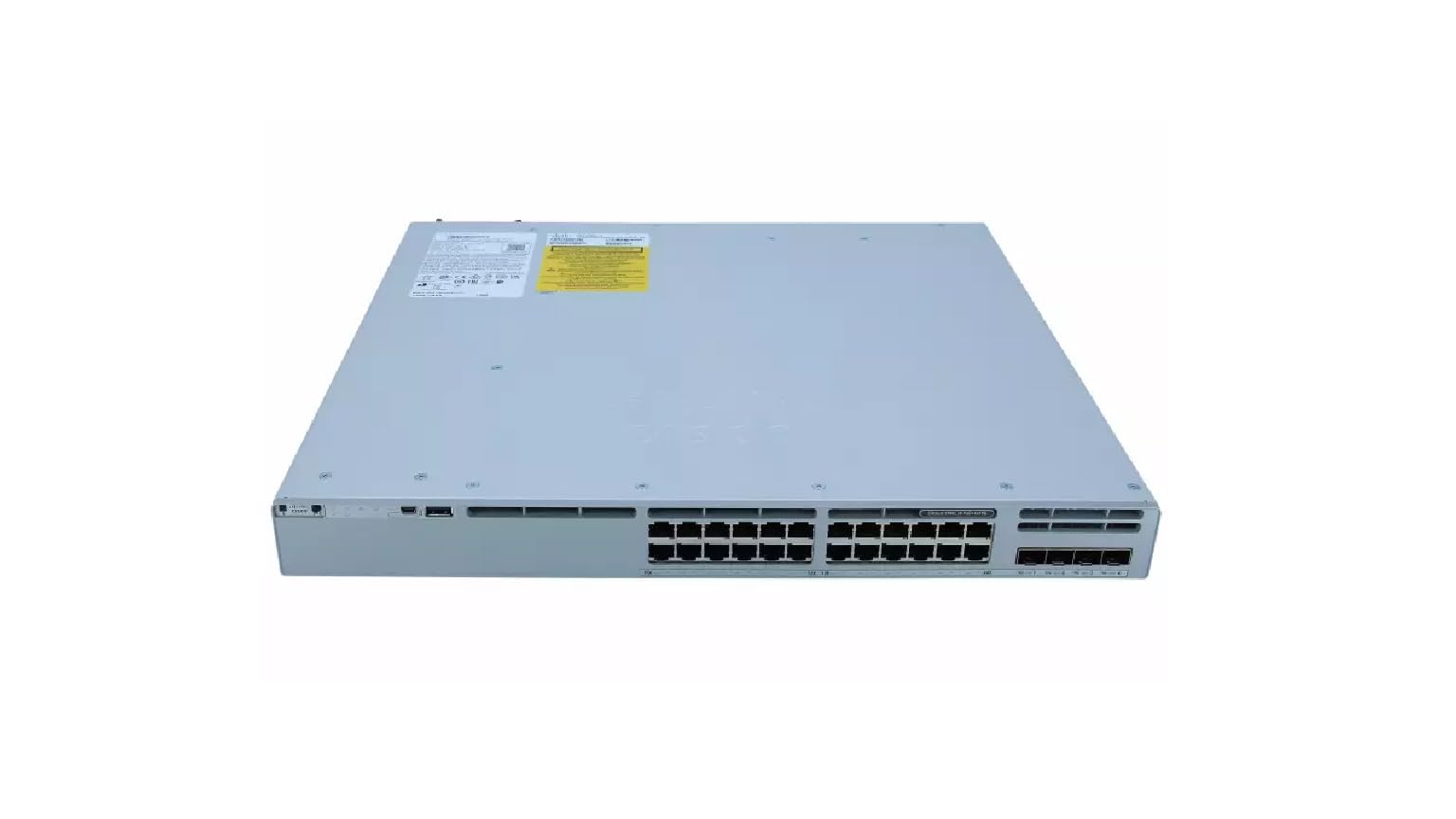
This image displays the rear panel of the Cisco Catalyst C9300L-24P-4X-E switch, highlighting the various ports, cooling fans, and the power supply unit.
Informasi Safety
Tindakake pancegahan keamanan ing ngisor iki kanggo nyegah ciloko lan kerusakan peralatan:
- Priksa manawa grounding wis bener sadurunge nyambungake daya.
- Aja ngoperasikake saklar ing lingkungan sing teles utawa lembab banget.
- Gunakake mung kabel daya lan aksesoris sing wis disetujoni.
- Priksa manawa ventilasi sing cukup kanggo nyegah overheating.
- Pedhot daya sadurunge nindakake prosedur pangopènan utawa instalasi apa waé.
Isi Paket
Priksa manawa paket sampeyan ngemot item ing ngisor iki:
- Cisco Catalyst C9300L-24P-4X-E Switch
- Kabel Daya
- Piranti sing dipasang ing rak (yen ana)
- Kabel Konsol (RJ-45 nganti DB-9)
- Dokumentasi (Panduan Miwiti Cepet, Informasi Keamanan)
Deskripsi Fisik
The Cisco Catalyst C9300L-24P-4X-E switch features a robust design for network deployments. The rear panel includes:
- 24 Gigabit Ethernet PoE+ Ports: For connecting network devices and providing power over Ethernet.
- 4x 10Gbps SFP+ Uplink Ports: For high-speed connections to the distribution or core layer.
- Port Konsol: Kanggo akses antarmuka baris perintah.
- Port USB: Kanggo file management and system configuration.
- Modular Power Supply Bay: For installing power supply units.
- Kipas pendingin: For thermal management.
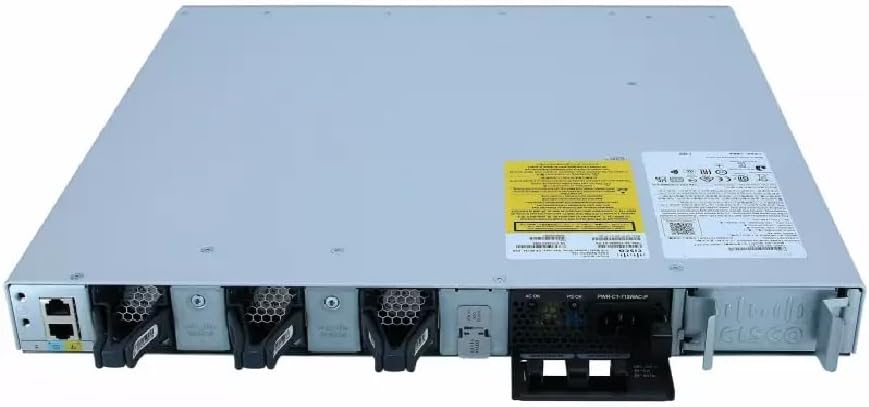
A rinci view of the rear panel of the Cisco Catalyst C9300L-24P-4X-E switch, illustrating the 24 Gigabit PoE+ ports, four 10Gbps SFP+ uplink ports, and the modular power supply bay.
Setup
1. Mbukak lan Inspeksi
Carefully remove the switch from its packaging. Inspect the device for any signs of physical damage. If damage is found, contact your supplier immediately.
2. Pasang Ngalih
The switch can be mounted in a standard 19-inch equipment rack or placed on a desktop.
- Pemasangan Rak: Pasang braket sing dipasang ing rak sing wis disediakake menyang sisih-sisine sakelar nggunakake sekrup. Pasang sakelar menyang rak nggunakake sekrup rak sing cocog.
- Instalasi Desktop: Ensure the surface is flat, stable, and allows for adequate ventilation around the switch. Attach the rubber feet (if provided) to the bottom of the switch.
3. Daya Nyambung
Insert the power cord into the AC power connector on the rear of the switch. Connect the other end of the power cord to a grounded electrical outlet. Ensure the power supply is properly seated in its bay.
4. Sambungan Jaringan
- Port PoE +: Connect Ethernet cables from your network devices (e.g., IP phones, access points, surveillance cameras) to the 24 Gigabit PoE+ ports. These ports will provide both data connectivity and power.
- SFP+ Uplink Ports: Insert compatible SFP+ transceivers into the four 10Gbps SFP+ uplink ports. Connect fiber optic cables from these transceivers to your distribution or core network devices.
- Port Konsol: For initial configuration or troubleshooting, connect a console cable from your management workstation to the console port on the switch.
Ngoperasikake Switch
1. Daya wiwitan
After connecting power, the switch will automatically power on. Observe the system LED indicators for boot status. The system LED should turn green once the boot process is complete.
2. Konfigurasi dhasar
The Cisco Catalyst C9300L-24P-4X-E runs on Cisco IOS XE. Initial configuration can be performed via the console port using a command-line interface (CLI) or through a web-based graphical user interface (GUI) if enabled. Refer to Cisco's official documentation for detailed configuration guides.
3. Indikator LED
The switch features various LED indicators to provide status information:
- Sistem LED: Indicates overall system status (e.g., green for normal operation, amber for warning).
- PoE LED: Indicates Power over Ethernet status for the ports.
- LED Status Port: Nuduhake status link lan aktivitas kanggo saben port jaringan.
Pangopènan
Pangopènan rutin njamin kinerja sing optimal lan umur saklar sampeyan:
- Reresik: Resiki sisih njaba saklar kanthi periodik nganggo kain alus lan garing. Priksa manawa bolongan ventilasi bebas saka bledug lan rereged. Aja nggunakake pembersih cair langsung ing piranti.
- Nganyari Firmware: Keep the switch firmware updated to the latest version provided by Cisco. This ensures access to new features, security patches, and performance improvements.
- Kontrol lingkungan: Maintain the operating environment within specified temperature and humidity ranges to prevent hardware failure.
- Manajemen Kabel: Ensure all cables are neatly organized and properly secured to prevent accidental disconnections or damage.
Ngatasi masalah
If you encounter issues with your switch, consider the following troubleshooting steps:
- Ora Daya: Verify the power cord is securely connected to both the switch and the power outlet. Check the power source and any circuit breakers. Ensure the power supply unit is correctly installed.
- Ora Ana Konektivitas Jaringan: Check the link status LEDs on the affected ports. Ensure Ethernet cables are properly connected and undamaged. Verify connected devices are powered on and functioning correctly.
- Piranti PoE Ora Diaktifake: Confirm the PoE+ port is enabled and the device is PoE compatible. Check the PoE budget and ensure it's not exceeded.
- Kinerja alon: Check for network congestion, duplex mismatches, or errors on ports. Ensure uplink bandwidth is sufficient.
- Accessing the Switch: If unable to access via network, try connecting directly to the console port for CLI access.
Spesifikasi
| Fitur | Rincian |
|---|---|
| Merk | Cisco |
| Nomer Model | C9300L-24P-4X-E |
| Jumlah Pelabuhan | 24 Gigabit PoE+ ports, 4x 10Gbps SFP+ uplinks |
| Antarmuka | PoE, SFP+ |
| Tingkat Transfer Data | 1 Gigabits Per Second (Gigabit Ethernet), 10 Gigabits Per Second (Uplinks) |
| Voltage | 240 Volt (AC) |
| Tipe Ngalih | Managed, Fixed, PoE+, Layer 2 |
| Case Material Type | Plastik |
| Piranti sing kompatibel | Desktop, Laptop, Printer (and other network devices) |
Informasi Garansi
Produk iki dilengkapi karo a 90 dina babar pisan winates. Please refer to the warranty documentation provided with your purchase for specific terms and conditions. For warranty claims, contact your reseller or the manufacturer's support channels.
Dhukungan Teknis
For further assistance, technical support, or advanced configuration guidance, please refer to the official Cisco documentation available on their website. You may also contact your authorized Cisco reseller or support provider for specialized assistance.
Dhukungan Cisco Websitus: https://www.cisco.com/c/en/us/support/index.html