
1. Pambuka
Matur nuwun kanggo tukuasing the CAMMUS C5 Bundle Complete Set. This manual provides detailed instructions for the setup, operation, maintenance, and troubleshooting of your C5 Direct Drive Steering Wheel, CP5 Pedals, and Desk Clamp. This system is designed to deliver a responsive and dynamic racing experience exclusively on PC hardware. Please read this manual thoroughly before use to ensure proper installation and optimal performance.
Cathetan Penting: The CAMMUS C5 operates exclusively on PC hardware and is not compatible with Xbox or PlayStation systems. Ensure your operating system is Windows 7 or newer for optimal performance.
2. Informasi Safety
- Always connect the power adapter to a suitable power outlet as specified.
- Jaga piranti supaya adoh saka banyu utawa cairan liyane kanggo nyegah sengatan listrik.
- Do not attempt to disassemble or modify the product. Unauthorized modifications can void the warranty and pose safety risks.
- Ensure proper ventilation around the wheelbase to prevent overheating. The C5 DD base includes an intelligent temperature control system with a turbo blower cooling fan for safe operation.
- Gunakake mung adaptor daya lan kabel sing kasedhiya.
- Prodhuk iki dimaksudaké kanggo nggunakake wong umur 12 lan lawas.
3. Isi Paket
Priksa manawa kabeh item ing ngisor iki ana ing paket sampeyan:
- CAMMUS C5 Direct Drive Setir
- CAMMUS CP5 Pedals
- Meja Clamp
- Power Adapter (19V / 7.35A)
- Kabel USB
- Manual Instruksi (dokumen iki)

4. Produk Liwatview
4.1 CAMMUS C5 Direct Drive Steering Wheel
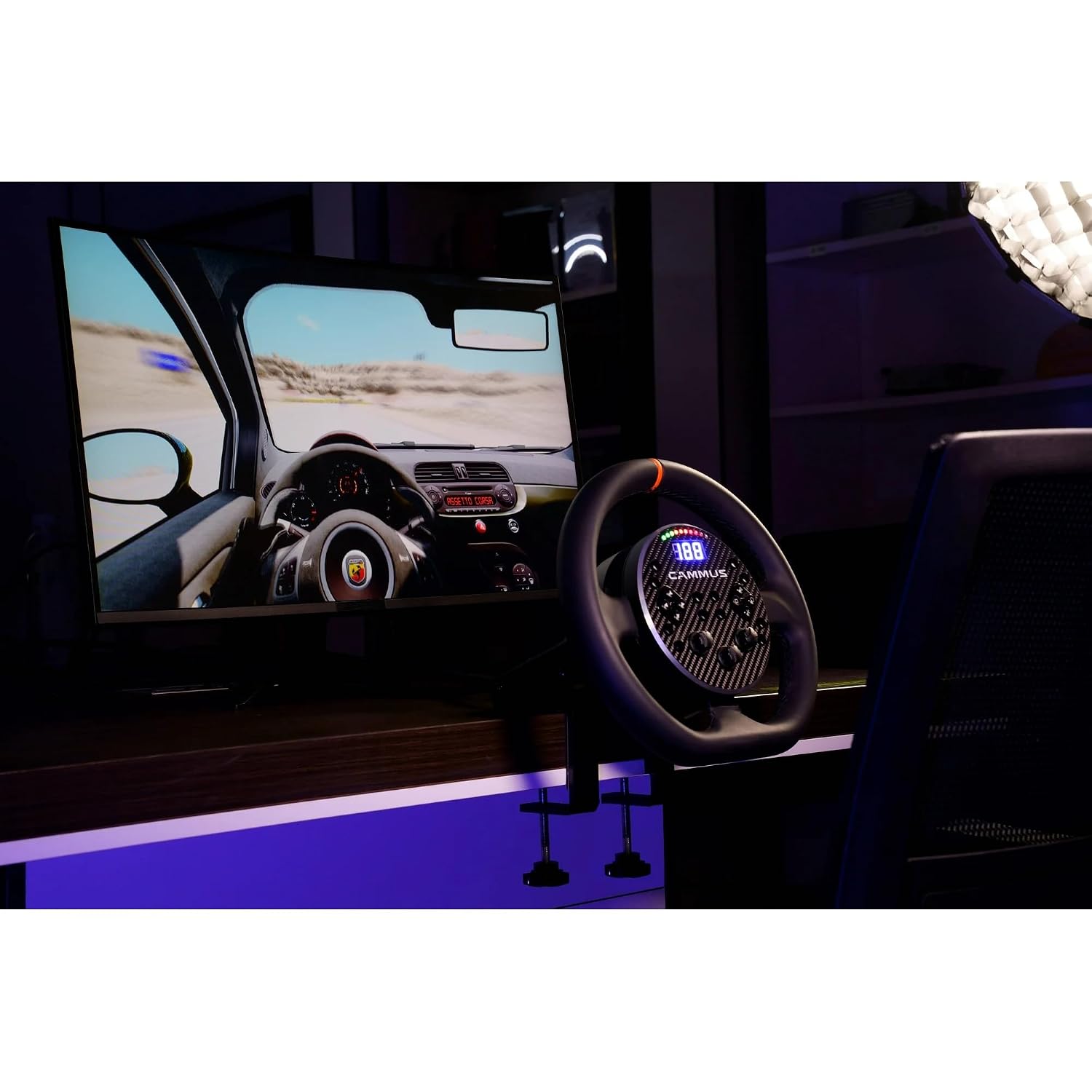
The C5 steering wheel features a 5Nm direct drive wheelbase for precise force feedback. It includes various controls for an immersive racing experience.

- Steering Wheel Return Reminder Strip: Visual indicator for wheel center.
- 10 LED: Customizable shift lights and indicators.
- Tampilan Layar: Shows speed, gear, or other telemetry data.
- Shift Paddles (x2): For quick gear changes.
- Direction Key Area: D-pad for menu navigation.
- 12-band Knobs (x3): Rotary encoders for fine adjustments.
- Programmable Buttons (x12): Assignable functions for in-game controls.
- Area Tombol Kontrol: Additional buttons (A, B, C, D) for various functions.

4.2 CAMMUS CP5 Pedals
The CP5 Pedals provide realistic throttle and brake input for precise control during racing simulations.

4.3 Meja Clamp
Meja sing kalebuamp allows for secure mounting of the C5 wheelbase to a desk or table.
5. Instruksi persiyapan
5.1 Mounting the Wheelbase
- Place the C5 wheelbase on a stable desk or table.
- Pasang meja clamp to the front underside of the wheelbase.
- Position the wheelbase and clamp on your desk. Tighten the clamp screws until the wheelbase is securely fastened and does not move during use.

5.2 Nyambungake Komponen

- Sambungake Pedal: Connect the CP5 Pedals to the designated port on the C5 wheelbase (if applicable, typically via USB or a proprietary cable).
- Nyambung menyang PC: Connect the C5 wheelbase to your PC using the provided USB cable. Insert one end into the USB socket on the wheelbase and the other into an available USB port on your computer.
- Sambungake Daya: Plug the power adapter into the "Power base" port on the C5 wheelbase. Then, plug the power adapter into a wall outlet.
- Daya On: The system should power on automatically or via a power button (refer to specific product for power button location if present).
Once connected, your PC should detect the CAMMUS C5 device. You may need to install drivers, which are typically available on the official CAMMUS websitus.
6. Instruksi Operasi
6.1 Persiyapan lan Kalibrasi Awal
- After connecting the device to your PC, ensure all drivers are installed.
- Open the CAMMUS PC software (available for download from the official CAMMUS websitus).
- Follow the on-screen instructions within the software to calibrate the steering wheel and pedals. This typically involves turning the wheel to its full lock left and right, and pressing the pedals to their full extent.
- Adjust force feedback strength, damping, and other settings to your preference within the software.
6.2 In-Game Use
Once calibrated, launch your preferred PC racing simulator game.
- Navigate to the game's controller settings or options menu.
- Select the CAMMUS C5 as your primary controller.
- Map the steering, throttle, brake, and any desired buttons (shift paddles, programmable buttons) to their respective in-game functions.
- Adjust in-game force feedback settings to complement the CAMMUS C5's direct drive system.

7. Kontrol Piranti Lunak lan Aplikasi
The CAMMUS C5 system offers advanced control through its dedicated PC software and mobile application.
- Piranti Lunak PC: Provides comprehensive control over force feedback settings, button mapping, LED customization, and firmware updates. It is essential for initial setup and advanced configuration.
- Aplikasi seluler: The CAMMUS mobile app allows you to check your device's status, create and save custom settings profiles, and launch games with one click. This offers convenient adjustments without interrupting your gameplay on the PC.
Download the latest PC software and mobile app from the official CAMMUS website or your mobile app store.

8. Pangopènan
- Reresik: Use a soft, dry cloth to clean the steering wheel, pedals, and wheelbase. Avoid abrasive cleaners or solvents.
- Panyimpenan: Nalika ora digunakake, simpen piranti ing lingkungan sing resik lan garing, adoh saka sinar srengenge langsung lan suhu sing ekstrem.
- Manajemen Kabel: Priksa manawa kabeh kabel wis diurutake kanthi rapi lan ora kenceng supaya ora rusak.
- Nganyari Firmware: Regularly check the official CAMMUS websitus kanggo nganyari perangkat kukuh kanggo njamin kinerja optimal lan akses kanggo fitur-fitur anyar.
9. Ngatasi masalah
9.1 Device Not Detected by PC
- Ensure the USB cable is securely connected to both the wheelbase and the PC.
- Coba port USB liyane ing PC sampeyan.
- Verify that the power adapter is correctly connected and the device is powered on.
- Check Device Manager on Windows to see if the device is listed. If there's an error, reinstall the drivers from the CAMMUS websitus.
- Confirm your PC meets the minimum operating system requirement (Windows 7 or newer).
9.2 No Force Feedback or Weak Force Feedback
- Ensure the power adapter is connected and providing sufficient power. The C5 requires 19V / 7.35A.
- Check force feedback settings in both the CAMMUS PC software and your racing game. Increase the strength if necessary.
- Verify that the game's force feedback is enabled and configured correctly.
- Update the wheelbase firmware to the latest version.
9.3 Pedals Not Responding
- Ensure the pedal cable is securely connected to the wheelbase.
- Calibrate the pedals using the CAMMUS PC software.
- Check in-game settings to ensure pedals are correctly mapped.
9.4 Overheating
- The C5 DD base has intelligent temperature control. If you experience overheating warnings, ensure the wheelbase has adequate airflow.
- Do not block the cooling fan vents.
- Allow the device to cool down before resuming use if it feels excessively hot.
10. Spesifikasi
| Fitur | Spesifikasi |
|---|---|
| Merk | KAMMUS |
| Jeneng Model | C5 Bundle Complete Set (Model 901) |
| Piranti sing kompatibel | PC (Windows 7 utawa sing luwih anyar) |
| Tipe Kontrol | Setir Drive Langsung |
| Meksa Umpan Balik | 5Nm Wheelbase |
| Sumber Daya | Corded Electric (19V / 7.35A) |
| Teknologi Konektivitas | USB |
| Tombol Jumlah | 23 (including programmable buttons, D-pad, knobs) |
| Bobot Barang | 24.3 Pounds (total bundle) |
| Item Dimensions (Wheel) | Kira-kira. 27.8 x 26.5 x 8.2 cm (10.9 x 10.4 x 3.2 inci) |
| Bahan Konstruksi | Aviation-grade aluminum base |
| Sistem pendinginan | Intelligent temperature control with turbo blower fan |
11. Warranty lan Dhukungan
11.1 Informasi babar pisan
The CAMMUS C5 Bundle Complete Set comes with a Garansi pabrikan 1 taun from the date of purchase. This warranty covers defects in materials and workmanship under normal use. It does not cover damage caused by misuse, accidents, unauthorized modifications, or improper installation. Please retain your proof of purchase for warranty claims.
11.2 Dhukungan Pelanggan
For technical assistance, troubleshooting, or warranty inquiries, please contact CAMMUS customer support through their official website. You can typically find contact information, FAQs, and driver downloads on the support section of the CAMMUS websitus.
Official CAMMUS Websitus: www.cammus.com (Cathetan: Iki minangka placeholder URL. Please refer to your product packaging or official documentation for the correct websitus.)