
Pambuka
Matur nuwun kanggo tukuasing the LDNIO Portable Wireless Bluetooth Speaker GTS-1393. This manual provides essential information for the safe and efficient use of your speaker. Please read these instructions carefully before use and retain them for future reference.
Informasi Safety Penting
- Aja nyedhiyakake speaker ing suhu sing ekstrem, sinar srengenge langsung, utawa kelembapan sing dhuwur.
- Aja ngeculake utawa nyebabake speaker kena pengaruh sing kuat.
- Aja mbongkar, ndandani, utawa ngowahi speaker dhewe. Hubungi petugas servis sing mumpuni kanggo ndandani apa wae.
- Tansah speaker adoh saka banyu lan cairan liyane.
- Gunakake mung kabel pangisi daya lan adaptor daya sing ditemtokake.
- Buwang batere lan speaker miturut peraturan lokal.
Isi Paket
Priksa manawa kabeh item ana ing paket sampeyan:
- LDNIO Portable Wireless Bluetooth Speaker GTS-1393
- Kabel Pengisian USB (x1)
- Baterei Lithium sing bisa diisi ulang (500mAh)
- Remote Control
- sing duwe
- Manual pangguna (dokumen iki)
Produk Overview
Familiarize dhewe karo komponen speaker lan kontrol. Note: The image below displays a similar model (GTS-1173) for illustrative purposes. The functionality described in this manual applies to the GTS-1393 model.
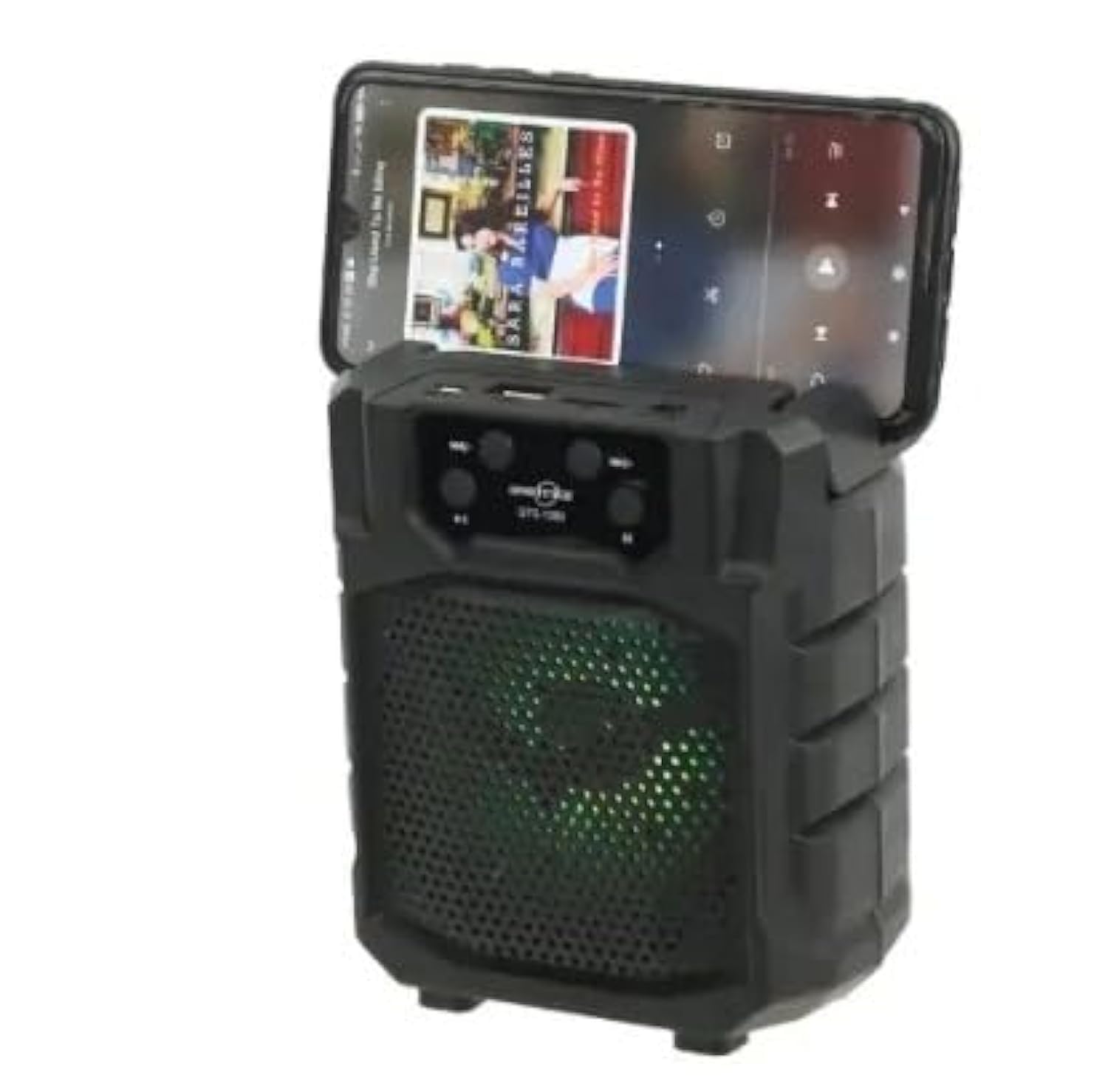
Gambar: Ngarep view of a portable wireless Bluetooth speaker, model GTS-1173, featuring control buttons at the top and a speaker grille with multi-color LED lights. This image is for illustrative purposes, showing a similar product design to the GTS-1393.
Controls and Ports (Based on typical speaker design and OCR from image):
- Tombol daya: Usually long press to turn on/off.
- Tombol Mode (M): Short press to switch between Bluetooth, FM Radio, USB, and TF card modes.
- Tombol Puter/Ngaso: Ngontrol puter maneh media.
- Previous Track / Volume Down (-): Pencet sedhela kanggo trek sadurunge, pencet suwe kanggo nyuda volume.
- Next Track / Volume Up (+): Pencet sedhela kanggo trek sabanjure, pencet dawa kanggo nambah volume.
- Port USB: Kanggo puter maneh USB flash drive.
- Slot Kertu TF: Kanggo muter kertu MicroSD/TF.
- Port Pengisian: Kanggo nyambungake kabel pangisi daya USB.
Setup
1. Ngisi daya Speaker
- Sambungake pucuk cilik kabel pangisi daya USB sing diwenehake menyang port pangisi daya ing speaker.
- Sambungake ujung kabel USB sing luwih gedhe menyang adaptor daya USB (ora klebu) utawa port USB komputer.
- Lampu indikator pangisi daya bakal murup (werna bisa beda-beda) kanggo nuduhake yen speaker lagi diisi daya.
- Sawise dayane kebak, lampu indikator bisa uga owah warna utawa mati. Copot kabel pangisi daya.
2. Powering On / Off
- To power on: Long press the Tombol Daya until you hear an audible prompt or see the indicator lights activate.
- To power off: Long press the Tombol Daya maneh nganti daya speaker mudhun.
Instruksi Operasi
1. Bluetooth Mode (Default)
- Ensure the speaker is powered on. It will typically enter Bluetooth pairing mode automatically, indicated by a flashing LED light and an audible prompt.
- Ing piranti seluler (smartphone, tablet, lsp.), aktifake Bluetooth lan telusuri piranti sing kasedhiya.
- Select "GTS-1393" (or similar name) from the list of devices.
- Sawise dipasangake, speaker bakal ngetokake konfirmasi sing bisa dirungokake, lan lampu LED bakal mandheg kedhip-kedhip.
- Saiki sampeyan bisa muter audio saka piranti liwat speaker. Gunakake kontrol speaker utawa kontrol piranti kanggo nyetel volume lan navigasi trek.
2. USB / TF Card Playback
- Lebokake flash drive USB utawa kertu TF (MicroSD) sing isine audio MP3 files menyang port sing cocog.
- Tekan ing Tombol Mode (M) to switch to USB or TF card mode. The speaker will automatically begin playing audio from the inserted storage device.
- Use the Play/Pause, Previous Track, and Next Track buttons to control playback.
3. Mode Radio FM
- Tekan ing Tombol Mode (M) bola-bali nganti sampeyan mlebu mode Radio FM.
- To auto-scan for stations: Long press the Tombol Puter / NgasoSpeaker bakal mindhai lan nyimpen stasiun FM sing kasedhiya.
- To switch between saved stations: Use the Trek Sadurunge (-) lan Trek Sabanjure (+) tombol.
4. Fungsi TWS (True Wireless Stereo).
The TWS function allows you to connect two GTS-1393 speakers together for a stereo sound experience.
- Priksa manawa loro-lorone speaker wis dipateni.
- Power on both speakers simultaneously. They should both enter Bluetooth pairing mode.
- On one of the speakers, long press the Tombol Mode (M) or a dedicated TWS button (if available) until you hear a confirmation tone, indicating they are paired with each other.
- Now, connect your mobile device to one of the speakers via Bluetooth as described in "1. Bluetooth Mode". The audio will play in stereo through both connected speakers.
Pangopènan
- Reresik: Use a soft, dry cloth to wipe the speaker. Do not use abrasive cleaners or solvents.
- Panyimpenan: Simpen speaker ing panggonan sing adhem lan garing adoh saka sinar srengenge langsung lan suhu sing ekstrem.
- Perawatan baterei: Kanggo ndawakake umur baterei, aja nganti kebak baterei sing kerep. Ngisi daya speaker kanthi rutin, sanajan ora digunakake kanggo wektu sing suwe.
Ngatasi masalah
| Masalah | Solusi sing mungkin |
|---|---|
| Speaker ora urip. | Priksa manawa batere wis diisi daya. Sambungake speaker menyang sumber daya nggunakake kabel USB. |
| Ora ana swara saka speaker. | Check the volume level on both the speaker and your connected device. Ensure the speaker is in the correct mode (Bluetooth, USB, TF, FM). |
| Ora bisa dipasangake liwat Bluetooth. | Ensure the speaker is in Bluetooth pairing mode (flashing LED). Turn off and on Bluetooth on your device. Move your device closer to the speaker. Forget the device from your phone's Bluetooth list and try pairing again. |
| Kertu USB/TF ora bisa diputer. | Ensure the card is inserted correctly. Verify that the audio files are in a supported format (e.g., MP3). Press the Mode button to select the correct input. |
| Resepsi radio FM sing ora apik. | Pindhah speaker menyang area sing sinyale luwih apik. Tambah antena sing wis ana yen ana. |
Spesifikasi
| Merk: | LDNIO |
| Jeneng Model: | GTS-1393 |
| Daya Output Speaker Maksimum: | 5 Watt |
| Teknologi konektivitas: | Nirkabel (Bluetooth) |
| Mode Output Audio: | Stereo |
| Jinis instalasi: | Meja |
| Tipe Speaker: | Outdoor (Portable) |
| Fitur Khusus: | Portable |
| Dianjurake nggunakake: | Smartphones, Tablets, Music Players, Computers |
| Piranti sing kompatibel: | Tablet, Laptop, Smartphone |
| Diameter Speaker: | 4 ing |
| warna: | ireng |
| Metode Kontrol: | remot |
| Sumber Daya: | Baterei Powered |
| Tipe Driver: | Driver Dinamis |
| Komponen sing kalebu: | Remote control, Holder |
| Jumlah item: | 1 |
| Konfigurasi Saluran Swara Surround: | 2 |
| Protokol Komunikasi Nirkabel: | Bluetooth |
| Kapasitas baterei: | 500 mAh |
Warranty lan Dhukungan
Kanggo informasi garansi utawa dhukungan teknis, delengen dokumentasi sing diwenehake karo tumbasan sampeyan utawa hubungi pengecer sampeyan. Simpen bukti tumbasan sampeyan kanggo klaim garansi.