
1. Pambuka
This manual provides essential instructions for the safe and efficient operation of your SHARP SMC1169KS Countertop Microwave Oven. Please read all instructions thoroughly before using the appliance and retain this manual for future reference. This microwave oven features a 1.1 cubic feet capacity, 1000 watts of cooking power, and is compatible with Alexa for voice control. It also includes a removable 12.4-inch carousel turntable and a child lock function.
2. Informasi Safety Penting
Nalika nggunakake piranti listrik, pancegahan safety dhasar kudu ditindakake, kalebu ing ngisor iki:
- Waca kabeh pandhuan sadurunge digunakake.
- Aja operate oven yen rusak utawa malfunctioning.
- Priksa manawa ventilasi sing tepat ing sekitar gelombang mikro.
- Aja panas wadhah sing disegel, amarga bisa njeblug.
- Aja nggunakake bahan kimia korosif utawa uap ing piranti iki.
- Ngawasi bocah-bocah kanthi rapet nalika gelombang mikro digunakake.
- Aja nyoba ndandani utawa ndandani oven dhewe. Hubungi petugas servis sing mumpuni.
- Tansah nggunakake piranti masak microwave-aman.
- Liquids heated in a microwave oven can boil over unexpectedly. Exercise caution when removing containers.
3. Produk Liwatview
The SHARP SMC1169KS is a stainless steel countertop microwave oven designed for convenient food preparation. Key features include:
- Kapasitas: 1.1 kaki kubik
- Output daya: 1000 watt
- Meja putar: Removable 12.4-inch glass carousel for even cooking
- Kontrol: Digital display with touch controls and Alexa voice compatibility
- Interioré: Gray interior with LED lighting
- Keamanan: Child Safety Lock function
- Fungsi masak: 10 power levels, 2-stage cooking, Auto Cook menus, Weight and Time Defrost, Express Cook, +30 seconds key.

Ngarep view of the SHARP SMC1169KS Countertop Microwave Oven, showcasing rampung stainless steel lan panel kontrol.
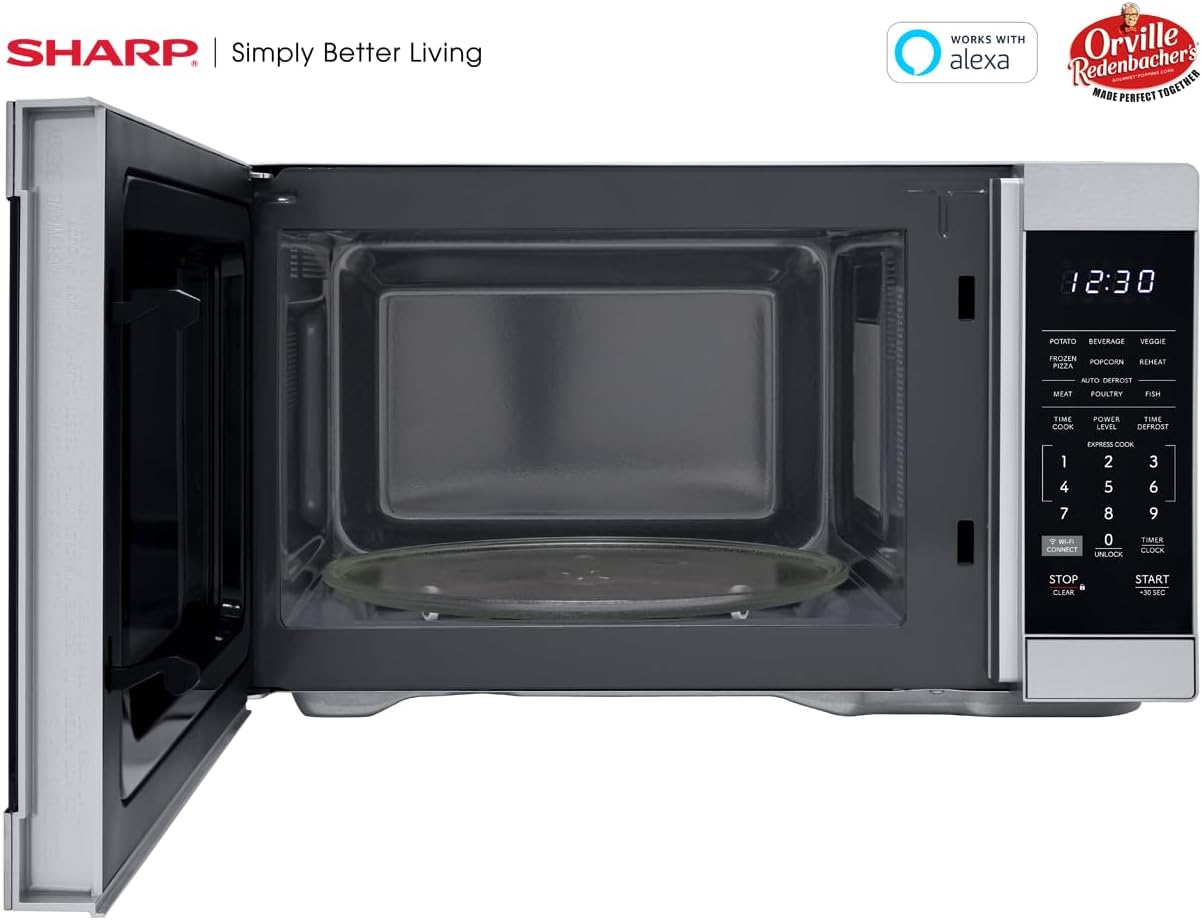
Interioré view of the SHARP SMC1169KS microwave oven, highlighting the removable glass carousel turntable for uniform heating.

Close-up of the SHARP SMC1169KS microwave oven control panel, featuring the digital display, number pad, and dedicated function buttons.
4. Setup
4.1 Mbukak kemasan lan Panggonan
- Remove all packing materials from inside and outside the microwave oven.
- Place the microwave on a flat, stable surface that is strong enough to hold the oven and the food being cooked.
- Ensure there is at least 4 inches (10 cm) of space on the top, back, and sides for proper ventilation. Do not block any ventilation openings.
- Jauhake microwave saka sumber panas lan medan magnet sing kuwat.
4.2 Instalasi Turntable
- Lebokake cincin turntable ing njero rongga microwave.
- Position the glass turntable plate securely on top of the turntable ring. Ensure it is centered and sits properly on the coupler.
4.3 Sambungan Daya
Plug the power cord into a standard 3-prong, 120V AC, 60Hz grounded electrical outlet. Do not use an extension cord or adapter.
4.4 Initial Setup (Clock & Wi-Fi/Alexa)
- Setelan Jam: Tekan ing TIMER / JAM button once. Use the number pad to enter the current time. Press TIMER / JAM maneh kanggo konfirmasi.
- Connecting to Wi-Fi/Alexa: Refer to the separate Alexa setup guide or the Sharp Home Appliances app for detailed instructions on connecting your microwave to your home Wi-Fi network and linking it with your Amazon Alexa account. Press the WI-FI Sambungake button to initiate pairing mode.
5. Instruksi Operasi
5.1 Masak Microwave Dasar (Masak Wektu)
- Selehake panganan ing wadhah sing aman kanggo gelombang mikro ing meja putar.
- Nutup lawang.
- Tekan ing WAKTU MASAK tombol.
- Ketik wektu masak sing dikarepake nggunakake papan nomer.
- Pencet MULAI/+30 SEC.
5.2 Nyetel Tingkat Daya
- After entering cooking time (Step 3 of Basic Cooking), press TINGKAT DAYA.
- Ketik level daya sing dikarepake saka 1 nganti 10 (10 minangka daya 100%).
- Pencet MULAI/+30 SEC.
5.3 Masak Express
For quick cooking at 100% power, simply press the number pad (1-6) for 1 to 6 minutes of cooking time. The oven will start immediately.
5.4 Menu Masak Otomatis
The microwave includes preset cooking options for common food items:
- KENTANG: Kanggo manggang kentang.
- OMBÈNAN: Kanggo ngombe panas.
- VEGGIE: For cooking vegetables.
- PIZZA FROZEN: For heating frozen pizza.
- POPCORN: Optimized for Orville Redenbacher's popcorn (3.3 oz Classic or 1.16 oz Mini Bag).
- PANAS maneh: For reheating various foods.
- MEAT, POULTRY, FISH: For specific meat types.
To use an Auto Cook menu: Press the desired menu button, then follow the display prompts (e.g., enter quantity) and press MULAI/+30 SEC.
5.5 Defrosting
Microwave nawakake rong cara defrost:
- Defrost bobot: Pencet TIME DEFROST, enter the food's weight, then press MULAI/+30 SEC.
- Wektu Defrost: Pencet TIME DEFROST twice, enter the desired defrosting time, then press MULAI/+30 SEC.
5.6 Fungsi Kunci Bocah
Kanggo ngaktifake Child Lock:
- Pencet terus tombol STOP / CLEAR button for 3 seconds. The lock indicator will appear on the display.
Kanggo mateni Child Lock:
- Pencet terus tombol Mbukak kunci button (0) for 3 seconds. The lock indicator will disappear.
5.7 Kontrol Swara Alexa
Once connected to Alexa, you can use voice commands for various functions. Examples kalebu:
- "Alexa, microwave for 1 minute."
- "Alexa, defrost 1 pound of chicken."
- "Alexa, microwave Classic Popcorn."
Refer to the Alexa app or Sharp's online resources for a comprehensive list of voice commands.
6. Pangopènan
6.1 Reresik Interior
Regularly clean the interior of the oven to prevent food particles from accumulating. Use a mild detergent and a soft cloth. For stubborn stains, place a cup of water with lemon juice in the microwave and heat for 2-3 minutes, then wipe clean.
6.2 Reresik njaba
Ngusap lumahing njaba kanthi alus, damp kain. Aja nganggo pembersih abrasif utawa bantalan gosok sing bisa ngeruk lapisan baja tahan karat.
6.3 Care Turntable
Turntable kaca lan ring turntable bisa dibusak lan sakabeheng ing anget, banyu soapy utawa ing dishwasher. Priksa manawa wis rampung garing sadurunge dilebokake maneh ing oven.
7. Ngatasi masalah
If you encounter issues with your microwave, refer to the table below for common problems and solutions.
| Masalah | Kemungkinan Penyebab | Solusi |
|---|---|---|
| Oven ora diwiwiti | Lawang ora ditutup kanthi bener; kabel daya dicopot; Sekring sing diunekake / pemutus sirkuit sing rusak. | Priksa manawa lawang ditutup kanthi aman; Priksa sambungan kabel daya; Priksa sekring kluwarga / pemutus sirkuit. |
| Panganan ora masak kanthi rata | Panganan ora diudhek/diputer; Meja putar ora muter. | Stir or rearrange food during cooking; Ensure turntable and ring are correctly placed and free of obstructions. |
| Tampilan nuduhake "LOCK" | Child Lock diaktifake. | Pencet terus tombol Mbukak kunci button (0) for 3 seconds to deactivate. |
| Alexa printah ora bisa | No Wi-Fi connection; Microwave not linked to Alexa; Incorrect command. | Check Wi-Fi connection; Re-link microwave in Alexa app; Use correct voice commands. |
Yen masalah tetep sawise nyoba solusi kasebut, hubungi dhukungan pelanggan.
8. Spesifikasi
| Fitur | Spesifikasi |
|---|---|
| Nomer Model | SMC1169KS |
| Kapasitas | 1.1 Kaki Kubik |
| Wattage | 1000 watt |
| Voltage | 120 volt |
| Ukuran produk (L x W x H) | 14.7" x 20.6" x 11.8" |
| Bobot Barang | 34.9 kab |
| Bahan | Baja tahan karat |
| Fitur Khusus | Child Safety Lock, Alexa Compatible |

Dimensional diagram of the SHARP SMC1169KS microwave oven.
9. Informasi babar pisan
SHARP products are manufactured to high-quality standards. For specific warranty details, including coverage period and terms, please refer to the warranty card included with your product or visit the official Sharp websitus. Simpen kuitansi tuku minangka bukti tuku kanggo klaim garansi.
10. Dhukungan Pelanggan
For further assistance, technical support, or service inquiries, please visit the official Sharp websitus utawa hubungi departemen layanan pelanggan. Informasi kontak biasane bisa ditemokake ing pabrikan websitus utawa ing kemasan produk.