
STORCUBE STC 03/600M
STORCUBE Portable Power Station 600W User Manual
Model: STC 03/600M
1. Pambuka
Thank you for choosing the STORCUBE Portable Power Station 600W. This device is a versatile and reliable power solution designed for various applications, including outdoor camping, emergency home backup, and mobile work. Featuring a durable LiFePO4 battery, pure sine wave AC output, and multiple charging options, it provides stable and efficient power for your electronic devices and small appliances.
Pandhuan iki nyedhiyakake informasi penting kanggo operasi pembangkit listrik sampeyan sing aman lan efisien. Wacanen kanthi tliti sadurunge digunakake lan simpen kanggo referensi ing mangsa ngarep.
2. Pandhuan Safety
To ensure safe operation and prolong the lifespan of your power station, please adhere to the following safety guidelines:
- Aja mbongkar, ndandani, utawa ngowahi unit kasebut. Pemasangan ulang sing salah bisa nyebabake geni utawa kejut listrik.
- Do not place the unit near fire or expose it to direct sunlight.
- Aja ngisi daya, nggunakake, utawa nyimpen unit iki ing jedhing utawa ing area sing kena banyu utawa lembab.
- Gunakake mung aksesoris sing disedhiyakake utawa sing disetujoni.
- Ensure proper ventilation during use and charging. Do not block the ventilation openings.
- Supaya unit adoh saka bocah lan pets.
- If the unit emits an odor, generates heat, or behaves abnormally, discontinue use immediately and contact customer support.
- Avoid dropping, heavy impacts, or strong vibrations.
- Dispose of the unit and its accessories according to local regulations.
3. Isi Paket
Priksa manawa kabeh item kalebu ing paket sampeyan:
- 1x STORCUBE 600W Portable Power Station
- 1x Adaptor Daya AC
- 1 x Kabel Daya AC
- 1 x Kabel Pengisian Mobil
- 1x Pandhuan Pangguna (Dokumen iki)
4. Produk Liwatview
Familiarize yourself with the components and features of your STORCUBE Portable Power Station.

Ngarep view of the STORCUBE Portable Power Station 600W, showcasing its compact design and main display.

Detailed diagram illustrating the 12 versatile output ports and 2 input ports on the power station, including USB-C PD100W, USB-A, DC5521, AC outlets, Anderson input, and car outlet.
4.1. Port lan Kontrol
- Outlet AC (x3): 110V Pure Sine Wave output for household appliances up to 600W.
- Port DC (x4): 12V output for DC-powered devices.
- USB-C PD100W Port (x1): For fast charging compatible USB-C devices and recharging the power station.
- USB-A QC3.0 Port (x1): 18W Quick Charge 3.0 for rapid charging of smartphones and tablets.
- Port USB-A (x2): Standard 5V/2.4A USB-A outputs.
- 12V Car Outlet (x1): For car-powered devices.
- Input DC5521: For charging via AC adapter or car charging cable.
- PV (Solar) Input: Dedicated input for solar panel charging (18-24V, max 120W).
- Senter LED: Lampu terintegrasi karo pirang-pirang mode.
4.2. Clear LCD Display

Illustration of the clear LCD display, showing remaining output time, battery percentage, input/output power, and active port indicators.
The large and clear LCD display provides real-time information:
- Remaining Output Time: Estimates how long the power station can power connected devices.
- Frekuensi Output: Displays the AC output frequency (e.g., 60Hz).
- Bathi Persentage Tampilan: Nuduhake tingkat pangisian baterei saiki.
- Indikator Status Output: Indicates which output groups (AC, DC, USB) are active.
- Daya Input: Displays the current charging power in Watts.
- Daya Output: Displays the total power consumption of connected devices in Watts.
- Kabar Baterei Kurang: Tandha nalika baterei sithik.
- Thermometer Icon: Indicates high temperature warning.
5. Setup
Sadurunge digunakake pisanan, priksa manawa stasiun daya wis diisi daya kanthi kebak.
5.1. Ngisi wiwitan
- Connect the AC power adapter to the DC5521 input port on the power station.
- Colokke kabel daya AC menyang stopkontak ing tembok.
- The LCD display will show the input power, and the battery icon will animate, indicating charging.
- Charge until the battery percentage reaches 100% and the input power drops to near zero.
For faster charging, simultaneously use the AC adapter and a 100W PD USB-C charger (not included) connected to the USB-C PD100W port. This can charge the unit to 80% in approximately 2.5 hours.
6. Instruksi Operasi
The STORCUBE Portable Power Station offers multiple output options to power your devices.
6.1. Nguripake / Pateni
- Daya On: Press and hold the main power button for 2-3 seconds. The LCD display will light up.
- Daya Mati: Press and hold the main power button for 2-3 seconds until the display turns off.
6.2. Nggunakake Stopkontak AC
- Press the AC ON/OFF button to activate the AC outlets. The AC icon will appear on the display.
- Plug your AC-powered devices into the outlets. Ensure the total power consumption does not exceed 600W (1000W peak).
- When finished, press the AC ON/OFF button again to turn off the AC output and conserve battery.
6.3. Using DC Outlets (12V Car Port & DC5521)
- Press the DC ON/OFF button to activate the DC outlets. The DC icon will appear on the display.
- Connect your 12V DC devices to the appropriate ports.
- When finished, press the DC ON/OFF button again to turn off the DC output.
6.4. Using USB Ports (USB-A & USB-C)
- The USB ports are typically active when the main power is on.
- Connect your USB-powered devices (smartphones, tablets, laptops via USB-C PD) to the respective ports.
- The display will show the output power for USB devices.

Image demonstrating USB-C fast charging capability, showing a laptop and lantern powered by the unit.
6.5. LED Flashlight Operation
- Press the LIGHT ON/OFF button to turn on the flashlight.
- Press again to cycle through different lighting modes: Common brightness, High brightness, Slow blinking, Fast blinking.
- Pencet terus kanggo mateni senter.

Image showing the power station's LED light illuminating a room, highlighting its four lighting modes.
6.6. Power-saving Mode
The power station features an automatic power-saving mode. If the output is less than 5W or no device is being charged for 1 hour, the unit will automatically turn off to conserve battery life.

Image illustrating the power-saving mode, showing users working on laptops outdoors with the power station.
6.7. Pengisian Pass-Through
The STORCUBE Power Station supports pass-through charging, meaning it can charge connected devices while simultaneously being recharged itself. This provides greater flexibility and convenience.

Image depicting pass-through charging, with the power station charging a laptop while being recharged from a wall outlet.
6.8. Skenario Panggunaan Khas

Infographic showing estimated charges/hours for various devices: Phone (45 charges), Laptop (9 charges), CPAP (11 hours), Wi-Fi Router (45 hours), Light (45 hours), Tablet (15 charges), Projector (4.5 hours), TV (5.5 hours), Radio (90 hours).


The power station is ideal for various outdoor activities like camping and picnics, providing reliable power for all your needs.

The power station is suitable for outdoor adventures and serves as a crucial backup during power outages.
Official video demonstrating the STORCUBE Portable Power Station 600W in various outdoor and indoor scenarios, showcasing its versatility for powering devices like coffee makers, laptops, and for solar charging.
7. Ngisi daya Pembangkit Listrik
Your STORCUBE Portable Power Station can be recharged using multiple methods:
7.1. Pengisian Dinding AC
- Connect the provided AC power adapter and cable to the DC5521 input port and a wall outlet.
- Wektu pangisian daya: Kira-kira 6 jam kanggo pangisian daya lengkap.
7.2. Pengisian Mobil
- Use the provided car charging cable to connect the power station's DC5521 input to your vehicle's 12V/24V car outlet.
- Wektu pangisian daya: Kira-kira 11 jam kanggo pangisian daya lengkap.
7.3. Pangisian Daya Panel Surya
- Connect a compatible solar panel (18-24V, max 120W, not included) to the PV input port on the power station.
- Posisikan panel surya ing panggonan sing kena sinar srengenge langsung supaya pangisian daya optimal.
- Charging time: Approximately 6.6 hours with a 100W solar panel in ideal conditions.

Visual guide for various charging methods: AC adapter + USB-C (3.2 hours), AC adapter only (6 hours), 12V/24V car charging (11 hours), and 100W solar panel charging (6.6 hours).

Image showing the power station being charged by a solar panel in an outdoor setting, emphasizing its green energy capability.
Video demonstrating the portability and charging capabilities of a STORCUBE power station, including solar panel setup and charging various devices like drones and laptops outdoors.
8. Pangopènan
Pangopènan sing tepat njamin umur dawa lan kinerja optimal saka pembangkit listrik sampeyan.
- Panyimpenan: Simpen unit ing papan sing adhem lan garing, adoh saka sinar srengenge langsung lan suhu sing ekstrem.
- Frekuensi Ngisi Ulang: For optimal battery health, recharge the unit every 3-6 months, even if not in use.
- Reresik: Use a dry, soft cloth to clean the exterior. Do not use abrasive cleaners or solvents.
- Ventilasi: Tansah bukaan ventilasi saka bledug lan lebu.
9. Ngatasi masalah
If you encounter issues with your power station, refer to the following common problems and solutions:
| Masalah | Kemungkinan Penyebab | Solusi |
|---|---|---|
| Unit ora urip | Batere entek kabeh; Tombol daya ora dipencet cukup suwe. | Isi daya piranti nganggo adaptor AC; Pencet terus tombol daya sajrone 2-3 detik. |
| Output AC ora bisa | AC output not activated; Device power exceeds 600W; Overload protection triggered. | Press the AC ON/OFF button; Reduce the load; Disconnect devices, restart the unit. |
| Unit ora ngisi daya | Charging cable/adapter faulty; Input port loose; Extreme temperature. | Check connections; Try a different charging method/cable; Move to a suitable temperature environment. |
| Display shows error code/icon | Overload, over-temperature, or other internal fault. | Refer to the specific icon on the display for details (e.g., thermometer for over-temperature). Disconnect devices, allow to cool, then restart. If persistent, contact support. |
If the problem persists after trying these solutions, please contact STORCUBE customer support.
10. Spesifikasi
Detailed technical specifications for the STORCUBE Portable Power Station 600W:

Infographic highlighting the power station's capacity (529.9Wh, 600W) and estimated charges for various devices like phones, laptops, and drones.
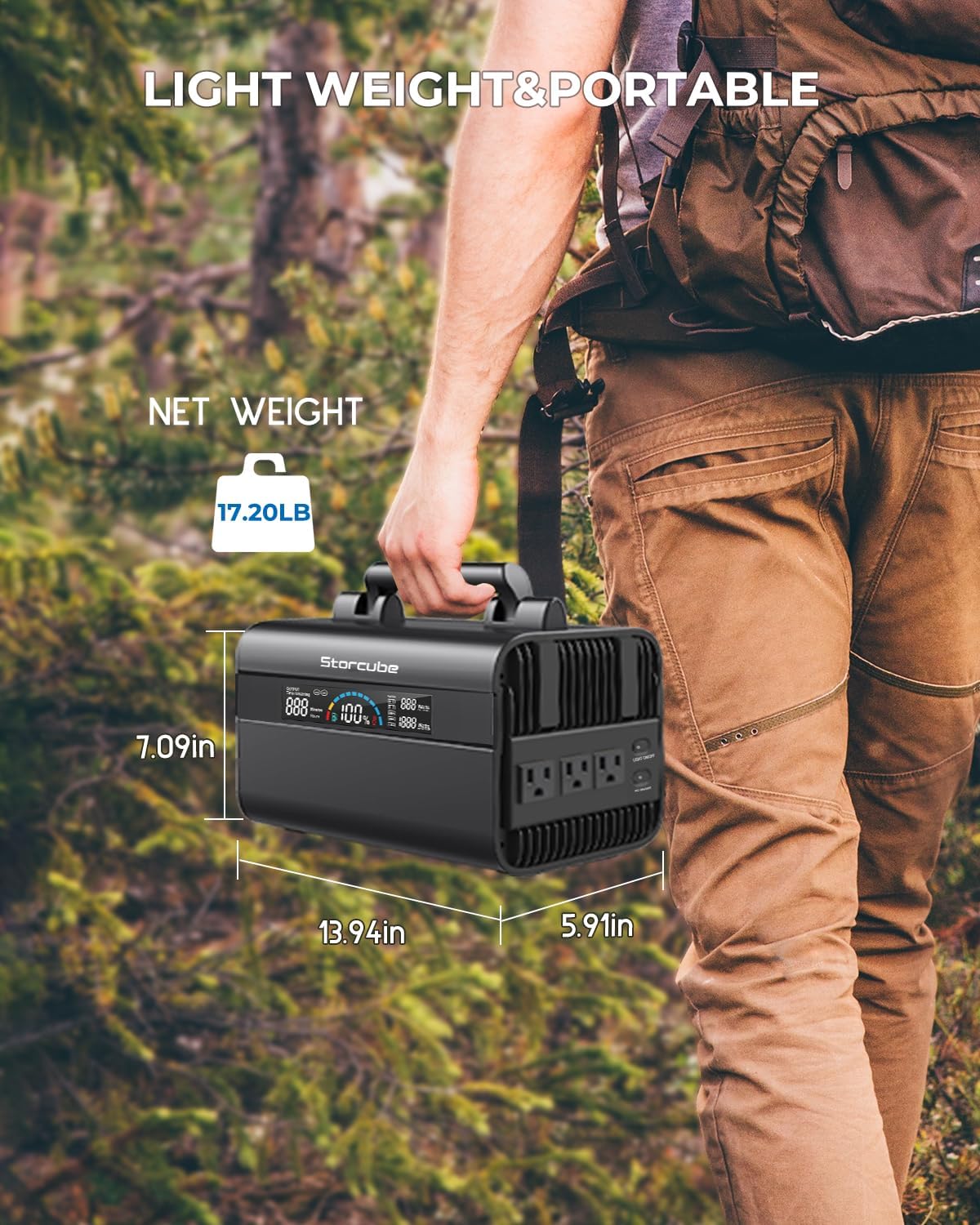
Image showing the dimensions (13.94"L x 5.91"W x 7.09"H) and net weight (17.20 lbs) of the portable power station, emphasizing its lightweight and portable design.
| Fitur | Rincian |
|---|---|
| Model | STC 03/600M |
| Jinis baterei | LiFePO4 (Lithium Iron Phosphate) |
| Kapasitas | 529.9Wh |
| Output AC | 600W (Rated), 1000W (Peak), 110V Pure Sine Wave, 60Hz |
| Output/Input USB-C | PD100W |
| Output USB-A | 1x QC3.0 (18W), 2x 5V/2.4A |
| Output DC | 4x DC5521, 1x 12V Car Outlet |
| DC Input | DC5521 (for AC adapter/car charging) |
| Masukan Surya | 18-24V (Max 120W) |
| Ukuran (L x W x H) | 13.94" x 5.91" x 7.09" |
| Bobot | 17.2 lbs |
| Bahan | alumunium |
| Suhu operasi | Recommended: 14°F to 104°F (-10°C to 40°C) |
| Suhu Pengisian | Recommended: 32°F to 104°F (0°C to 40°C) |
10.1. Output Gelombang Sinus Murni

Image illustrating the pure sine wave output, which provides stable power suitable for sensitive electronics.
The STORCUBE portable power station utilizes pure sine wave technology for its AC output. This ensures stable and clean power delivery, making it safe for sensitive electronics and precision electrical products, similar to the power supplied by a standard household wall outlet.
11. Warranty lan Dhukungan
STORCUBE provides a comprehensive warranty and dedicated customer support for your peace of mind.
- Garansi: The STORCUBE Portable Power Station 600W comes with an extended 5-YEAR warranty.
- Layanan Pelanggan: For any questions, technical assistance, or warranty claims, please contact STORCUBE customer service.
- Informasi Kontak: Refer to the contact details provided on the product packaging or the official STORCUBE websitus.