
1. Pambuka
Thank you for choosing the OUILA Rechargeable LED Cabinet Light. This manual provides detailed instructions for the safe and efficient use of your new lighting product. Please read it thoroughly before installation and operation, and retain it for future reference.
2. Produk Liwatview lan Isi Paket
The OUILA LED Cabinet Light is a versatile, rechargeable, and dimmable lighting solution featuring a motion sensor. It is designed for various indoor applications such as cabinets, wardrobes, drawers, stairs, and kitchens, providing comfortable and stable illumination.
Isi Paket:
- OUILA LED Cabinet Light Bar (x2 for 2-piece set)
- USB-C Charging Cable (x2 for 2-piece set)
- Adhesive Magnetic Strips (for non-metallic surfaces)

Image: Two OUILA LED cabinet light bars and their respective USB-C charging cables, illustrating the complete product package.
3. Fitur Utama
- Sensor gerak: Automatically detects human activity within 3 meters (10 feet) in dark environments.
- 3 Mode Cahya: Night Sensing (AUTO), Always ON, and OFF.
- Stepless Dimming: Adjustable brightness from 10% to 100% with memory function.
- Baterei sing bisa diisi ulang: Built-in 2800mAh lithium polymer battery, charged via USB-C.
- Desain Ultra-Tipis: 9mm thick aluminum alloy body for sleek integration.
- Proteksi mripat: High-quality LEDs provide stable, flicker-free, and anti-glare illumination.
- Instalasi Gampang: Integrated magnets for direct attachment to metallic surfaces or adhesive magnetic strips for other surfaces.

Image: Visual comparison highlighting the OUILA light's eye protection features, such as no flicker and a soft light source, compared to traditional cabinet lights.
4. Persiyapan lan Instalasi
The OUILA LED Cabinet Light offers two convenient installation methods:
Method 1: Magnetic Adsorption
The light bar has built-in magnets. Simply attach it directly to any magnetic metallic surface (e.g., iron shelves, refrigerators).
Method 2: Adhesive Magnetic Strips
For non-metallic surfaces (e.g., wood cabinets, walls), use the included double-sided adhesive magnetic strips:
- Clean the target surface to ensure it is dry and free of dust.
- Peel off the protective film from one side of the adhesive magnetic strip.
- Attach the strip firmly to the desired installation location.
- Align the light bar with the magnetic strip and allow the built-in magnets to secure it in place.
The light can be easily removed from the magnetic strips for charging or use as a portable light.

Image: Illustration of the two installation methods: using the built-in magnets for metallic surfaces and using adhesive magnetic strips for non-metallic surfaces.
5. Instruksi Operasi
The light features a multi-function button for mode selection and brightness adjustment.
5.1. Ngalih Mode
Press the button briefly to cycle through the three operating modes:
- First Press: Always ON Mode - The light remains continuously on.
- Second Press: Night Sensing Mode (AUTO) - The light will automatically turn on when motion is detected in a dark environment (within 3 meters / 10 feet). It will turn off after 20 seconds if no further motion is detected, conserving energy.
- Third Press: OFF Mode - The light is turned off.

Gambar: Detil view of the control panel, illustrating how to switch between Always-ON, Auto Sensing, and OFF modes with button presses.
5.2. Brightness Adjustment (Dimming)
When the light is on (in either Always ON or Night Sensing mode), press and hold the button to adjust the brightness continuously (stepless dimming) from 10% to 100%. Release the button when the desired brightness is reached. The light features a memory function, retaining the last brightness setting when turned off and on again.
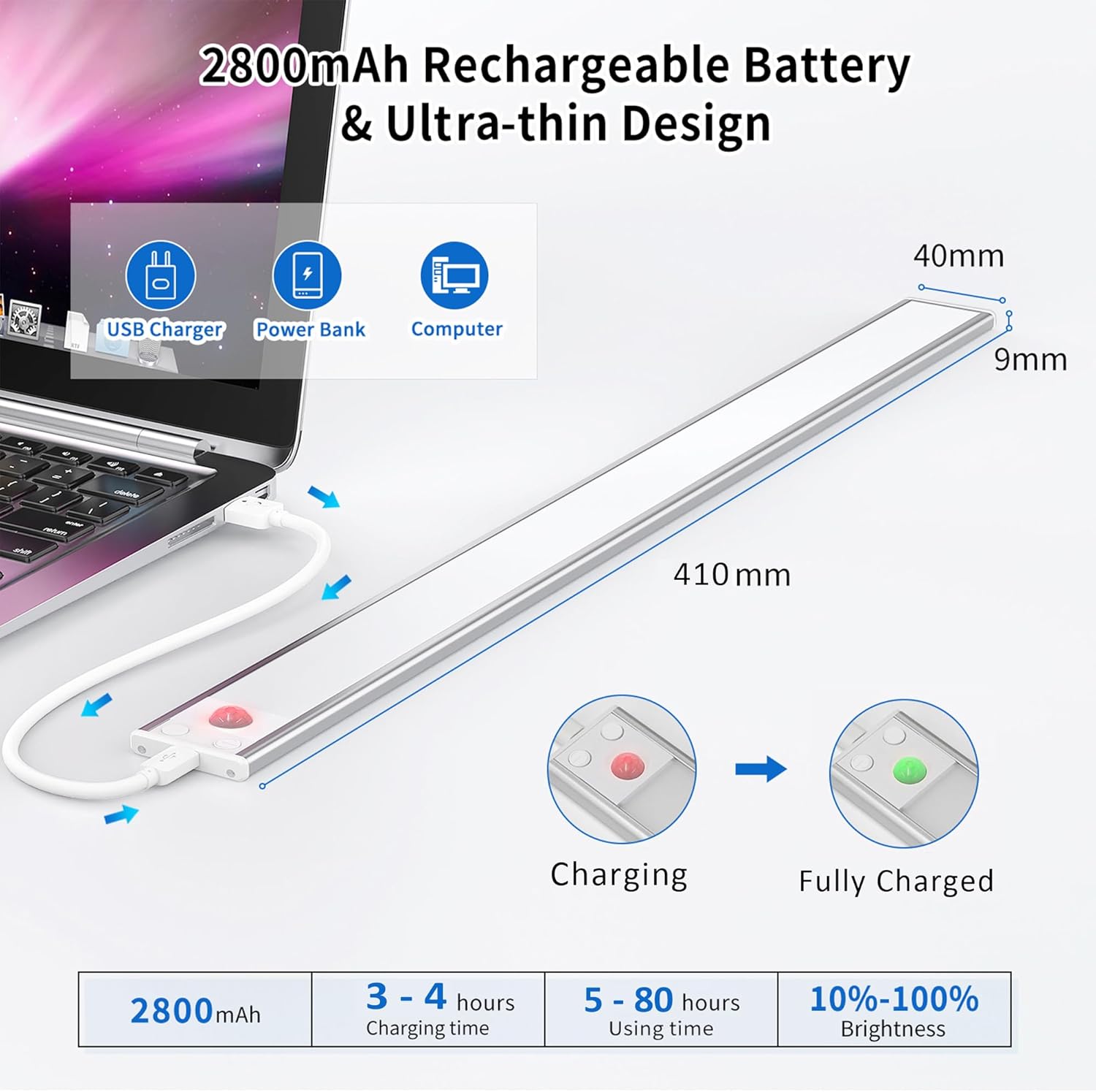
Image: Demonstration of the stepless dimming feature, showing the light's output at 10%, 50%, and 100% brightness in a kitchen setting.
6. Ngisi Daya Baterei
The OUILA LED Cabinet Light is equipped with a built-in 2800mAh rechargeable lithium polymer battery.
- Connect the provided USB-C charging cable to the light's charging port.
- Connect the other end of the cable to a DC 5V-1A power source (e.g., USB charger, power bank, computer USB port).
- Lampu indikator abang bakal sumunar nalika ngisi daya.
- Lampu indikator bakal dadi ijo nalika baterei wis kebak.
- Charging typically takes 3 to 4 hours.
- A full charge provides approximately 5 to 80 hours of use, depending on the selected brightness level and mode.

Image: Technical diagram detailing the product dimensions, various USB charging methods, and battery performance metrics including charging time and usage duration.
7. Pangopènan
- Reresik: Usap permukaan sing entheng nganggo kain alus lan garing. Aja nggunakake pembersih utawa pelarut sing abrasif.
- Perawatan baterei: To prolong battery life, avoid fully discharging the battery frequently. Charge the light regularly, especially if it will not be used for an extended period.
- Panyimpenan: Simpen cahya ing panggonan sing adhem lan garing yen ora digunakake.
8. Ngatasi masalah
| Masalah | Kemungkinan Penyebab | Solusi |
|---|---|---|
| Cahya ora urip. | Battery is depleted. Incorrect mode selected. | Charge the light fully. Press the button to switch to Always ON or Night Sensing mode. |
| Sensor gerak ora bisa digunakake. | Light is not in Night Sensing (AUTO) mode. Ambient light is too bright. Obstruction blocking sensor. | Ensure the light is in Night Sensing mode. The sensor only activates in dark environments. Clear any obstructions from the sensor area. |
| Light turns off too quickly in Night Sensing mode. | Ora ana gerakan terus-terusan sing dideteksi. | The light is designed to turn off after 20 seconds of no motion to save energy. This is normal operation. |
9. Spesifikasi
| Merk | OUILA |
| Nomer Model | GLS-C018 |
| Ukuran (L x W x H) | Ukuran 41 x 4 x 1.2 cm (16.1 x 1.6 x 0.5 inci) |
| Bobot | 490 g (1.08 lbs) |
| Bahan | Aluminium Alloy Kab |
| Suhu Warna Cahya | 6000K (Putih Keren) |
| Jumlah LED | 72 |
| daya | 5 Watt |
| Fluks cahya | 3000 Lumen |
| Kapasitas baterei | 2800 mAh |
| Port Pengisian | USB Tipe-C |
| Vol inputtage | 5 volt |
| Fitur Khusus | Motion Sensor, Dimmable, Rechargeable, Magnetic Installation |
| Lingkungan Panggunaan | njero ruangan |
10. Informasi Safety
- Do not disassemble, modify, or repair the product yourself. This may cause damage or injury.
- Keep the product away from water and high humidity to prevent electrical shock or damage.
- Do not expose the product to extreme temperatures (hot or cold) or direct sunlight for prolonged periods.
- Gunakake mung kabel USB-C sing kasedhiya utawa sing padha karo sing disertifikasi kanggo ngisi daya.
- Tetep adoh saka bocah-bocah.
11. Warranty lan Dhukungan
For any questions, concerns, or technical support regarding your OUILA LED Cabinet Light, please contact the seller or manufacturer through your purchase platform. Please have your model number (GLS-C018) and purchase details ready.