
Alula RE667W-R-Pro
Pandhuan Pangguna Alula RE667W-R-Pro Touchpad Slimline Pro
Model: RE667W-R-Pro
Pambuka
The Alula Slimline Touchpad PRO provides modern and intuitive control for your smart security system. Featuring a 7-inch full-color touchscreen, this device can be wall-mounted or placed on a tabletop, offering complete control of your security system from anywhere within your premises. It allows you to arm and disarm the system, view cameras, control smart devices, and initiate scenes. Its interface mirrors the Alula Smart Security app, ensuring ease of use and a familiar experience.

Figure 1: Alula Slimline Touchpad Pro main interface.
Isi Paket
- Alula Slimline Touchpad PRO
- Bracket Dinding Kab
- Meja Stand
- 110V Plug-in Transformer
- Pangisi daya
Setup lan Instalasi
The Slimline Touchpad PRO offers flexible installation options, including wall mounting or tabletop placement. Ensure the device is placed within Wi-Fi range for optimal performance.
Pemasangan Wall Mount
- Choose a suitable location on a wall, preferably near a power outlet.
- Secure the wall mount bracket to the wall using appropriate screws (not included).
- Connect the 12V direct wire or use the 110V plug-in transformer to power the device.
- Carefully attach the touchpad to the mounted bracket, ensuring it clicks securely into place.
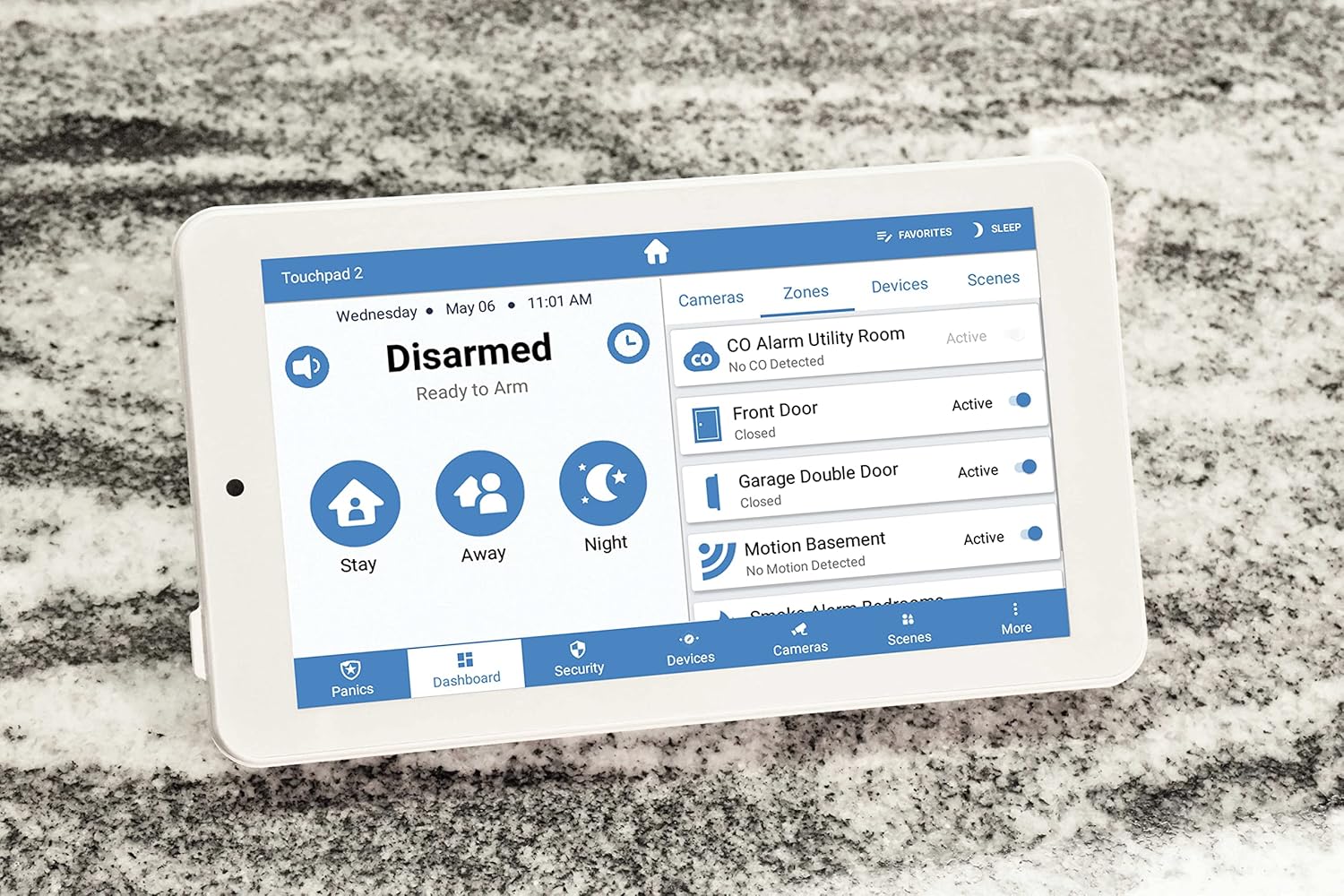
Figure 2: Touchpad in tabletop configuration, showing device and zone management.
Pemasangan Stand Meja
- Attach the tabletop stand to the back of the touchpad.
- Place the touchpad on a flat, stable surface.
- Connect the 110V plug-in transformer to the touchpad and plug it into a power outlet.
Initial Power-Up and Wi-Fi Connection
- Once powered, the touchpad will boot up.
- Follow the on-screen prompts to connect to your home Wi-Fi network.
- Ketik sandhi Wi-Fi nalika dijaluk.
- The touchpad will then attempt to connect to your Alula smart security system.
Instruksi Operasi
The Slimline Touchpad PRO provides comprehensive control over your Alula smart security system.
Arming lan Disarming
- Lengan Tetep: Tap the "Stay" icon to arm the system with interior motion sensors bypassed. Ideal for when you are home.
- Lengan Away: Tap the "Away" icon to arm all sensors. Ideal for when you leave the premises.
- Arm Night: Tap the "Night" icon for a customized arming mode, typically similar to "Stay" but with specific zones armed.
- Lumpuhake: Tap the "Disarmed" area and enter your user code to disarm the system.
Controlling Smart Devices and Scenes
- Navigate to the "Devices" or "Scenes" tab on the bottom menu.
- From the "Devices" tab, you can control connected smart home devices such as lights, locks, and thermostats.
- From the "Scenes" tab, you can activate pre-configured scenes that control multiple devices simultaneously (e.g., "Good Morning" scene).

Figure 3: Touchpad displaying a scenic background in disarmed state.
Komunikasi Audio Dua Arah
The touchpad supports two-way audio, allowing communication with monitoring stations or other connected devices if configured within your system.
Pangopènan
To ensure the longevity and optimal performance of your Alula Slimline Touchpad PRO, follow these maintenance guidelines:
- Reresik: Use a soft, dry, lint-free cloth to clean the touchscreen. For stubborn smudges, slightly dampen the cloth with water. Avoid abrasive cleaners, solvents, or aerosol sprays.
- Nganyari piranti lunak: Ensure your touchpad's software is kept up-to-date. Updates are typically pushed automatically via your Wi-Fi connection.
- Sumber Daya: Always use the original Alula power adapter. Do not use third-party adapters.
- Panggonan: Avoid placing the touchpad in direct sunlight, near heat sources, or in areas with extreme humidity.
Ngatasi masalah
| Masalah | Kemungkinan Penyebab | Solusi |
|---|---|---|
| Touchpad not powering on. | Ora ana daya, adaptor rusak, utawa sambungan kendho. |
|
| Ora bisa nyambung menyang Wi-Fi. | Sandhi salah, ora bisa diakses, utawa masalah router. |
|
| Layar tutul ora responsif. | Gangguan piranti lunak sementara utawa kerusakan fisik. |
|
| System not arming/disarming. | Incorrect user code, system fault, or communication issue. |
|
Spesifikasi
| Fitur | Rincian |
|---|---|
| Nomer Model | RE667W-R-Pro |
| Ukuran Layar | 7 ing |
| Resolusi | 1024 x 600 piksel |
| warna | Putih |
| Sumber Daya | 110V (with included transformer) or 12V direct wire |
| Konektivitas | Nirkabel (Wi-Fi) |
| Metode Kontrol | Tutul |
| Audio | Audio rong arah |
| Ukuran (L x W x H) | 9 x 6 x 4 inci |
| Jinis Instalasi | Wall Mount, Meja |
| Piranti sing kompatibel | Smartphone (via Alula Smart Security app) |
| UPC | 810044990607 |
Warranty lan Dhukungan
For warranty information and technical support, please refer to the official Alula website or contact your authorized Alula dealer. Keep your purchase receipt as proof of purchase.
Alula Support: alula.com/support
Ask a question about this manual
Ask about setup, troubleshooting, compatibility, parts, safety, or missing instructions. Manuals+ will review the question and use this page’s manual context to help answer it.