
1. Produk Liwatview
The Strex 4K 16MP Action Camera is designed for capturing high-quality photos and videos during various activities, from extreme sports to casual adventures. It features stunning 4K resolution, a 170-degree wide-angle lens, and Electronic Image Stabilization (EIS) for clear, stable footage sanajan ing lingkungan dinamis.
Equipped with built-in Wi-Fi, a 2-inch LCD screen, and a waterproof housing, this camera is versatile and user-friendly, allowing you to record and share your most exciting moments with ease.

Image 1.1: The Strex 4K 16MP Action Camera, shown within its transparent waterproof housing. The camera's rear screen displays a dynamic scene of a snowboarder, highlighting its capability for capturing action sports. The front lens and control buttons are clearly visible.
2. Fitur Utama
- Ultra HD 4K Video Recording: Capture breathtaking footage at 4K resolution with options for 30FPS, 1080P at 60FPS, or 720P at 120FPS for slow-motion effects.
- Resolusi Foto 16MP: Take crisp, high-detail still images.
- 170-Degree Wide-Angle Lens: Nyedhiyakake lapangan sing jembar view, perfect for capturing landscapes and immersive action shots.
- Stabilisasi Gambar Elektronik (EIS): Ensures smooth and steady video, minimizing blur from camera movement.
- Waterproof up to 30m (98ft): With the included waterproof housing, the camera is suitable for diving, snorkeling, and other water sports.
- Wi-Fi sing dibangun: Easily connect to your smartphone via a dedicated app for remote control, live preview, and instant sharing of content.
- Layar LCD 2-inch: Allows for easy framing of shots, playback, and menu navigation.
- Baterei 950 mAh: Nyedhiyani ample power for extended recording sessions.

Image 2.1: The Strex 4K Action Camera held in a hand, emphasizing its compact size. Overlaid text highlights its main features: 16MP Camera, 4K Resolution, 60FPS, WiFi connectivity, and a 950 mAh battery.
3. Isi Paket
Your Strex Action Camera package includes a variety of accessories to enhance your recording experience across different activities. Please verify that all items listed below are present:
- Perumahan anti banyu
- Pemasangan Bracket
- Kait Gesper
- Clamping Sistem
- Sekrup Pangaturan
- Adapter Piece
- Gunung Datar
- Pemasangan Tali
- Fixing Cable
- Kabel Pengisian
- Manual pangguna (dokumen iki)
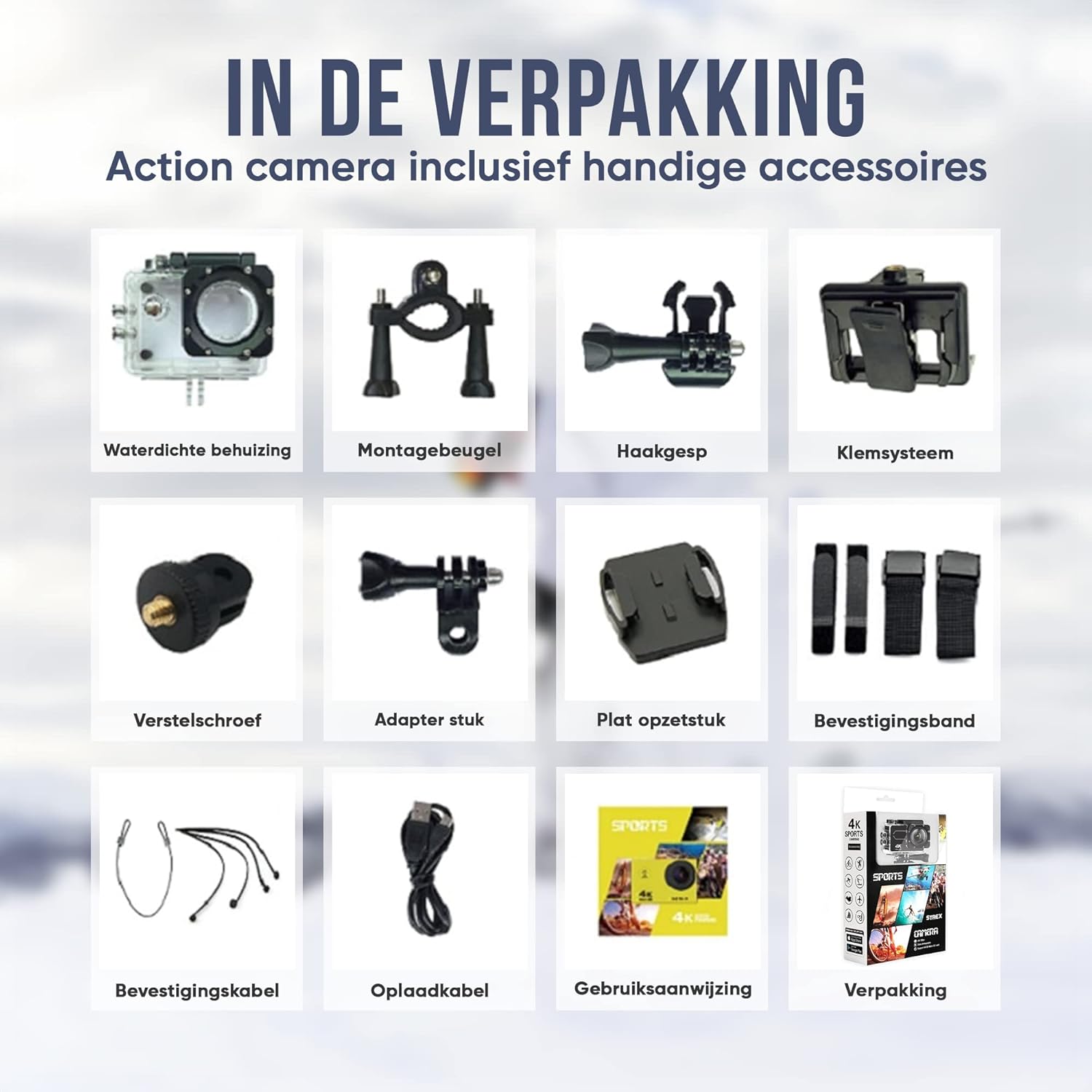
Image 3.1: A visual representation of all accessories included with the Strex Action Camera. This grid displays the waterproof housing, various mounting brackets, buckles, screws, adapter pieces, straps, and cables, along with the user manual and product packaging.
4. Setup
4.1 Ngisi daya baterei
Before first use, fully charge the camera's battery. Connect the included charging cable to the camera's charging port and a USB power source (e.g., computer, wall adapter). The charging indicator light will show the charging status and turn off when fully charged.
4.2 Nglebokake kertu SD Micro
The camera supports Micro SD cards for storage. Open the Micro SD card slot cover, and gently insert a compatible Micro SD card (Class 10 or higher recommended) with the contacts facing the correct direction until it clicks into place. Close the cover securely.
4.3 Pasang Aksesoris
Depending on your activity, select the appropriate accessories from the package. For water sports, ensure the camera is securely placed inside the waterproof housing. For mounting on helmets, bicycles, or other surfaces, use the relevant mounting brackets and straps. Always ensure accessories are firmly attached before use.

Image 4.1: The Strex Action Camera shown mounted on a helmet, illustrating its suitability for various rugged environments. Icons depict activities such as motorcycling, skydiving, skiing, diving, and cycling, demonstrating the camera's versatility with different mounts.

Image 4.2: The Strex Action Camera encased in its waterproof housing, submerged in water. The image visually confirms its waterproof capability up to 30 meters, with depth markers at 10M, 20M, and 30M, making it ideal for diving, snorkeling, and other water sports.
5. Ngoperasikake Kamera
5.1 Powering On / Off
Press and hold the Power/Mode button (usually on the front or top) for a few seconds to turn the camera on or off.
5.2 Navigasi Menu
Use the Mode button to cycle through different camera modes (Video, Photo, Playback, Settings). Use the Up/Down buttons (if present) to navigate within menus and the Shutter/OK button to confirm selections.
5.3 Recording Video / Taking Photos
In Video mode, press the Shutter/OK button to start recording. Press it again to stop. In Photo mode, press the Shutter/OK button to take a picture.
5.4 Konektivitas Wi-Fi lan Kontrol Aplikasi
To use Wi-Fi, enable it in the camera's settings. Download the free Strex app (available for Android and iOS) on your smartphone. Connect your phone to the camera's Wi-Fi network (SSID and password usually displayed on the camera screen). Once connected, you can control the camera, view urip footage, lan transfer files directly from your phone.

Image 5.1: A smartphone screen showing the Strex action camera's companion app, positioned next to the camera itself. This illustrates the ease of sharing and controlling the camera wirelessly, with icons for App Store and Google Play indicating where to download the application.
5.5 Mode lan Setelan kamera
The camera offers various modes such as Slow Motion and Time-lapse. Access these through the camera's menu settings. Adjust video resolution, photo quality, white balance, exposure, and other parameters to suit your recording conditions.

Image 5.2: The Strex Action Camera in its waterproof case, with an arrow pointing to its 2-inch screen. The image highlights the camera's 170-degree wide-angle capability and available camera modes such as Slow Motion and Time-lapse, indicating its versatility for different shooting styles.
6. Pangopènan
- Reresik: Gunakake kain sing alus lan garing kanggo ngresiki awak kamera. Kanggo lensa, gunakake kain pembersih lensa khusus lan solusi.
- Perumahan anti banyu: After using the waterproof housing in saltwater, rinse it with fresh water and let it air dry. Ensure the seals are clean and free of debris.
- Panyimpenan: Store the camera and accessories in a cool, dry place away from direct sunlight and extreme temperatures. Remove the battery if storing for extended periods.
- Perawatan baterei: Aja ngeculake baterei kanthi asring. Ngisi daya kanthi rutin, sanajan ora digunakake, kanggo njaga kesehatan baterei.
7. Ngatasi masalah
7.1 Kamera Ora Nyala
- Priksa manawa batere wis kebak.
- Priksa manawa baterei wis dipasang kanthi bener.
- Try connecting the camera to a power source to see if it powers on.
7.2 Poor Video/Photo Quality
- Clean the camera lens and waterproof housing lens.
- Ensure sufficient lighting in your recording environment.
- Check camera settings (resolution, EIS, exposure).
- Use a high-speed Micro SD card (Class 10 or higher).
7.3 Masalah Sambungan Wi-Fi
- Ensure Wi-Fi is enabled on both the camera and your smartphone.
- Wiwiti maneh kamera lan smartphone sampeyan.
- Verify the Wi-Fi password if prompted.
- Ensure your smartphone is within range of the camera's Wi-Fi signal.
7.4 Camera Freezes/Unresponsive
- Copot lan lebokake maneh baterei kanggo ngreset hard.
- Format the Micro SD card (this will erase all data, so back up first).
- Ensure the camera's firmware is up to date (check Strex websitus kanggo nganyari).
8. Spesifikasi Teknis
| Merk | Strex |
| Model | SP257 |
| Jinis produk | Kamera Tindakan |
| warna | ireng |
| Resolusi Video | 4K 30FPS, 1080P 60FPS, 1080P 30FPS, 720P 120FPS |
| Resolusi Foto Diam | 16 megapiksel |
| Lensa | 170-Degree Wide-Angle |
| Stabilisasi Gambar | Stabilisasi Gambar Elektronik (EIS) |
| Waterproof ambane | Up to 30 meters (with waterproof housing) |
| Tipe Layar | 2-inch LCD |
| Konektivitas | Wi-Fi |
| Media Panyimpenan | Micro SD |
| Kapasitas baterei | 950 mAh |
| Ukuran produk (L x W x H) | 2.5 x 4 x 6 cm |
| Bobot Barang | 55 XNUMXgm |
| Format Video | AVI |
| Format Audio | AAC |
| Teknologi Sensor Foto | CMOS |
9. Warranty lan Dhukungan
For warranty information and customer support, please refer to the official Strex websitus utawa hubungi pengecer Panjenengan. Simpen kuitansi tuku minangka bukti tuku kanggo klaim garansi.
For the latest software updates, FAQs, and additional support resources, visit the Strex support page.
Note: Information regarding spare parts availability and software updates is not explicitly provided in the product data. Please contact Strex customer service for details.


