
Pambuka
Thank you for choosing the sonoro Primus Internet Radio with Bluetooth. This manual provides essential information for setting up, operating, and maintaining your device to ensure optimal performance and longevity. Please read it thoroughly before use.
Pandhuan Safety Penting
- Sumber Daya: Gunakake mung adaptor daya sing ditemtokake. Priksa manawa voltage cocog karo sumber daya lokal.
- Ventilasi: Aja ngalangi bukaan ventilasi. Njaga papan sing nyukupi ing saubengé unit kanggo aliran udara sing tepat.
- Banyu lan Kelembapan: Do not expose the unit to rain, moisture, dripping, or splashing. Keep liquids away from the device.
- panas: Aja masang ing cedhak sumber panas kayata radiator, register panas, kompor, utawa piranti liyane (kalebu ampliifiers) sing ngasilake panas.
- Reresik: Unplug the unit before cleaning. Use a dry cloth only.
- Layanan: Aja nyoba layanan produk iki dhewe. Hubungi kabeh layanan kanggo personel layanan sing berkualitas.
- Produk Laser: This product contains a Class 1 laser. Do not open the casing.
Isi Paket
Mangga priksa manawa kabeh item ana:
- sonoro Primus Internet Radio Unit
- Adaptor Daya
- Remote Control (karo baterei)
- Manual pangguna (dokumen iki)
Setup
1. Unpacking lan Panggonan
Carefully remove the unit from its packaging. Place the sonoro Primus on a stable, flat surface, ensuring adequate ventilation around the device. Avoid placing it near strong magnetic fields or direct sunlight.
2. Daya Nyambung
Connect the provided power adapter to the AC IN port on the rear of the unit. Plug the other end into a suitable wall outlet. The unit will enter standby mode.
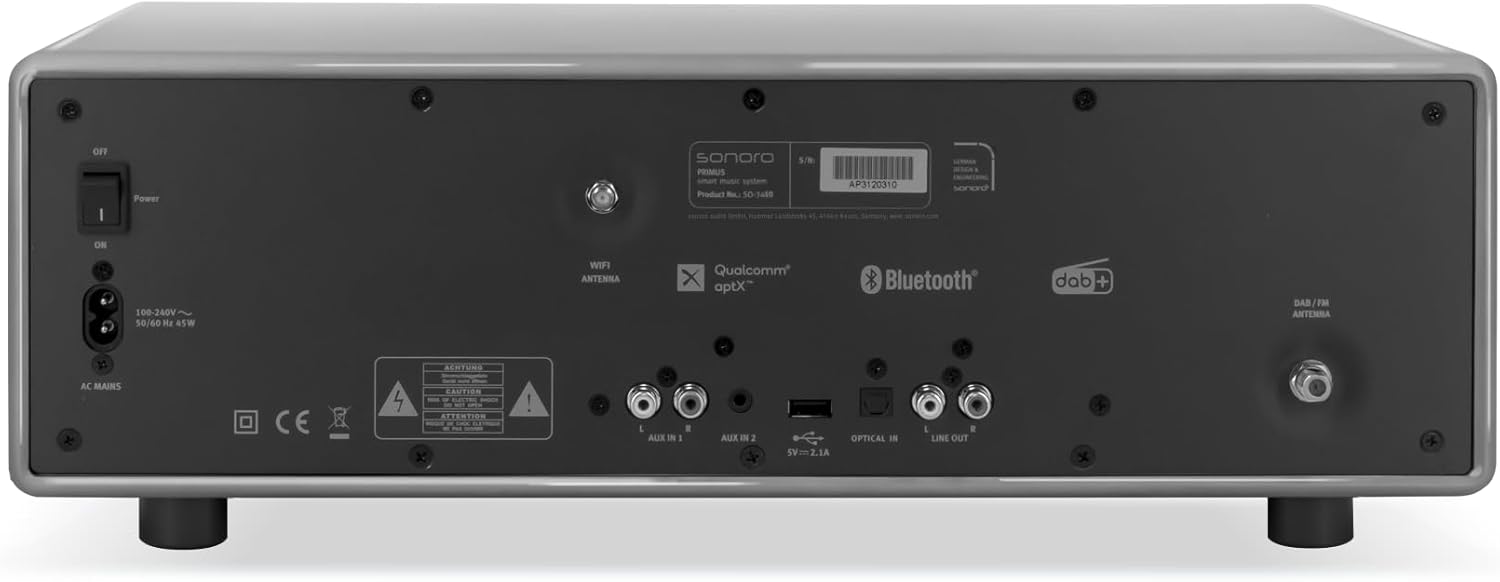
Gambar: Rear panel of the sonoro Primus, highlighting the power input and other connectivity options like AUX-in, Optical-in, and antenna connections.
3. Sambungan Antena
For optimal FM and DAB+ reception, connect the included antenna to the appropriate antenna input on the rear panel. Extend the antenna fully for best signal quality.
4. Daya wiwitan
Press the Power button on the front panel or the remote control to turn on the unit. Follow the on-screen instructions for initial setup, including language selection and network configuration.

Gambar: Ngarep view of the sonoro Primus, displaying the central screen, control knobs, and various buttons for media playback and source selection.
Instruksi Operasi
Kontrol dhasar
The sonoro Primus features intuitive controls on the front panel and a comprehensive remote control. Key controls include:
- Tombol daya: Nguripake/mateni unit utawa menyang mode siaga.
- Tombol Volume: Nyetel tingkat volume master.
- Tombol Setel/Pilih: Navigasi menu lan milih opsi.
- Tombol Sumber: Selects input sources (Internet Radio, DAB+, FM, Bluetooth, CD, AUX-in, Optical-in).
- Kontrol puter maneh: Play/Pause, Skip Forward/Backward for CD and streaming.
Internet Radio and Podcasts
Access over 25,000 internet radio stations and numerous podcasts worldwide. Ensure your device is connected to a stable Wi-Fi network. Navigate through the menu using the Tune/Select knob to find and save your favorite stations.
DAB+ and FM Radio
Switch to DAB+ or FM mode using the source buttons. The unit will automatically scan for available stations. You can manually tune or save presets for quick access to your preferred channels.
Konektivitas Bluetooth
To connect a Bluetooth device (smartphone, tablet, laptop):
- Select the Bluetooth source on the sonoro Primus.
- Aktifake Bluetooth ing piranti eksternal sampeyan.
- Nggoleki "sonoro Primus" in your device's Bluetooth settings and pair.
- Sawise disambungake, sampeyan bisa stream audio kanthi nirkabel menyang unit.
Puter maneh CD
Insert an audio CD into the CD slot. The unit will automatically detect and begin playback. Use the playback controls to manage your music.
Streaming Services (Spotify Connect, Amazon Music, Deezer)
The sonoro Primus supports various streaming services. To use Spotify Connect, Amazon Music, or Deezer, ensure your device is connected to Wi-Fi and you have an active subscription to the respective service. Follow the instructions within the service's app to connect to your sonoro Primus.
AUX-in and Optical-in
Connect external audio devices using the AUX-in (3.5mm jack) or Optical-in ports on the rear panel. Select the corresponding source on the unit to play audio from these inputs.
Pangopènan
Reresik Unit
To clean the exterior of the unit, unplug it from the power source. Use a soft, dry, lint-free cloth. Do not use abrasive cleaners, waxes, or solvents as they may damage the finish.
Perawatan Pamuter CD
Handle CDs by their edges to avoid fingerprints. If a CD is dirty, wipe it gently with a soft, dry cloth from the center outwards. Do not use solvents or abrasive cleaners on CDs.
Nganyari piranti lunak
Periodically check for software updates via the unit's menu (if available). Updates can improve performance and add new features. Ensure a stable internet connection during updates.
Ngatasi masalah
| Masalah | Kemungkinan Penyebab | Solusi |
|---|---|---|
| Ora ana daya | kabel daya ora nyambung; stopkontak rusak. | Priksa sambungan kabel daya; nyoba stopkontak liyane. |
| Ora ana swara | Volume too low; wrong input source selected; mute activated. | Increase volume; select correct input source; deactivate mute. |
| Resepsi radio sing ora apik | Antenna not properly connected or extended; interference. | Adjust antenna position; move unit away from other electronic devices. |
| Pasangan Bluetooth gagal | Piranti kejauhan; Bluetooth ora diaktifake ing piranti eksternal; unit ora ana ing mode pasangan. | Ensure devices are close; enable Bluetooth; put sonoro Primus in pairing mode. |
| CD ora muter | CD dipasang salah; CD reged utawa scratched; format disk sing ora didhukung. | Reinsert CD correctly; clean or replace CD; ensure it's an audio CD. |
| Masalah sambungan Wi-Fi | Sandhi salah; router kelewat adoh; gangguan jaringan. | Verify Wi-Fi password; move unit closer to router; restart router. |
Yen masalah tetep, hubungi dhukungan pelanggan.
Spesifikasi
- Merk: sonoro
- Model: e60a53a9-4d44-4a55-b129-3386e8f3e186
- Teknologi Tuner: FM, DAB+
- Mode Output Audio: Stereo
- Format Audio sing Didhukung: MP3, AAC, WAV
- Konfigurasi Speaker: 2.1 (Two coaxial speakers and a powerful 5.25 inch subwoofer)
- Konektivitas: Optical, Auxiliary, Bluetooth, WLAN
- Piranti sing kompatibel: Laptop, MP3 player, Smartphone, Tablet
- Sumber Daya: Kabel Listrik Kab
- Tipe tampilan: LCD utawa LED
- Komponen sing kalebu: Power adapter, Remote control (with Lithium-metal batteries)
- Ukuran (Paket): 52.6 x 33.2 x 27.4 cm
- Berat (Paket): 9.45 kg
- warna: Chalk Grey (Note: Other colors may be available for different models)
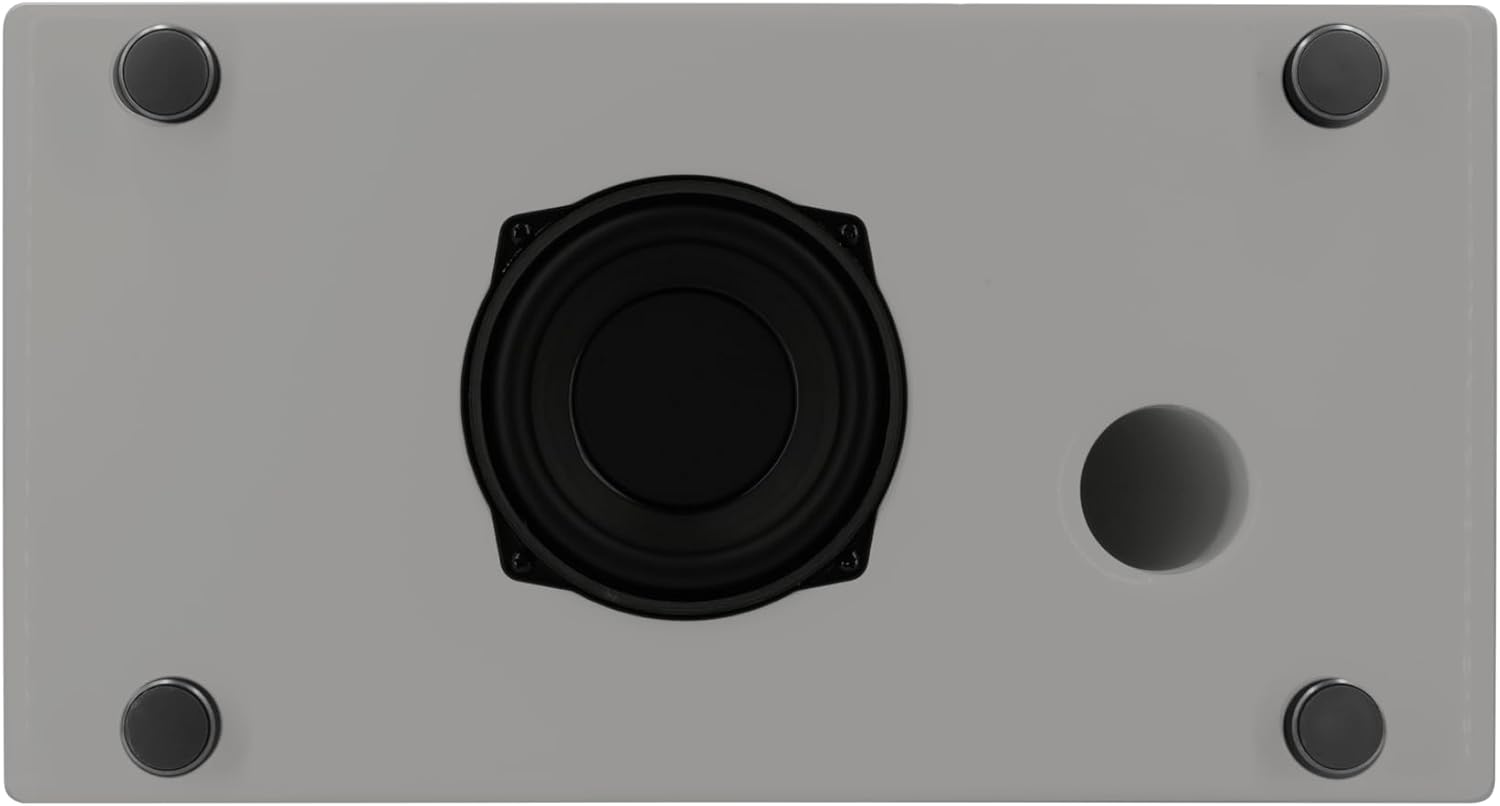
Gambar: Underside of the sonoro Primus, revealing the integrated 5.25-inch subwoofer for enhanced bass performance.
Warranty lan Dhukungan
The sonoro Primus comes with a standard manufacturer's warranty. Please refer to the warranty card included in your package for specific terms and conditions. For technical support, service, or warranty claims, please contact sonoro audio GmbH customer service through their official websitus utawa informasi kontak sing kasedhiya karo tuku.
Produsen: sonoro audio GmbH
Tanggal kasedhiya pisanan: 2 Januari 2023