
Pambuka
Thank you for choosing the Dpofirs Portable MP3 Player. This device is designed to provide high-quality, lossless audio playback in a compact and durable form factor. This manual will guide you through the setup, operation, and maintenance of your new MP3 player.
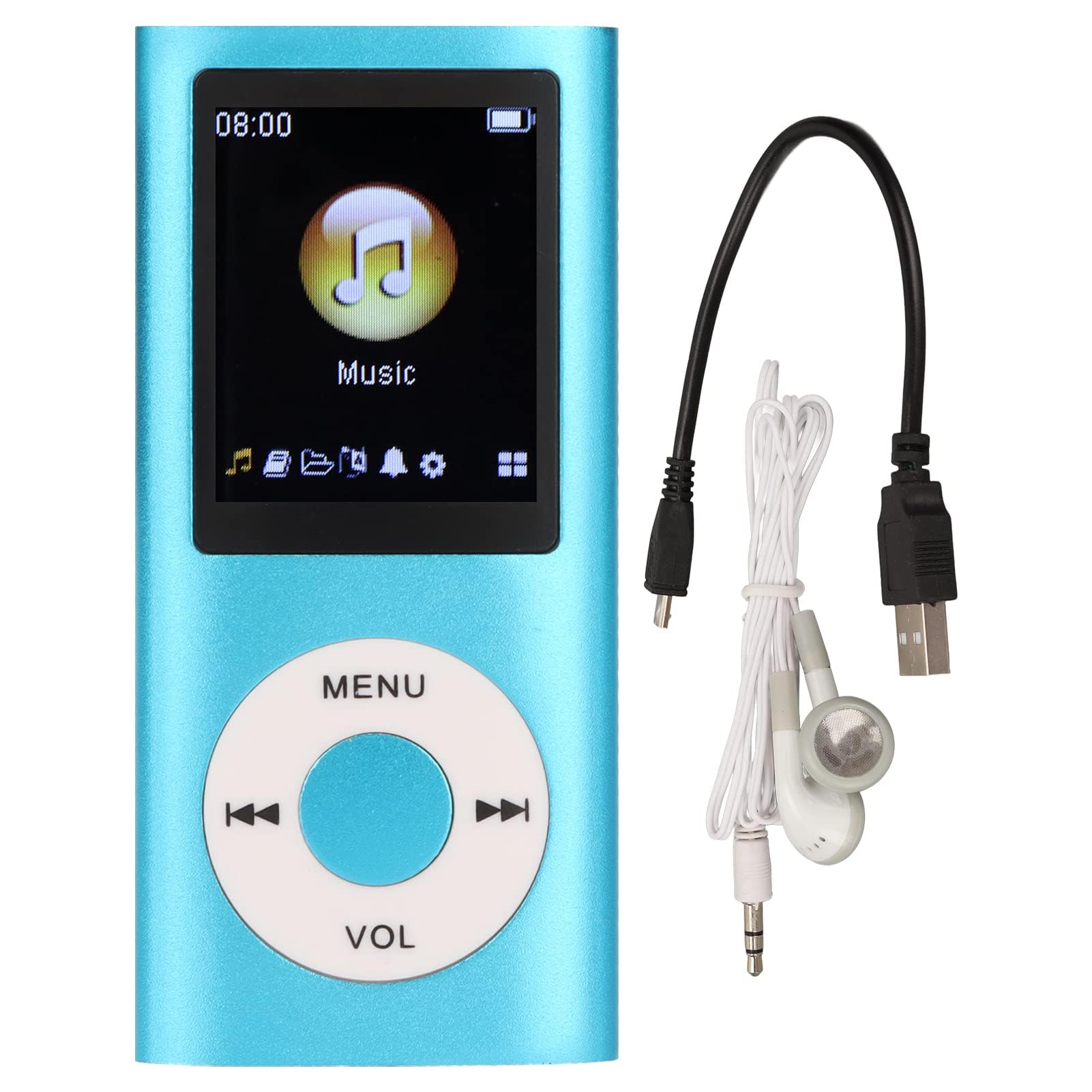
Image: The Dpofirs Portable MP3 Player, featuring a blue aluminum alloy casing and a circular control pad. A person is visible in the background, enjoying music with headphones.
Isi Paket
Mangga dipriksa paket kanggo item ing ngisor iki:
- 1 x Dpofirs MP3 Player
- 1 x Kabel Pengisian
- 1 x Earphone
Fitur Utama
- Kualitas Swara Tanpa Loss: Supports MP3, WMA, FLAC, APE, AAC, OGG, and ACELP audio formats.
- Memori sing bisa ditambahi: Supports up to 64GB memory card (not included). MYMAHDI memory cards are recommended.
- Antarmuka pangguna-loropaken: Easy navigation for selecting songs, creating playlists, and managing playback.
- Urip baterei dawa: Nganti 8 jam puter maneh terus-terusan kanthi daya lengkap.
- Desain awet: Constructed from premium aluminum alloy for enhanced durability.
- Mode puter maneh: Supports sequential and random playback, and sleep shutdown function.
Setup
1. Ngisi daya Piranti
Sadurunge digunakake pisanan, isi daya pamuter MP3 sampeyan nganti kebak.
- Connect the provided charging cable to the MP3 player's charging port.
- Sambungake ujung kabel liyane menyang adaptor daya USB (ora klebu) utawa port USB komputer.
- The device will indicate charging status. A full charge typically takes approximately 2 hours.
penting: Ensure the charging cable is functioning correctly. If the device does not charge, try a different USB port or adapter.
2. Nglebokake kertu memori
The MP3 player requires a memory card for storing music.
- Locate the memory card slot on the side of the MP3 player.
- Gently insert a microSD card (up to 64GB, not included) into the slot until it clicks into place.
- Kanggo nyopot, push kertu menyang rada nganti spring metu.
Cathetan: A memory card is not included with the player. MYMAHDI brand memory cards are recommended for optimal performance.
3. Nyambungake Earphone
Connect the provided earphones or your preferred 3.5mm audio headphones to the headphone jack on the MP3 player.
Instruksi Operasi
1. Daya On / Off
- To power on, press and hold the power button (usually the Play/Pause button or a dedicated power button) until the screen lights up.
- Kanggo mateni piranti, pencet terus tombol daya maneh nganti layar mati.
2. Pandhu arah dhasar
The MP3 player features a circular control pad with several buttons:
- MENU: Bukak menu utama utawa bali menyang layar sadurunge.
- VOL (+/-): Nyetel tingkat volume.
- Puter / Ngaso: Miwiti utawa ngaso puter maneh.
- Sabanjure/Sadurunge: Skip to the next track or go back to the previous track. Long press to fast forward/rewind.
3. Transfer Musik Files
To transfer music to your MP3 player:
- Connect the MP3 player to your computer using the charging cable.
- The player should appear as a removable disk drive on your computer.
- Seret lan selehake musik sampeyan files (MP3, WMA, FLAC, APE, AAC, OGG, ACELP) into the player's memory card folder.
- Copot piranti saka komputer kanthi aman sadurunge nyopot kabel.
4. Muter Musik
- Saka menu utama, bukak bagean "Musik" utawa "Audio".
- Browse your music by artist, album, genre, or all songs.
- Select a song to begin playback.
- Use the Play/Pause, Next/Previous, and VOL buttons to control playback.
5. Pilihan Puter maneh
- Dhaptar lagu: Create and manage custom playlists directly on the device.
- Shuffle/Repeat: Toggle between sequential playback, shuffle, and repeat modes.
- Sleep Shutdown: Set a timer for the device to automatically power off.
Pangopènan
- Jaga piranti tetep garing. Kelembapan bisa ngrusak sirkuit internal.
- Ngindhari suhu sing ekstrem.
- Resiki piranti nganggo kain alus lan garing. Aja nggunakake bahan kimia utawa bahan pembersih sing atos.
- Nglindhungi layar saka goresan.
- Simpen piranti ing panggonan kang aman yen ora dienggo.
Ngatasi masalah
Piranti ora urip:
- Ensure the battery is charged. Connect the player to a power source and allow it to charge for at least 30 minutes.
- Try pressing and holding the power button for an extended period (5-10 seconds).
Cannot hear any sound:
- Check if the earphones are properly connected to the headphone jack.
- Tambah volume nganggo tombol VOL+.
- Test with a different pair of earphones to rule out faulty headphones.
- Priksa manawa audio files are not corrupted and are in a supported format.
Musik files are not recognized:
- Ensure the memory card is properly inserted and recognized by the device.
- Priksa manawa musik kasebut files are in one of the supported formats (MP3, WMA, FLAC, APE, AAC, OGG, ACELP).
- Try reformatting the memory card (this will erase all data) and re-transferring the music.
- Ensure the memory card is not full.
Piranti macet utawa ora nanggepi:
- Pencet terus tombol daya watara 10-15 detik kanggo meksa miwiti maneh.
- If available, use a small pin to press the reset button (if present on the device).
Spesifikasi
| Merk | Dpofir |
| Nomer Model | Dpofirs5yhtvp70d23123-13 |
| Bahan | Aluminium Alloy Kab |
| Baterei | Baterei Lithium 200mAh sing dibangun |
| Wektu Ngisi daya | Kira-kira. 2 jam |
| Wektu Playback | Nganti 8 jam (diisi daya kanthi lengkap) |
| Dhukungan kertu memori | Up to 64GB (microSD, not included) |
| Format Audio sing Didhukung | MP3, WMA, FLAC, APE, AAC, OGG, ACELP |
| Teknologi Konektivitas | Tambahan, Bluetooth, Wi-Fi (Note: Bluetooth/Wi-Fi functionality not detailed in product description, focusing on core MP3 player features) |
| warna | Biru |
| Negara Asal | Cina |
Warranty lan Dhukungan
Specific warranty information for this product is not provided in the available documentation. Please refer to the retailer's return policy or contact the seller directly for details regarding warranty coverage.
For technical support or further assistance, please contact Dpofirs customer service through the platform where you purchased the product.