
Collective Minds CM00136
Collective Minds Strike Pack Eliminator
Manual Instruksi Panganggo
Model: CM00136 | Brand: Collective Minds
Pambuka
The Collective Minds Strike Pack Eliminator is an advanced controller adapter designed to enhance your gaming experience on Xbox Series X|S and Xbox One. This device adds four remappable hyper-response back buttons and pre-installed MODS, providing a competitive edge without the need for expensive custom controllers. It is ergonomically designed for a perfect fit with standard Xbox Series 1914 controllers and Xbox One 1537, 1697, & 1708 models.

Gambar 1: Ngarep view of the Collective Minds Strike Pack Eliminator.
Setup
Follow these steps to properly install your Strike Pack Eliminator onto your Xbox controller:
- Prepare your controller: Ensure your Xbox controller is powered off and any existing battery pack or cover is removed from the battery compartment.
- Insert the back plate: Locate the correct back plate for your controller model (Xbox Series 1914 or Xbox One 1537, 1697, & 1708). Slide the designated back plate into the battery compartment of your controller until it clicks securely into place.

Gambar 2: Mburi view of the Strike Pack Eliminator attached to an Xbox controller, showing the back plate integration.
- Attach the Strike Pack: Align the Strike Pack Eliminator with the back plate. Gently slide the Strike Pack onto the controller, ensuring the connectors on the Strike Pack align with the ports on the back plate. It should snap into place.

Gambar 3: Angled view of the Strike Pack Eliminator securely attached to an Xbox controller.
- Sambungake kabel USB: Plug the included USB cable into the port on the top of the Strike Pack Eliminator and connect the other end to your Xbox console or PC. The Strike Pack will illuminate, indicating a successful connection.
For a visual guide on the setup process, please refer to the official product videos available on the product page.
Instruksi Operasi
The Strike Pack Eliminator offers remappable back buttons and various gaming MODS to enhance your gameplay.
Remapping Back Buttons:
- To remap a back button, press and hold the small button on the front of the Strike Pack (usually indicated by a small LED).
- While holding the small button, press the back button you wish to remap.
- Then, press the controller button you want to assign to the back button (e.g., A, B, X, Y, bumper, trigger).
- Release all buttons. The back button is now remapped. Repeat for other back buttons as desired.
Using Built-in MODS:
The Strike Pack comes with pre-installed MODS such as anti-recoil, rapid fire, and quick scope. These MODS are activated through specific button combinations or by mapping them to the back paddles.
- Refer to the detailed user guide (PDF) for a complete list of MODS and their activation methods.
- MODS can often be toggled on/off or adjusted for intensity directly from the Strike Pack.
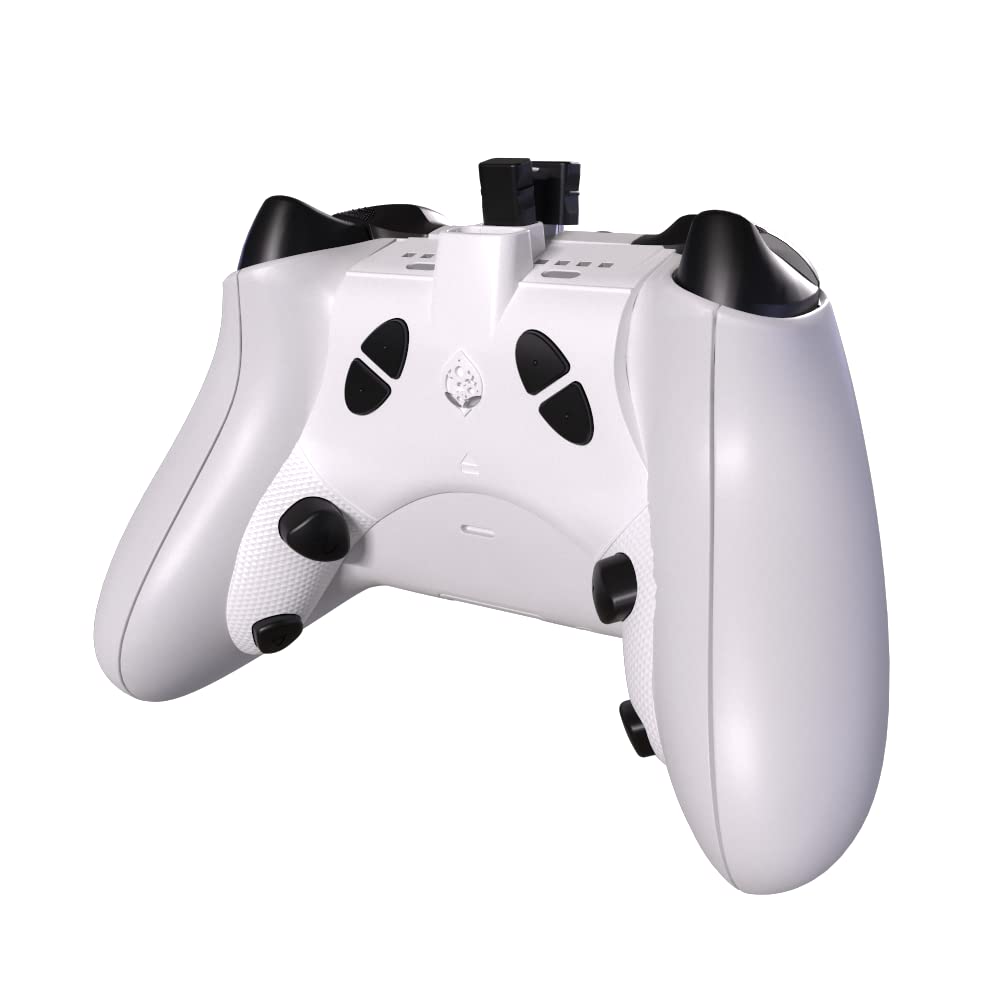
Figure 4: The Strike Pack Eliminator attached to a controller, highlighting the remappable back buttons.
Pangopènan
To ensure the longevity and optimal performance of your Strike Pack Eliminator, follow these maintenance guidelines:
- Reresik: Use a soft, dry cloth to wipe down the Strike Pack and your controller. Avoid using harsh chemicals or abrasive materials.
- Panyimpenan: When not in use, store the Strike Pack in a cool, dry place away from direct sunlight and extreme temperatures.
- Perawatan kabel: Aja mlengkung utawa crimping kabel USB banget kanggo nyegah karusakan.
Ngatasi masalah
If you encounter issues with your Strike Pack Eliminator, try the following solutions:
| Jeksa Agung bisa ngetokake | Solusi sing mungkin |
|---|---|
| Strike Pack not powering on/LED not lighting up. |
|
| Back buttons not remapping or MODS not activating. |
|
| Controller disconnects or behaves erratically. |
|
Spesifikasi
| Fitur | Rincian |
|---|---|
| Nomer Model | CM00136 |
| Kompatibilitas | Xbox Series X|S (1914 model), Xbox One (1537, 1697, & 1708 models) |
| Konektivitas | Kabel USB |
| Tombol mburi | 4 Hyper-response, remappable |
| Built-in MODS | Anti-recoil, Rapid Fire, Quick Scope, and more |
| ukuran | 3.25 x 3.5 x 1 inci |
| Bobot | 8, XNUMXuw |
| Produsen | Collective Minds Gaming |
Warranty lan Dhukungan
For detailed warranty information and further support, please visit the official Collective Minds website or refer to the full user guide PDF provided with your product. You can also find the user guide online at: Collective Minds User Guide (PDF).
Ask a question about this manual
Ask about setup, troubleshooting, compatibility, parts, safety, or missing instructions. Manuals+ will review the question and use this page’s manual context to help answer it.