
Pambuka
The FreedConn T-COMVB Bluetooth Helmet Headset is designed to provide wireless communication for motorcyclists. This system allows for hands-free phone calls, music listening, FM radio, GPS voice prompts, and intercom communication between riders. It features Bluetooth 5.0 technology, noise cancellation, and a waterproof design for various riding conditions.
Apa ing Box
Priksa manawa kabeh komponen ana ing paket sampeyan:
- FreedConn T-COMVB Bluetooth Headset Unit (x2 for 2-pack)
- Speaker Stereo
- Boom Microphone (for open-face/modular helmets)
- Soft-Wire Microphone (for full-face helmets)
- Helmet Mount Bracket (clip-on and adhesive options)
- Kabel Pengisian USB
- Manual pangguna
- Velcro Pads kanggo Speakers lan Mikropon
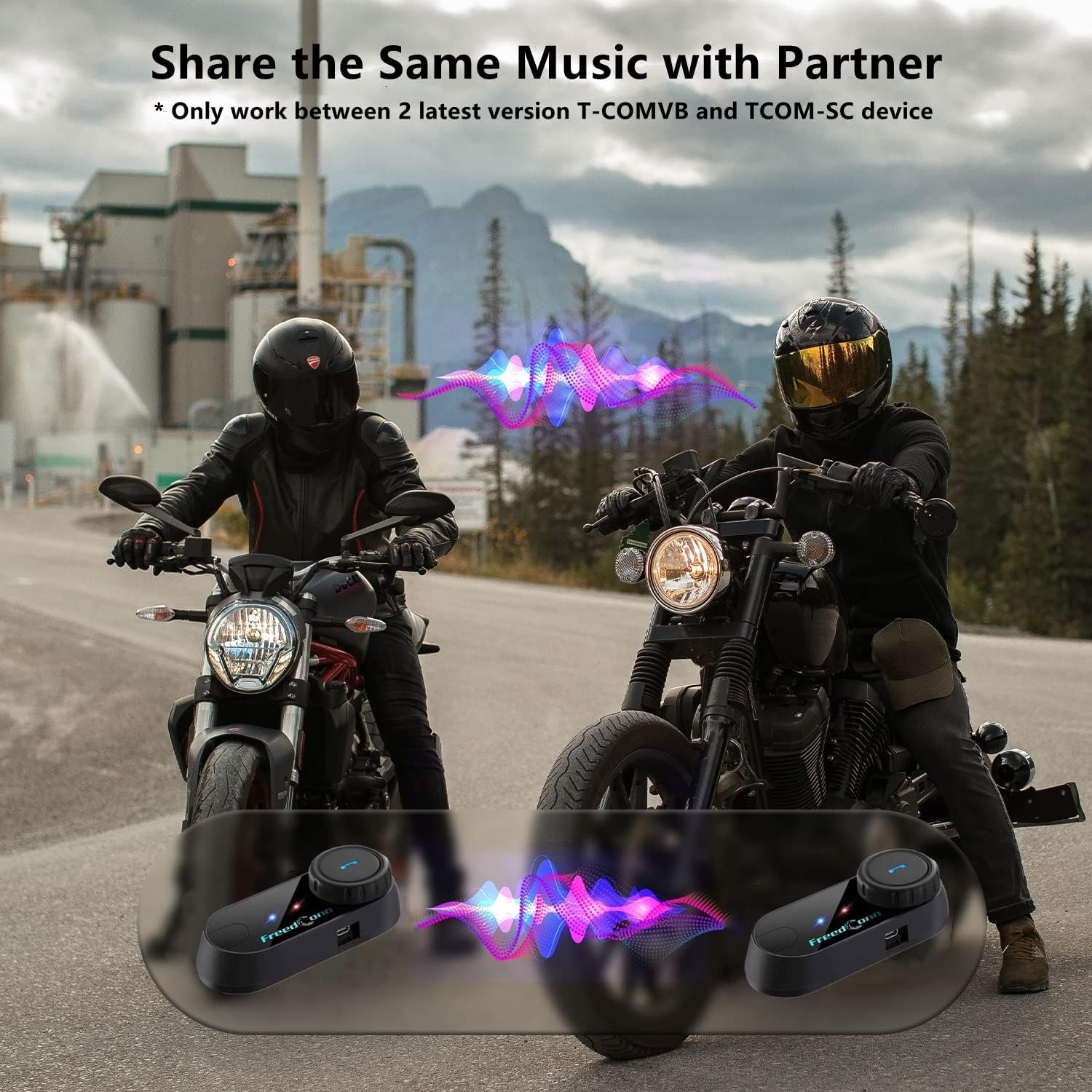
Image: Package contents for the FreedConn T-COMVB Bluetooth Helmet Headset 2-pack, showing all included accessories.
Setup
1. Ngisi daya Piranti
Before first use, fully charge the T-COMVB unit. Connect the USB charging cable to the headset's charging port and a USB power source. The indicator light will show charging status.
- Wektu Pengisian Daya: Kira-kira 3-4 jam.
- Urip baterei: Up to 7-8 hours of intercom, 10 hours of phone calls/music, 300 hours standby.

Image: Visual representation of the 400mAh battery capacity and estimated usage times for intercom, phone calls, and standby.
2. Microphone Selection
Pilih mikropon sing cocog kanggo jinis helm sampeyan:
- Mikrofon Boom: Recommended for open-face, half, and modular flip-up helmets.
- Soft-Wire Microphone: Recommended for full-face and off-road helmets.
Connect the chosen microphone and speakers to the corresponding ports on the headset unit.
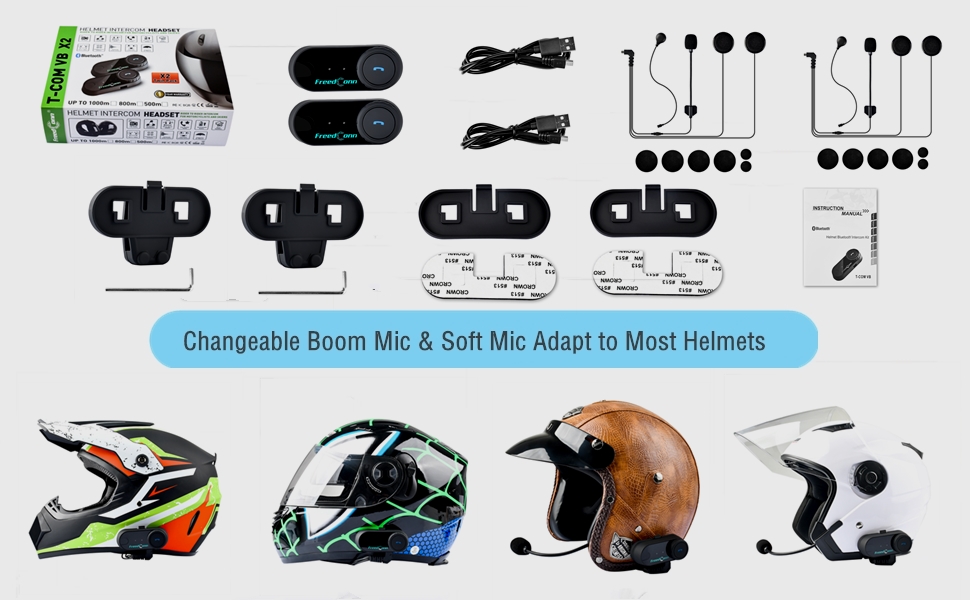
Image: Illustration demonstrating the compatibility of boom and soft-wire microphones with various helmet styles.
3. Pemasangan Helm
Mount the T-COMVB unit to the side of your helmet using either the clip-on bracket or the adhesive bracket. Ensure the unit is securely attached and the speakers are positioned correctly inside the helmet for optimal audio.

Image: A FreedConn T-COMVB unit securely installed on the exterior of a motorcycle helmet.
Instruksi Operasi
1. Daya On / Off
- Daya On: Pencet terus tombol Daya nganti lampu indikator kedhip-kedhip.
- Daya Mati: Pencet terus tombol Daya nganti lampu indikator mati.
2. Bluetooth Pairing (with Phone/GPS)
To connect your T-COMVB to a Bluetooth-enabled device (phone, GPS):
- Ensure the T-COMVB is off.
- Pencet terus tombol Daya kira-kira 5-7 detik nganti lampu indikator kedhip-kedhip abang lan biru genti-genten, nuduhake mode pasangan.
- Ing telpon utawa GPS sampeyan, aktifake Bluetooth lan goleki piranti sing kasedhiya.
- Select "FreedConn T-COMVB" from the list. If prompted, enter "0000" as the PIN.
- Sawise dipasangake, lampu indikator bakal kedhip-kedhip biru alon-alon.

Image: The T-COMVB headset demonstrating its Bluetooth 5.0 and universal connectivity with different devices and helmet types.
3. Intercom Communication (Rider to Rider)
The T-COMVB supports intercom communication with other T-COMVB or TCOM-SC units.
- Ensure both units are powered on and not connected to other Bluetooth devices.
- On one unit, press and hold the Intercom button until the indicator light flashes red and blue alternately.
- On the second unit, press the Intercom button once.
- The units will automatically search and pair. Once connected, the indicator lights will flash blue slowly.
- To initiate intercom, press the Intercom button once. To end, press it again.
4. Puter maneh lan Nuduhake Musik
Once paired with your phone, you can play music. Music sharing is supported between two latest version T-COMVB and TCOM-SC devices.
- Puter / Ngaso: Pencet tombol Multi-fungsi sapisan.
- Trek Sabanjure: Rotate the Multi-function button clockwise.
- Lacak sadurunge: Rotate the Multi-function button counter-clockwise.
- Nuduhake Musik: While music is playing, press and hold the Intercom button on both units to initiate music sharing.

Image: Two riders sharing music through their FreedConn T-COMVB headsets, highlighting the music sharing feature.
5. Radio FM Kab
To activate the built-in FM radio:
- Uripake FM: Press the FM button once.
- Saluran Scan: Rotate the Multi-function button to scan for stations.
- Pateni FM: Press the FM button again.
6. Telpon Telpon
When paired with your phone, the T-COMVB allows for hands-free calls.
- Jawab Telpon: Pencet tombol Multi-fungsi sapisan.
- Mungkasi Telpon: Pencet tombol Multifungsi sapisan sajrone nelpon.
- Nolak Telpon: Pencet terus tombol Multifungsi sajrone 2 detik.
- Nelpon maneh nomer pungkasan: Pencet kaping pindho tombol Multi-fungsi.
- Voice Assistant (Siri/Google Voice): Press the Voice Assistant button to activate your phone's voice assistant.

Image: Icons representing voice assistant activation (Siri, Google Voice) for hands-free calling functionality.
Pangopènan
- Reresik: Gunakake alus, damp cloth to clean the unit. Do not use harsh chemicals or solvents.
- Tahan banyu: The unit is waterproof, but avoid submerging it in water. Ensure all ports are securely closed when exposed to rain.
- Perawatan baterei: If the device is not used for an extended period, charge it at least once a month to preserve battery life.

Image: The FreedConn T-COMVB headset on a helmet, illustrating its waterproof feature in rainy conditions.
Ngatasi masalah
- Ora Daya: Ensure the unit is fully charged. Connect to a power source and check the charging indicator.
- Ora Bisa Pasangake Bluetooth: Ensure the unit is in pairing mode (red and blue flashing light). Make sure other Bluetooth devices are disconnected. Try restarting both the headset and your phone/GPS.
- Ora Swara saka Speakers: Check that the speakers are securely plugged into the headset unit. Ensure volume is not set to minimum.
- Interkom Ora Nyambung: Ensure both units are T-COMVB or TCOM-SC models and are in intercom pairing mode. Keep units within range (up to 800 meters).
- Kualitas Audio/Swara Ora Apik: Ensure the microphone is positioned correctly, close to your mouth. The T-COMVB features advanced noise cancellation technology.

Image: A visual representation of the advanced noise cancellation technology, demonstrating its effect on sound quality.
Spesifikasi
| Model | T-COMVB |
| Versi Bluetooth | 5.0 + EDR |
| Range Interkom | Up to 800 meters (2-3 riders) |
| Kapasitas baterei | 400mAh |
| Wektu Ngisi daya | 3-4 jam |
| Wektu Interkom | 7-8 jam |
| Phone Call/Music Time | 10 jam |
| Wektu siyaga | 300 jam |
| Tahan banyu | anti banyu |
| Metode Kontrol | Voice, Manual Buttons |
| Fitur Khusus | Microphone Included, Noise Cancellation, FM Radio |
| Bahan | Polimer |
| Bobot Barang | Kira-kira 1.15 pon (kanggo 2 unit) |
Warranty lan Dhukungan
For warranty information, technical support, or service inquiries, please refer to the contact details provided with your purchase or visit the official FreedConn websitus. Simpen bukti tuku kanggo klaim garansi.