
Saooer BLUE 20A
Saooer 20A Solar Charge Controller User Manual
Model: BLUE 20A
Pambuka
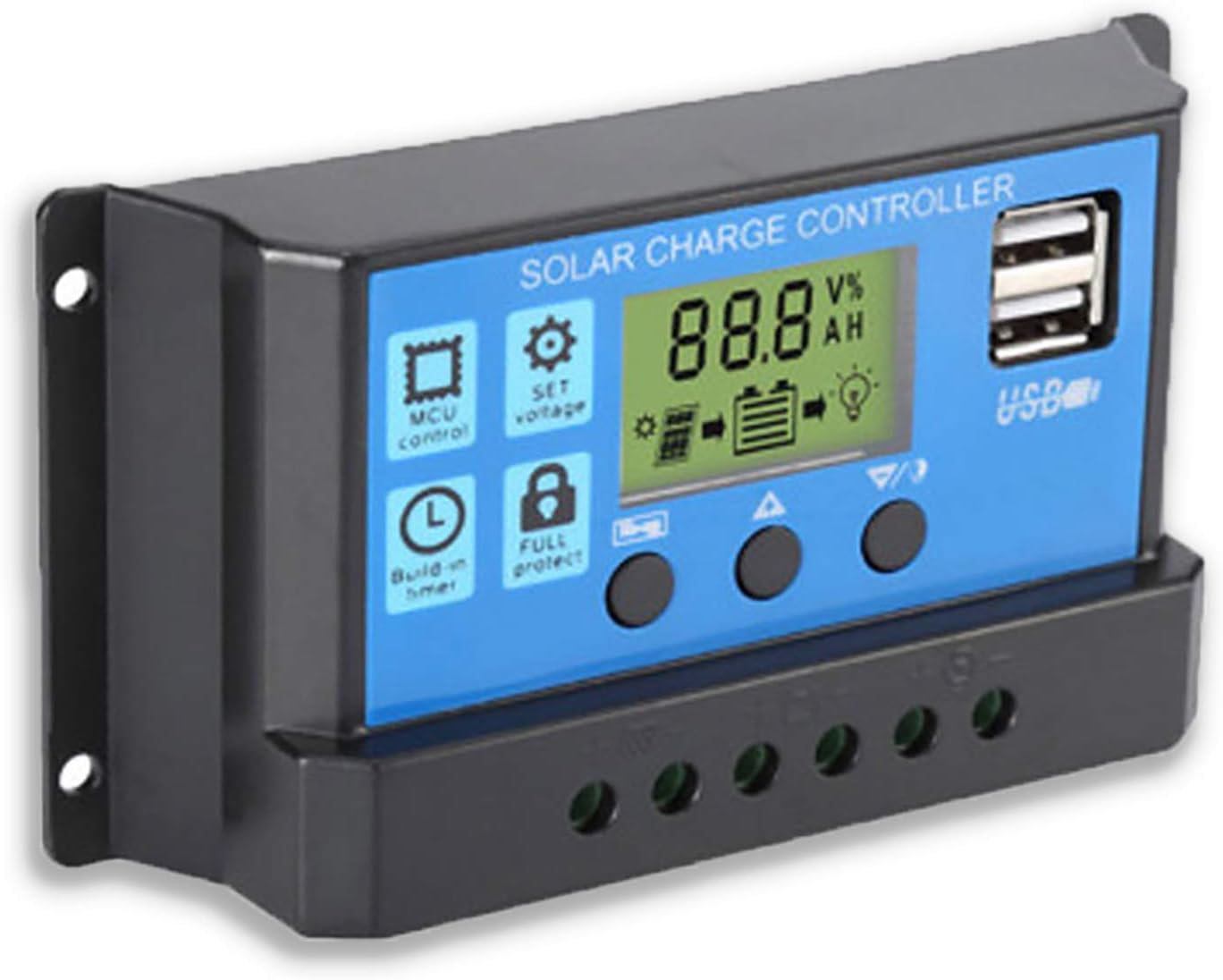
This manual provides essential information for the safe and efficient operation of your Saooer 20A Solar Charge Controller. This intelligent regulator is designed to manage the working of solar panels and batteries in a solar system, featuring dual USB ports for mobile device charging. It is compatible with 12V and 24V systems and includes multiple protection functions to ensure system efficiency and prolong battery lifespan.

Gambar 1: Ngarep view of the Saooer 20A Solar Charge Controller.
Pandhuan Safety
- Ensure all connections are correct before powering on the controller. Incorrect wiring can damage the device or connected components.
- The controller is designed for indoor use or in a protected environment. Avoid exposure to direct sunlight, high temperatures, or moisture.
- Do not attempt to disassemble or repair the controller yourself. Refer to qualified personnel for service.
- Tetep adoh saka bocah-bocah.
- This controller is only suitable for lead-acid batteries: OPEN, AGM, GEL. Do not use with other battery types like Lithium-ion or LiFePO4, as this may cause damage or safety hazards.
- Always connect the battery first, then the solar panel, and finally the load. When disconnecting, reverse the order: disconnect the load, then the solar panel, and finally the battery.
Fitur produk
- Sistem Otomatis Voltage Identifikasi: Automatically detects 12V/24V system voltage.
- Pangisian Daya PWM: Efficient Pulse Width Modulation charging mode.
- Dual USB Port: Provides 5V/2A output for charging mobile devices.
- Layar LCD: Clear display of status and data, allowing for convenient mode switching and parameter configuration.
- Multiple Protection Fungsi: Includes short-circuit protection, open-circuit protection, reverse protection, and over-load protection.
- Parameter sing bisa diatur: User-adjustable charge and discharge parameters.
- Kompensasi Suhu: Automatic temperature compensation for optimal charging.
Setup lan Instalasi
Follow these steps carefully to install your solar charge controller. Incorrect installation can lead to damage or malfunction.
- Siapke Wiring: Ensure all wires are properly stripped and have appropriate connectors if necessary. Use wires of sufficient gauge for your system's current.
- Sambungake baterei: Connect the battery to the charge regulator first. Observe correct polarity (+ to + and - to -). The controller will automatically recognize the battery voltage (12V utawa 24V).
Gambar 2: Sisih view showing the connection terminals for battery, solar panel, and load.
- Sambungake Panel Surya: Connect the solar panel to the solar charge controller. Ensure correct polarity.
- Sambungake beban: Connect the consumer or load to the charge controller regulator. Ensure correct polarity.
Cathetan Penting: Always connect the battery first, then the solar panel, and finally the load. When disconnecting the controller, please remove the solar panel, then the load, and finally the battery. This sequence helps the controller recognize the battery voltage correctly and prevents damage.
Instruksi Operasi
Layar LCD lan Tombol

Gambar 3: Angled view showing the LCD display and control buttons.
The controller features an LCD display and three buttons for operation:
- Tombol Menu: Used to cycle through display modes and enter parameter setting mode.
- Tombol munggah: Used to increase values or navigate upwards in menus.
- Tombol Down: Used to decrease values or navigate downwards in menus.
Mode Tampilan
Press the Menu button to cycle through the following display modes:
- Baterai Voltage (V)
- Panel Surya Voltage (V)
- Arus Beban (A)
- Battery Temperature (°C)
- Pengisian Arus (A)
- Arus Discharge (A)
- Load Working Mode (24H, 0-23H, 0H)
Setelan Parameter
To enter parameter setting mode, press and hold the Menu button for 5 seconds. Use the Up and Down buttons to adjust values, and the Menu button to confirm and move to the next parameter. Press and hold Menu again to exit setting mode.
| Paramèter | Katrangan | Default (12V) | Range (12V) |
|---|---|---|---|
| B01/B02/B03 | Battery Type Selection (B01=Lead-acid, B02=Lithium Ion, B03=LiFePO4) | B01 | N/A |
| Charge Off Voltage | Voltage at which charging stops | 14.4V | 13.0V - 15.0V |
| Discharge Reconnect Voltage | Voltage at which load reconnects after low voltage medhot sambungan | 12.6V | 11.0V - 13.5V |
| Discharge Stop Voltage | Voltage at which load disconnects to protect battery | 10.7V | 9.0V - 11.5V |
| Load Working Time | Timer for load output (24H, 0-23H, 0H) | 24H | N/A |
Note: For 24V systems, multiply the 12V values by two.
Pangopènan
- Pemeriksaan rutin: Priksa kanthi periodik kabeh sambungan kabel kanggo sesak lan karat.
- Kebersihan: Tansah controller resik lan bebas saka bledug. Gunakake kain garing kanggo ngresiki.
- Ventilasi: Priksa manawa ventilasi ing sekitar controller cukup kanggo nyegah panas banget.
- Kesehatan baterei: Monitor baterei voltage and health regularly. Replace batteries as needed.
Ngatasi masalah
| Masalah | Kemungkinan Penyebab | Solusi |
|---|---|---|
| Controller not powering on / LCD blank | Baterei ora nyambung utawa polaritas mbalikke; Voltase bateretage kurang banget. | Check battery connections and polarity. Ensure battery has sufficient charge. |
| Solar panel not charging battery | Solar panel not connected or reverse polarity; Insufficient sunlight; Damaged solar panel. | Check solar panel connections and polarity. Ensure panel is in direct sunlight. Test solar panel output. |
| Muat ora bisa digunakake | Load not connected or reverse polarity; Battery voltage too low (low voltage disconnect); Overload protection activated. | Check load connections and polarity. Charge battery. Reduce load or check for short circuit. |
| Port USB ora ngisi daya | Batere voltage too low; Device not compatible; Faulty USB cable. | Ensure battery is charged. Try a different device or cable. |
| Controller gets hot | Overload; Poor ventilation. | Reduce load. Ensure controller has adequate airflow and is not in an enclosed space. |
Spesifikasi
| Fitur | Rincian |
|---|---|
| Model | BIRU 20A |
| Sistem Voltage | 12V / 24V Otomatis |
| Max Ngisi / Discharge Saiki | 20A |
| Output USB | Dual USB, 5V/2A (Max) |
| Kompatibilitas Tipe Baterei | Lead-acid (OPEN, AGM, GEL) |
| Dimensi produk | 5.12 x 2.76 x 1.5 inches (133mm x 70mm x 38mm approx.) |
| Bobot Barang | 5, XNUMXuw |
| Tampilan | LCD |
| Suhu operasi | -35°C nganti +60°C |

Figure 4: Product dimensions of the solar charge controller.
Warranty lan Dhukungan
For warranty information or technical support, please contact the manufacturer, Saooer, through their official channels. Refer to your purchase documentation for specific warranty terms and contact details.
Produsen: Saooer
ASIN: B095764VB7
UPC: 605832982977
Sampeyan bisa ngunjungi Saooer Store on Amazon kanggo informasi luwih lengkap utawa hubungi dhukungan.