
1. Pambuka
This manual provides comprehensive instructions for the installation, operation, and maintenance of the SINOTIMER TM919B 30A Programmable Electronic Timer Switch. This device is designed to automatically control the ON/OFF switching of various electrical appliances based on user-defined daily or weekly programs. Please read this manual carefully before installation and use to ensure proper function and safety.
2. Informasi Safety
PERINGATAN: Risiko sengatan listrik. Pemasangan mung kudu ditindakake dening tukang listrik sing mumpuni utawa personel sing wis terlatih.
- Always disconnect power at the circuit breaker before installing or servicing the timer switch.
- Priksa manawa kabeh sambungan kabel aman lan tundhuk karo kode listrik lokal.
- Aja ngluwihi rating beban maksimal 30A.
- Piranti iki mung kanggo panggunaan njero ruangan. Ngindhari paparan kelembapan utawa suhu sing ekstrem.
- Aja nyoba mbongkar utawa ndandani unit dhewe. Hubungi personel layanan sing mumpuni.
3. Produk Liwatview
The SINOTIMER TM919B is a digital timer switch featuring a large LCD display, multiple programming options, and a manual override function. It is designed for DIN rail mounting.
3.1. Komponen lan Kontrol
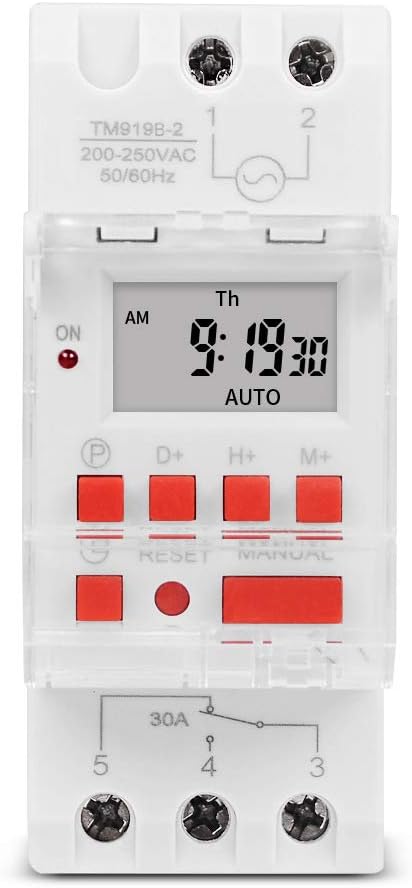
Gambar 1: Ngarep view of the TM919B timer switch, showing the LCD display, control buttons, and terminal connections.

Gambar 2: miring view of the TM919B with the transparent protective cover open, revealing the programming buttons (P, D+, H+, M+, RESET, MANUAL).
- Layar LCD: Nuduhake wektu, dina, lan status program saiki.
- Tombol P (Program): Enters/exits program setting mode.
- Tombol D+ (Dina): Adjusts day of the week in setting modes.
- Tombol H+ (Jam): Adjusts hour in setting modes.
- Tombol M+ (Menit): Adjusts minute in setting modes.
- Tombol RESET: Clears all settings and resets the timer to factory defaults.
- Tombol MANUAL: Ngalih ing antarane mode ON, AUTO, lan OFF.
- Sambungan Terminal: For power input and load output.
4. Spesifikasi
| Fitur | Spesifikasi |
|---|---|
| Model | TM919B |
| Voltage | 220V (AC200-250V) |
| Frekuensi | 50/60Hz |
| Muatan Maks | 30A (Beban Resistif) |
| Program | 16 ON/OFF programs per day/week |
| Interval Minimal | 1 menit |
| Baterei Serep | Built-in rechargeable battery (for memory retention) |
| Pemasangan | Rel DIN 35mm |
| ukuran | Waca Gambar 3 |

Gambar 3: Detailed dimensions of the TM919B timer switch, showing height, width, and depth measurements.
5. Persiyapan lan Instalasi
Follow these steps for safe and correct installation of your timer switch.
5.1. Pemasangan
- Priksa manawa daya ing pemutus sirkuit utama wis dicopot.
- Mount the TM919B onto a standard 35mm DIN rail. The device features a clip mechanism on the back for secure attachment.
- Press the orange clip at the bottom of the unit to release it from the DIN rail if removal is necessary.

Gambar 4: Sisih view of the TM919B, highlighting the orange DIN rail mounting clip.

Gambar 5: Mbalik view of the TM919B, illustrating the DIN rail mounting mechanism.
5.2. Wiring Diagram
Refer to the diagram below for correct wiring connections. Ensure all connections are tight and insulated.

Gambar 6: Sisih view of the TM919B showing the wiring diagram printed on the casing. Terminals 1 and 2 are for power input (L and N). Terminals 3, 4, and 5 are for load output (Common, Normally Open, Normally Closed).
- Terminal 1 & 2: Power Input (L - Live, N - Neutral). Connect your 220V AC supply here.
- Terminal 3: Common (COM) for the output relay.
- Terminal 4: Normally Open (NO) output. The load will be powered when the timer is ON.
- Terminal 5: Normally Closed (NC) output. The load will be powered when the timer is OFF.
For typical applications where the load is switched ON by the timer, connect the load between Terminal 3 (COM) and Terminal 4 (NO).
6. Instruksi Operasi
6.1. Initial Setup and Reset
- After connecting power, the display may be blank or show random characters. Press the RESET button with a pointed object (e.g., a pen tip) to clear all memory and reset the timer. The display will show "0:00" and "MO".
- Allow the internal battery to charge for at least 30 minutes before programming for optimal performance and memory retention during power outages.
6.2. Nyetel Wektu lan Dina Saiki
- Pencet terus tombol D+ button to set the current day of the week (MO, TU, WE, TH, FR, SA, SU).
- Pencet terus tombol H+ tombol kanggo nyetel jam saiki (0-23).
- Pencet terus tombol M+ tombol kanggo nyetel menit saiki (0-59).
- Release the buttons when the correct time and day are displayed. The timer will automatically save the settings.
6.3. Pemrograman ON / OFF Siklus
The TM919B supports up to 16 ON/OFF programs. Each program consists of an ON time and an OFF time.
- Tekan ing P button once. The display will show "1 ON". This is for the first ON program.
- Gunakake D+ kanggo milih dina kanggo program iki. Pilihan kalebu:
- MO TU WE TH FR SA SU (Every day)
- MO (Monday only)
- TU (Tuesday only)
- ...
- MO TU WE TH FR (Weekdays)
- SA SU (Weekends)
- MO TU WE (Mon-Wed)
- TH FR SA (Thu-Sat)
- MO WE FR (Mon, Wed, Fri)
- TU TH SA (Tue, Thu, Sat)
- MO TU WE TH FR SA (Mon-Sat)
- Gunakake H+ lan M+ to set the desired ON hour and minute.
- Tekan ing P button again. The display will show "1 OFF". This is for the first OFF program.
- Gunakake D+, H+, lan M+ to set the desired OFF day, hour, and minute. Ensure the OFF time is after the ON time for the same program.
- Repeat steps 1-5 for additional ON/OFF programs (up to 16). If you don't need all 16 programs, simply press P to cycle through unused programs until you return to the current time display.
- To exit programming mode and save settings, press the clock button (usually labeled with a clock icon, or simply wait for 30 seconds without input).
6.4. Override Manual
Tekan ing MANUAL tombol kanggo muter liwat mode operasi:
- ON: The timer output is continuously ON, ignoring all programs.
- OTOMATIS: Timer beroperasi miturut siklus ON/OFF sing wis diprogram. Iki minangka mode operasi standar.
- MATI: The timer output is continuously OFF, ignoring all programs.
Priksa manawa timer disetel kanggo OTOMATIS for programmed operation.
7. Pangopènan
- The TM919B is designed for maintenance-free operation.
- Resik njaba nganggo kain sing alus lan garing. Aja nggunakake pembersih abrasif utawa pelarut.
- Ensure the internal battery is charged by keeping the unit powered for at least 24 hours initially, and periodically thereafter, to maintain time and program memory during power outages.
8. Ngatasi masalah
| Masalah | Kemungkinan Penyebab | Solusi |
|---|---|---|
| Tampilan kosong | No power supply; internal battery discharged. | Check power connections. Allow unit to charge for 30 minutes. |
| Timer not switching load. | Incorrect wiring; timer in MANUAL ON/OFF mode; incorrect program settings. | Verify wiring (refer to Figure 6). Ensure timer is in AUTO mode. Check program times and days. |
| Program ilang sawise daya matitage. | Baterei internal ora kebak utawa rusak. | Ensure unit is powered for at least 24 hours to fully charge the battery. If problem persists, contact support. |
| Tombol ora nanggapi. | Unit frozen; temporary glitch. | Tekan ing RESET tombol. |
9. Warranty lan Dhukungan
SINOTIMER products are manufactured to high-quality standards. For warranty information or technical support, please refer to the documentation provided with your purchase or visit the official SINOTIMER websitus. Simpen kuitansi tuku minangka bukti tuku.
For further assistance, you may contact SINOTIMER customer service through their official channels.