
1. Pambuka
This manual provides detailed instructions for the installation, operation, and maintenance of the SINOTIMER TM919A-2 LCD Digital Programmable Timer Switch. This device is designed for automatic control of electrical appliances based on programmed time schedules, offering daily and weekly programming options.
2. Fitur Produk
- Weekly 7-day programmable digital time switch.
- Multiple voltage options (5V, 12V, 24V, 110V, 220V, 85-265V). This specific model is 220V.
- Detachable battery design for backup power.
- 35mm DIN rail mounting for easy installation.
- LCD display for clear time and program viewing.
- 16 ON/OFF programs per day or week.
- Manual override function.
- High capacity 16A switching contact.
3. Informasi Safety
WARNING: Risk of electric shock. Installation should only be performed by a qualified electrician or competent person.
- Priksa manawa daya wis pedhot sadurunge instalasi utawa pangopènan.
- Do not exceed the maximum load capacity of 16A.
- Verifikasi bener voltage supply for the specific model (220V for TM919A-2).
- Jaga piranti supaya adoh saka lembab lan suhu ekstrem.
4. Produk Liwatview lan Komponen
The SINOTIMER TM919A-2 features an LCD display, control buttons, and wiring terminals for power input and load control.

Gambar 4.1: Ngarep view of the SINOTIMER TM919A-2 Digital Timer Switch, showing the LCD display, control buttons (P, D+, H+, M+, RESET, MANUAL), and wiring terminals.

Gambar 4.2: The timer switch with its transparent protective cover opened, revealing the control buttons for programming and manual operation.
Tombol Kontrol:
- P (Program): Mlebet mode setelan program.
- D+ (Day): Adjusts day of the week or program day.
- H+ (Hour): Adjusts hour or program hour.
- M+ (Minute): Adjusts minute or program minute.
- RESET: Reset kabeh setelan menyang standar pabrik.
- MANUAL: Toggles output ON/AUTO/OFF.
5. Persiyapan lan Instalasi
5.1 Diagram Wiring
Refer to the wiring diagram on the side of the device and the illustration below for correct connection. Ensure all connections are secure.

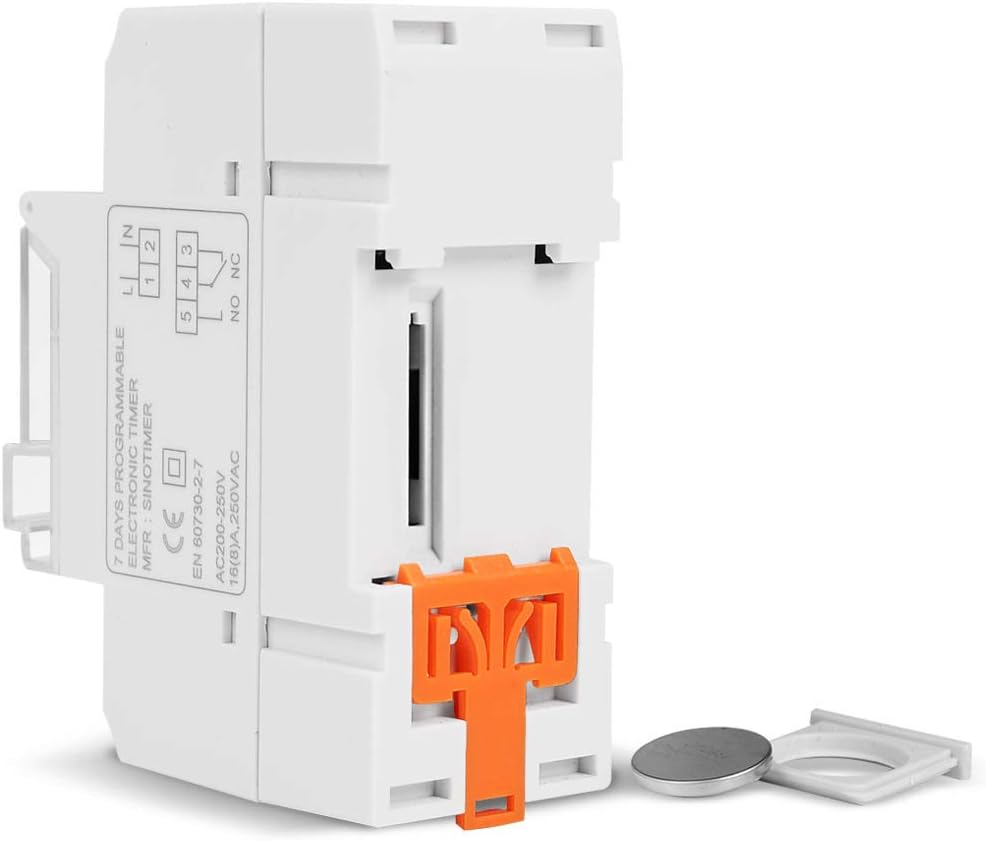
Gambar 5.1: Sisih view of the timer switch displaying the wiring diagram. Terminals 1 and 2 are for power input (L and N). Terminals 3, 4, and 5 are for the relay output (Common, Normally Open, Normally Closed).
- Terminal 1 & 2 (L, N): Connect to the main power supply (220V AC for this model).
- Terminal 3 (NO - Normally Open): Connects to the load when the timer is ON.
- Terminal 4 (COM - Common): Connects to one side of the load and the power supply.
- Terminal 5 (NC - Normally Closed): Connects to the load when the timer is OFF (less common for typical applications).
5.2 Initial Power-up and Reset
Upon first power-up or after a long period without power, the LCD display may be blank. The internal battery provides backup for settings. If the display is unresponsive or shows garbled characters, press the RESET button using a pointed object (e.g., a pen tip). This will clear all settings and restore the timer to its default state.
5.3 Nyetel Wektu lan Dina Saiki
- Tekan ing P button once. The display will show the current time setting.
- Pencet D+ kanggo nyetel dina saiki minggu.
- Pencet H+ kanggo nyetel jam saiki.
- Pencet M+ kanggo nyetel menit saiki.
- Tekan ing P button again to exit time setting mode and return to normal operation.
6. Instruksi Operasi
6.1 Pemrograman Siklus ON/OFF
Timer iki ndhukung nganti 16 program ON/OFF. Saben program dumadi saka wektu ON lan wektu OFF.
- Tekan ing P button repeatedly until "1 ON" appears on the display. This is the first ON program.
- Pencet D+ kanggo milih dina kanggo program iki. Pilihan kalebu dina individu, dina kerja, akhir minggu, utawa kabeh 7 dina.
- Pencet H+ to set the desired hour for the "ON" event.
- Pencet M+ to set the desired minute for the "ON" event.
- Pencet P again. "1 OFF" will appear. This is the first OFF program.
- Repeat steps 2-4 to set the day(s), hour, and minute for the "OFF" event.
- Terus pencet P to cycle through "2 ON", "2 OFF", up to "16 ON", "16 OFF". If you do not need all 16 programs, simply press P until the display returns to the current time.
- To save and exit programming mode, press the P tombol nganti wektu saiki ditampilake.
6.2 Manual Override
Ing MANUAL button allows you to override the programmed settings temporarily or permanently.
- Pencet MANUAL once: Toggles between ON/AUTO/OFF modes.
- ON: The output is continuously ON, ignoring programs.
- MATI: The output is continuously OFF, ignoring programs.
- OTOMATIS: Timer beroperasi miturut siklus ON/OFF sing wis diprogram. Iki minangka mode operasi standar.
7. Pangopènan
7.1 Panggantos baterei
The timer includes a detachable CR2032 lithium battery to maintain time and program settings during power outages. If the display becomes dim or resets frequently, the battery may need replacement.

Gambar 7.1: The timer switch shown with its battery compartment open and a CR2032 lithium battery, indicating the detachable battery design.
- Disconnect power to the timer before attempting battery replacement.
- Golekana papan baterei, biasane ing sisih utawa mburi unit.
- Kasebut kanthi teliti, mbusak baterei CR2032 lawas.
- Insert a new CR2032 battery, ensuring correct polarity (+ side up).
- Nutup kompartemen baterei.
- Reconnect power and reset the current time and day if necessary.
8. Ngatasi masalah
- Tampilan kosong:
- Check power supply connections (Terminals 1 & 2).
- Ensure the internal battery is charged or replaced if old.
- Tekan ing RESET tombol.
- Program ora mlaku:
- Priksa manawa timer wis ana ing OTOMATIS mode (check the display for "AUTO"). Press MANUAL kanggo mode siklus.
- Verify that the current time and day are set correctly.
- Check that the ON/OFF programs are correctly entered and enabled for the desired days.
- Confirm wiring to the load (Terminals 3, 4, 5) is correct.
- Timer resets unexpectedly:
- The internal battery may be low or depleted. Replace the CR2032 battery.
- Ensure stable power supply to the unit.
9. Spesifikasi
| Fitur | Spesifikasi |
|---|---|
| Model | TM919A-2 |
| Power Supply | 220V AC (as per model) |
| Konsumsi Daya | 4.5 VA (MAX) |
| Range Suhu | -20°C nganti +50°C |
| Tampilan | LCD |
| Ngalih Kontak | 1 ngalih ganti |
| Program | 16 ON/OFF per day or week |
| Histeresis | 2 detik/dina (ing suhu 25°C) |
| Kapasitas | 16A |
| Range Timer | 1 menit nganti 168 jam |
| Interval Minimal | 1 menit |
| Black-out Memory | 60 days (with internal battery) |
| Bobot Barang | 0.15 kg (5.3 ons) |
| Pemasangan | Rel DIN 35mm |
| Ukuran Layar | 1.2 inchi |
Gambar 9.1: Dimensional drawing of the SINOTIMER TM919A-2, showing measurements in centimeters for height, width, and depth.
10. Warranty lan Dhukungan
Specific warranty information for the SINOTIMER TM919A-2 is not provided in the product details. For warranty claims or technical support, please contact your retailer or the manufacturer directly. Keep your purchase receipt as proof of purchase.