
1. Pambuka
1.1 Produk Overview
The Renkforce RF-HC-100 is a compact 16-megapixel trail camera designed for outdoor monitoring. It features a time-lapse function, night vision capabilities, and a durable, camouflage brown housing. This camera is suitable for wildlife observation, property surveillance, and other outdoor recording needs.
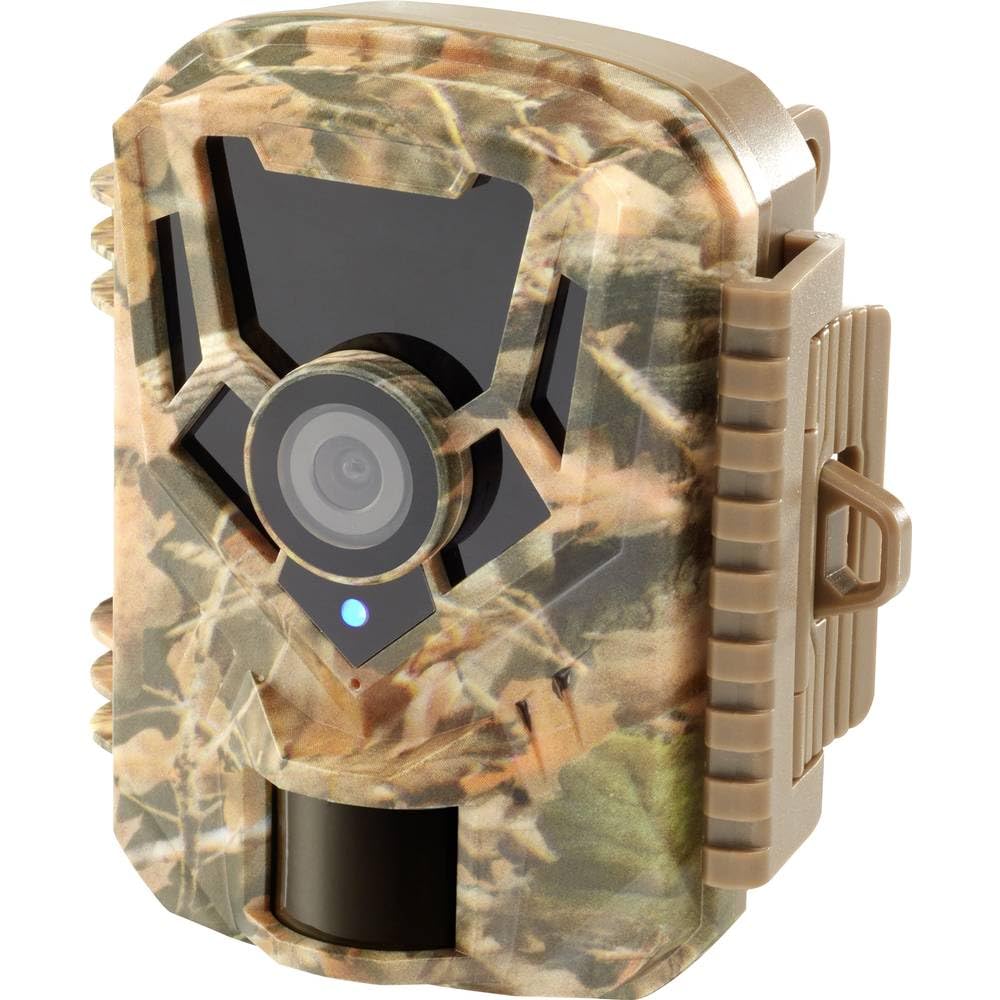
Gambar: sisih ngarep view of the Renkforce RF-HC-100 Trail Camera, showcasing its compact design and camouflage pattern.

Gambar: Ngarep view of the Renkforce RF-HC-100 Trail Camera, highlighting the main lens and motion sensor.
1.2 Isi Paket
- 1 x Renkforce RF-HC-100 Trail Camera Unit
- Note: Additional accessories such as mounting straps, USB cables, or user manuals may be included depending on the specific package.
2. Informasi Safety
- Waca kabeh instruksi kasebut kanthi teliti sadurunge ngoperasikake piranti.
- Do not expose the camera to extreme temperatures, direct sunlight for prolonged periods, or corrosive liquids.
- Ensure the battery compartment is properly sealed to maintain the IP65 weather resistance.
- Dispose of batteries according to local regulations. Do not mix old and new batteries or different types of batteries.
- Tansah piranti adoh saka bocah-bocah.
- Aja nyoba mbongkar utawa ngowahi kamera, amarga iki bakal mbatalake garansi lan bisa nyebabake kerusakan.
3. Fitur Produk
The Renkforce RF-HC-100 Trail Camera offers the following key features:
- Pencitraan Resolusi Tinggi: 16 Megapixel effective capture resolution for clear photos and 1080p video recording.
- Wawasan wengi: Equipped with color night vision for monitoring in low-light conditions.
- Fungsi Selang Wektu: Capture images at set intervals to observe long-term events.
- Slot kertu SD: Supports external SD cards for ample storage of photos and videos.
- Tahan Cuaca: IP65 international protection rating ensures durability in various outdoor environments.
- Desain kompak: Miniature form factor with a camouflage brown finish for discreet placement.
- Wide Angle View: 90-degree angle of view to cover a broad area.
- Konektivitas: Features wired connectivity (USB, AV ports) and Wi-Fi protocol for data transfer and control via application.
- Pilihan Pemasangan: Includes support for wall mounting.
4. Setup
4.1 Instalasi baterei
- Bukak omah kamera kanthi mbukak klip sisih.
- Goleki kompartemen baterei.
- Insert the required number of AA batteries (not included) according to the polarity markings (+/-).
- Nutup kompartemen baterei kanthi aman.
4.2 Instalasi kertu SD
- Kanthi omah kamera mbukak, goleki slot kertu SD.
- Insert a compatible SD card (up to 32GB, Class 10 recommended) into the slot with the metal contacts facing down until it clicks into place.
- Kanggo nyopot, copot kertu SD maneh nganti metu.

Image: The Renkforce RF-HC-100 Trail Camera with its housing open, revealing the control panel, USB, AV, and DC ports, and the ON/SETUP/OFF switch.
4.3 Masang Kamera
The camera can be mounted using a strap or a wall mount bracket (if included or purchased separately).
- Pemasangan tali: Thread a mounting strap through the slots on the back of the camera and secure it to a tree or pole.
- Pemasangan tembok: Use the integrated mounting points or a compatible wall mount bracket to attach the camera to a flat surface. Ensure the camera is stable and pointed in the desired direction.
5. Instruksi Operasi
5.1 Power On/Off lan Pilihan Mode
Locate the ON/SETUP/OFF switch inside the camera housing.
- MATI: Powers off the camera.
- SETUP: Enters setup mode, allowing you to configure settings via the internal display.
- ON: Activates the camera for recording based on the configured settings.
5.2 Configuring Settings
In SETUP mode, use the navigation buttons (if available) to access the menu and adjust parameters such as:
- Resolusi Foto/Video
- Sensitivitas Sensor PIR
- Deteksi Tundha
- Interval Wektu-Lapse
- Tanggal lan Wektu
- Recording Mode (Photo, Video, Photo+Video, Time-Lapse)
5.3 Pamulangan Data
Kanggo ngakses direkam files:
- Liwat USB: Connect the camera to a computer using a USB cable. The camera will appear as a removable disk.
- Liwat kertu SD: Remove the SD card from the camera and insert it into a computer's card reader.
6. Pangopènan
- Reresik: Use a soft, dry cloth to clean the camera lens and housing. For stubborn dirt, a slightly damp kain bisa digunakake, nanging priksa manawa ora ana kelembapan sing mlebu ing piranti kasebut.
- Panggantos baterei: Replace batteries when the low battery indicator appears or when performance degrades.
- Manajemen Kertu SD: Regularly format the SD card (after backing up important data) to maintain optimal performance and prevent errors.
- Panyimpenan: Yen ora digunakake sajrone wektu sing suwe, copot batere lan simpen kamera ing panggonan sing adhem, garing, lan ora kena sinar srengenge langsung.
7. Ngatasi masalah
| Masalah | Kemungkinan Penyebab | Solusi |
|---|---|---|
| Kamera ora urip. | Low or dead batteries; incorrect battery installation; power switch in OFF position. | Replace batteries; ensure correct polarity; set switch to ON or SETUP. |
| Kualitas gambar/video kurang apik. | lensa reged; kahanan kurang cahya; setelan resolusi sing salah. | Clean the lens; ensure adequate lighting or use night vision; adjust resolution settings. |
| Kamera ora ngrekam. | SD card full or faulty; incorrect mode selected; PIR sensor blocked. | Format or replace SD card; select appropriate recording mode; clear sensor path. |
| Ora bisa nyambung menyang komputer. | Faulty USB cable; camera not in correct mode; driver issues. | Try a different USB cable; ensure camera is in connection mode (if applicable); try another computer or card reader. |
8. Spesifikasi
| Jeneng Model | RF-HC-100 (RF-4466574) |
| Effective Capture Resolution | 16 megapiksel |
| Resolusi Video | 1080p |
| Ukuran (L x W x H) | Ukuran 21 x 12 x 9 cm (8.27 x 4.72 x 3.54 inci) |
| Bobot | 186 Gram (0.41 lbs) |
| Teknologi Konektivitas | Wired (USB, AV), Wi-Fi Protocol (for control/transfer) |
| Fitur Khusus | Local Recording, Night Vision (Color Night Vision) |
| Lingkungan Panggunaan | njobo |
| Rating Proteksi Internasional | IP65 |
| Sumber Daya | Manual Operation (Battery-powered, batteries not included) |
| Wattage | 1.5 Watt |
| View Sudut | 90 derajat |
| warna | Camouflage Brown |
| Bahan | Metal (internal) |
| Tipe Gunung | Dhukungan Wall Mount |
9. Warranty lan Dhukungan
Renkforce provides support for its products. Spare parts availability is indicated for 1 year from the date of purchase. For technical assistance, troubleshooting beyond this manual, or warranty claims, please refer to the contact information provided with your product packaging or visit the official Renkforce websitus.