
1. Pambuka
This manual provides instructions for the proper setup, operation, and maintenance of your IPD IPH-160 Monaural Wired Headset. The IPH-160 is designed for clear communication in various environments, featuring a noise-cancelling microphone and a 3.5mm jack for broad compatibility.
2. Isi Paket
Priksa manawa kabeh item ana ing paket sampeyan:
- IPD IPH-160 Monaural Headset
- Quick Disconnect (QD) to 3.5mm Jack Cable (4-pole)
- Ear Cushions (pre-installed or spare)
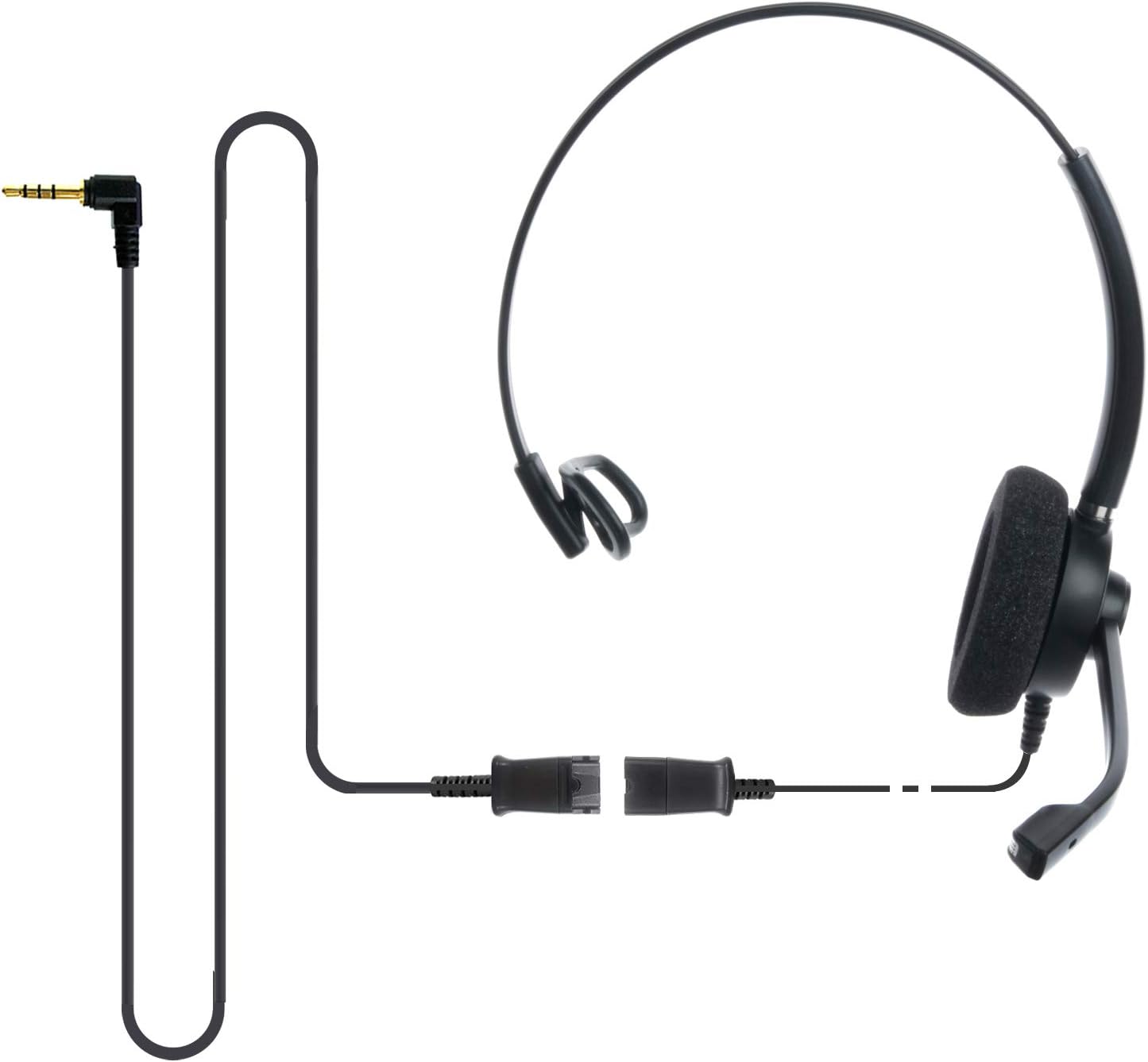
Image: The IPD IPH-160 headset with its detachable Quick Disconnect cable and 3.5mm jack connector.
3. Setup
3.1 Nyambungake Headset
- Connect the Quick Disconnect (QD) cable to the headset. Ensure a secure connection.
- Insert the 3.5mm jack of the cable into the corresponding port on your device (Android cell phone, laptop, tablet, Apple MacBook, or other smart device).

Gambar: A close-up view of the 3.5mm jack connector, illustrating its connection to a mobile device and laptop.
3.2 Kompatibilitas piranti
The 3.5mm jack (4 poles) is compatible with a wide range of devices including:
- Android cell phones (e.g., Samsung, Huawei, HTC, ZTE)
- Laptop
- Tablet
- Apple MacBooks with a single 3.5mm headset port
Cathetan:
- iPhone 7/7S and later models may require an additional Lightning to 3.5mm adapter (not included).
- If your specific phone model is not listed or you encounter compatibility issues, please contact IPD support for assistance.

Image: The IPD headset shown with various connection options for desk phones, PCs/softphones, and mobile phones, highlighting the versatility of Quick Disconnect cables.
4. Ngoperasikake Headset
4.1 Nganggo lan Nyetel
The IPH-160 headset is designed for all-day comfort. Adjust the headband for a secure yet comfortable fit. The microphone boom is flexible; position it approximately 1-2 inches from your mouth for optimal voice pickup.
4.2 Mikropon Noise Cancelling
The headset features a passive noise-cancelling microphone to reduce background noise, ensuring clearer conversations. Proper microphone positioning is crucial for effective noise cancellation.

Image: A user wearing the headset, demonstrating the microphone's position and illustrating the effect of noise cancellation on audio waveforms.
4.3 Acoustic Shock Protection (ASP)
The headset incorporates an Acoustic Shock Protection (ASP) circuit on the speaker. This feature protects your hearing from sudden, unwanted loud noises by cutting sounds over 105dB and maintaining levels below 105dB.
4.4 Wideband Audio
The HD Wideband speaker delivers clear sound, enhancing the quality of your calls and audio monitoring.

Image: A close-up of the headset's ear cushion, visually representing the distinction between acoustic noise and clear sound for high-quality voice communication.
5. Pangopènan
5.1 Reresik
To maintain hygiene and performance, regularly clean the ear cushions and other surfaces of the headset with a soft, dry cloth. Avoid using harsh chemicals or abrasive materials.
5.2 Panyimpenan
Nalika ora digunakake, simpen headset ing panggonan sing resik, garing, lan adoh saka sinar srengenge langsung lan suhu ekstrem. Aja nganti kabel kusut supaya ora rusak.
6. Ngatasi masalah
6.1 Ora Ana Swara utawa Volume Kurang
- Priksa manawa jack 3.5mm wis dilebokake kanthi lengkap ing piranti sampeyan.
- Priksa setelan volume piranti.
- Verify that the headset is selected as the audio output device in your computer's sound settings.
- Confirm the Quick Disconnect (QD) cable is securely connected to the headset.
6.2 Mikropon Ora Bisa
- Priksa manawa boom mikropon dipasang kanthi bener ing cedhak tutuk.
- Priksa setelan input mikropon piranti sampeyan lan priksa manawa headset wis dipilih minangka piranti input.
- Test the headset with another compatible device to rule out a device-specific issue.
6.3 Masalah Kompatibilitas
If you experience compatibility problems with your device, especially if it's not explicitly listed as compatible, please contact IPD customer support for guidance.
7. Spesifikasi
| Fitur | Spesifikasi |
|---|---|
| Jeneng Model | IPH-160-35 |
| Teknologi Konektivitas | Kabel |
| Jack Headphone Kab | 3.5 mm Jack (4-pole) |
| Kontrol swara | Pembatalan Noise Pasif |
| Respon Frekuensi | 10 KHz |
| Sensitivitas | 58 dB |
| Impedansi | 150 ohm |
| Bobot Barang | 198 gram (7 ons) |
| Bahan | Plastik |
| Penempatan kuping | Swara Kuping |
| Fitur Khusus | Noise Cancellation |
| Klebu Komponen | Bantalan kuping |
8. Informasi babar pisan
The IPD IPH-160 Headset comes with a garansi 3 taun saka tanggal tuku. Garansi iki nyakup cacat manufaktur ing panggunaan normal. Mangga nyimpen bukti tuku kanggo claims babar pisan.
9. Dhukungan
For technical assistance, warranty claims, or any questions regarding your IPD IPH-160 Headset, please contact IPD customer support. You can find contact information on the official IPD websitus utawa liwat pengecer sampeyan.
Dolan maring IPD Store kanggo informasi luwih lengkap lan produk.