
TKSTAR TK905
TKSTAR TK905 GPS Tracker User Manual
Model: TK-905
1. Pambuka
This user manual provides comprehensive instructions for the operation and maintenance of your TKSTAR TK905 GPS Tracker. Designed for real-time tracking and monitoring, this device utilizes advanced GPS and AGPS dual positioning technology to provide accurate location data for vehicles, motorcycles, trucks, and other assets. Please read this manual thoroughly before using the device to ensure proper functionality and safety.
2. Produk Liwatview
2.1 Fitur Utama
- 3G GPS Tracker: Supports GSM (2G) & WCDMA (3G) networks.
- Real-time Tracking: Locate and monitor targets via SMS, APP, and Internet.
- Precise Positioning: Utilizes GPS and AGPS dual positioning.
- Multifunctionality: Includes SMS/APP/Web tracking, Electronic fence, History route playback, Over-speed alarm, Shake alarm, Loosing alarm, and Low power alarm.
- Geo-fence: Define restricted areas and receive alerts upon entry or exit.
- Super Long Standby Time: Built-in 3.7V 7800mAh rechargeable Li-ion battery, offering up to 80 days standby.
- Strong Magnetic Mount: Equipped with powerful magnets for easy installation on metallic surfaces.
2.2 Komponen piranti
The TKSTAR TK905 GPS Tracker is a compact device designed for durability and ease of use. It features a robust casing and essential ports for operation.

Figure 1: TKSTAR TK905 GPS Tracker showing its ports and dimensions. The device has an indicator light, a USB port for charging, and a SIM card slot. Dimensions are approximately 90mm (3.5 inches) length, 72mm (2.8 inches) width, and 22mm (0.8 inches) thickness.
The device includes a USB port for charging, a SIM card slot for network connectivity, and an indicator light to show operational status. Its strong magnetic base allows for secure attachment to various surfaces, particularly suitable for vehicles.
3. Setup
3.1 Instalasi Kertu SIM
The TKSTAR TK905 requires a local SIM card that supports both 2G (GSM) and 3G (WCDMA) networks for full functionality. In the US, T-Mobile is a recommended provider. Ensure the SIM card has an active data plan and is not PIN-locked.
- Open the rubber cover on the side of the tracker to expose the SIM card slot.
- Insert the activated SIM card into the slot with the metal contacts facing down and the notched corner oriented correctly.
- Pencet alon-alon kertu SIM nganti mencet ing panggonane.
- Tutup tutup karet kanthi kenceng supaya tahan banyu.
3.2 Ngisi daya piranti
Before first use, fully charge the TK905 GPS Tracker. The device has a built-in 7800mAh rechargeable Li-ion battery.
- Connect the provided USB charging cable to the tracker's USB port.
- Connect the other end of the cable to a standard USB power adapter (e.g., phone charger, computer USB port).
- The indicator light will illuminate during charging. It will change color or turn off once fully charged.
- A full charge can provide up to 80 days of standby time, depending on usage and network conditions.
4. Instruksi Operasi
4.1 Powering On / Off
- To power on: Press and hold the power button (if available, otherwise, insertion of SIM card and charging may activate it). The indicator light will flash.
- To power off: Send an SMS command or use the mobile application (refer to specific app instructions).
4.2 Pelacakan Wektu Nyata
The TK905 allows for real-time tracking via a dedicated mobile application or web platform. This feature provides the current location of the device.

Figure 2: Real-time tracking interface on a smartphone, showing the current location of the GPS tracker on a map.
Download the official TKSTAR tracking application from your smartphone's app store or access the web platform using the provided URL. Log in with your device ID and password. The map will display the current position of your tracker.
4.3 Puter Ulang Rute Riwayat
Review past travel routes of your tracker through the application or web platform. This feature is useful for monitoring travel history.
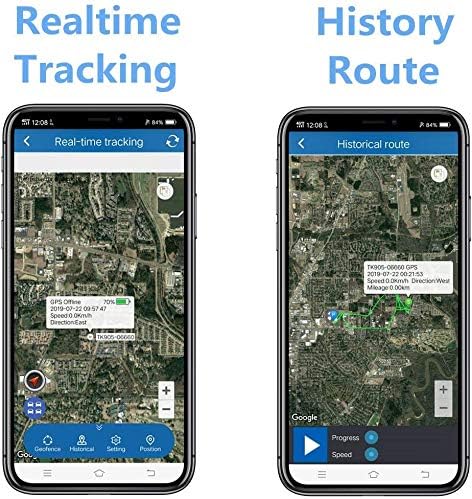
Figure 3: Comparison of Real-time Tracking and History Route features on the mobile application. The history route displays the path taken by the device over a selected period.
Navigate to the "History Route" section within the application or web interface. Select the desired date and time range to view the recorded path.
4.4 Geo-fence Function
Set up virtual boundaries (geo-fences) on the map. You will receive an alert if the tracker enters or exits these predefined areas.

Figure 4: Geo-fence feature illustration. Users can define a geographical area, and the tracker will send an alert if it crosses the boundary.
Access the "Geo-fence" setting in the application. Draw a polygon or circle on the map to define your desired area. Save the geo-fence, and configure alert notifications.
4.5 Fungsi Weker
The TK905 supports various alarm types to enhance security and monitoring:
- Over-speed Weker: Set a speed limit. If the tracker exceeds this limit, an alert will be sent.
- Weker goyang: Receive an alert if the device detects vibration or movement after being stationary for a set period (e.g., 5 minutes).
- Loosing Alarm: Alerts if the device is removed from its magnetic attachment point (if applicable).
- Alarm Daya Kurang: Notifies you when the battery level is critically low, prompting you to recharge the device.

Figure 5: Shake Alarm in action. The device sends an SMS alert to the user's phone when it detects unauthorized movement or vibration.
Configure these alarms within the mobile application or web platform settings. Ensure your notification settings are correctly configured to receive alerts.
5. Pangopènan
Proper maintenance ensures the longevity and optimal performance of your TKSTAR TK905 GPS Tracker.
- Reresik: Usap piranti nganggo kain alus lan garing. Aja nggunakake bahan kimia sing atos utawa pembersih sing abrasif.
- Tahan banyu: Ensure the rubber cover for the SIM card slot and USB port is always securely closed to maintain water resistance. While the device is designed to be waterproof, avoid prolonged submersion.
- Perawatan baterei: To maximize battery life, avoid fully discharging the battery frequently. Store the device in a cool, dry place when not in use for extended periods. Recharge periodically if stored for a long time.
- Panyimpenan: Store the tracker in a temperature-controlled environment, away from extreme heat or cold, and direct sunlight.
- kertu SIM: Periodically check the SIM card's data plan and ensure it remains active to avoid service interruptions.
6. Ngatasi masalah
| Masalah | Kemungkinan Penyebab | Solusi |
|---|---|---|
| Piranti ora aktif. | Low battery; device not activated. | Charge the device fully. Ensure SIM card is correctly inserted and activated. |
| No real-time tracking data. | No network signal; SIM card issues (no data, expired, PIN-locked); device in an area with poor GPS signal. | Check network coverage. Verify SIM card status with your provider. Move the device to an open area with clear sky view. |
| Inaccurate positioning. | Weak GPS signal; interference; device indoors or underground. | Priksa manawa piranti wis cetha view of the sky. Avoid placing it near large metal objects or in enclosed spaces. |
| Alarms not working. | Alarm settings not configured; notification settings on phone/app disabled. | Verify alarm settings in the application/web platform. Check your phone's notification settings for the tracking app. |
| urip baterei cendhak. | Frequent tracking updates; poor network signal (device consumes more power searching); old battery. | Adjust tracking interval to a longer period. Ensure good network coverage. If battery life significantly degrades, consider contacting support for battery replacement options. |
7. Spesifikasi
- Model: TK905
- Ukuran produk: 0.9 x 2.8 x 3.5 inci (kira-kira 2.29 x 7.11 x 8.89 cm)
- Bobot barang: 10.6 ons (kira-kira 300.5 gram)
- Teknologi konektivitas: Cellular (GSM/WCDMA)
- Aplikasi sing Didhukung: GPS Tracking App/Web Platform
- Baterei: 3.7V 7800mAh Rechargeable Li-ion battery
- Wektu siyaga: Nganti 80 dina
- Produsen: TKSTAR
- Tanggal kasedhiya pisanan: 25 Maret 2017
8. Warranty lan Dhukungan
For warranty information, technical support, or service inquiries regarding your TKSTAR TK905 GPS Tracker, please contact the manufacturer directly through their official websitus utawa informasi kontak sing diwenehake karo tumbasan sampeyan. Simpen kuitansi tumbasan sampeyan minangka bukti tumbasan kanggo klaim garansi.
For general inquiries or to visit the brand's store, you may refer to the TKSTAR Store on Amazon: TKSTAR Store.
Dokumen sing gegandhengan - TK905
 |
Pelacak GPS & LKGPS TKSTAR: Pandhuan Pangguna lan Pandhuan Persiapan Comprehensive user manual for TKSTAR GPS and LKGPS trackers. Learn how to install SIM cards, activate devices, track locations via SMS and online platforms, and configure settings like speed alerts and sleep modes. |
 |
GPT09 Long Standby GPS Tracker User Manual Comprehensive user manual for the GPT09 Long Standby GPS Tracker, covering product features, installation, operation via web platform, APP, and SMS, troubleshooting, and warranty information. Includes basic specifications and maintenance records. |
 |
S20Pro 4G Vehicle GPS Tracker: User Manual and Features Explore the NoEnName_Null S20Pro 4G Vehicle GPS Tracker. This manual covers real-time tracking, long battery life, strong magnetic mounting, waterproof capabilities, and alarm functions for vehicle security. |
 |
Pandhuan Pangguna lan Panduan GPS TK-STAR PET TRACKER Pandhuan panganggo lengkap kanggo TK-STAR PET GPS TRACKER, sing nyakup instalasi, operasi, printah SMS, pelacakan online, lan pemecahan masalah. Sinau carane nglacak lokasi kewan sampeyan nganggo piranti iki. |
 |
TK905 GPS Tracker Data Management and User Guide Comprehensive guide to data management for the TK905 GPRS GPS tracker. Details data types, volume, format, storage, retention, and user access/deletion procedures via the companion app. Includes link to English terms and conditions. |
 |
Long Standby GPS Tracker User Manual | Installation, Features & Troubleshooting Comprehensive user manual for the Long Standby GPS Tracker. Learn about specifications, installation, features, troubleshooting, warranty, and FCC compliance. |
Ask a question about this manual
Ask about setup, troubleshooting, compatibility, parts, safety, or missing instructions. Manuals+ will review the question and use this page’s manual context to help answer it.