
Pambuka
Matur nuwun kanggo tukuasing the QUMOX L165U 2.4GHz Wireless Gamepad. This high-quality game controller is designed for use with PC and Android devices, offering a reliable 2.4GHz wireless connection for an enhanced gaming experience. Please read this manual carefully to ensure proper setup and operation of your new gamepad.

Figure 1: QUMOX L165U Gamepad with included USB adapter and OTG connection kit.
Isi Paket
Priksa manawa kabeh item ana ing paket sampeyan:
- 1x QUMOX L165U Gamepad
- 1x 2.4GHz USB Wireless Adapter
- 1x OTG Connection Kit (Micro USB to USB-A adapter)
Setup
1. Instalasi baterei
The QUMOX L165U Gamepad is powered by 2 AAA batteries (not included). To install the batteries:
- Locate the battery compartment on the back of the gamepad.
- Geser mbukak tutup baterei.
- Lebokake 2 baterei AAA, njamin polaritas sing bener (+/-).
- Nutup tutup baterei kanthi aman.

Figure 2: Open battery compartment for AAA battery installation.
2. Nyambung menyang PC
- Plug the 2.4GHz USB Wireless Adapter into an available USB port on your PC.
- Turn on the gamepad by pressing the 'START' button. The gamepad will automatically attempt to connect.
- The PC should recognize the gamepad and install necessary drivers automatically.
- If the gamepad does not connect, press the 'MODE' button on the gamepad to cycle through connection modes until it is recognized by your PC.
3. Connecting to an Android Device (with OTG support)
- Connect the OTG Connection Kit to your Android device's Micro USB port.
- Plug the 2.4GHz USB Wireless Adapter into the USB-A end of the OTG Connection Kit.
- Turn on the gamepad by pressing the 'START' button. The gamepad will automatically attempt to connect.
- Your Android device should recognize the gamepad.
- If the gamepad does not connect, press the 'MODE' button on the gamepad to cycle through connection modes until it is recognized by your Android device.
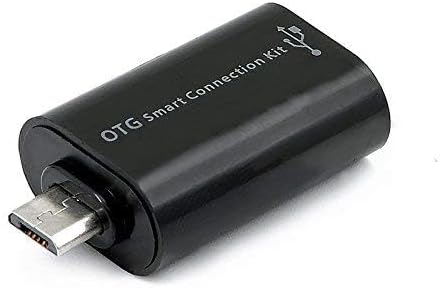
Figure 3: OTG Connection Kit for Android device connectivity.
Instruksi Operasi
Once connected, your QUMOX L165U Gamepad is ready for use. The layout is standard for most game controllers.
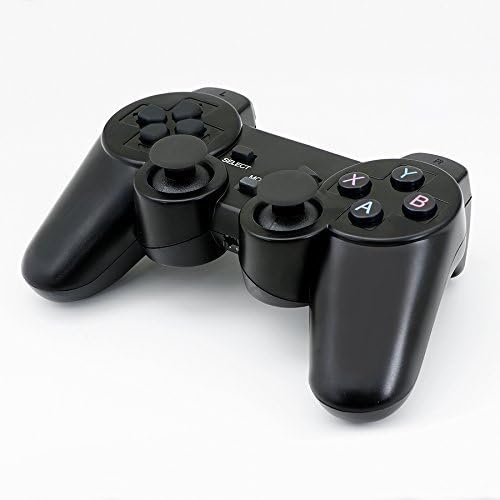
Gambar 4: Ndhuwur view of the QUMOX L165U Gamepad, highlighting button layout.
- Pad Arah (D-Pad): Kanggo input arah sing tepat.
- Joystick Analog: Rong stik analog kanggo gerakan 360 derajat lan kontrol kamera.
- Tombol Tindakan (A, B, X, Y): Tombol tumindak standar kanggo printah ing game.
- Tombol Pundhak (L1, R1) & Pemicu (L2, R2): Located on the top of the gamepad for additional actions.
- Tombol PILIH/MURI: Biasane digunakake kanggo navigasi menu utawa fungsi khusus ing game.
- Tombol START: Digunakake kanggo ngendhegake game utawa ngonfirmasi pilihan.
- Tombol MODE: Cycles through different operating modes (e.g., Android, PC) if automatic detection fails.
Video Demonstrasi
Video 1: A seller-provided overview of a 2-pack wireless controller, demonstrating its features and compatibility. While showing a similar product, it illustrates general wireless controller usage and setup.
Pangopènan
- Reresik: Gunakake kain sing alus lan garing kanggo ngresiki gamepad. Aja nggunakake bahan kimia sing atos utawa bahan abrasif.
- Panyimpenan: Simpen gamepad ing papan sing adhem lan garing, adoh saka sinar srengenge langsung lan suhu sing ekstrem.
- Perawatan baterei: Copot batere yen gamepad ora bakal digunakake sajrone wektu sing suwe kanggo nyegah bocor.
Ngatasi masalah
| Masalah | Kemungkinan Penyebab | Solusi |
|---|---|---|
| Gamepad does not connect. | Low batteries, incorrect mode, adapter not properly inserted. | Replace batteries. Press the 'MODE' button to cycle through modes. Ensure USB adapter is fully inserted into PC or OTG adapter. |
| Tombol utawa joystick ora nanggepi. | Connection issue, game incompatibility, physical damage. | Reconnect the gamepad. Check game settings for controller support. If issue persists, contact support. |
| Android device does not recognize gamepad. | Android device lacks OTG support, OTG adapter issue. | Verify your Android device supports OTG. Ensure OTG adapter is functioning correctly. |
Spesifikasi
| Fitur | Rincian |
|---|---|
| Nomer Model | L165U |
| Teknologi Konektivitas | 2.4GHz Wireless (via USB Adapter) |
| Piranti sing kompatibel | PC, Android (with OTG support) |
| Sumber Daya | 2 x Baterei AAA |
| Bobot Barang | 5.3, XNUMXuw |
| Ukuran Paket | 8.07 x 5.63 x 2.95 inci |
| warna | ireng |
Warranty lan Dhukungan
For warranty information or technical support, please refer to the contact details provided with your purchase or visit the official QUMOX websitus. Simpen bukti tuku kanggo klaim garansi.