
1. Pambuka
This manual provides essential instructions for the installation, operation, maintenance, and troubleshooting of the APC Smart-UPS SRT3000RMXLT 3kVA 208V Rackmount Uninterruptible Power Supply (UPS). Please read this manual thoroughly before installing or operating the equipment to ensure proper usage and safety.
2. Informasi Safety
Gatekna kabeh peringatan lan pandhuan operasi ing manual iki. Yen ora ditindakake bisa nyebabake ciloko utawa kerusakan peralatan.
- Keamanan Listrik: Unit iki ngemot vol sing mbebayanitages. Do not attempt to disassemble the UPS. Servicing should only be performed by qualified personnel.
- Keamanan baterei: Baterei bisa nyebabake risiko sengatan listrik lan arus pendek sing dhuwur. Copot jam tangan, cincin, utawa barang logam liyane sadurunge nangani batere. Gunakake piranti kanthi gagang sing diisolasi.
- Bobot: UPS-e abot. Gunakna teknik ngangkat sing bener lan priksa manawa dhukungane cukup nalika instalasi.
- Lingkungan: Install the UPS indoors in a controlled environment, free from excessive dust, moisture, and extreme temperatures.
3. Isi Paket
Carefully unpack the UPS and inspect for shipping damage. The package should contain the following items:
- APC Smart-UPS SRT3000RMXLT Unit
- Power Supply (Built-In)
- Hardware rak sing dipasang
- CD Dokumentasi
- kabel USB
- Kabel serial
4. Setup
4.1 Instalasi Fisik
The SRT3000RMXLT is designed for rack installation. Ensure the rack is stable and capable of supporting the UPS weight (approximately 69 pounds).
- Mount the UPS into a standard 19-inch rack using the provided rack-mounting hardware.
- Priksa manawa aliran udara sing cukup ing sakubenge unit. Aja ngalangi bukaan ventilasi.

Gambar 4.1: Ngarep view of the APC Smart-UPS SRT3000RMXLT. This image shows the front panel with the display and ventilation grille.
4.2 Connecting the UPS
Connect the UPS to the utility power and your equipment.
- Connect the UPS input power cord to a dedicated 208V AC outlet. The UPS uses a Type B - 3 pin (North American) power plug.
- Connect your equipment to the output receptacles on the rear of the UPS. The unit provides 12 IEC 320 C13/C14 outlets.
- For communication, connect the USB cable or serial cable from the UPS to your computer or network management card.
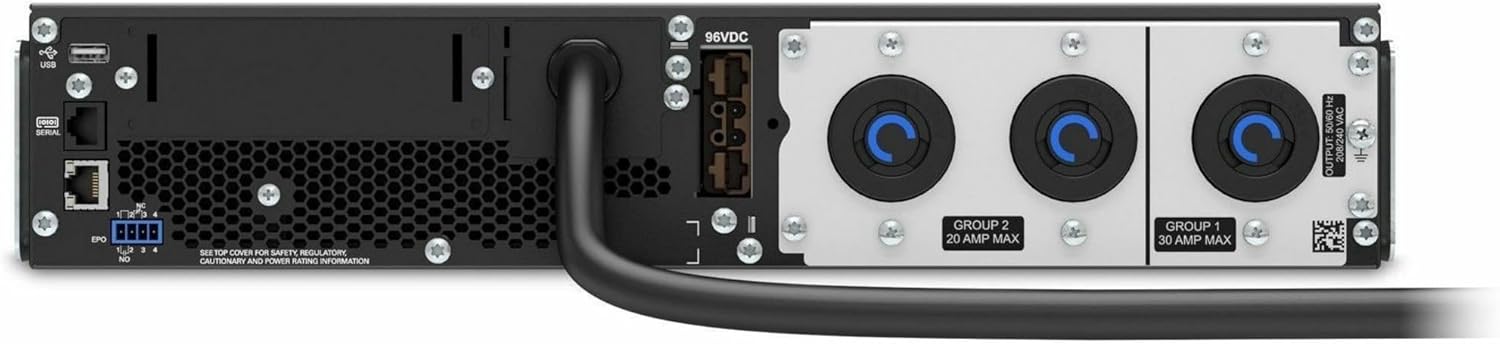
Gambar 4.2: Mburi view of the APC Smart-UPS SRT3000RMXLT. This image displays the various input and output ports, including USB, serial, EPO, and the 12 output receptacles, along with the main power input.
4.3 Daya-Up wiwitan
After all connections are secure:
- Pencet tombol daya ing panel ngarep kanggo nguripake UPS.
- The UPS will perform a self-test and the display will show the current status.
- Allow the batteries to charge for at least 6 hours before relying on them for extended backup time.
5. Ngoperasikake UPS
5.1 Tampilan lan Kontrol Panel Ngarep
The front panel features an LCD display and control buttons for monitoring and configuring the UPS.
- Layar LCD: Shows real-time status, load, battery charge, input/output voltage, and event logs.
- Tombol ESC: Exits the current menu or cancels an operation.
- Tombol OK: Konfirmasi pilihan utawa mlebu menu.
- Panah munggah/mudhun: Navigasi liwat pilihan menu utawa nyetel setelan.
5.2 Operasi dhasar
- Nguripake: Pencet terus tombol daya nganti tampilan murup.
- Pateni: Press and hold the power button until the UPS powers down. Ensure all connected equipment is safely shut down first.
- Mode baterei: Ing acara saka daya outage, the UPS will automatically switch to battery power. The display will indicate 'On Battery'.
- Self-Test: Initiate a manual self-test through the front panel menu to verify battery and UPS functionality.
6. Pangopènan
6.1 Panggantos baterei
The UPS uses sealed lead-acid batteries. Battery life is typically 3-5 years, depending on environmental conditions and usage. Replace batteries when the UPS indicates a 'Battery Fault' or 'Replace Battery' warning.
- Contact APC support or a certified service technician for battery replacement.
- Always use genuine APC replacement battery cartridges (RBCs) to ensure compatibility and optimal performance.
- Daur ulang batere lawas kanthi tanggung jawab.
6.2 Reresik
Keep the UPS free from dust and debris to ensure proper ventilation.
- Use a soft, dry cloth to clean the exterior of the UPS.
- Aja nggunakake pembersih cair utawa pelarut.
- Priksa manawa bukaan ventilasi ora ana alangan.
7. Ngatasi masalah
Bagian iki menehi solusi kanggo masalah umum. Kanggo masalah sing luwih rumit, hubungi dhukungan teknis.
| Masalah | Kemungkinan Penyebab | Solusi |
|---|---|---|
| UPS ora bisa diuripake | No input power; Battery disconnected or discharged | Check power cord connection; Ensure utility power is present; Allow batteries to charge. |
| UPS muni terus-terusan | Daya batere mati; Kondisi kelebihan beban | Check utility power; Reduce connected load. |
| 'Replace Battery' indicator | Baterei cedhak pungkasan urip | Pesan lan ganti kartrid baterei. |
| UPS not providing power to outlets | Output circuit breaker tripped; UPS in fault mode | Reset circuit breaker; Check display for fault codes and consult manual. |
8. Spesifikasi
Key technical specifications for the APC Smart-UPS SRT3000RMXLT.
| Fitur | Spesifikasi |
|---|---|
| Nomer Model | SRT3000RMXLT |
| Merk | APC |
| Kapasitas Daya Output | 3000 VA / 2700 Watt |
| Nominal Output Voltage | 208 V AC |
| Input Nominal Voltage | 208V AC / 230V AC |
| Frekuensi Input | 60 Hz |
| Sambungan Output | 12 x IEC 320 C13/C14 |
| Jinis baterei | Asam timbal |
| Wektu Isi Ulang Khas | 6 Jam |
| Wektu Serep Khas (Muatan Penuh) | 4 menit |
| Faktor wangun | rak |
| Ukuran (L x W x H) | 9 x 23 x 34 inci |
| Bobot | 69 pon |
| Suhu operasi | 0 - 40 °C (32 - 104 °F) |
9. Warranty lan Dhukungan
9.1 Informasi babar pisan
APC provides a standard warranty for this product. Please refer to the warranty card included with your product or visit the official APC websitus kanggo syarat lan kahanan babar pisan rinci khusus kanggo wilayah sampeyan.
9.2 Dhukungan Teknis
For technical assistance, product information, or troubleshooting beyond the scope of this manual, please contact APC customer support. Have your model number (SRT3000RMXLT) and serial number ready when contacting support.
- Dolan maring kantor cabang resmi APC websitus kanggo sumber dhukungan, FAQ, lan informasi kontak.
- Online resources often include updated manuals, firmware, and diagnostic tools.