
Solight TE09
Solight TE09 Weather Station User Manual
Model: TE09
Pambuka
Thank you for choosing the Solight TE09 Weather Station. This manual provides essential information for the proper setup, operation, and maintenance of your device. Please read it thoroughly before use and retain it for future reference.
Informasi Safety
- Aja nyedhiyakake piranti menyang suhu sing ekstrem, sinar srengenge langsung, utawa kelembapan sing dhuwur.
- Aja nyelehake utawa nyebabake piranti kena pengaruh sing kuat.
- Aja nyoba mbongkar utawa ngowahi piranti kasebut. Iki bakal mbatalake garansi.
- Tansah baterei saka tekan bocah. Yen ditelan, golek bantuan medis langsung.
- Buang baterei sing digunakake miturut peraturan lokal.
- Resik piranti nganggo kain sing alus lan garing. Aja nggunakake pembersih abrasif utawa pelarut.
Isi Paket
Mangga priksa isi paket nalika mbukak bungkus. Yen ana barang sing ilang utawa rusak, hubungi pengecer sampeyan.
- Solight TE09 Weather Station Unit
- Manual pangguna (dokumen iki)
Produk Overview
The Solight TE09 Weather Station is designed to provide accurate indoor temperature and humidity readings. Its compact design makes it suitable for various indoor environments.
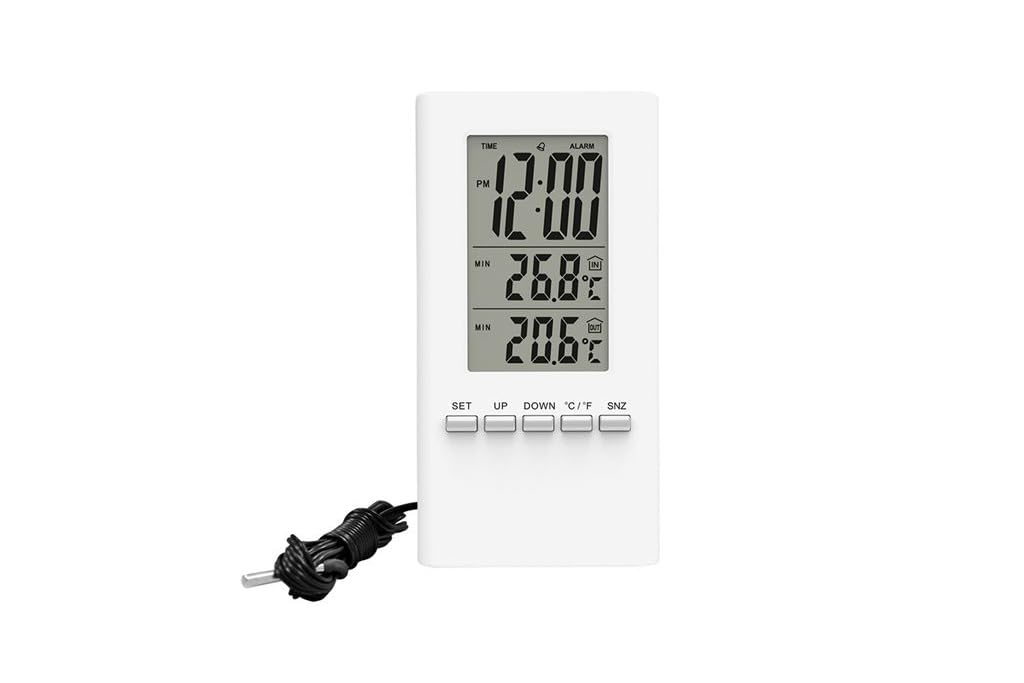
Gambar 1: Ngarep view of the Solight TE09 Weather Station, displaying its screen and compact white casing.
Komponen utama:
- Layar LCD: Shows temperature, humidity, and other relevant information.
- Tombol Kontrol: For setting time, units, and other functions.
- Kompartemen baterei: Dumunung ing mburi unit.
Setup
1. Instalasi baterei
- Locate the battery compartment cover on the back of the Solight TE09 Weather Station.
- Geser utawa bukak tutup kanggo mbukak.
- Insert 1.5V AAA alkaline batteries (not included) according to the polarity indicators (+ and -) inside the compartment.
- Nutup tutup kompartemen baterei kanthi aman.
Cathetan: Ensure batteries are inserted correctly. Incorrect insertion may damage the device.
2. Initial Power-On and Placement
- Once batteries are installed, the device will power on automatically and display initial readings.
- Place the weather station in a suitable indoor location, away from direct sunlight, heat sources, and drafts, which could affect temperature and humidity accuracy.
- Allow the device a few minutes to stabilize and display accurate readings after initial setup.
Instruksi Operasi
1. Displaying Temperature and Humidity
The main display continuously shows the current indoor temperature and humidity. No specific action is required to view bacaan-bacaan iki.
2. Changing Temperature Units (Celsius/Fahrenheit)
Kanggo ngalih antarane Celsius (°C) lan Fahrenheit (°F):
- Locate the "°C/°F" button, usually on the back or side of the unit.
- Press the button once to toggle between the two temperature units. The display will update accordingly.
3. Setting Time and Date (if applicable)
Cathetan: The Solight TE09 is primarily a temperature and humidity monitor. If your model includes time/date functionality, follow these general steps:
- Press and hold the "SET" or "MODE" button for a few seconds until the time display starts flashing.
- Use the "UP" or "DOWN" buttons to adjust the hour, then press "SET" or "MODE" to confirm and move to minutes.
- Repeat for minutes, then for date (year, month, day) if available.
- Press "SET" or "MODE" again to exit the setting mode.
Pangopènan
1. Ngresiki Piranti
- Wipe the exterior of the weather station with a soft, dry, or slightly damp kain.
- Do not use abrasive cleaners, alcohol, or corrosive chemicals, as these can damage the surface and internal components.
- Priksa manawa ora ana cairan sing mlebu ing piranti kasebut.
2. Panggantos baterei
- When the display becomes dim or the device stops functioning, it's time to replace the batteries.
- Follow the "Battery Installation" steps in the Setup section to replace the old batteries with new 1.5V AAA alkaline batteries.
- Dispose of old batteries responsibly according to local environmental regulations.
3. Panyimpenan
If the device will not be used for an extended period, remove the batteries to prevent leakage and store the unit in a cool, dry place.
Ngatasi masalah
| Masalah | Kemungkinan Penyebab | Solusi |
|---|---|---|
| Ora ana tampilan utawa tampilan surem. | Baterei mati utawa salah dipasang. | Replace batteries with new 1.5V AAA alkaline batteries, ensuring correct polarity. |
| Wacan suhu / kelembapan sing ora akurat. | Device placed near heat sources, direct sunlight, or drafts. | Relocate the weather station to a stable indoor environment away from interfering factors. Allow time for readings to stabilize. |
| Tombol ora nanggapi. | Piranti lunak sauntara utawa baterei sithik. | Remove and reinsert batteries to reset the device. If the issue persists, replace batteries. |
Spesifikasi
- Model: Solight TE09
- warna: Putih
- Bahan: Plastik
- Sumber Daya: Battery (AAA alkaline, 1.5V)
- Baterei kalebu: Ora
- GTIN: 08592718012212
- Produsen: Solight
- Tanggal kasedhiya pisanan: 7 Oktober 2018
Warranty lan Dhukungan
For warranty information and technical support, please refer to the documentation provided at the point of purchase or contact your retailer. Keep your purchase receipt as proof of purchase.
Ask a question about this manual
Ask about setup, troubleshooting, compatibility, parts, safety, or missing instructions. Manuals+ will review the question and use this page’s manual context to help answer it.