
Russell Hobbs 22630
Russell Hobbs 22630 Brew and Go Filter Coffee Machine User Manual
Model: 22630 | Brand: Russell Hobbs
1. Pambuka
This manual provides comprehensive instructions for the safe and efficient operation, maintenance, and troubleshooting of your Russell Hobbs 22630 Brew and Go Filter Coffee Machine. Please read all instructions carefully before using the appliance and retain them for future reference.
The Russell Hobbs 22630 is designed to brew fresh coffee directly into a portable stainless steel travel mug, offering convenience for individuals on the go. It features a 24-hour programmable timer, an adjustable drip tray, and a permanent coffee filter.

Image: The Russell Hobbs 22630 Brew and Go Filter Coffee Machine with its included stainless steel travel mug.
2. Instruksi Safety Penting
Nalika nggunakake piranti listrik, pancegahan safety dhasar kudu ditindakake, kalebu ing ngisor iki:
- Waca kabeh instruksi.
- Aja ndemek permukaan sing panas. Gunakake gagang utawa knobs.
- Kanggo nglindhungi saka geni, kejut listrik, lan ciloko kanggo wong, aja nyemplungake kabel, colokan, utawa piranti ing banyu utawa cairan liyane.
- Pengawasan sing cedhak perlu nalika piranti apa wae digunakake dening utawa ing cedhak bocah.
- Copot saka stopkontak nalika ora digunakake lan sadurunge ngresiki. Diwenehake nganti adhem sadurunge dilebokake utawa dicopot, lan sadurunge ngresiki piranti.
- Aja ngoperasikake piranti apa wae kanthi kabel utawa plug sing rusak utawa sawise piranti kasebut gagal, utawa rusak kanthi cara apa wae.
- Panggunaan lampiran aksesoris sing ora dianjurake dening pabrikan piranti bisa nyebabake geni, kejut listrik, utawa ciloko kanggo wong.
- Aja nggunakake njobo.
- Aja nganti kabel macet ing pinggir meja utawa counter, utawa tutul lumahing panas.
- Aja diselehake ing utawa cedhak karo gas panas utawa kompor listrik, utawa ing oven sing digawe panas.
- Tansah masang plug menyang piranti dhisik, banjur plug kabel menyang stopkontak tembok. Kanggo medhot sambungan, nguripake sembarang kontrol kanggo "mati", banjur copot plug saka stopkontak tembok.
- Aja nggunakake piranti kanggo nggunakake liyane saka dimaksudaké.
- Scalding bisa kedadeyan yen tutup dicopot sajrone siklus pembuatan bir.
- Piranti iki mung kanggo panggunaan kluwarga.

Image: The UK 3-pin plug for the coffee machine, emphasizing electrical safety.
3. Komponen produk
Familiarize yourself with the parts of your Russell Hobbs Brew and Go Coffee Machine:
- Tutup Reservoir Banyu
- Waduk banyu
- Filter Basket Holder
- Filter permanen
- Kepala Brew
- Panel Kontrol karo Tampilan Digital
- Adjustable Drip Tray
- Stainless Steel Travel Mug (400 ml capacity)
- Kabel Listrik lan Plug
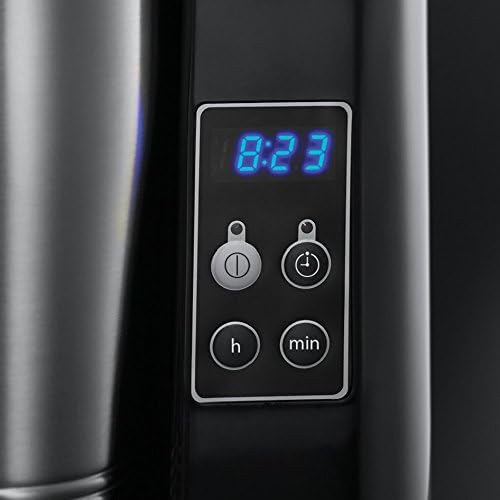
Image: Close-up of the digital control panel with time, brew, and timer buttons.

Image: The included 400 ml stainless steel travel mug.

Image: The adjustable drip tray at the base of the coffee machine.

Image: The reusable permanent coffee filter.
4. Setup lan Gunakake First
4.1 Mbukak kemasan
Carefully remove all packaging materials and dispose of them responsibly. Ensure all components listed in Section 3 are present and undamaged.
4.2 Reresik Sadurunge Gunakake Pisanan
Before using your coffee machine for the first time, it is recommended to clean all removable parts and run a brewing cycle with only water to flush the system.
- Wash the permanent filter, filter basket holder, and travel mug in warm, soapy water. Rinse thoroughly and dry.
- Fill the water reservoir with clean water up to the 400ml mark.
- Place the empty travel mug on the drip tray.
- Press the brew button to start a cycle. Allow the water to brew through.
- Discard the water from the travel mug. Your machine is now ready for use.
4.3 Panggonan
Place the coffee machine on a stable, flat, heat-resistant surface, away from the edge of the counter. Ensure there is adequate ventilation around the unit.

Image: Diagram showing the dimensions of the coffee machine (12.48 x 11.34 x 16.65 cm).
5. Instruksi Operasi
5.1 Brewing Coffee with Ground Coffee
- Bukak tutup reservoir banyu.
- Fill the travel mug with the desired amount of cold, fresh water (up to 400ml). Pour this water into the water reservoir.
- Place the permanent filter into the filter basket holder.
- Add your preferred amount of ground coffee into the permanent filter. A general guideline is 1-2 tablespoons per 100ml of water, adjust to taste.
- Nutup tutup reservoir banyu kanthi aman.
- Place the empty travel mug onto the drip tray. Ensure it is centered.
- Tancepake piranti menyang stopkontak sing cocog.
- Tekan ing brew button (often indicated by a coffee cup icon or power symbol) to start the brewing process. The indicator light will illuminate.
- The machine will automatically stop brewing once the water reservoir is empty.
- Carefully remove the travel mug. Be aware that the mug and coffee will be hot.

Image: A pile of fresh ground coffee, suitable for use with the permanent filter.
5.2 Brewing Coffee with Soft Filter Coffee Pods
This machine is also compatible with soft filter coffee pods.
- Follow steps 1 and 2 from "Brewing Coffee with Ground Coffee".
- Place one soft filter coffee pod into the permanent filter. Do not use the permanent filter if using a pod that already contains a filter.
- Continue from step 5 in "Brewing Coffee with Ground Coffee".

Image: A single soft filter coffee pod, an alternative to ground coffee.
5.3 Nggunakake Timer Programmable 24 Jam
Timer sing bisa diprogram ngidini sampeyan nyetel mesin supaya miwiti nggawe bir ing wektu tartamtu.
- Prepare the coffee machine as described in Section 5.1 or 5.2, ensuring water and coffee are loaded and the travel mug is in place.
- Setel wektu saiki: Pencet tombol jam button (often indicated by a clock icon). Use the H (hour) and Min (minute) buttons to set the current time.
- Set the auto-brew time: Press the Program button (often indicated by a timer icon). Use the H lan Min tombol kanggo nyetel wektu masakan sing dikarepake.
- Activate the timer: Press the Program button again to confirm the setting. A small indicator light (e.g., a timer icon or "AUTO") will illuminate on the display, indicating that the timer is active.
- Mesin bakal miwiti nggawe bir kanthi otomatis ing wektu sing disetel.
6. Maintenance lan Cleaning
Reresik reguler njamin kinerja optimal lan ngluwihi umur mesin kopi.
6.1 Reresik saben dina
- Tansah copot piranti lan wenehake nganti adhem sadurunge ngresiki.
- Remove the permanent filter and filter basket holder. Discard used coffee grounds/pods.
- Wash the permanent filter, filter basket holder, and travel mug in warm, soapy water. Rinse thoroughly and dry. These parts are generally top-rack dishwasher safe, but hand washing is recommended for longevity.
- Ngilangke njaba mesin kopi nganggo iklanamp kain. Aja nggunakake pembersih abrasif utawa bantalan gosok.
- Clean the drip tray and its cover.
6.2 Nurunake
Mineral deposits (limescale) can build up in your coffee machine over time, affecting performance and taste. Descale your machine regularly, depending on the hardness of your water and frequency of use (e.g., every 2-3 months).
- Prepare a descaling solution according to the descaler manufacturer's instructions. Alternatively, you can use a solution of white vinegar and water (e.g., 1 part vinegar to 2 parts water).
- Tuangake solusi descaling menyang reservoir banyu.
- Place the empty travel mug on the drip tray.
- Start a brewing cycle without coffee. Allow half of the solution to brew through, then turn off the machine and let it stand for 15-20 minutes to allow the solution to work.
- Turn the machine back on and allow the remaining solution to brew through.
- Discard the descaling solution from the travel mug.
- Rinse the machine by running at least two full cycles with fresh, clean water to remove any residual descaler taste.
7. Ngatasi masalah
| Masalah | Kemungkinan Penyebab | Solusi |
|---|---|---|
| Kopi ora digawe. | No water in reservoir; Machine not plugged in; Brew button not pressed. | Fill water reservoir; Ensure power cord is securely plugged in; Press the Brew button. |
| Kopi lemes utawa rasane ora enak. | Insufficient coffee grounds; Coffee too coarse; Machine needs descaling. | Add more coffee grounds; Use finer grind; Descale the machine (see Section 6.2). |
| Kopi ora cukup panas. | Machine needs descaling; Travel mug not pre-heated. | Descale the machine; Rinse travel mug with hot water before brewing. |
| Banyu meluap saka kranjang filter. | Too much coffee grounds; Filter clogged; Travel mug not in place. | Reduce coffee amount; Clean permanent filter thoroughly; Ensure travel mug is correctly positioned. |
8. Spesifikasi
| Fitur | Rincian |
|---|---|
| Merk | Russell Hobbs |
| Nomer Model | 22630 |
| warna | Perak, Ireng |
| Dimensi produk | 12.48 x 11.34 x 16.65 cm |
| Kapasitas Volume | 0.4 litres (400 ml) |
| Voltage | 220 volt |
| Fitur Khusus | Permanent Filter, 24-hour Programmable Timer, Adjustable Drip Tray |
| Bobot Barang | 1.18 kg |
| Jenis Kopi | Mesin Kopi Tetes Kab |
9. Warranty lan Dhukungan
Kanggo informasi garansi lan dhukungan pelanggan, delengen kertu garansi sing kalebu ing produk sampeyan utawa kunjungi kantor pusat Russell Hobbs resmi. websitus. Simpen bukti tuku kanggo klaim garansi.
If you encounter issues not covered in the troubleshooting section, please contact Russell Hobbs customer service for assistance.
For more information, you may visit the Russell Hobbs Store: Russell Hobbs Store on Amazon.co.uk
Ask a question about this manual
Ask about setup, troubleshooting, compatibility, parts, safety, or missing instructions. Manuals+ will review the question and use this page’s manual context to help answer it.