
1. Pambuka
This manual provides essential instructions for the safe and efficient operation of your Sharp CD-DH950P 240W Mini-Component System. This system features a 5-disc CD changer, a cassette deck, an iPod/iPhone docking station, a USB host for digital audio playback, and an AM/FM tuner. Please read this manual thoroughly before using the system and retain it for future reference.
2. Informasi Safety
- Sumber Daya: Sambungake unit mung menyang stopkontak AC kanthi voltase sing wis ditemtokaketage.
- Ventilasi: Priksa manawa ventilasi sing cukup. Aja ngalangi bukaan ventilasi.
- Banyu lan Kelembapan: Aja mbabarake unit menyang udan, kelembapan, utawa cairan sing netes / cipratan.
- panas: Supaya unit adoh saka sumber panas kayata radiator, register panas, kompor, utawa apparatus liyane sing gawé panas.
- Reresik: Copot unit saka stopkontak sadurunge ngresiki. Gunakake kain sing alus lan garing.
- Layanan: Aja nyoba layanan produk iki dhewe. Hubungi kabeh layanan kanggo personel layanan sing berkualitas.
3. Isi Paket
Priksa manawa paket sampeyan ngemot item ing ngisor iki:
- Main Unit (CD-DH950P)
- Speaker kiwa
- Speaker tengen
- Remote Control karo Baterei
- Antena AM Loop
- Antena Kawat FM
- Kabel Daya
4. Setup
4.1 Nyambungake Speaker
Connect the speaker wires from the main unit to the corresponding terminals on the back of each speaker. Ensure correct polarity (red to red, black to black) for optimal sound quality. The left speaker connects to the left speaker output, and the right speaker to the right speaker output.
4.2 Connecting the Antennas
- Antena FM: Connect the supplied FM wire antenna to the FM antenna terminal on the rear of the main unit. Extend the wire for better reception.
- Antena AM: Connect the supplied AM loop antenna to the AM antenna terminals on the rear of the main unit. Position the antenna for best reception.
4.3 Sambungan Daya
Plug the power cord into the AC IN jack on the rear of the main unit, then plug the other end into a standard AC wall outlet.
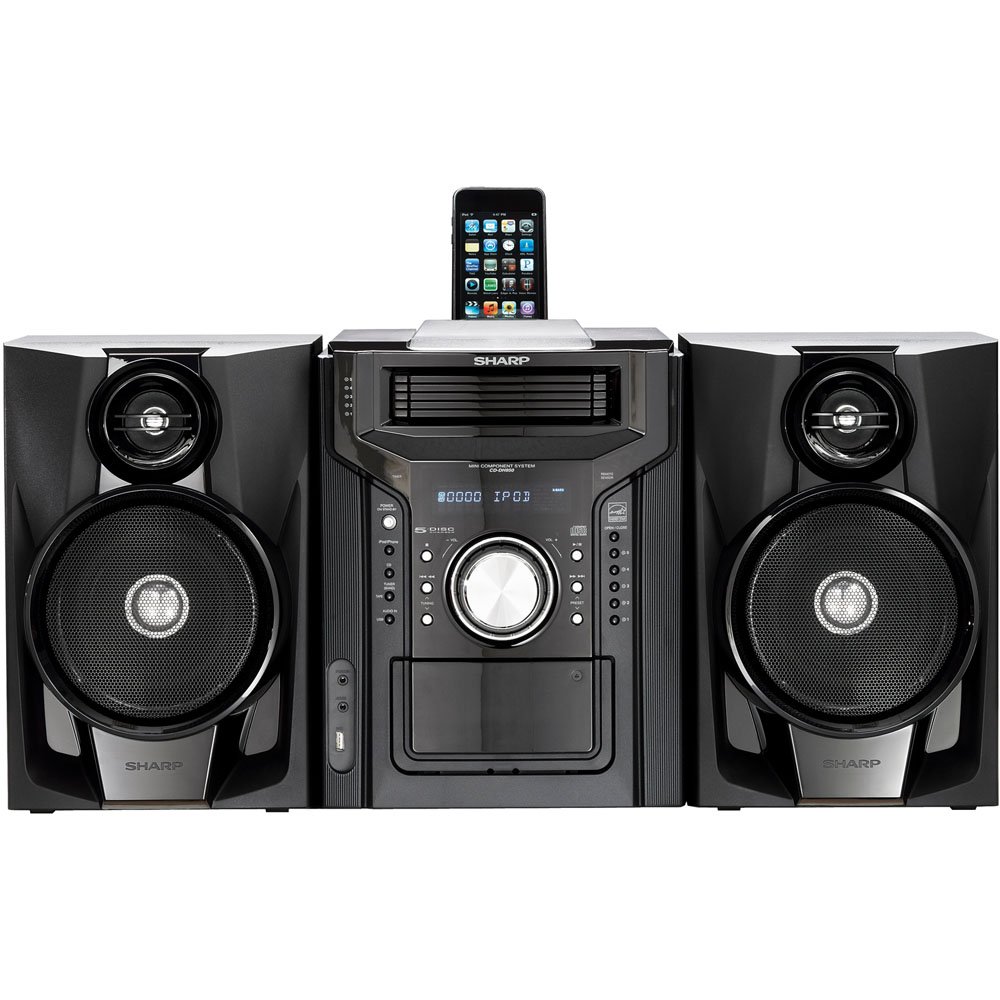
Gambar 4.3.1: Sakabèhé view of the Sharp CD-DH950P Mini-Component System, showing the main unit flanked by two speakers, with an iPhone docked on top of the main unit.
5. Instruksi Operasi
5.1 Power On / Off lan Kontrol Volume
- Tekan ing DAYA tombol ing panel ngarep utawa remot kontrol kanggo nguripake utawa mateni unit.
- Puter ing VOLUME tombol ing panel ngarep utawa nggunakake VOL +/- tombol ing remot kontrol kanggo nyetel tingkat swara.
5.2 Puter maneh CD
This system features a 5-disc CD changer.
- Tekan ing Mbukak / TUTUP tombol kanggo mbukak tray CD.
- Place up to five CDs on the disc trays, label side up.
- Pencet Mbukak / TUTUP maneh kanggo nutup tray.
- Tekan ing CD tombol kanggo milih fungsi CD.
- Tekan ing PLAY / PAUSE tombol kanggo miwiti puter maneh.
- Gunakake ing SKIP buttons to navigate between tracks or discs.
5.3 Operasi Dek Kaset
- Tekan ing TAPE OPEN/CLOSE button to open the cassette deck.
- Lebokake tape kaset.
- Tekan ing TAPE tombol kanggo milih fungsi kaset.
- Pencet PLAY kanggo miwiti puter maneh.
- To record, ensure the source is selected (e.g., CD, Tuner) and press the RECORD button on the cassette deck.
5.4 Docking iPod/iPhone
The system includes a top-mounted docking slot for compatible iPod and iPhone devices (30-pin connector).
- Carefully place your iPod or iPhone into the docking slot.
- The system will automatically switch to iPod/iPhone mode or you may need to press the iPod / iPhone tombol.
- Use the system's controls or your device's controls to play music. The device will also charge while docked.
5.5 USB Host Playback
Connect a USB storage device containing MP3 or WMA audio files to the USB port on the front panel.
- Lebokake piranti USB menyang port USB.
- Tekan ing USB button to select the USB function.
- Gunakake kontrol puter maneh kanggo navigasi lan muter files.
5.6 AM/FM Tuner
- Tekan ing TUNER tombol kanggo milih radio AM utawa FM.
- Gunakake ing TUNING +/- tombol kanggo nyetel stasiun kanthi manual.
- To auto-scan, press and hold the TUNING +/- tombol.
- To store a preset, tune to the desired station, then press INGET ngiring dening nomer prasetel.
5.7 Input Audio
Connect an external audio device (e.g., MP3 player, smartphone) to the AUDIO IN jack on the front panel using a 3.5mm stereo cable.
- Connect your device to the AUDIO IN jack.
- Tekan ing AUDIO ING button to select this source.
- Kontrol puter maneh saka piranti sing disambungake.
6. Pangopènan
6.1 Reresik Unit
Wipe the exterior of the unit with a soft, dry cloth. Do not use abrasive cleaners, waxes, or solvents. Ensure the unit is unplugged before cleaning.
6.2 CD and Cassette Care
- Handle CDs by their edges to avoid fingerprints and scratches. Clean discs with a soft, lint-free cloth from the center outwards.
- Store cassette tapes away from strong magnetic fields and direct sunlight.
7. Ngatasi masalah
| Masalah | Kemungkinan Penyebab | Solusi |
|---|---|---|
| Ora ana daya | kabel daya ora nyambung; stopkontak rusak | Priksa manawa kabel listrik wis dipasang kanthi aman; Coba stopkontak liyane |
| Ora ana swara | Volume too low; Speakers not connected; Incorrect source selected | Tambah volume; Priksa sambungan speaker; Pilih sumber input sing bener |
| CD ora muter | Disc inserted incorrectly; Disc is dirty or scratched | Insert disc correctly (label side up); Clean or replace disc |
| Resepsi radio sing ora apik | Antenna not positioned correctly; Weak signal | Adjust position of AM/FM antennas; Try auto-tuning or manual fine-tuning |
| iPod/iPhone not charging/playing | Device not properly docked; Device not compatible (e.g., newer connector) | Re-dock the device; Note that this system uses a 30-pin connector, newer devices may require an adapter (not included) |
8. Spesifikasi
- Merk: Tajem
- Model: CD-DH950P
- Total Daya Output: 240 Watts RMS (85W/ch FTC)
- Konfigurasi Speaker: 2.1 Saluran
- Format Audio sing Didhukung: CD, MP3, WMA
- Rasio Signal-to-Noise: 100 dB
- Piranti sing kompatibel: MP3 Player, Smartphone (via 30-pin dock or USB/Audio In)
- Ukuran (L x W x H): 27.6 x 13.6 x 13.5 inci
- Bobot barang: 24.4 pon
- UPC: 074000369863, 074000369290
9. Informasi babar pisan
This product is covered by a 1-year limited warranty from the date of purchase. Please refer to the warranty card included with your product for full terms and conditions, or contact Sharp customer service for details.
10. Dhukungan
For further assistance, technical support, or service inquiries, please contact Sharp customer service. Contact information can typically be found on the Sharp official websitus utawa ing dokumentasi sing diwenehake karo produk sampeyan.