
Sony TCM-200DV
Sony TCM-200DV Portable Cassette Recorder User Manual
Model: TCM-200DV
1. Pambuka
This manual provides detailed instructions for the operation, maintenance, and troubleshooting of your Sony TCM-200DV Portable Cassette Recorder. Please read this manual thoroughly before using the device to ensure proper functionality and longevity.
The Sony TCM-200DV is designed for convenient and reliable audio recording and playback using standard cassette tapes. Its features include voice-operated recording, double recording time, and clear voice enhancement.
2. Fitur Utama
- Wektu Rekaman Dobel: Allows recording on a standard cassette at either normal speed or half the normal speed for extended recording sessions.
- Rekaman Swara (VOR): Activates recording only when audible sound is present, conserving tape and eliminating silent passages.
- Urip baterei dawa: Advanced technology extends battery power for extended use (up to 20 hours).
- Kontrol Kacepetan Puter maneh: Adjusts playing speed by +30% or -15% for easier review of recorded information.
- Battery Indicator with Alert LED: Confirms battery operation and alerts you of low battery power.
- Built-in Flat Mic: Provides convenient recording versatility.
- Jack Mikrofon: Ngidini sambungan mikropon eksternal.
- Clear Voice Recording System: Enhances voice quality during recording and playback for greater clarity.
- 3-Digit Tape Counter: Helps in finding specific locations on the tape for rapid access and editing.
- Rekaman Siji Tutul: Simplifies quick play/record operation.
- Isyarat lan Review: Provides sound during fast forward and rewind modes to help locate specific passages.
- Kontrol Level Rekaman Otomatis Sony-Matic: Ensures correct recording level automatically.
- 3V DC-in Jack: For 2-way operation using replaceable batteries or an optional AC adapter.
- Monaural Earphone Jack: Provides sound in both ears when using an optional stereo headset.
- Mateni otomatis: Conserves battery and prevents tape damage.
- Two Tape Speeds: 4.8cm/s (normal) and 2.4cm/sec (double recording time).
3. Setup
3.1. Instalasi baterei
The Sony TCM-200DV requires two (2) AA batteries for operation. Follow these steps to install them:
- Locate the battery compartment cover on the back or side of the unit.
- Geser utawa angkat tutup kanggo mbukak kompartemen.
- Lebokake rong batere AA, priksa manawa terminal positif (+) lan negatif (-) wis sejajar karo indikator ing njero kompartemen.
- Nutup tutup kompartemen baterei kanthi aman.
The Battery Indicator LED will confirm operation. If the LED flashes, battery power is low and replacement is needed.
3.2. Nguatake Unit
The unit can be powered by the installed AA batteries or an optional 3V DC AC adapter (not included). Connect the AC adapter to the 3V DC-in jack on the unit and plug it into a standard wall outlet.
4. Instruksi Operasi
4.1. Loading Tape Kaset
- Tekan ing STOP / EJECT tombol kanggo mbukak kompartemen kaset.
- Insert a standard cassette tape with the open edge facing the tape heads. Ensure the tape is fully seated.
- Tutup wadhah kaset alon-alon nganti muni klik.
4.2. Ngrekam
Before recording, ensure the cassette tape's erase-prevention tabs are intact. If a tab is broken off, the tape cannot be recorded on. You can cover the tab opening with adhesive tape to enable recording.
- Select Recording Speed: Gunakake ing REK WAKTU switch to select NORMAL (4.8cm/s) or GANDA (2.4cm/sec) for extended recording time.
- Rekaman Siji Tutul: Tekan ing RECORD button (red) and the PLAY button simultaneously. The unit will begin recording.
- Rekaman Swara (VOR): To activate VOR, slide the V-O-R ngalih menyang ON position. Recording will automatically start when sound is detected and pause during silence.
- Monitoring Recording: The built-in flat microphone captures audio. For external audio input, connect an external microphone to the MIC jack. The Sony-Matic Automatic Recording Level Control will adjust the recording level automatically.
- Kanggo mungkasi ngrekam: Tekan ing STOP / EJECT tombol.
4.3. Puter maneh
- Insert a recorded cassette tape.
- Tekan ing PLAY button. Audio will play through the built-in speaker.
- Kontrol Kacepetan Puter maneh: Nyetel ing Kontrol SPEED dial to increase or decrease playback speed by up to +30% or -15%.
- Isyarat lan Review: While playing, press and hold the CEPAT MAJU or REWIND buttons to quickly scan through the tape with audible sound. Release the button to resume normal playback.
- Nggunakake Earphone: Connect a 3.5mm monaural or stereo earphone/headset to the EAR jack kanggo ngrungokake pribadi.
- To Stop Playback: Tekan ing STOP / EJECT tombol.
4.4. Using the Tape Counter
The 3-digit tape counter helps you locate specific sections on the tape. Press the COUNTER RESET button to set the counter to "000" at the beginning of a recording or a desired point.
4.5. Otomatis Mati
The unit features an automatic shut-off mechanism that stops the tape when it reaches the end, preventing unnecessary wear and conserving battery life.
5. Pangopènan
5.1. Ngresiki Kepala Pita
Regular cleaning of the tape heads, pinch roller, and capstan is essential for optimal sound quality and to prevent tape damage. Use a cotton swab lightly moistened with isopropyl alcohol. Clean these components after every 10-20 hours of use or if sound quality deteriorates.
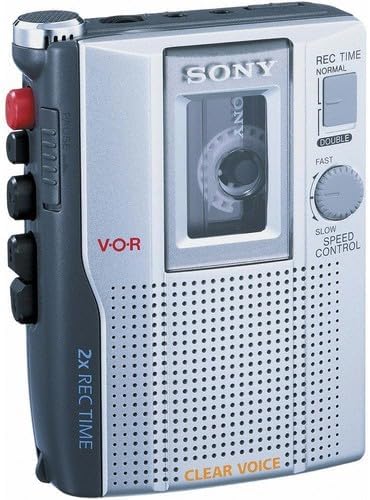
Gambar 1: Ngarep view of the Sony TCM-200DV Portable Cassette Recorder, showing the cassette window, controls, and speaker grille.
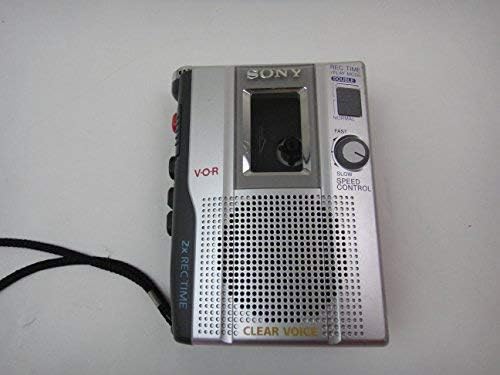
Gambar 2: Ndhuwur-mudhun view of the Sony TCM-200DV Portable Cassette Recorder, highlighting the side controls and strap.
5.2. Baterei Care
- Copot baterei yen unit ora bakal digunakake kanggo wektu lengkap kanggo nyegah bocor.
- Aja nyampur baterei lawas lan anyar, utawa macem-macem jinis baterei.
- Mbuwang baterei bekas kanthi tanggung jawab miturut peraturan lokal.
5.3. Perawatan Umum
- Jaga unit iki adoh saka sinar srengenge langsung, sumber panas, lan bledug utawa kelembapan sing akeh banget.
- Resik njaba nganggo kain sing alus lan garing. Aja nggunakake pembersih abrasif utawa pelarut.
- Aja nyelehake utawa nyebabake unit kasebut kena pengaruh sing kuat.
6. Ngatasi masalah
If you experience issues with your Sony TCM-200DV, please refer to the following common problems and solutions:
- Unit ora aktif:
- Priksa manawa batere wis dipasang kanthi bener lan ora entek. Ganti yen perlu.
- Yen nggunakake adaptor AC, priksa manawa wis disambungake kanthi bener lan stopkontak bisa berfungsi.
- Ora bisa ngrekam:
- Ensure the cassette tape's erase-prevention tabs are intact. If a tab is broken, cover the opening with adhesive tape.
- Verifikasi yen RECORD lan PLAY buttons are pressed simultaneously.
- Check if the VOR function is enabled and if there is sufficient audible sound for it to activate.
- Poor sound quality during playback or recording:
- Clean the tape heads, pinch roller, and capstan as described in the Maintenance section.
- Ensure the cassette tape is not damaged or worn out. Try a different tape.
- Check battery level; low batteries can affect sound quality.
- Tape does not move or jams:
- Ensure the cassette tape is properly loaded and not tangled.
- Check for any foreign objects inside the cassette compartment.
- If the unit has been stored for a long time, the rubber belts might have deteriorated. Professional service may be required.
Yen masalah isih ana sawise nyoba solusi kasebut, hubungi dhukungan pelanggan Sony.
7. Spesifikasi
| Fitur | Rincian |
|---|---|
| Dimensi produk | 9.7 x 4.9 x 2.2 inci |
| Bobot Barang | 6.1 ons (6.08 ons) |
| Nomer Model | TCM-200DV |
| Produsen | Sony |
| Piranti sing kompatibel | Pita Kaset Kab |
| Antarmuka Hardware | Audio 3.5mm Kab |
| Faktor Bentuk Mikrofon | Dibangun ing |
| Format | Mono |
| Jack Headphone Kab | 3.5 milimeter |
| Urip baterei | 15 Hours (up to 20 hours with advanced technology) |
| Mode Operasi Mikrofon | Mono |
| Tape Speeds | 4.8cm/s (Normal), 2.4cm/sec (Double) |
| Sumber Daya | 2 AA Batteries or 3V DC AC Adapter (optional) |
8. Warranty lan Dhukungan
For warranty information and customer support regarding your Sony TCM-200DV Portable Cassette Recorder, please refer to the documentation included with your purchase or visit the official Sony support website. You can also contact Sony customer service directly for assistance with product inquiries, technical support, or service requests.
For the latest support information, please visit the Toko Sony ing Amazon utawa Sony resmi websitus.