
1. Produk Liwatview
The Technoline WS 6810 amber Weather Station is a sophisticated device designed to provide accurate indoor and outdoor temperature readings, precise timekeeping via DCF-77 radio control, and convenient alarm functions. Its modern design with a warm amber LED display and black high-gloss finish integrates seamlessly into any contemporary home environment. This manual provides detailed instructions for setting up, operating, and maintaining your weather station.

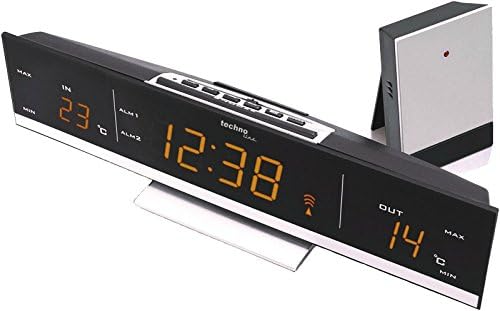
Gambar 1.1: Ngarep view of the Technoline WS 6810 Weather Station, displaying indoor and outdoor temperatures, current time, and alarm indicators.
2. Isi Paket
Mangga priksa isi paket kasebut kanthi teliti. Yen ana barang sing ilang utawa rusak, hubungi toko sampeyan langsung.
- 1 x Technoline WS 6810 Temperature Station (Main Unit)
- 1 x TX96 (TW004) Outdoor Sensor
- 1 x Power Supply Unit (220V)
- 1 x User Manual (dokumen iki)
Cathetan: 3 x AAA Micro LR03 batteries for main unit backup and 2 x AAA Micro LR03 batteries for the outdoor sensor are ora klebu lan kudu dituku dhewe.

Figure 2.1: The Technoline WS 6810 main unit alongside its TX96 outdoor sensor.
3. Fitur Utama
- DCF-77 Radio-Controlled Clock: Automatic time synchronization for precise timekeeping. Includes manual setting option and time zone adjustment (± 1 hour).
- Indoor and Outdoor Temperature Display: Monitors and displays current temperatures for both indoor and outdoor environments.
- Memori Suhu Min / Maks: Records and displays the highest and lowest temperatures measured.
- Dual Alarm Clocks: Two independent alarms (ALM1, ALM2) with adjustable settings.
- Fungsi Tundha: Provides a temporary pause for alarms, typically 5 minutes.
- Padhang tampilan sing bisa diatur: Two brightness levels for optimal visibility in various lighting conditions.
- Stand Meja: Integrated stand for convenient desktop placement.
- Tampilan LED: Clear, warm amber LED digits for easy readability.
4. Pandhuan Setup
4.1. Nguripake Unit Utama
- Connect the provided power supply unit to the DC IN port on the back of the WS 6810 main unit.
- Plug the power adapter into a standard 220V electrical outlet. The display will illuminate.
- Kanggo daya serep sak outages, insert 3 x AAA Micro LR03 batteries (not included) into the battery compartment on the back of the main unit, observing polarity (+/-).
4.2. Installing Batteries in the Outdoor Sensor (TX96)
- Open the battery compartment on the back of the TX96 outdoor sensor.
- Insert 2 x AAA Micro LR03 batteries (not included), ensuring correct polarity.
- Nutup kompartemen baterei kanthi aman.
4.3. Initial Synchronization and Sensor Placement
- Place the outdoor sensor within effective transmission range (typically up to 30 meters in open air) of the main unit. Avoid placing it near large metal objects, electrical appliances, or direct sunlight.
- The main unit will automatically attempt to receive the DCF-77 radio signal for time synchronization and connect with the outdoor sensor. This process may take several minutes. A signal icon will appear on the display once synchronization is successful.
- If the outdoor temperature does not appear after a few minutes, press the "SENSOR" button on the main unit to manually initiate a search for the outdoor sensor.
4.4. Time Zone Setting (if required)
If you are in a region where the DCF-77 signal's standard time differs from your local time (e.g., outside Central European Time), you may need to adjust the time zone.
- In normal time display mode, press and hold the "SET" button until the time zone offset flashes.
- Use the "+" or "-" buttons to adjust the time zone offset in ±1 hour increments.
- Press "SET" again to confirm and exit.
Gambar 4.1: Ndhuwur view of the WS 6810, highlighting the control buttons for setup and operation.
5. Instruksi Operasi
5.1. Tampilan Informasi
The large LED display shows the following information:
- ING: Suhu njero ruangan.
- metu: Outdoor temperature (from TX96 sensor).
- Wektu: Current time (radio-controlled).
- ALM1 / ALM2: Indicators for Alarm 1 and Alarm 2.
- Ikon Sinyal: Indicates successful DCF-77 signal reception.
- MIN / MAX: Indicators for minimum and maximum temperature records.
5.2. Nyetel Weker
The WS 6810 features two independent alarms (ALM1 and ALM2).
- Press the "ALARM" button repeatedly to cycle through ALM1, ALM2, and normal time display.
- When ALM1 or ALM2 is displayed, press and hold the "ALARM" button until the alarm time flashes.
- Use the "+" or "-" buttons to adjust the hour, then press "ALARM" to confirm and move to minutes.
- Use the "+" or "-" buttons to adjust the minutes, then press "ALARM" to confirm.
- To activate/deactivate an alarm, select ALM1 or ALM2 display, then press the "+" button. An alarm icon will appear/disappear.
5.3. Fungsi Snooze
When an alarm sounds, press the "SNOOZE/LIGHT" button to activate the snooze function. The alarm will temporarily stop and sound again after approximately 5 minutes.
5.4. Adjusting Display Brightness
Press the "SNOOZE/LIGHT" button (when no alarm is sounding) to toggle between the two available brightness levels for the LED display.
5.5. Viewing Min/Max Temperatures
Press the "MIN/MAX" button to cycle through the current, maximum, and minimum recorded indoor and outdoor temperatures. To reset the min/max records, press and hold the "MIN/MAX" button while the min/max values are displayed.
6. Pangopènan
- Reresik: Usap unit utama lan sensor njaba nganggo kain alus,amp kain. Aja nggunakake pembersih abrasif utawa pelarut.
- Panggantos baterei: Replace batteries in the outdoor sensor and main unit (for backup) when the low battery indicator appears on the display or when performance degrades. Always replace all batteries of a set at the same time.
- Panggonan Sensor: Periodically check the outdoor sensor's placement to ensure it is protected from direct sunlight and heavy precipitation for accurate readings and longevity.
- Panyimpenan: Yen nyimpen piranti nganti suwe, copot kabeh baterei kanggo nyegah bocor.
7. Ngatasi masalah
| Masalah | Kemungkinan Penyebab | Solusi |
|---|---|---|
| Ora ana tampilan ing unit utama. | Power adapter not connected or faulty; batteries (backup) are dead or incorrectly inserted. | Ensure power adapter is securely plugged in. Check and replace backup batteries, ensuring correct polarity. |
| Outdoor temperature not displayed or inaccurate. | Outdoor sensor batteries are dead; sensor out of range; interference; sensor not paired. | Replace outdoor sensor batteries. Move sensor closer to the main unit. Avoid placing near electronics. Press "SENSOR" button on main unit to re-establish connection. |
| Wektune ora bener utawa ora sinkron. | Weak DCF-77 signal; interference; incorrect time zone setting. | Relocate the main unit to an area with better signal reception (e.g., near a window, away from electronics). Check time zone setting. Manual time setting is available if radio control fails. |
| Weker ora muni. | Alarm is not activated; alarm volume too low (not applicable for this model, but common issue). | Ensure the alarm icon (ALM1 or ALM2) is displayed, indicating activation. Re-set the alarm time. |
8. Spesifikasi Teknis
| Model | WS 6810 amber |
| Ukuran Unit Utama (L x W x H) | 28.5 x 7 x 5.5 cm (kira-kira 11.2 x 2.8 x 2.2 inci) |
| Bobot Unit Utama | 500 g (kira-kira 1.1 lbs) |
| Outdoor Sensor (TX96) Dimensions (L x W x H) | 50 x 22 x 104 mm (kira-kira 2.0 x 0.9 x 4.1 inci) |
| Catu Daya (Unit Utama) | 220V AC Power Adapter (included) |
| Backup Power (Main Unit) | 3 x AAA Micro LR03 batteries (not included) |
| Catu Daya (Sensor Luar Ruangan) | 2 x AAA Micro LR03 batteries (not included) |
| Tipe Tampilan | LED (Amber) |
| Sinkronisasi Wektu | DCF-77 Radio Controlled |
| Temperature Range (Indoor) | (Information not provided, typical range is 0°C to 50°C) |
| Temperature Range (Outdoor) | (Information not provided, typical range is -20°C to 60°C) |
9. Warranty lan Dhukungan
Technoline products are manufactured to high quality standards. For warranty information, technical support, or service inquiries, please contact your retailer or visit the official Technoline websitus.
Kaca Produk Resmi: http://www.technoline.eu/products/en/4029665068107
Mangga nyimpen bukti tuku kanggo claims babar pisan.