
Pambuka
Thank you for choosing the RadioShack Lightweight Stereo Headphones, Model 33-1116. These headphones are designed for comfortable listening with clear audio. This manual provides essential information for setting up, operating, maintaining, and troubleshooting your headphones to ensure optimal performance and longevity.
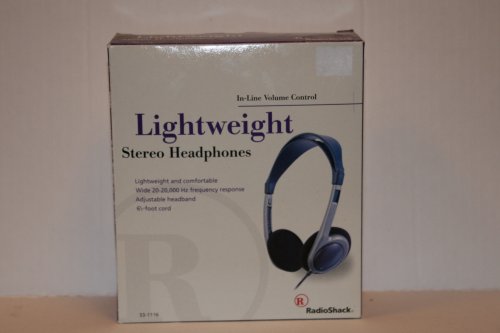
Image: RadioShack Lightweight Stereo Headphones, Model 33-1116. This image displays the headphones with an adjustable headband and a visible audio cable.
Informasi Safety
- Perlindhungan kuping: Aja ngrungokake ing tingkat volume dhuwur kanggo wektu sing suwe kanggo nyegah karusakan pangrungu.
- Kesadaran Lingkungan: Aja nggunakake headphone ing kahanan sing ora bisa krungu swara sekitar bisa mbebayani, kayata nalika nyopir, nyepep, utawa mlaku-mlaku ing lalu lintas.
- Reresik: Gunakake kain sing alus lan garing kanggo ngresiki. Aja nggunakake pembersih cair utawa aerosol.
- Panyimpenan: Simpen headphone ing panggonan sing resik, garing, lan adoh saka suhu ekstrem.
Isi Paket
Mangga dipriksa paket kanggo item ing ngisor iki:
- RadioShack Lightweight Stereo Headphones (Model 33-1116)
Setup
- Sambungake menyang Sumber Audio: Insert the 3.5mm audio jack at the end of the headphone cable into the headphone output port of your audio device (e.g., smartphone, tablet, computer, stereo system).
- Nyetel Headband: Place the headphones on your head. Adjust the sliding headband on both sides until the earcups comfortably cover your ears and the headphones feel secure without excessive pressure.
Operasi
- Nguripake Sumber Audio: Ensure your audio device is powered on and playing audio.
- Nyetel Volume: Use the in-line volume control located on the headphone cable to adjust the listening volume to a comfortable level. You may also need to adjust the volume on your audio source.
- Ngrungokake: Enjoy your audio.
Pangopènan
- Ngresiki Earcup lan Headband: Use a soft, dry, lint-free cloth to gently wipe the earcups and headband. Do not use abrasive cleaners, solvents, or spray directly onto the headphones.
- Perawatan kabel: Avoid sharply bending or twisting the 6.5-foot cable. Store the cable neatly to prevent tangling and damage.
- Panyimpenan: Yen ora digunakake, simpen headphone ing papan sing adhem lan garing.
Ngatasi masalah
Yen sampeyan nemoni masalah karo headphone, waca masalah lan solusi umum ing ngisor iki:
- Ora Swara:
- Priksa manawa jack audio 3.5mm wis dipasang kanthi lengkap menyang piranti audio sampeyan.
- Check the volume level on both the in-line control and your audio device. Increase if necessary.
- Coba headphone nganggo sumber audio sing beda kanggo mesthekake yen ana masalah ing piranti.
- Swara sing kleru:
- Lower the volume on both the headphones and your audio device. High volume can cause distortion.
- Priksa manawa jack audio resik lan bebas saka rereged.
- Tes karo sumber audio utawa audio liyane file.
- Ora Nyaman Fit:
- Adjust the headband sliders on both sides to achieve a comfortable and secure fit.
Spesifikasi
| Merk | RadioShack |
| Nomer Model | 33-1116 |
| Teknologi Konektivitas | Kabel |
| Respon Frekuensi | 20 Hz - 20 kHz |
| Dawane kabel | 6.5 kaki (kira-kira 2 meter) |
| Fitur Tambahan | Adjustable Headband, Lightweight Design, In-line Volume Control |
Warranty lan Dhukungan
For warranty information, please refer to the documentation included with your purchase or the retailer's policy where the product was acquired. For further support or inquiries, please visit the official RadioShack brand store or contact their customer service.
RadioShack Brand Store: https://www.amazon.com/stores/RadioShack/page/428CD7AB-87FF-4B6C-B5C3-96B7B297DFC4