
Lampu Philips 7388
Pandhuan Pangguna Bohlam Halogen Philips 7388 20 Watt 6 Volt
Model: 7388
Pambuka
This manual provides essential information for the safe and effective use of your Philips 7388 20 Watt 6 Volt Halogen Bulb. Please read these instructions carefully before installation and operation to ensure optimal performance and longevity of the product.
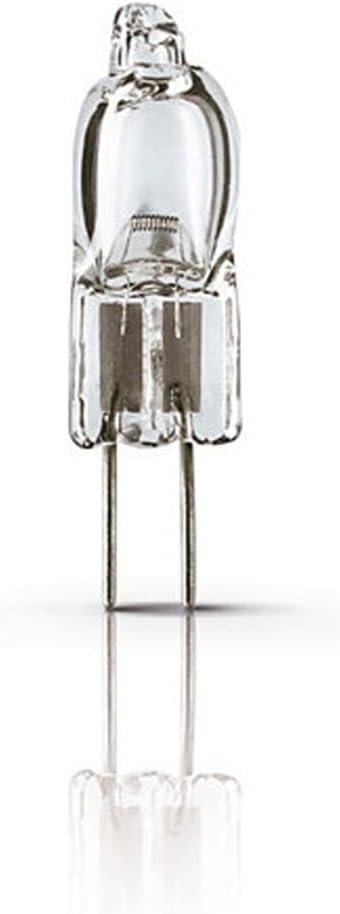
The Philips 7388 halogen bulb is designed to produce a comfortable, warm white light, maintaining its luminous efficiency throughout its operational life. It features a G4 socket and is suitable for various lighting applications.
Informasi Safety
Tansah mirsani pancegahan safety ing ngisor iki:
- Daya Mati: Always disconnect power to the fixture before installing, removing, or cleaning the bulb.
- Nangani kanthi ati-ati: Halogen bulbs can become very hot. Allow the bulb to cool completely before handling.
- Awas Kontak: Do not touch the glass part of the bulb with bare hands. Oils from your skin can create hot spots, leading to premature failure. Use a clean cloth or gloves if necessary.
- Bener Voltage: Priksa manawa voltage matches the bulb's voltage (6 Volts). Using an incorrect voltage can damage the bulb or the fixture.
- Perlengkapan sing tepat: Use only in fixtures designed for halogen bulbs and with appropriate wattage ratings.
- Pembuangan: Buang bolam bekas miturut peraturan lokal.
Setup lan Instalasi
Tindakake langkah iki kanggo instalasi sing bener:
- Step 1: Power Disconnection
Ensure the power supply to the lighting fixture is turned off at the circuit breaker or by unplugging the fixture. - Step 2: Remove Old Bulb (if applicable)
If replacing an existing bulb, allow it to cool completely. Gently pull the old G4 bulb straight out from its socket. - Step 3: Prepare New Bulb
Carefully remove the new Philips 7388 bulb from its packaging. Avoid touching the glass envelope with bare hands. If you accidentally touch it, wipe it clean with a lint-free cloth moistened with rubbing alcohol. - Step 4: Insert New Bulb
Align the two pins of the G4 bulb with the holes in the socket. Gently push the bulb straight into the socket until it is fully seated. Do not force it. - Langkah 5: Mulihake Daya
Sawise bohlam wis diinstal kanthi aman, mulihake daya menyang peralatan. - Langkah 6: Tes
Nguripake saklar lampu kanggo verifikasi operasi sing bener.
Instruksi Operasi
The Philips 7388 halogen bulb operates immediately upon receiving power. No special operating procedures are required beyond turning the fixture's power switch on or off.
- Dimming: If used with a compatible dimmer switch, the brightness of the bulb can be adjusted. Ensure the dimmer is rated for halogen or incandescent loads and matches the bulb's voltage lan wattage.
- Output panas: Halogen bulbs produce heat. Ensure adequate ventilation around the fixture to prevent overheating.
Pangopènan
Minimal maintenance is required for the Philips 7388 halogen bulb.
- Reresik: If the bulb becomes dusty, ensure the power is off and the bulb is cool. Gently wipe the glass with a soft, dry, lint-free cloth. Do not use liquid cleaners directly on the bulb.
- Pengganti: When the bulb reaches the end of its life, replace it following the "Setup and Installation" steps. Always use a bulb with the same specifications (20W, 6V, G4 base) to ensure compatibility and safety.
Ngatasi masalah
If your Philips 7388 bulb is not functioning as expected, consider the following:
- Bohlam Ora Lampu:
- Priksa manawa catu daya menyang piranti wis urip.
- Priksa manawa bohlam wis dipasang kanthi bener ing soket G4.
- Inspect the bulb for any visible damage or a broken filament. If damaged, replace the bulb.
- Nyoba piranti nganggo bohlam sing bisa digunakake kanggo ngilangi masalah perlengkapan.
- Lampu kedip-kedip:
- Ensure the bulb is fully inserted into the socket.
- Priksa sambungan sing kenthel ing piranti utawa kabel.
- If using a dimmer, ensure it is compatible with halogen bulbs and not overloaded.
- Umur Bohlam Cekak:
- Verifikasi vol sing benertage (6V) is being supplied to the bulb. Overvoltage can significantly reduce bulb life.
- Ensure the bulb is not being touched with bare hands during installation, as skin oils can cause premature failure.
- Check for excessive vibration or heat in the fixture, which can shorten bulb life.
Spesifikasi
Key technical specifications for the Philips 7388 Halogen Bulb:
| Fitur | Spesifikasi |
|---|---|
| Merk | Lampu Philips Kab |
| Nomer Model | 7388 |
| Jinis cahya | Halogen |
| Wattage | 20 Watt |
| Voltage | 6 volt |
| Fluks cahya | 460 - 475 lm (typical) |
| Socket/Base | G4 |
| Suhu Warna | 3200 - 3350 Kelvin (Warm White) |
| Ukuran Bentuk Bohlam | JC |
| Indeks Rendering Warna (CRI) | 100 |
| Bahan | Tembaga (pin) |
| Dimensi produk | 0.35 "W x 1.21" H (kira-kira.) |
| Panggunaan njero ruangan / ruangan | njero ruangan |

Warranty lan Dhukungan
For warranty information or technical support regarding your Philips 7388 Halogen Bulb, please refer to the official Philips Lighting websitus utawa hubungi layanan pelanggan langsung. Simpen kuitansi tuku minangka bukti tuku.
Sampeyan bisa ngunjungi Toko Philips kanggo informasi luwih lengkap: Toko Philips ing Amazon
Ask a question about this manual
Ask about setup, troubleshooting, compatibility, parts, safety, or missing instructions. Manuals+ will review the question and use this page’s manual context to help answer it.